
AdsPower: a powerful antidetect browser for secure multi-accounting and automation
In a world where platforms like Facebook, Google, and TikTok are increasingly strict about detecting suspicious activity, managing multiple accounts from a single device has become a real challenge. Bans, restrictions, and lost access to ad accounts are everyday realities for traffic arbitrage specialists, SMM managers, and e-commerce owners. AdsPower offers a reliable solution: an antidetect browser that masks digital fingerprints and simplifies automation. With over 9 million users worldwide, this tool helps scale operations without the risk of detection.
Official website: adspower.com.
What is AdsPower and why do you need an antidetect browser
AdsPower is a specialized browser designed to create and manage numerous isolated profiles, each with unique digital fingerprints. Unlike regular browsers, it can simulate the behavior of different devices and users, making accounts indistinguishable from one another.
How antidetect works: hiding your digital footprint
Antidetect technology spoofs the “browser fingerprint” — a set of data about your device that websites collect automatically. This includes IP address, screen resolution, fonts, WebRTC, Canvas, and WebGL. AdsPower generates a unique combination of parameters for every profile, so platforms see not one device, but many different “identities.” As a result, multiple accounts running on the same PC appear to come from different machines in different locations.
How platforms detect multi-accounting and why it leads to bans
Social networks and ad platforms use algorithms to analyze fingerprints: if several accounts share the same Canvas rendering or DNS queries, the system flags suspicious activity. This triggers bans, especially in high-risk scenarios like traffic arbitrage or crypto trading. Without proper antidetect + proxy protection, a single ban can wipe out months of account warming and wasted budget.
Why AdsPower stands out among competitors
AdsPower combines cutting-edge spoofing technology with user-friendly features: Chromium-based (SunBrowser with full Chrome Web Store access) and Firefox-based (FlowerBrowser) cores for maximum undetectability, plus iOS/Android fingerprints.
The service is security-certified with multiple internationally recognized standards. Besides its active Bug Bounty program, AdsPower has also won many security-related certificates, including SOC 2 Type 2 Certification, ISO 27001, and others — while storing all data strictly locally on the user’s device. This combination of proven certifications, ongoing vulnerability rewards, and true local storage makes it a trusted choice for everything from solo work to large teams.
Who benefits from an antidetect browser
- Traffic arbitrage & media buyers: scaling campaigns without account associations.
- SMM specialists: managing profiles in social networks for brand promotion.
- E-commerce owners: competitor monitoring and multi-accounting on marketplaces like Amazon.
- Crypto enthusiasts: participating in IDO or farming with multiple wallets.
- Advertisers: working with Facebook/Google/TikTok Ads without ban waves.
Key features of AdsPower
AdsPower focuses on practical tools that save time and reduce risks. Here are the core features confirmed by user feedback.
Flexible browser fingerprint management
Each profile can be customized across 20+ parameters: geolocation, timezone, User-Agent, hardware specs, etc. The strength lies in iOS/Android fingerprint support for mobile emulation and the choice between Chromium (great for extensions) and Firefox (better privacy). Profiles pass even deep checks on LinkedIn or Discord.
RPA and automation tools
The built-in RPA robot (Robotic Process Automation) handles repetitive tasks: form filling, clicks, scrolling. Ready-made templates cover common workflows like creating ad creatives or checking notifications. Local API integrates with external scripts, and dedicated Facebook automation speeds up campaign launches — boosting productivity 5–10× while minimizing human error.
Synchronizer tool
An exclusive AdsPower feature: it mirrors actions across multiple windows (opening pages, typing, clicking, installing extensions). No coding or extra fees required. Perfect for managing 10–50 accounts simultaneously — ideal for mass posting in SMM or synchronized account warming in arbitrage.
Team collaboration and security
Role-based access: admins set permissions (view-only, edit profiles), log every action, and receive anomaly alerts. End-to-end encryption covers storage, transmission, and servers; 2FA, IP allowlists, and malicious-extension protection ensure compliance. Everything stays local — no cloud risks — making it perfect for agencies running 100+ profiles.
Additional tools and advantages of AdsPower
AdsPower provides a convenient ecosystem for different workflows:
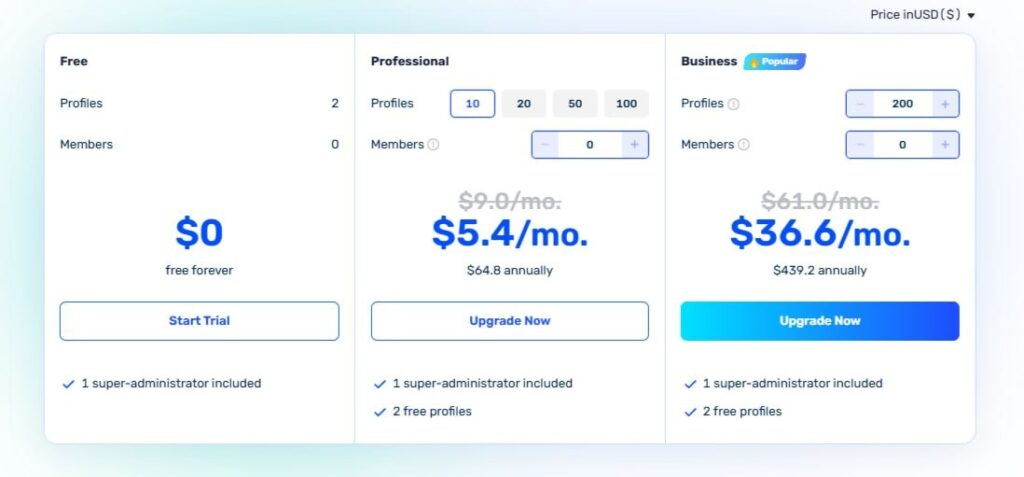
- Free plan — 2 lifetime profiles for testing.
- Paid plans — charged exactly by the number of profiles and team members (starting at ~$5.4/mo for 10 profiles).
- No overpayment for unused slots.
- Support in 20+ languages (including Russian).
- Regular discounts: 20% for 90 days, 25% for 180 days, 40% for a full year.
- 7-day trial of advanced features on request.
- Ready-made team solutions: role permissions, action logs, shared access, and optional encrypted cloud storage.
All of this makes switching to AdsPower simple and cost-effective.
How to use proxies in AdsPower
Proxies are a mandatory part of AdsPower: the antidetect hides browser fingerprints, while proxies change the IP and geolocation. Without them, even perfect fingerprints get caught by repeated IPs. Together — AdsPower + residential proxies — each profile looks like a real user from the right country, dropping association risks to almost zero.
Which proxy types work best for multi-accounting
- Residential — highest trust level for Facebook, TikTok, Wildberries, Avito. They look like real home connections.
- ISP — for account warming and long-term sessions (sticky sessions 10–30 min).
- Datacenter — for scraping, landing-page checks, and speed-focused tasks.
AdsPower supports HTTP/HTTPS and SOCKS5 — the most common protocols.
Step-by-step proxy setup
- Open a profile → Proxy section.
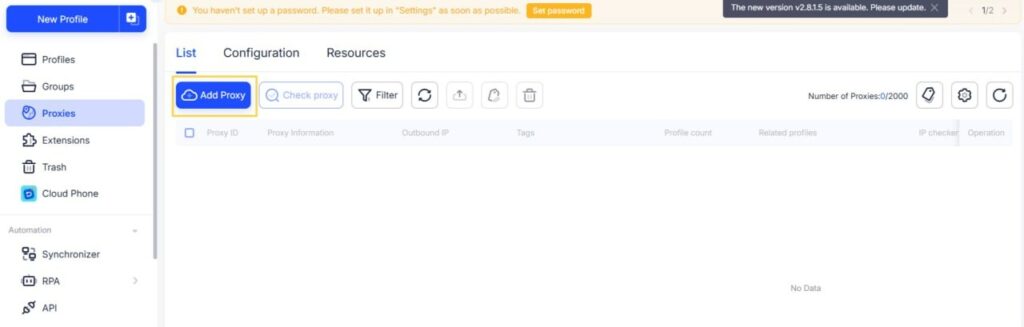
- Enter credentials: IP:port, login/password.
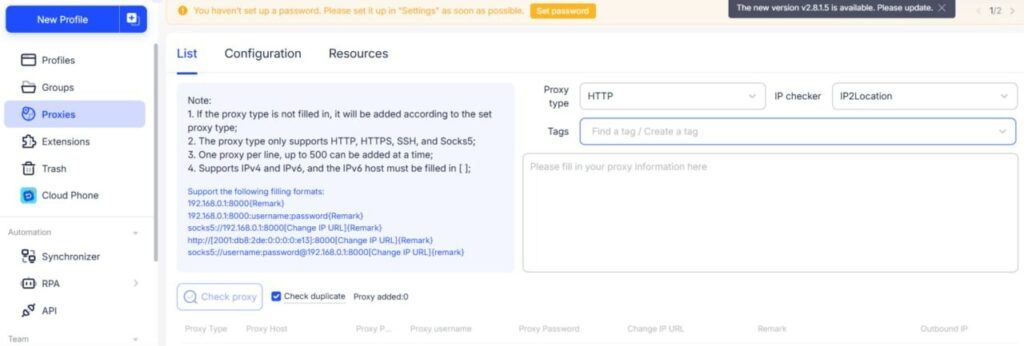
- Supported formats: string (ip:port:login:password) or bulk import.
- Click “Check Proxy” — it tests speed, geo, and connectivity.
- Save and launch.
Note: the steps above describe direct entry inside a profile. If you prefer to reuse the same proxy across many profiles, first add it to the global proxy list (Proxies → New Proxy), save it there, then create a new profile and simply select the saved proxy from the dropdown list in the Proxy section — this is the method most teams use for large-scale work.
In practice, most teams use large residential pools with precise city-level targeting — for example, MangoProxy (90M+ IPs in 200+ countries, flexible rotation, stable ping). Residential IPs significantly reduce technical restrictions related to overlapping network parameters and geodata.
Who benefits most from AdsPower
| Who uses it | Typical pain points | How AdsPower + proxies help |
| Traffic arbitrage & media buyers | Ban waves after launching dozens of cabinets | Unique fingerprint + separate residential IP per profile — safe warming |
| Agencies & large teams | IP overlaps, employee mistakes, access chaos | Roles & logs, Synchronizer for managing hundreds of windows simultaneously |
| Team leads & owners | Controlling tasks and team actions | RPA bots for routine, log monitoring, anomaly alerts |
| Marketplace sellers (WB, Ozon, Avito, Amazon) | Extra-account blocks & competitor price scraping | City-targeted residential IPs + different fingerprints — accounts look like regular buyers |
| SMM specialists & Telegram bots | Shadowbans during mass posting/messaging | Synchronizer + rotating residential IPs — thousands of actions without limits |
| Crypto teams & farmers | Wallet limits in IDO, airdrops, farming | iOS/Android fingerprints + ISP proxies for long sessions — each wallet appears as a separate user |
If at least one of these scenarios sounds familiar, AdsPower + proxies will eliminate the issue and let you focus on growth instead of fighting blocks.
Conclusion: is AdsPower worth it
Most bans in arbitrage, SMM, and e-commerce aren’t caused by bad creatives or budgets — they happen because of matching browser fingerprints and IP addresses. The result: lost accounts, drained budgets, and weeks spent on restarts.
AdsPower combined with quality residential proxies dramatically reduces these technical risks: a unique fingerprint per profile + a clean “home” IP with no overlaps. Automation (RPA + Synchronizer) speeds up routine work, team tools simplify collaboration, and flexible pricing lets you start risk-free.
If you’re tired of ban waves and want to scale your account park without constant losses — start with the free 2 profiles in AdsPower. Connect residential proxies, run Synchronizer on 10–20 accounts, and you’ll see the difference on day one.
Head over to adspower.com, sign up, and test it — stable work with hundreds of profiles is closer than you think.