

11.11 — Time for a Discount

–8% OFF Static ISP Proxies

11.11 - three days of better deals!

Choose your GEO and keep the same IP


–8% OFF Static ISP Proxies
CHOOSE PROXIES

Static ISP Proxies

Dedicated permanent IPs from internet service provider networks for tasks where IP stability and network type matter. Available in more than 70 countries.

Dedicated IP Assigned only to you
ISP network An internet provider IP
70+ countries Broad coverage
24/7 Always-on access

Why choose static ISP proxies

A permanent IP from an internet provider network for tasks where stability, network type, and a predictable connection matter.

ISP identity

The IP belongs to an internet provider network, not a regular data center.

Permanent IP

The same address stays assigned to you for the entire rental period.

Dedicated use

The IP is used only by you and is not shared with other Mango Proxy clients.

Standard or New stock?

Two ISP proxy options. Choose the one that fits your tasks.

Standard

A proven core pool for long-term tasks and stable work.

  • Proven core pool
  • 30-day rental
  • 70+ countries
  • The same referral terms apply
  • Suited to long-term tasks
New stock available

New stock

Fresh IPs with flexible rental terms for short-term and test tasks.

  • Fresh IPs
  • Rent for 1, 7, or 90 days
  • Availability depends on the country
  • The same referral and promo terms apply
  • Suited to short-term and test tasks

Which proxy type should you choose?

Compare static ISP, static datacenter, and residential proxies across the key parameters.

You are on this page

Static ISP

A permanent IP from an internet provider network.

IP type
ISP
IP changes
No
Geography
70+ countries
Payment / traffic
Per IP
Best for
Accounts and services sensitive to IP type
Buy proxies

Static Datacenter

Stable IPs from data centers worldwide.

IP type
Datacenter
IP changes
No
Geography
70+ countries
Payment / traffic
Unlimited, per IP
Best for
Automation, monitoring, and a permanent IP
Learn more

Residential

Real user IPs worldwide.

IP type
Residential + Mobile
IP changes
Yes
Geography
200+ countries
Payment / traffic
Per GB
Best for
Parsing, multi-accounting, and tasks that need rotation
Learn more

Which tasks are static ISP proxies good for?

Permanent ISP IPs fit tasks where a stable address, network type, and a predictable connection matter.

Account work

A permanent ISP IP for services where frequent network changes are undesirable.

Antidetect browsers

The same IP for persistent profiles and long-running sessions.

Access to services

For platforms that are sensitive to network type and IP stability.

Automation and scripts

Long-running processes through the same IP without rotation.

E-commerce and marketplaces

Work with accounts, dashboards, and recurring tasks.

Work systems

A fixed IP for panels, internal services, and IP-restricted access.

ISP proxies in 70+ countries

Choose a location from the broad Standard pool, or use fresh IPs from the New batch in available countries.

Standard

70+ countries

A wide choice of locations and a stable IP pool for long-term tasks.

Popular countries

  • United States
  • United Kingdom
  • Germany
  • France
  • Netherlands
  • Canada
  • Australia
  • Singapore
  • Japan
Full list of 70+ countries
NEW

New stock

19 countries

Fresh IPs with flexible rental terms of 1, 7, or 90 days.

Available countries

  • Australia
  • Canada
  • Germany
  • Spain
  • France
  • United Kingdom
  • Hong Kong
  • Italy
  • Japan
  • South Korea
  • Moldova
  • Netherlands
  • Poland
  • Singapore
  • United States

New stock location availability can change depending on IP supply.

How to set up static ISP proxies

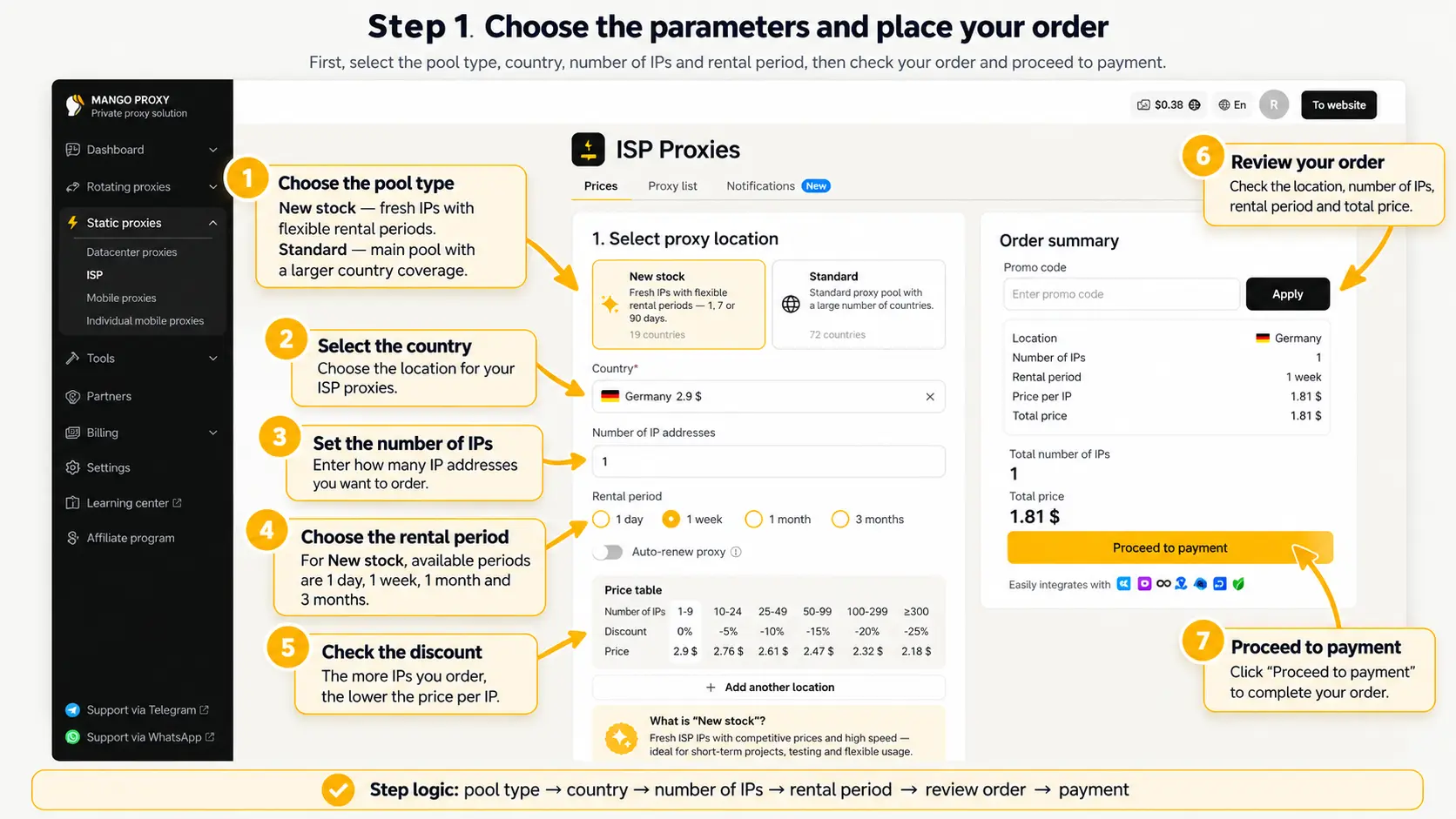
Two steps in the dashboard: place the order, then copy the connection string.

[ 01 ]

Choose the options and place the order

First choose the pool type, country, number of IPs, and rental term, then review the order and continue to payment.

Choose the options and place the order
  1. Choose the pool type. New batch means fresh IPs and flexible terms. Standard is the core pool with broader country coverage.
  2. Choose a country and set the location you need.
  3. Enter how many IP addresses you want to order.
  4. Choose the rental term. New batch is available for 1 day, 7 days, and 90 days.
  5. Check the discount: the more IPs you order, the lower the price per address.
  6. Review the location, IP quantity, rental term, and total cost.
  7. Click Continue to payment to place the order.
[ 02 ]

Get the proxies and start using them

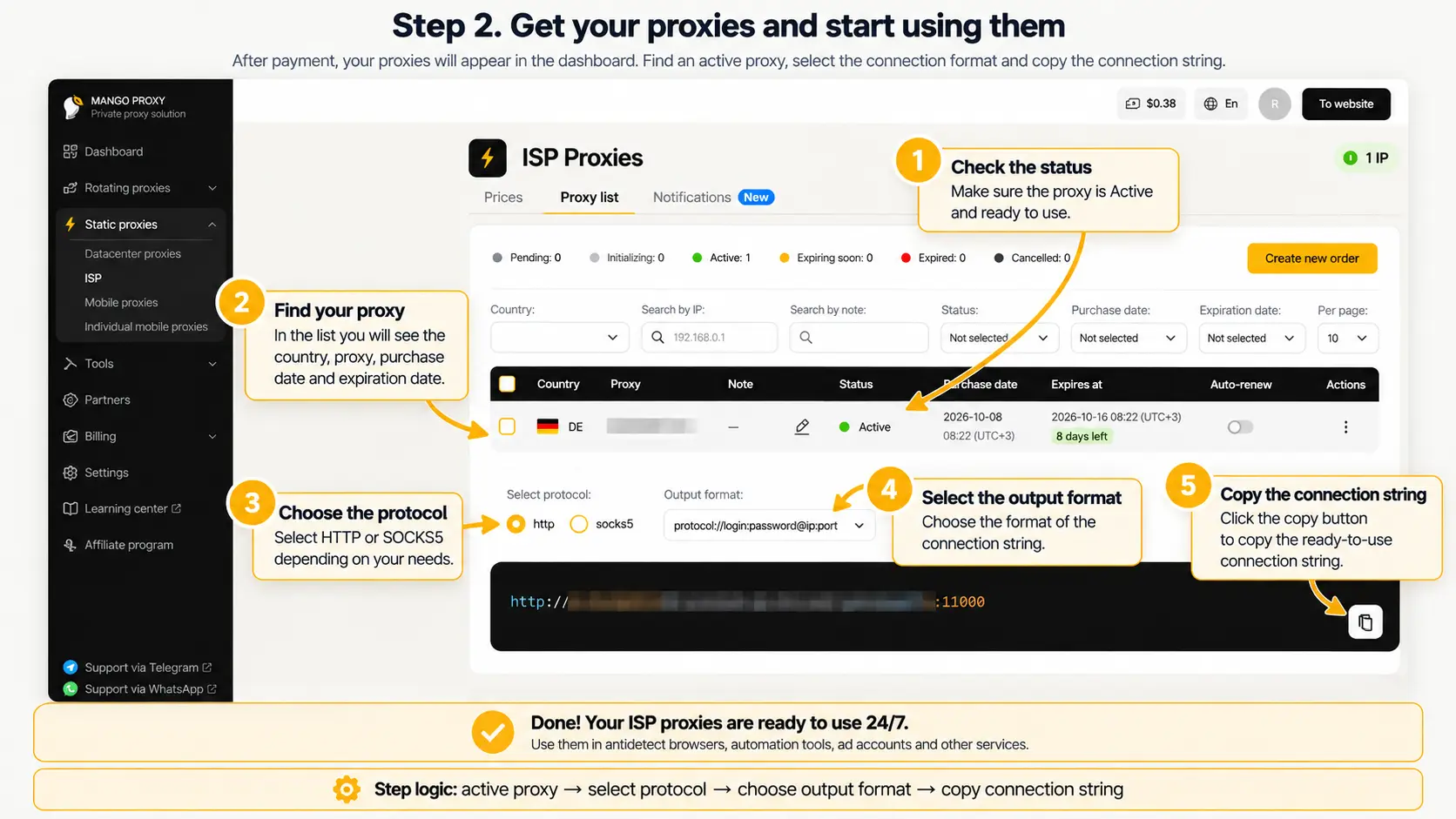
After payment, the proxies appear in the dashboard. Find an active proxy, choose the format, and copy the connection string.

Done. ISP proxies run 24/7: use them in antidetect browsers, parsers, ad accounts, and other services.

Get the proxies and start using them
  1. Check the status and make sure the proxy is active.
  2. Find your proxy in the table: country, address, purchase date, and expiration.
  3. Choose HTTP or SOCKS5.
  4. Pick a convenient connection-string format.
  5. Copy the ready connection string.
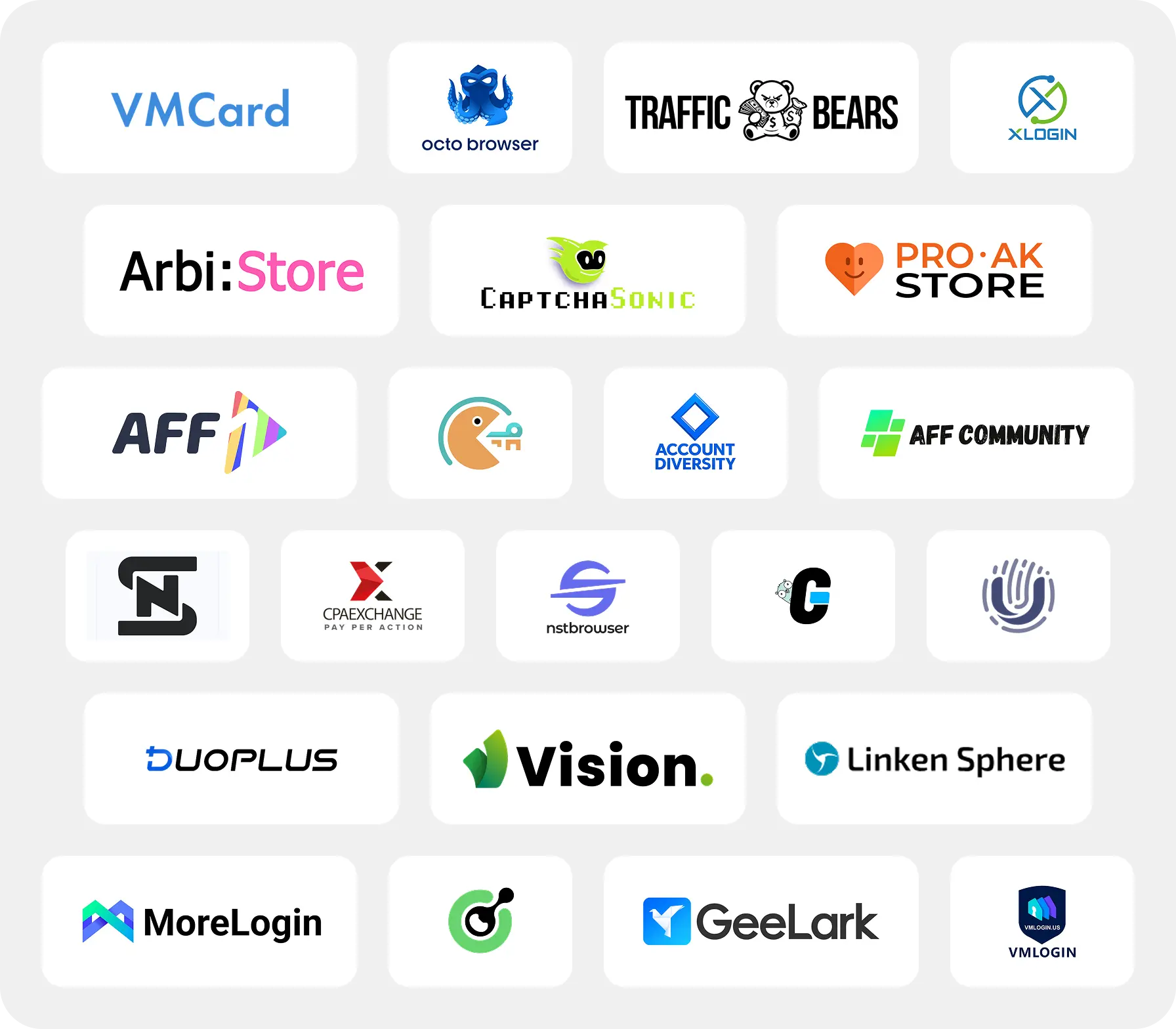
Examples of browsers and applications compatible with MangoProxy

Integrations

  • Support for 450+ tools: antidetect browsers, trackers, parsers, and automation systems
  • Fast connection to the global network with 90M+ clean IPs across 220+ geos
  • Flexible pricing and reliable infrastructure for any traffic volume
All integrations

What Mango Proxy users say

Real Mango Proxy reviews on independent platforms.

SourceForge Verified Review

The experience turned out better than expected

What I liked most was the quality of the residential and ISP proxies. I tested them on several sites and in different tools, and the connections stayed stable and responsive during regular work. I also liked that switching between locations and sessions was simple and did not require extra setup every time. I originally chose the service because I needed a more stable option for ongoing tasks, and it turned out better than I expected.

Nina K. Performance Marketing Manager

Frequently asked questions

Still have questions?

Get a consultation

What are static ISP proxies?

Static ISP proxies use permanent IP addresses from internet service provider networks. The IP is assigned to the user for the entire paid rental period and does not change automatically.

How are static ISP proxies different from static datacenter proxies?

Both types use permanent dedicated IPs. The main difference is the network type: Static ISP belongs to internet provider networks, while Static Datacenter belongs to data centers.

Is one ISP IP used by other clients?

No. The IP is assigned to one user and is not used by other MangoProxy clients at the same time.

In which countries are ISP proxies available?

Standard is available in more than 70 countries. New batch coverage is smaller and depends on the current supply of fresh IPs.

How is New stock different from Standard?

Standard is the core ISP proxy pool for regular and long-term use. New stock offers fresh IPs with more flexible rental terms and a limited list of available countries.

How long can I rent ISP proxies?

Standard uses the regular monthly rental. New stock is available for 1 day, 7 days, and 90 days.

Which protocols are supported?

HTTP and SOCKS5 are available. After purchase, the connection details appear in the MangoProxy dashboard.

Which tasks are Static ISP best for?

They fit account work, antidetect browsers, automation, e-commerce, work systems, and other tasks where a permanent IP and an ISP network type matter.

Can the referral program be used for New stock?

Yes. New stock uses the same referral terms as Standard.

What should I choose: Static ISP or Static Datacenter?

Static ISP is the better fit when you need an IP from an internet provider network. Choose Static Datacenter when you need a permanent fast datacenter IP with unlimited traffic.