
Hotlogin: Advanced anti-detect browser for scaled digital operations and automation
In the fast-paced world of digital marketing, e-commerce, and data-driven workflows, professionals frequently manage dozens or hundreds of online accounts across platforms like social networks, ad systems, or marketplaces. As detection mechanisms grow more advanced, platforms quickly identify linked activity through shared digital footprints, resulting in account associations, restrictions, or bans. Standard browsers exacerbate these issues by lacking proper isolation, consistent hardware signatures, and automation capabilities—leading to inefficiencies, heightened risks, and limited growth potential. Specialized anti-detect browsers like HotLogin, trusted by over 2.8 million users worldwide, provide secure, isolated environments that emulate unique devices. This enables reliable scaling, reduced detection risks, and efficient automation for global digital operations.
Understanding Hotlogin: Core technology behind secure profile handling
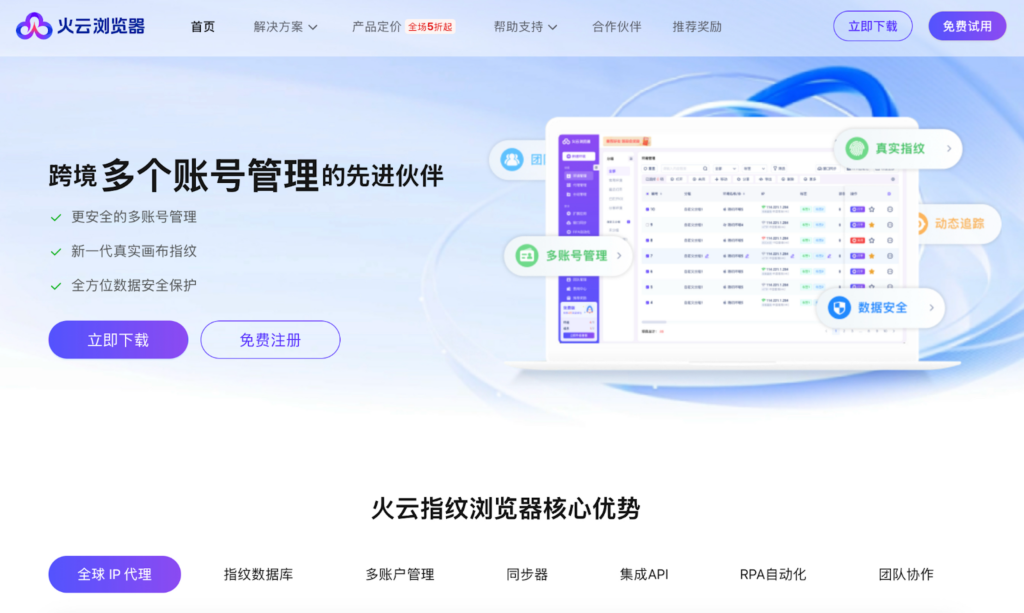
HotLogin operates as an anti-detect fingerprint browser, generating realistic and customizable digital signatures for each profile. These include parameters such as User-Agent, timezone, and hardware details, ensuring accounts behave like independent devices.
This approach effectively counters platform association checks common in high-volume tasks. With seamless proxy integration and support for scripting tools, HotLogin delivers stability and anonymity where conventional browsers fall short.
Core features of Hotlogin
HotLogin offers a range of practical tools designed for reliable multi-account operations in demanding environments like cross-border e-commerce and digital marketing.
Precise fingerprint customization
HotLogin uses advanced Canvas fingerprint simulation to generate realistic, unique signatures for each profile. Users can adjust key parameters like User-Agent, timezone, fonts, and hardware details, ensuring each account mimics a distinct real device and significantly reducing the chance of platform associations.
Bulk profile orchestration
The browser allows unlimited multi-window operation, enabling smooth management of hundreds of profiles simultaneously on standard hardware. Isolated environments for each profile—combined with independent storage—prevent data leaks and support efficient batch tasks, such as synchronized actions across accounts.
Automation and scripting integration
HotLogin integrates with popular tools like Selenium, Puppeteer, Playwright, and RPA frameworks, making it straightforward to script repetitive processes. This includes automated account warming through gradual activity simulation or running multiple parallel scripts for tasks like registration and data extraction, with stable performance even at scale.
Secure cookie and session management
Each profile maintains separate cookies, local storage, and sessions, allowing long-term account persistence without cross-profile interference or the need for constant re-authentication.
Proxy integration and IP management
Built-in support for proxy assignment ensures one unique IP per profile with minimal configuration—one-click setup routes traffic effectively. This pairs naturally with high-quality residential or ISP proxies to enhance authenticity and maintain consistent geo-specific access.
Team collaboration controls
Features like multi-user access, role-based permissions, and detailed operation logs make it easier for teams or agencies to coordinate on shared projects, with quick-response support available around the clock.
Performance and interface optimizations
An optimized kernel reduces memory usage by about 20% on complex pages, while improving overall access speeds. The clean, straightforward dashboard allows new users to configure isolated environments quickly, supporting lag-free handling of high-volume workflows.
Technical anatomy of fingerprinting
Browser fingerprinting collects subtle device and software signals to form a unique identifier, which anti-fraud systems like Pixelscan or Iphey use to spot inconsistencies or links across accounts.
Key components include:
- Canvas fingerprinting — Renders hidden graphics; GPU and driver variations produce unique hashes.
- WebGL — Captures 3D rendering details, revealing specific hardware capabilities.
- AudioContext — Processes audio data differently per system, generating identifiable patterns.
Platforms compare these against IP and behavior for detection. “Blocking” reacts to flags (e.g., bans), while “masking” proactively varies signals to appear natural. Without robust spoofing, even proxy use leaves hardware traces visible, enabling associations. HotLogin’s realistic variations resist over 100,000 daily evolving threats.
Real-world applications of Hotlogin
HotLogin proves particularly effective in scenarios where account isolation, fingerprint variation, and stable proxy integration directly impact operational safety and efficiency. Below are key practical examples drawn from common workflows.
Cross-border e-commerce operations
Manage multiple seller accounts or storefronts on platforms like Amazon, eBay, or independent shops without triggering association alerts. Users report handling 80–100+ accounts simultaneously, with isolated environments and unique fingerprints preventing cross-links. This supports bulk product uploads, inventory updates, and regional pricing adjustments while maintaining compliance across markets.
Social media account management
Operate large-scale profiles or matrices for content scheduling, community engagement, or client campaigns on platforms requiring strict anti-association rules. The ability to assign distinct IPs and fingerprints per profile allows safe multi-window operation, reducing risks during high-volume posting or interaction tracking.
Advertising account handling
Run separate cabinets on networks like Google Ads, Facebook, or TikTok, enabling parallel campaign testing, bid monitoring, and performance optimization. Independent sessions and hardware emulation help avoid environment-based restrictions, ensuring consistent access even during intensive A/B testing or budget scaling.
Competitor analysis and data gathering
Execute ongoing monitoring of public pricing, listings, or trends across e-commerce sites. Parallel scripting (up to 30+ instances) combined with varied fingerprints minimizes detection from anti-crawling systems, allowing reliable extraction of competitive intelligence without frequent interruptions.
Automated batch processes
Support tasks like mass registrations, account warming through simulated natural activity, or RPA-driven workflows. Integration with proxies ensures each automated action appears from a legitimate, unique source, improving success rates for repetitive operations in marketing or lead generation.
Vpn vs. anti-detect browsers: Why the difference matters
Beginners often rely on VPNs for anonymity, but they address only part of the challenge. Here’s a clear comparison:
| Aspect | VPN | Anti-detect browser (e.g., HotLogin) |
| IP handling | Masks IP for location simulation | Integrates proxies while managing full traffic routing |
| Fingerprint exposure | Leaves Canvas, WebGL, etc., unchanged | Spoofs hardware/software signals for unique emulation |
| Detection risk | Reduces geo-flags but allows device links | Minimizes associations through complete isolation |
| Automation support | Limited or none | Native compatibility with scripting frameworks |
| Scalability | Basic privacy | Designed for bulk profiles and team workflows |
VPNs suit simple needs, but anti-detect tools provide layered protection for professional scaled operations.
The role of infrastructure in reliable workflows
Consistent results in profile-heavy setups require solid foundations beyond the browser. High-quality proxies play a central role by providing unique IPs per profile, adding authenticity that aligns with real-user patterns (residential or ISP types especially). This complements fingerprint variations, reducing IP-related flags. Paired with HotLogin, it enables uninterrupted scaling, quicker responses, and stable performance overall.
Proxy setup in anti-detect browsers
To maximize stability in multi-accounting and automation, integrate proxies correctly. Residential or ISP proxies add traffic authenticity, mimicking real users from specific regions and minimizing IP-based detections or captchas.
Setup takes minutes in anti-detect browsers like HotLogin:
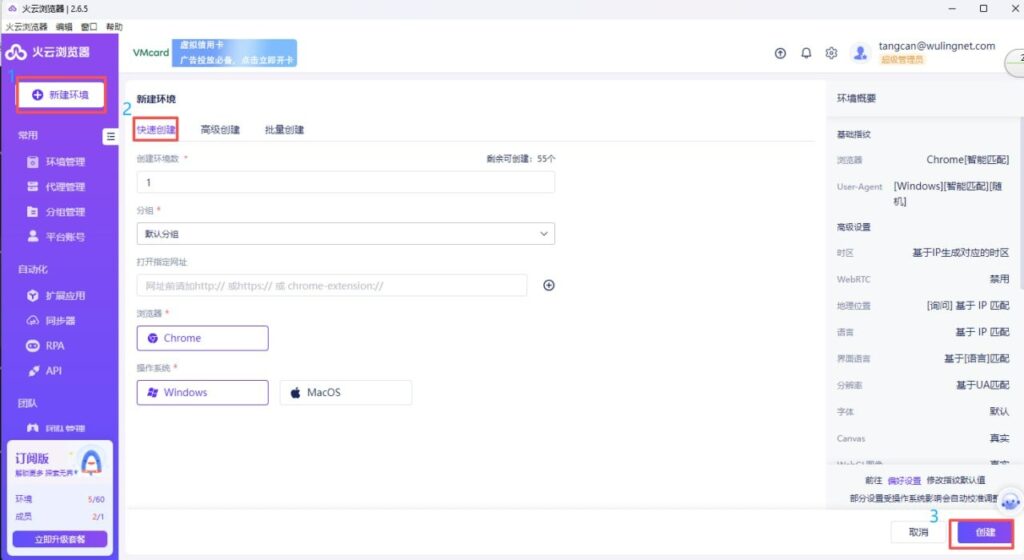
Create a new profile
In the dashboard, select profile creation. Set name, group, browser (Chrome/Edge), and OS (Windows/Mac) for fingerprint uniqueness.
Assign proxy to profile
In profile settings, choose HTTP/HTTPS or SOCKS5, enter host, port, username, and password. One-click apply.
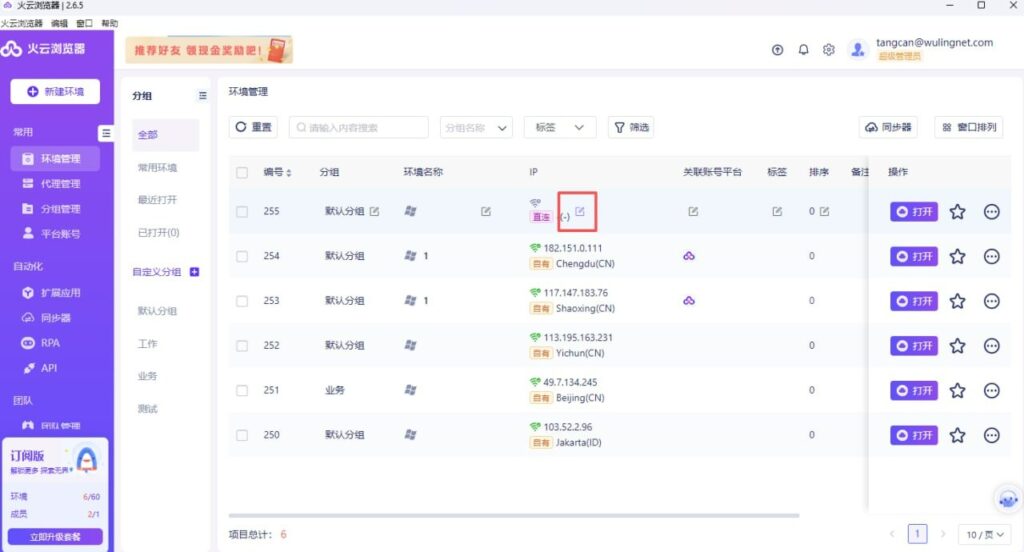
Check IP distribution
View assigned IPs in the profile list for geo-diversity confirmation.
Verify IP
Launch profile and check external IP via tools. Ensure geo matches and no leaks.
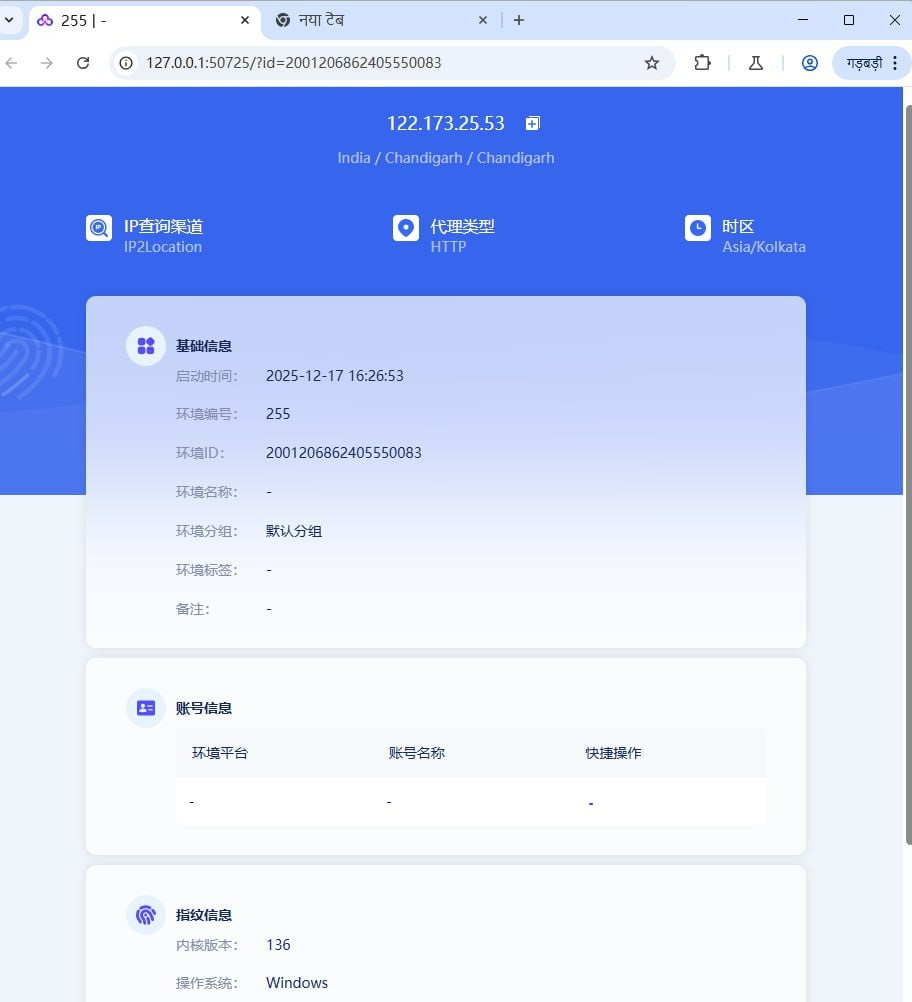
This setup ensures clean, unique IPs per profile—key for marketplace scraping, ad monitoring, or account management. Residential proxies with broad geo-coverage support natural behavior and lower risks.
Ideal users for Hotlogin
HotLogin aligns with specialists in detection-sensitive, high-volume tasks:
- E-commerce operators managing global storefronts
- Digital marketers building campaign matrices
- Affiliate and arbitrage professionals testing sources
- Data specialists focused on competitive insights
- Agencies coordinating client portfolios collaboratively
Final thoughts: Key takeaways and problem-solution summary
HotLogin provides a robust anti-detect solution for profile orchestration and automation, featuring advanced spoofing, complete isolation, and strong scripting support. Optimizations like lower memory demands, faster loading, and team tools—combined with compatibility across hundreds of platforms—help users scale securely while adapting to evolving detection landscapes. Trusted by millions for daily operations, it addresses key risks in modern digital projects, enabling focus on growth rather than maintenance.
For more details, visit HotLogin.
A useful guide for those who work with multiple accounts.