
How to use MostLogin with Mango Proxy: secure multi-accounting without bans
In 2025, multi-accounting has become an integral part of the work for marketers, SMM specialists, and data analysis teams. It involves managing multiple accounts on social networks, marketplaces, or search engines for testing, monitoring, and task automation. However, platforms like Facebook, TikTok, or Google have strengthened their algorithms for detecting suspicious activity: one IP for a dozen profiles — and you’re banned. A regular browser can’t handle this: it leaves traces in the form of a single digital fingerprint, including device characteristics, cookies, and geolocation.
Antidetect browsers, such as MostLogin, solve the problem by creating isolated profiles with unique fingerprints that mimic different devices. Proxy services add a layer of anonymity by substituting the IP address. When combined, MostLogin + Mango Proxy provide a reliable infrastructure: each profile operates as a separate user from the desired country, minimizing the risks of getting blocked and ensuring stable access.
What MostLogin is and why it is needed
MostLogin is an antidetect browser based on Chromium, specifically designed for multi-accounting and automation tasks. It generates unique profiles with individual parameters: canvas, audio fingerprints, WebRTC, DNS, and other network characteristics. This helps avoid detection based on suspicious patterns when multiple accounts are linked to one device.
Why do specialists need it? Imagine an SMM manager handling 50 Instagram accounts: without isolation, one ban for suspected spam can drag the entire network down. MostLogin addresses this through team collaboration — profiles can be shared among participants, cookies synchronized, and even automated via API. Integration with proxies makes it versatile: from account registration to A/B content testing.
What Mango Proxy is and which proxy types suit multi-accounting
Mango Proxy is a proxy provider with a pool of over 90 million IP addresses in 220+ countries. The service offers flexible rotation, 99.94% uptime, and API for automation, making it a suitable choice for teams needing stability and scale.
For multi-accounting, it’s important to choose the proxy type that matches the task: from imitating real users to high-volume processing. Here’s a comparison of the three main types in table form:
| Proxy type | Description | Application in multi-accounting |
| Residential (dynamic) | IPs from real home networks and devices. Rotated automatically or via API, with sticky sessions up to 30 minutes. Precise GEO-targeting by country, city, ASN. | Registration and management of accounts on social networks (Facebook, TikTok, Instagram). Maximum platform trust — they look like regular users, minimizing CAPTCHAs and bans. |
| ISP (dynamic and static) | IPs from internet providers. Dynamic for rotation, static fixed for the term. High speed and connection consistency. | Management of cabinets in SMM, Google Ads, long-term sessions. Balance between stability and anonymity — suitable for team work with accounts without frequent reconnections. |
| Datacenter (dynamic and static) | IPs from data centers. Fast, with instant rotation or fixed assignment. Large pools for high throughput. | Mass actions: A/B tests, price monitoring, registration on marketplaces (Avito, Wildberries). Optimal for technical tasks where volume and speed are needed, rather than maximum “human-like” appearance. |
The choice depends on the scenario: residential for platform trust, ISP for stable sessions, datacenter for scale and speed. All types support HTTP(S)/SOCKS5 and easily integrate with antidetect browsers like MostLogin.
Why the MostLogin + Mango Proxy combination reduces ban risks
In 2025, bans are not random but the result of analyzing combo signals: IP + fingerprint + behavior. MostLogin isolates profiles, emulating unique devices, while Mango Proxy adds IP anonymity, creating a complete picture of a “real user.”
Let’s break down the mechanics in more detail:
- Isolated profiles + unique IPs: In MostLogin, each profile operates in full isolation: no crossover of cookies, cache, or sessions between them. Add residential IPs from Mango with GEO-targeting (e.g., New York for US accounts), and the platform won’t see connections between profiles.
- Configured fingerprints: MostLogin generates over 100 parameters, including canvas and audio fingerprints. With clean Mango IPs, this enhances the illusion: the system sees not a bot, but a smartphone from Berlin.
- Clean IPs and trust: Mango’s pool — over 90 million ethical addresses with daily updates. Clean IP addresses have a high trust level, which is critical for working with platforms.
- Scalability for teams: Mango’s API allows scheduled IP rotation, and MostLogin — profile sharing among team members. This enables managing hundreds of accounts simultaneously: for example, 50 on residential IPs for content posting and 100 on ISP for analytics — without failures or trace overlaps.
The result? Significantly fewer bans and increased efficiency: teams spend less on verifications and more on content. This has been proven in thousands of cases from SMM agencies to arbitrage specialists.
Step-by-step guide: how to connect Mango Proxy in MostLogin
To set up proxies, prepare data from your Mango Proxy dashboard. Log in to the control panel, create a new proxy: select the desired type (residential, ISP, or datacenter), specify the country or city for GEO-targeting, and the preferred protocol (HTTP/HTTPS or SOCKS5).
You will receive:
- Host: gateway.mangoproxy.com (or another endpoint from the dashboard).
- Port: depends on the protocol (usually specified in settings).
- Username: may include GEO parameters (e.g., us-ny|your_login for New York).
- Password: generated in the dashboard.
Tip: For antidetect browsers like MostLogin, choose SOCKS5 — this protocol transmits the entire profile traffic without changes and ensures maximum compatibility.
Now let’s break down the integration step by step.
Step 1: installing and launching MostLogin
Download the app from the official MostLogin website, install it, and log in. If you’re new, register. Open the dashboard: here you’ll see the profile list. Click “Create Profile” for a new one. Specify basic settings: OS (Windows/Mac), browser (Chrome), geo (auto or manual). This is the foundation of isolation — each profile starts from a “clean slate.”
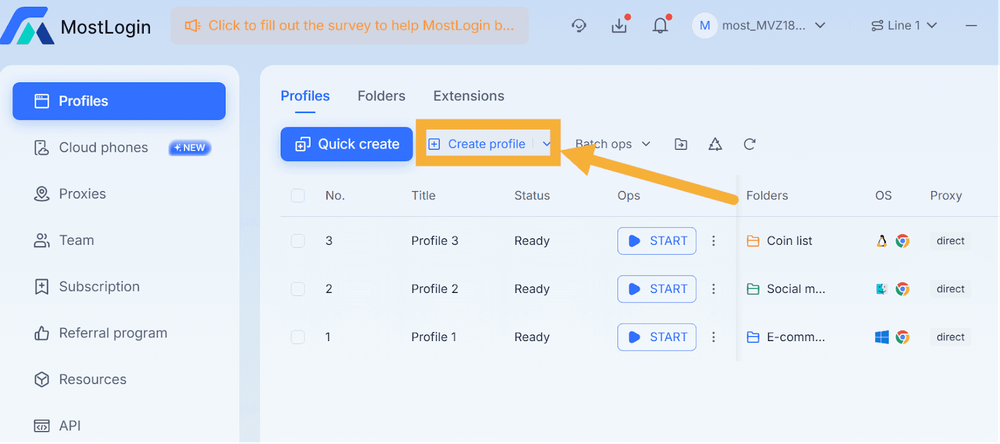
Step 2: navigating to the proxy section
In the profile creation window, find the “Proxy” tab. Here MostLogin offers protocol selection: HTTP/HTTPS for simplicity or SOCKS5 for high-anonymity tasks. Select the type.
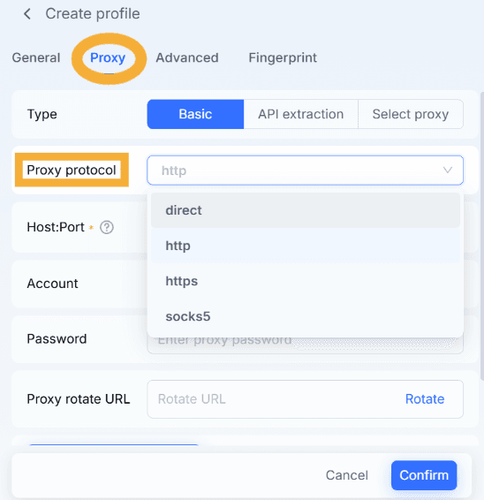
Step 3: adding the proxy
Click “Add Proxy.”
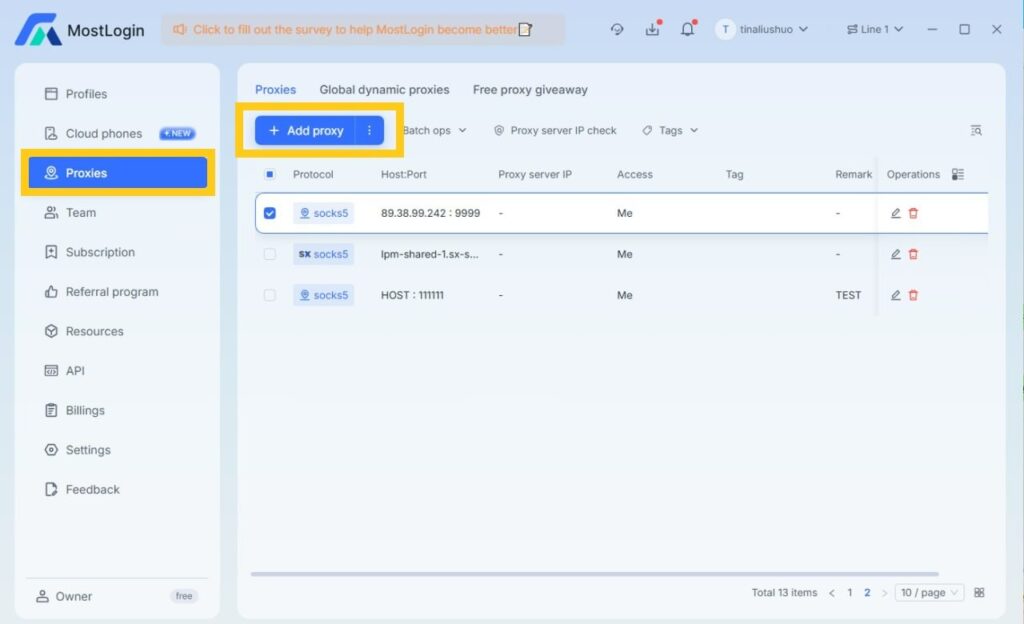
Enter data from the Mango panel:
- Host: gateway.mangoproxy.com (or your endpoint).
- Port: standard (e.g., 8080 for HTTP, 1080 for SOCKS5 — check in Mango).
- Username: your login + parameters (e.g., ru-mow|username for Moscow).
- Password: from the account.
Step 4: connection check
Click “Check Proxy.” MostLogin will test: the IP should show green with your GEO. If error — verify credentials or rotation (Mango API allows instant IP change).
Tip: Test on 2–3 profiles before scaling.
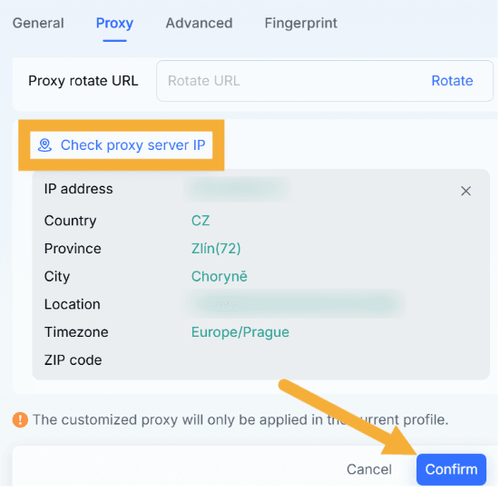
Step 5: saving and launching the profile
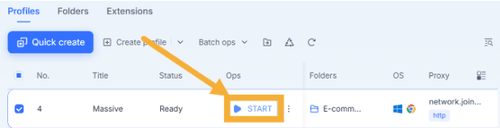
Click “Confirm” — the profile will save in the dashboard. Click “Start”: the browser opens with the new IP and fingerprint. Log in to an account (e.g., Facebook) — the session is isolated. For teams: share the profile via MostLogin, and colleagues will see the same settings. Done — now scale!
Practical use cases
The MostLogin and Mango Proxy combination suits various multi-accounting tasks. Here are the main scenarios:
- Managing accounts on social networks (Facebook, TikTok, Google): Handling 50+ profiles for posting and interaction. Advantage: Traffic looks natural, and fingerprint isolation prevents account linking and mass bans.
- SMM projects on Instagram: Stable content publishing and scheduling with profile distribution across the team. Advantage: Consistent sessions reduce platform suspicion, and team access simplifies collaboration.
- Traffic arbitrage and A/B landing page testing: Quick IP changes to imitate different visitors. Advantage: Rotation and fingerprint variety make tests realistic, minimizing system detection.
- Market monitoring for agencies: Competitor analysis in Europe or US with a separate profile per client. Advantage: Precise GEO-targeting provides local data, and isolation excludes information mixing between projects.
- Mass account creation and verification: Registering profiles in different countries with email checks. Advantage: IP changes and unique fingerprints reduce CAPTCHAs and increase verification success.
- Managing sellers on marketplaces (Wildberries, Avito): Working with multiple accounts for orders and analytics. Advantage: Stable sessions simplify long-term work, and antidetect protection hides multi-accounting from the platform.
These scenarios show how the combination helps scale tasks and reduce risks in daily operations.
Advantages of Mango Proxy when working through MostLogin
Mango Proxy complements MostLogin at the infrastructure level, making multi-accounting predictable and efficient.
- Global GEO: 220+ locations with filtering by ASN/cities — requests look like from a local user.
- Clean IPs: Over 90 million addresses from ethical pools, updated daily — minimizes blacklists risks.
- High stability: 99.94% uptime, 0.6–0.7 s response — sessions don’t break under load.
- SOCKS5/HTTP support: Full compatibility with MostLogin.
- Dynamic and static IPs: Rotation from 0 to 30 min via API — balance of anonymity and consistency.
- Convenient panel and API: Real-time monitoring, proxy generation, integration with tools.
Conclusion
In the era of strict 2025 algorithms, the MostLogin and Mango Proxy combination forms a reliable foundation for multi-accounting. Profile isolation in the antidetect browser combined with clean, geo-targeted IPs helps solve key pains: from frequent bans to scale limitations.
Setting up such a combination takes minimal time but allows focusing on core tasks — account growth, data analysis, and project development.
If you work with multiple profiles, start with registration in MostLogin via the link. Connecting Mango Proxy will take a few minutes and complete your infrastructure for stable operation.
Leave Comment