
Linken Sphere: A Reliable Antidetect Browser for Multi-Account and Advertising Workflows
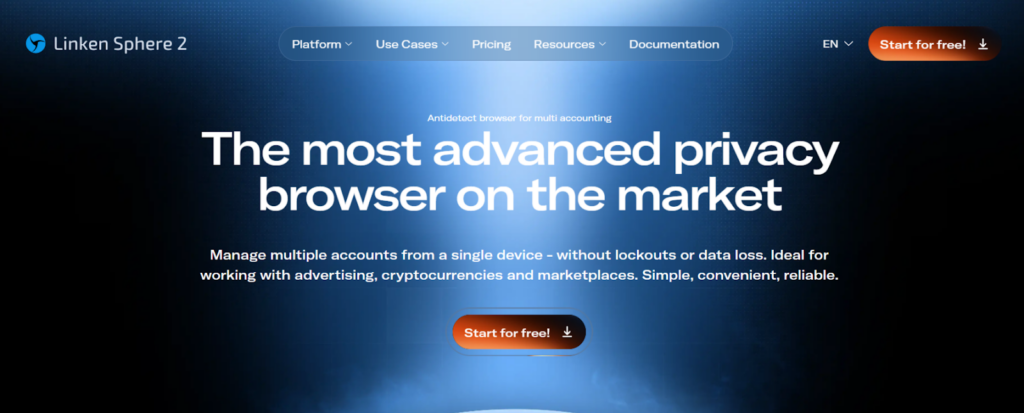
Modern digital workflows increasingly depend on behavioral consistency rather than individual actions. Advertising platforms, social networks, and marketplaces evaluate how sessions evolve over time, how devices behave across logins, and how activity patterns align within a broader context.
In such environments, using a standard browser for parallel account work creates structural risk. Shared states, overlapping sessions, and unstable authorization flows gradually distort platform perception, leading to inconsistent behavior and reduced operational predictability.
This is why teams move toward structured browser environments, where behavior is not left to chance but deliberately shaped and maintained across accounts.
Linken Sphere: Key Features and Purpose
Linken Sphere is an antidetect browser designed to manage multiple isolated browser profiles within a single workspace. Each profile operates as an independent environment with its own parameters, storage, and network context.
The tool was created to support workflows where parallel account usage is unavoidable: advertising operations, social media management, and large-scale account maintenance. Its core idea is straightforward: provide predictable, repeatable browser behavior while maintaining strict separation between profiles, allowing teams to scale without introducing instability.
Core Features of Linken Sphere
Modern multi-account work depends not on speed, but on environmental consistency. Linken Sphere approaches this challenge by treating the browser as an infrastructure layer, where isolation, configuration, and persistence are first-class concerns rather than secondary settings.
Profile Isolation
Profile isolation goes beyond logical separation. While standard browser profiles primarily isolate user-facing data, they still share parts of the underlying runtime, background processes, and storage mechanisms. In contrast, Linken Sphere builds environments where each profile functions as a technically independent instance, minimizing shared state at multiple levels.
Without such isolation, issues emerge quietly. Shared storage, service workers, background synchronization tasks, and cached scripts can leak context between sessions. These overlaps are rarely visible to users but are easily detected by modern platforms that monitor behavioral continuity across accounts.
This is why native user profiles in Chrome or Firefox are insufficient for parallel account work. They simplify organization but do not eliminate cross-profile signals, making them unreliable for environments where account separation is critical.
Fingerprint Management
Browser fingerprinting is often misunderstood as a collection of adjustable parameters. Linken Sphere approaches fingerprint management as a consistency problem rather than a masking exercise.
Randomized or frequently changing fingerprints introduce internal contradictions. For example, mismatches between WebGL rendering, Canvas output, and available font sets can signal artificial manipulation rather than natural diversity. Such inconsistencies are more suspicious than stable, well-aligned environments.
For long-living accounts, coherence matters more than variability. Linken Sphere allows fingerprints to remain stable across sessions, ensuring that device characteristics, rendering behavior, and system indicators evolve predictably instead of resetting unpredictably.
Cookies and Session Handling
Session persistence plays a central role in account stability. Short-lived sessions may be sufficient for testing, but production workflows depend on long-term trust relationships between accounts and platforms.
Repeated reauthorization, frequent MFA prompts, and disrupted trust windows often indicate unstable session handling rather than account issues. By maintaining cookies and local storage at the profile level, Linken Sphere preserves session continuity across restarts.
In this context, preserving state is more valuable than maintaining a “clean” environment. Stability reduces friction and minimizes behavioral anomalies that platforms associate with automated or suspicious activity.
Team Access and Role Management
Sharing credentials remains a common but flawed practice in collaborative environments. When multiple users access the same account without role separation, accountability disappears and operational risk increases.
Linken Sphere addresses this by separating access rights from account credentials. Profiles can be shared with defined permissions, allowing teams to distribute tasks without exposing full control or duplicating environments.
This structure supports auditability and responsibility. Actions remain traceable, and operational errors are easier to diagnose when access is controlled at the environment level rather than through shared logins.
Automating Workflows at Scale
However, in multi-account operations, the more critical challenge is automating the environment itself. Without environmental stability, automated actions amplify inconsistencies instead of efficiency.
Linken Sphere enables scalable workflows by ensuring that each automated interaction occurs within a repeatable context. As the number of profiles grows, this consistency prevents gradual drift in behavior that would otherwise accumulate unnoticed.
In large-scale operations, repeatability is more valuable than raw speed. Predictable environments reduce debugging overhead and improve long-term reliability.
Data Stability and Security
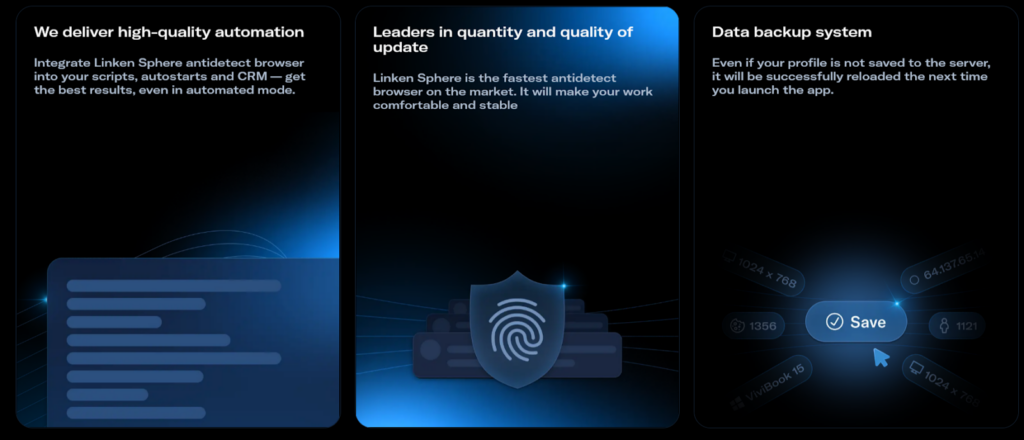
When browser environments become part of production workflows, data loss turns into an operational incident rather than a minor inconvenience. Lost profiles can mean broken sessions, invalidated accounts, and disrupted campaigns.
Linken Sphere treats profile data as persistent infrastructure. Synchronization and backup mechanisms are not optional features but necessary safeguards for long-running projects.
This stability is especially important in advertising workflows, where campaign lifecycles span weeks or months and environmental continuity directly affects performance.
How Teams Use Linken Sphere
Linken Sphere is typically adopted when manual browser management stops scaling and begins to introduce systemic risk.
In traffic arbitrage, teams often manage multiple advertising accounts simultaneously. Using standard browsers increases the likelihood of cross-account signals and unstable campaign behavior. Isolated profiles allow each campaign to operate within its own consistent environment.
When working with advertising dashboards, unstable sessions frequently trigger re-verification or session resets. Persistent browser environments reduce interruptions and help maintain predictable access over long-running campaigns.
SMM specialists managing brand and client accounts face similar challenges. Without isolation, behavioral patterns bleed across platforms, leading to authorization conflicts and inconsistent moderation outcomes. Structured profiles preserve separation between brands and workflows.
In e-commerce operations, browser environments are used not only for storefront management but also for supplier access, analytics, and regional interfaces. Separation at the profile level keeps operational roles distinct and reduces accidental interference.
For agencies and distributed teams, shared access models replace ad-hoc credential sharing. Defined roles and isolated environments allow multiple specialists to work in parallel without compromising account integrity.
How to Get Started with Linken Sphere
To begin, download the browser from the official website, install it, and register directly inside the client. During setup, choose the interface language and color theme.
A built-in step-by-step guide covers the basic workflows, while video tutorials and learning materials on the website answer most remaining questions. The interface is intuitive, and tooltips appear on hover, helping you understand active elements without digging into documentation.
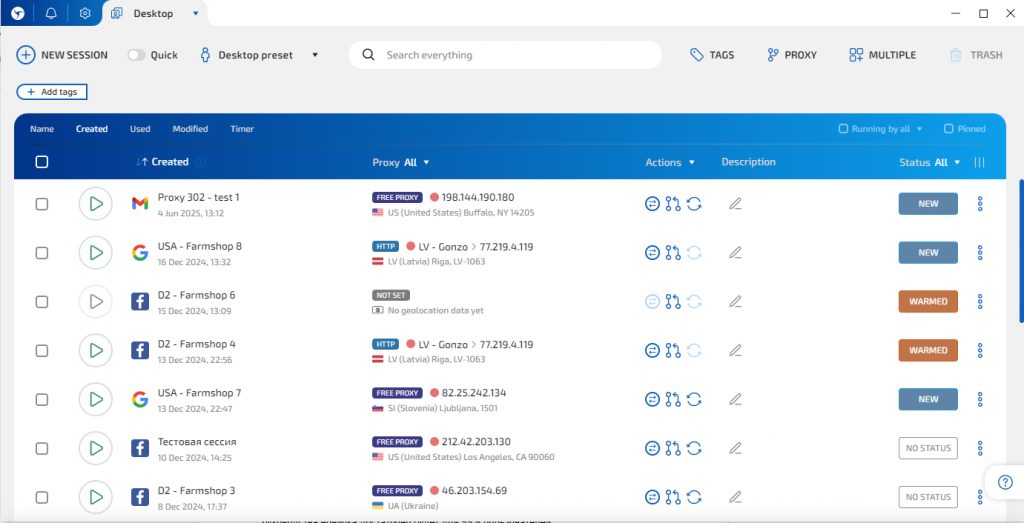
All activity in the browser takes place inside workspaces, where you can create profiles for specific tasks. The platform also includes tags, statuses, profile grouping, and custom icons with platform logos — everything needed to organize sessions and tailor the setup to your workflow.
Creating a standard profile starts with the New session button, which opens the settings editor where all key parameters are configured.
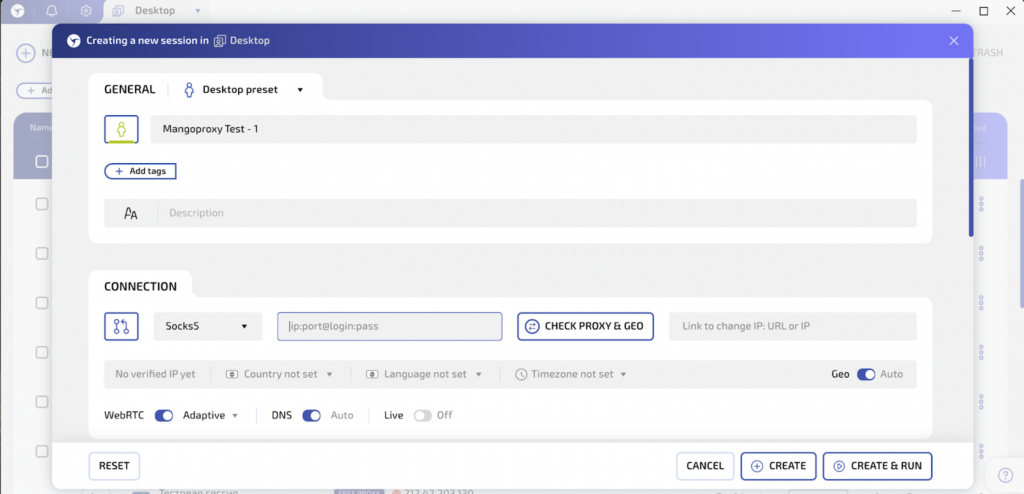
Add a profile name, description, and tags, then select the connection type.
To add a proxy, copy your Mango Proxy IP details and paste them in any supported format.
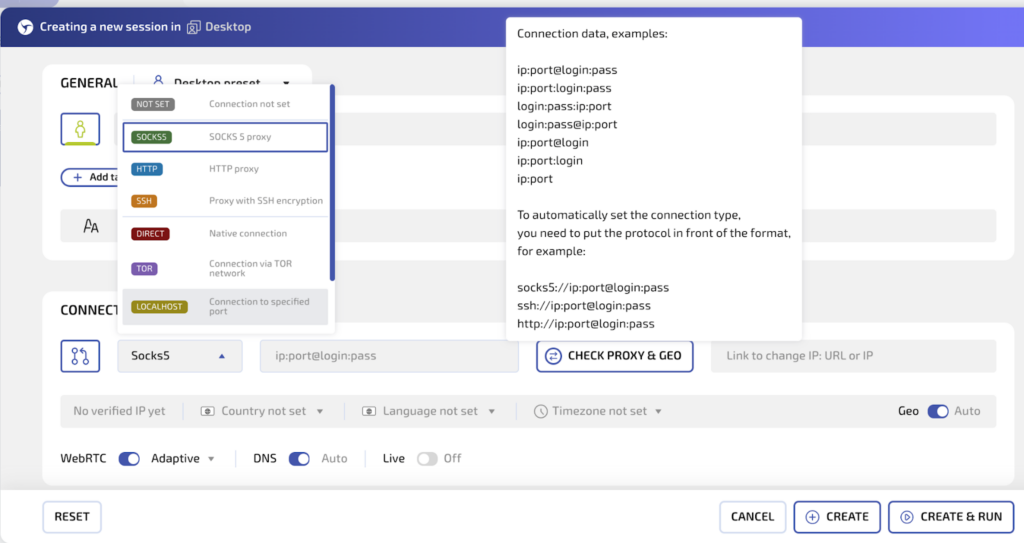
Use Check proxy & GEO button to verify the connection and proceed to browser settings.
Import cookies, set a start page, and add extensions (skip this step when creating a profile for a new account).
Select a browser fingerprint. The indicator on the right shows how closely the configuration matches real-world setups and helps avoid basic mistakes.
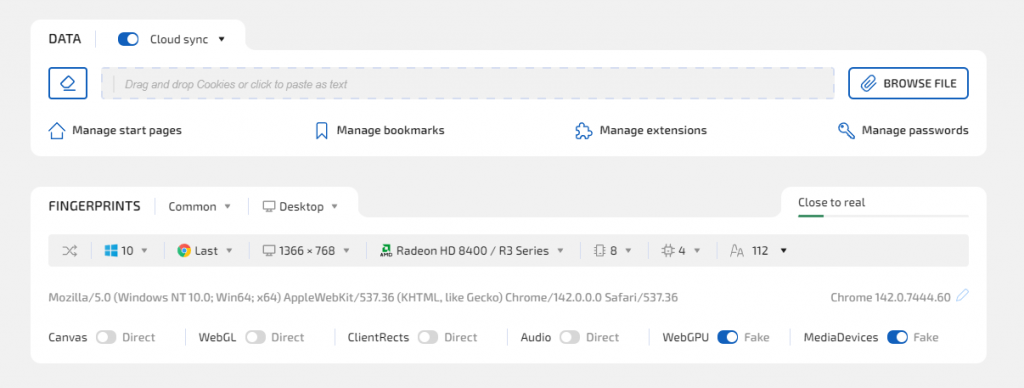
The browser offers three fingerprint modes: manual, Hybrid 2.0, and a pool of real device configurations.
If there is no need to select specific parameters, Hybrid mode is recommended — it automatically applies optimal settings based on your device.
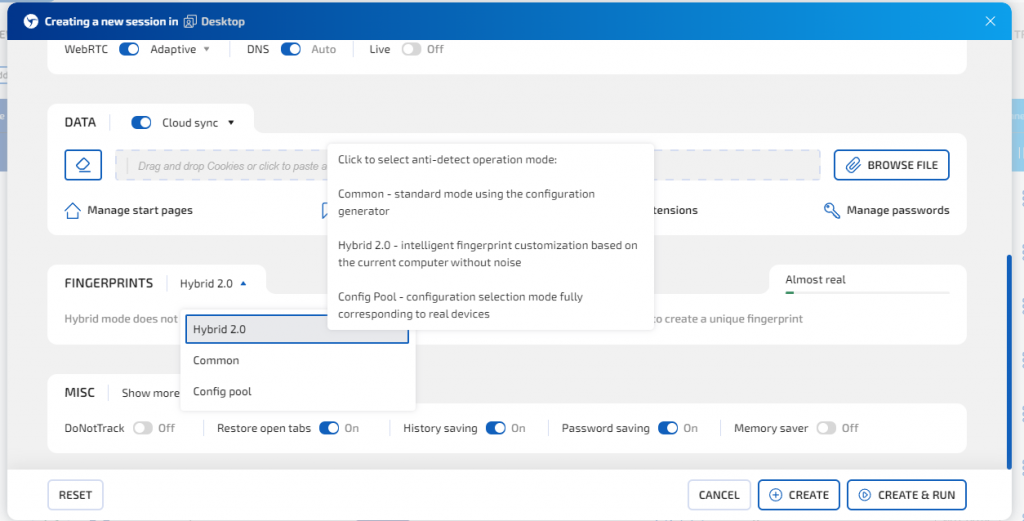
The profile is ready for use — all that remains is to save it and launch it.
To avoid repeating the same set of actions, presets with configuration templates can be used when creating profiles: select the required parameters, save them, and then create new profiles with the desired configuration in a single click.

Working with proxies in Linken Sphere
To work with proxies, open the proxy manager. Here you can add IP addresses manually and then assign them to the required profiles, as well as bulk import a large number of IPs using a list.

Simply select the connection protocol, add the IP address, and save it.
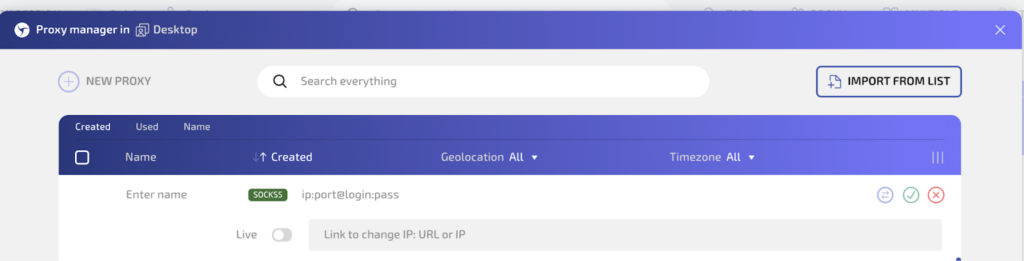
For bulk import, click Import from list and paste your proxy list:

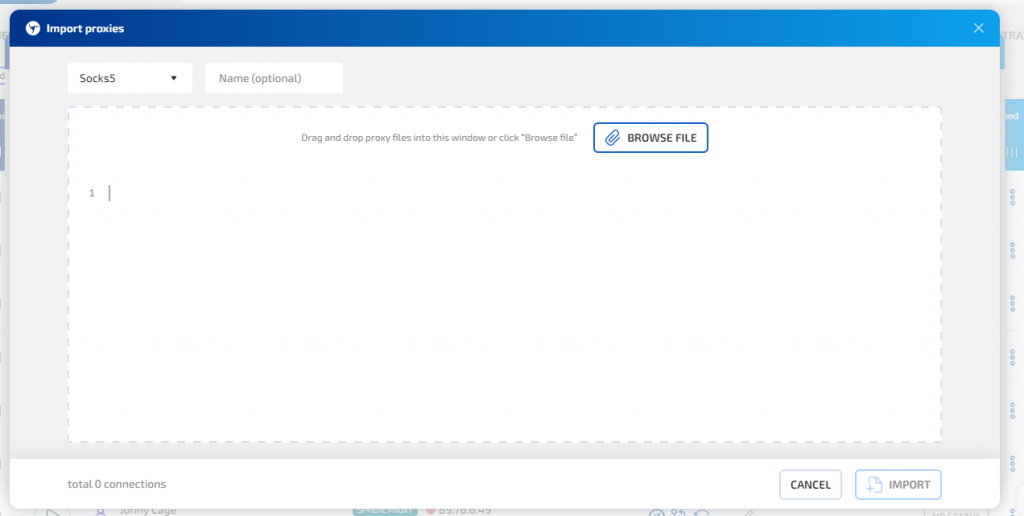
To make working with proxies easier, you can also assign names during import — all IP addresses will receive sequential names automatically.
Using Proxies to Enhance Browser Isolation
Proxies are a foundational component of antidetect browser setups. Without them, profile isolation remains incomplete, as network-level signals still converge.
In practice, proxies help solve several operational tasks:
- isolating accounts at the network level;
- distributing activity across independent sessions;
- reducing the likelihood of correlated behavior patterns.
Rather than acting as a standalone solution, proxies function as part of the broader infrastructure that supports stable multi-profile work.
How Mango Proxy Enhances Linken Sphere Workflows
Linken Sphere becomes more predictable and stable when combined with a reliable proxy provider like Mango Proxy. This is essential for workflows with long session lifecycles and multi-account operations.
Residential proxies are optimal for social media and advertising, ensuring session persistence and natural traffic patterns. ISP proxies suit daily operational tasks requiring consistent connectivity. Mango Proxy offers instant purchase, daily refreshed IP pools, access to 90M+ IPs across 200+ countries, and broad geographic coverage, making it easy to maintain stable and controlled network conditions.
Who Benefits from Linken Sphere
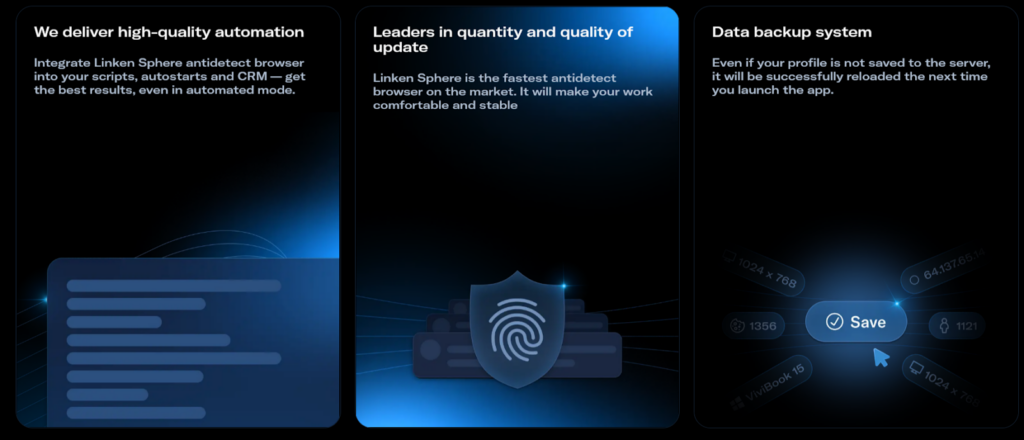
Linken Sphere is designed for professionals who manage complexity rather than avoid it:
- Traffic arbitrage specialists use it to maintain separation across campaigns.
- Marketing and SMM teams rely on it for consistent brand account management.
- Agencies benefit from shared access models that preserve accountability.
- Teams working with multiple accounts use it to centralize workflows without sacrificing control.
In each case, the value lies in predictability rather than speed.
Conclusion
Antidetect browsers have become part of the standard toolkit for modern digital operations. As platforms grow more sensitive to behavioral signals, structured browser environments are increasingly necessary.
Linken Sphere fits into this landscape as a tool focused on control, stability, and long-term use. Its role is not to simplify workflows artificially, but to make complex operations manageable.
For teams that depend on consistent browser behavior, it represents a practical approach to multi-account work in evolving digital environments.