
Optimize account management with Xlogin and MangoProxy proxies
Xlogin is an anti-detect browser designed to simplify and protect the management of numerous accounts. It suits marketers, arbitrage specialists, SMM professionals, e-commerce experts, and agencies handling dozens of profiles across social networks or marketplaces.
Confidentiality and security are critical in multi-accounting: without protection against browser fingerprints and real IP exposure, you face risks of blocks or data leaks. Anti-detect features and proxies isolate sessions, prevent restrictions, and enable safe automation. Reliable proxies like MangoProxy enhance Xlogin’s stability, offering anonymity and speed with a pool of 90+ million IPs across 200+ countries.
If you manage multiple accounts, Xlogin paired with MangoProxy proxies ensures secure, uninterrupted operations.
Xlogin offers a 3-day free trial — this lets you test all anti-detect browser features, including seamless proxy integration, with zero financial commitment and see profile isolation stability in real-world conditions.
Xlogin benefits for professional workflows
Xlogin provides a range of advantages that make it a go-to tool for specialists:
- Profile isolation. Each account operates in a separate environment with unique cookies, user-agents, and IPs, preventing data overlap.
- Easy management. An intuitive interface speeds up profile switching, even for beginners.
- Flexible proxy integration. Support for HTTP, HTTPS, and SOCKS5 protocols ensures compatibility with various proxy servers.
- Team collaboration. Profile sharing with access control simplifies teamwork.
- Security. Session encryption and fingerprint protection (Canvas, WebGL) minimize detection risks.
- Compatibility. Integrates with anti-detect browsers, APIs, and automation tools like Selenium.
| Feature | Xlogin | Regular Browser |
| Profile isolation | Yes | No |
| Fingerprint protection | Yes (unique) | No |
| Proxy support | Yes (HTTP/SOCKS5) | Limited |
| Scalability | Up to 3000 profiles | Limited |
How to connect MangoProxy to Xlogin: step-by-step guide
Setting up MangoProxy in Xlogin takes just a few minutes and ensures a stable connection. MangoProxy offers residential proxies with 99.9% uptime and rotation up to 30 minutes, perfect for multi-accounting.
1. Obtain MangoProxy data
After registering with MangoProxy, log into your account and copy the proxy details: IP address, port, login, and password.
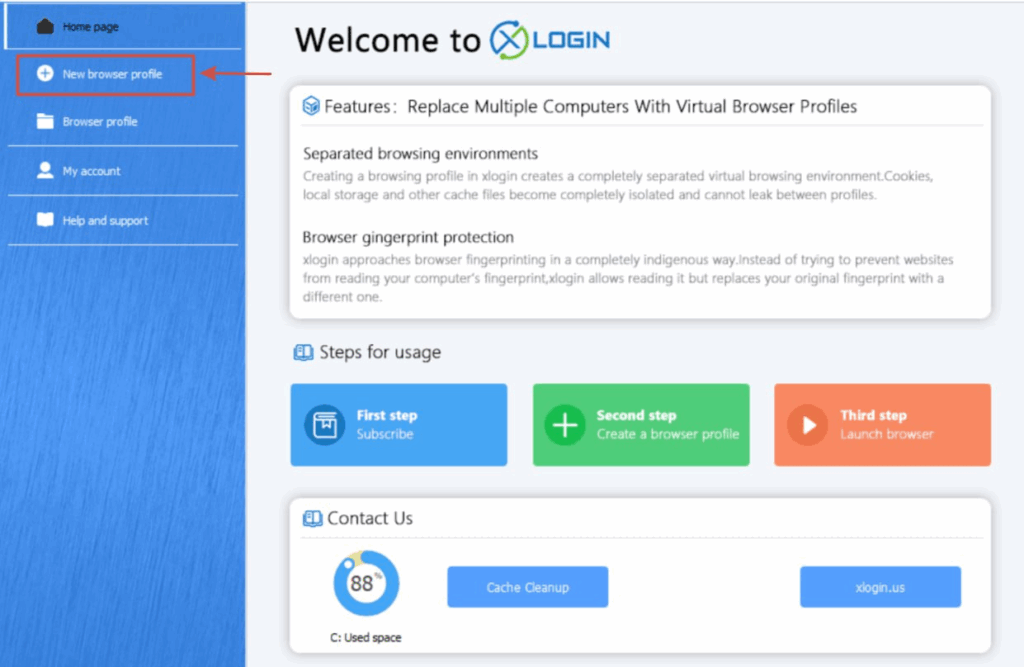
2. Open Xlogin settings
Launch Xlogin, select an existing profile or create a new one via the “New browser profile” section, then open the proxy settings window by clicking “Setting proxy server” in the profile’s basic parameters.
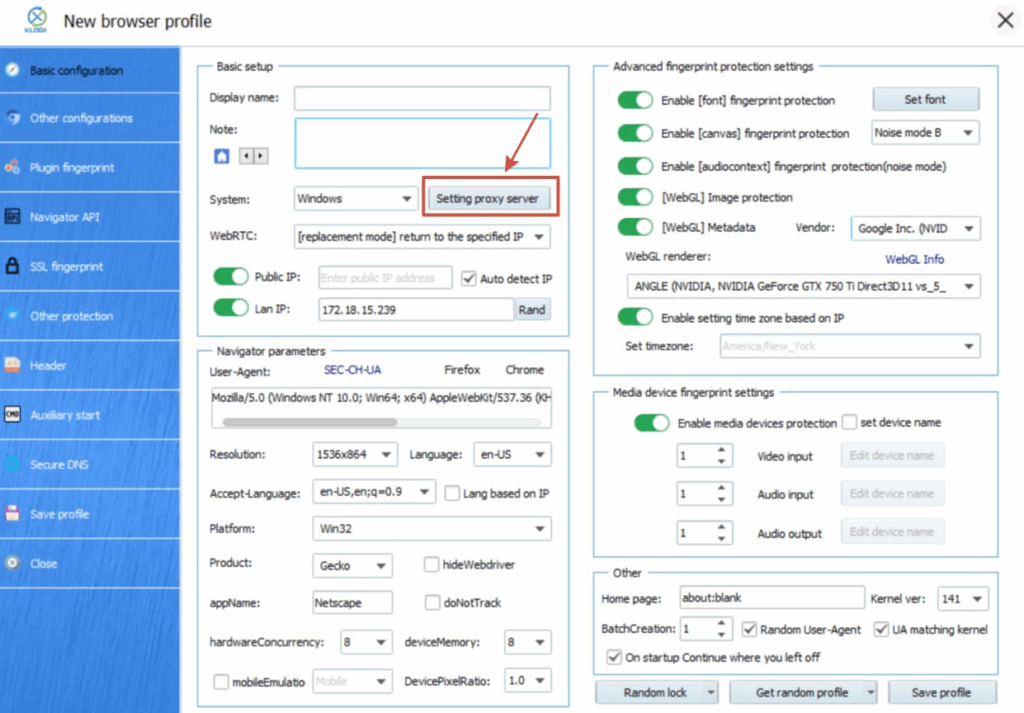
3. Add a new proxy
- Choose the connection type (HTTP/S or SOCKS5).
- Enter the obtained details: IP address, port, login, and password.
- Click “Test Proxy” to verify the connection.
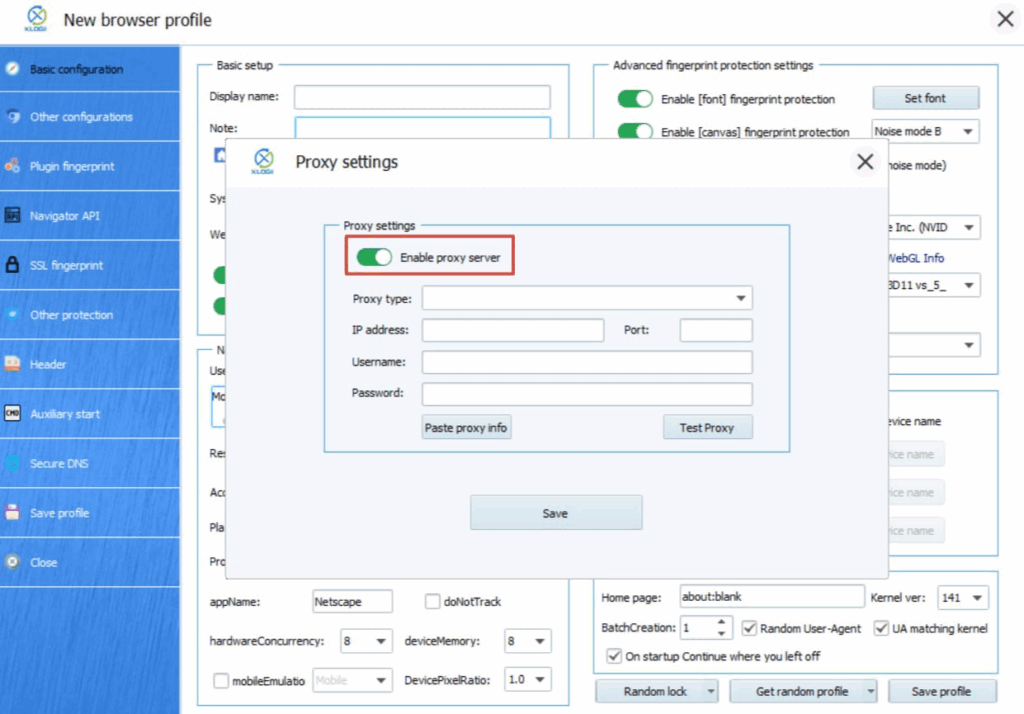
- Save the profile and launch Xlogin
After successful verification, save the settings. Connect the proxy to the profile and, if needed, configure IP rotation via the MangoProxy management panel.
Expert advice: ensuring stable Xlogin operation with MangoProxy
Stable performance of Xlogin with MangoProxy hinges on proper setup and parameter selection. Drawing from extensive experience in multi-account management and scraping, here are some recommendations:
- Opt for residential proxies. They offer the highest trust from platforms, reducing ban risks by 70–80%. Avoid datacenter IPs for sensitive tasks like managing Instagram or Amazon accounts.
- Adjust rotation wisely. Set rotation intervals (5–30 minutes) based on account activity. For consistent sessions, leverage MangoProxy’s sticky sessions up to 30 minutes.
- Monitor connection speed. Ensure latency stays below 0.7 seconds to support smooth automation—MangoProxy’s 99.9% uptime meets this standard.
- Test profiles regularly. After setup, run a test session in Xlogin to rule out conflicts between profiles or proxies, especially during large-scale scraping.
- Update settings as needed. If a platform updates its detection algorithms, refresh fingerprints in Xlogin and reconnect proxies via MangoProxy’s panel.
These steps minimize disruptions and enable efficient scaling while keeping data secure.
Enhance projects with Xlogin and MangoProxy
Xlogin and MangoProxy together create an optimal environment for multi-accounting:
- Xlogin ensures secure profile isolation, safeguarding each account’s data.
- MangoProxy adds anonymity with residential IPs and reliable connections.
- Together, they allow project scaling without bans or data leaks.
Try the Xlogin + MangoProxy combo and experience stable performance managing multiple accounts.
Why Xlogin and MangoProxy are the ideal solution for professionals
Xlogin is a powerful tool for multi-accounting, while MangoProxy delivers a dependable solution for privacy and speed. This combination is perfect for SMM specialists, analysts, and marketers seeking secure, efficient operations. Start using Xlogin today—set up MangoProxy proxies and manage any number of accounts without risks or limitations.