
How to avoid bans and restrictions in multi-accounting: a secure setup with Dolphin Anty and MangoProxy

Multi-accounting is used for a wide range of tasks: launching thousands of ad campaigns, posting reviews, publishing content, and more. In some cases, multiple accounts are also used to access bonuses, discounts, or product trial versions.
The main enemy of multi-accounting is bans and account restrictions. You create an account — and immediately face limits on daily ad spend, the number of products you can upload, or other functional constraints.
Why do accounts get restricted or banned?
All major platforms actively fight against manipulation and multi-accounting abuse. Their anti-fraud systems analyze far more than just your IP address — they also evaluate browser parameters, device fingerprints, and behavioral patterns.
Platforms continuously detect suspicious activity and build databases of technical and behavioral traits commonly associated with abuse. If your setup matches those patterns, restrictions or bans are only a matter of time.
Common anti-fraud triggers
Although anti-fraud systems are constantly evolving, there are certain red flags that remain relevant at all times.
1. Location and system time mismatch. If your IP address is located in one time zone while your device’s system time reflects another, platforms will likely suspect the use of a proxy or VPN. Your system time and proxy location must always be aligned.
2. Browser and device parameters matching previously banned users. There is nothing suspicious about sharing the same browser version, OS, CPU, or GPU with someone who has been banned. However, if the only differences between you and a blocked user are the IP address and user agent — while all other key parameters are identical — your account may quickly face restrictions again.
3. Unusual parameter combinations. If your browser or operating system uses fonts, hardware specifications, or configurations that are not typical for that environment, anti-fraud systems may flag you as suspicious.
You can check how your browser looks at anti-fraud systems by visiting pixelscan.net and clicking “Start”
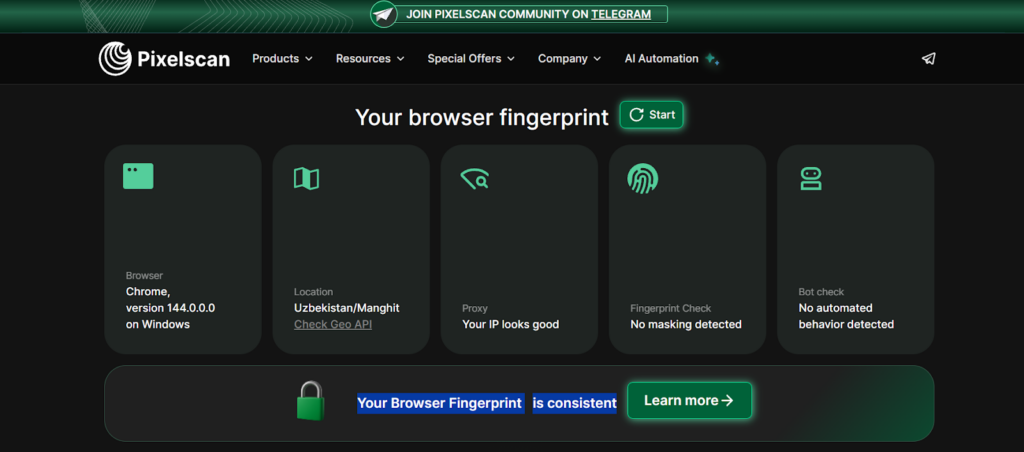
If you see the message “Your Browser Fingerprint is consistent,” it means your browser configuration looks natural — and many websites are more likely to treat you as a legitimate user.
The best protection: residential proxies + anti-detect browser
Many websites maintain IP blacklists. If your IP address appears on one of these lists, the platform may immediately restrict or ban your account. Large platforms also maintain databases of data centers commonly used for proxy traffic.
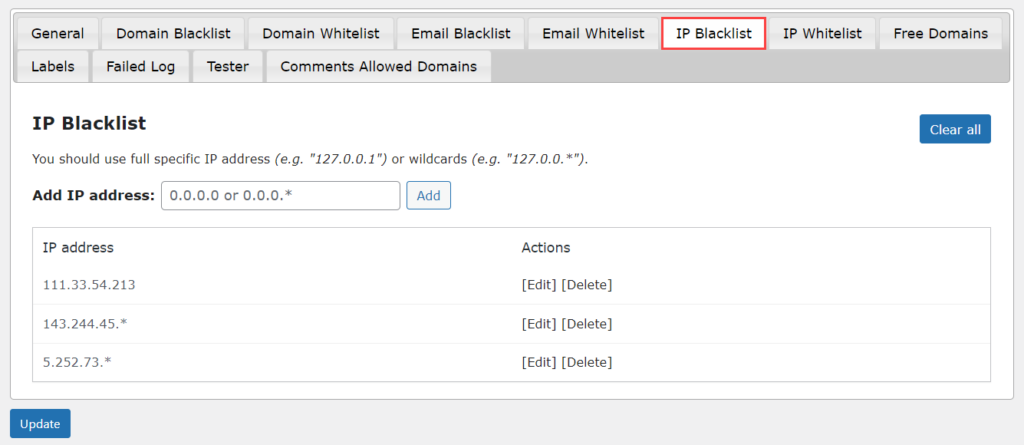
Form for adding IP addresses to a website blacklist.
That’s exactly why multi-accounting requires residential proxies with a clean IP history. When you use residential proxies, you access websites through IP addresses assigned to real users rather than data centers. These IPs are far less likely to appear on blacklists (especially if you use MangoProxy), which makes platforms treat the traffic as legitimate and trustworthy.
You can’t work without an anti-detect browser
Proxies replace your IP address. An anti-detect browser replaces everything else:
- User agent;
- WebRTC and WebGL parameters;
- Fonts, browser language, and system time;
- Cookies;
- CPU, GPU, and connected media device parameters.
The combination of these characteristics is called a browser fingerprint. If you modify only the IP and user agent, anti-fraud systems can still identify you based on the remaining parameters. But when the entire fingerprint is properly configured, platforms cannot easily recognize that you are the same user operating under a different identity.
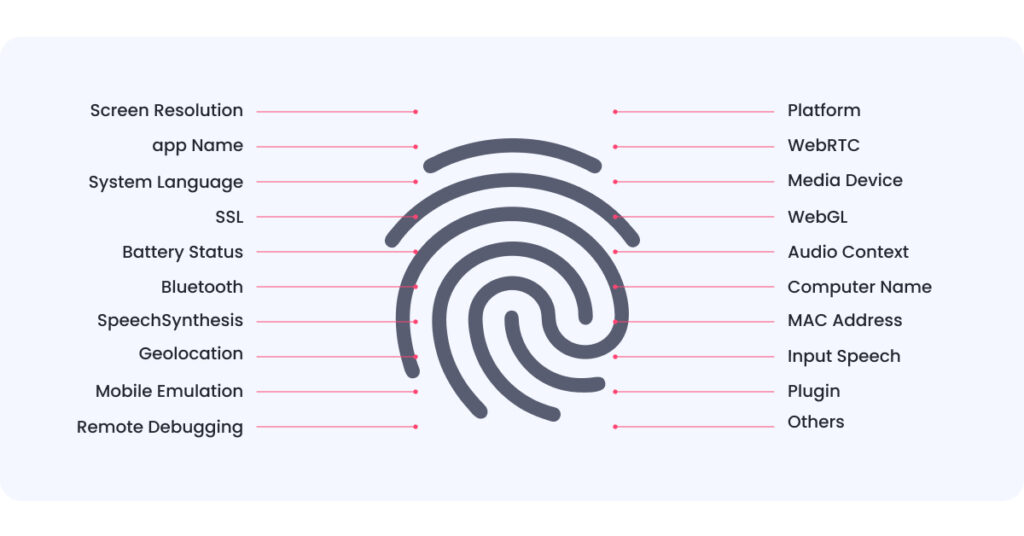
The most commonly scanned user parameters by websites.
There are virtually unlimited combinations of these parameters — just like there is an unlimited number of proxies you can purchase. That’s why, with the right setup, you can create and operate as many accounts as your workflow requires.
What’s a browser profile (profile or BP)?
A browser profile is a dedicated workspace where you configure both a proxy and a customized fingerprint. As a result, you create a new digital identity.
Each digital identity is fully isolated from the others. Platforms treat every browser profile as a separate user because they cannot detect that all profiles are being managed by the same person.
Why Dolphin Anty?
A high-quality anti-detect browser does not generate fingerprints randomly. Instead, it analyzes real user fingerprints from different regions of the world and uses them as a baseline.
When you create a new browser profile and select a proxy along with an operating system, Dolphin Anty automatically assigns a fingerprint that matches those parameters.
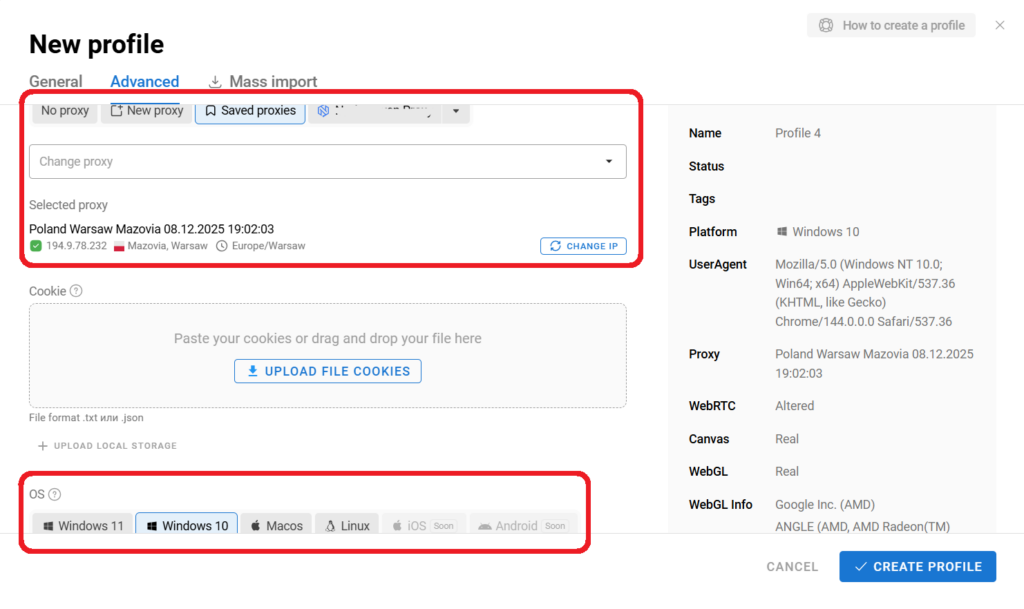
This is how not only Dolphin Anty works, but also many of its alternatives. It can be said that using real fingerprints is the gold standard for an anti-detect browser.
However, today high-quality fingerprint protection alone is not enough. Modern anti-detect solutions are primarily about speed and ease of use. The following Dolphin Anty features significantly simplify and accelerate workflow:
- Tags, statuses, and notes;
- Cookie Robot;
- Browser cloning;
- Scenarios;
- Synchronizer.
Tags, statuses, notes
They help you quickly find the required profile in the list and easily remember the purpose of each browser you have created.
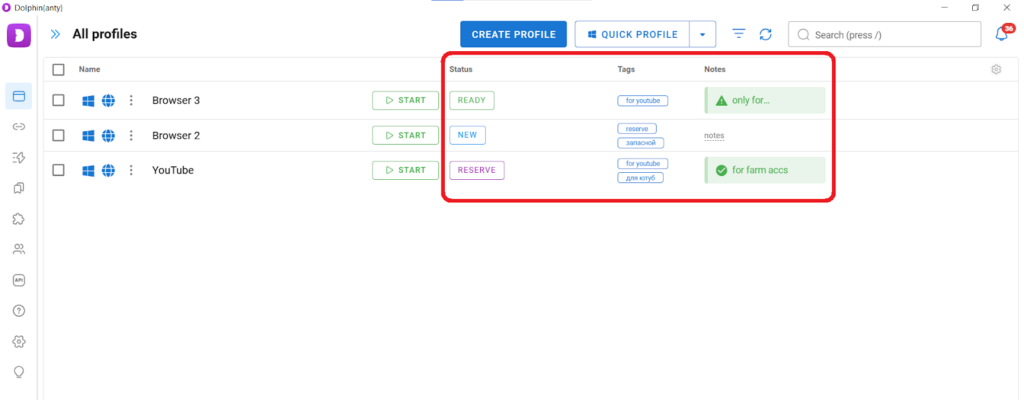
Tags allow you to filter and group profiles. For example, you can assign the tag “Facebook” to certain browsers. After clicking on this tag in the lower panel of the list, only the profiles with that tag will remain in the workspace.
Statuses and notes serve as reminders about the state and purpose of a profile. Statuses are typically used to indicate whether a browser is ready for work, while notes contain brief information that is important for ongoing tasks. Tags, statuses, and notes bring structure and order to managing browser profiles.
Cookie Robot
It is used to quickly generate cookies in the browser cache. A “clean” browser raises suspicion for anti-fraud systems, no matter how natural its fingerprint may look. A cookie file is not always available, yet a browser profile may need to be created immediately.
To use the robot, after creating a browser, hover over the three dots and select this function.
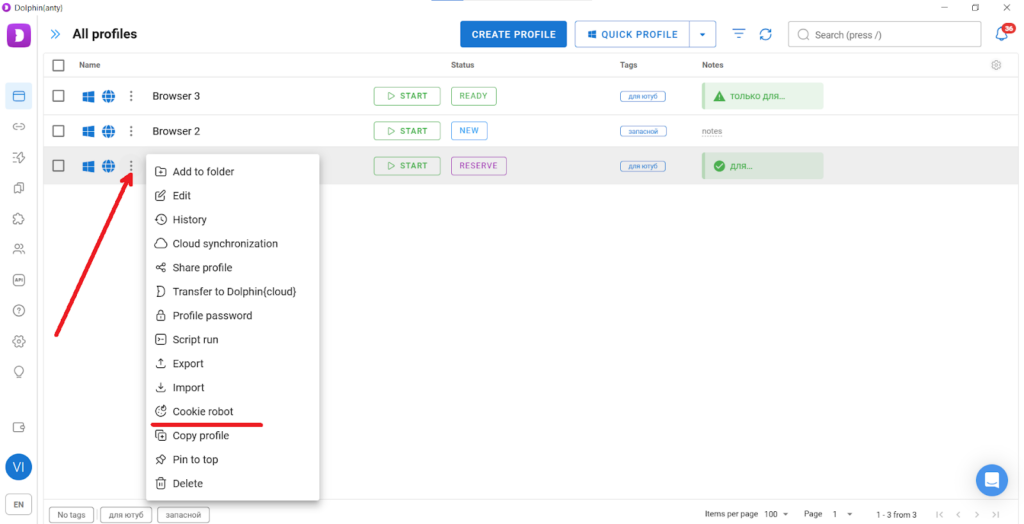
After clicking on Cookie Robot, a form for adding links will open. Paste the links as a list and click “Start.”
Important! To collect cookies, use regional websites that are typical for the country of your proxy.
Browser cloning
If you need multiple profiles with similar characteristics, there is no need to create each one separately. It is enough to create one browser and then clone it.
To copy a browser, hover over the three dots and click “Copy.” After that, you can specify the number of copies.
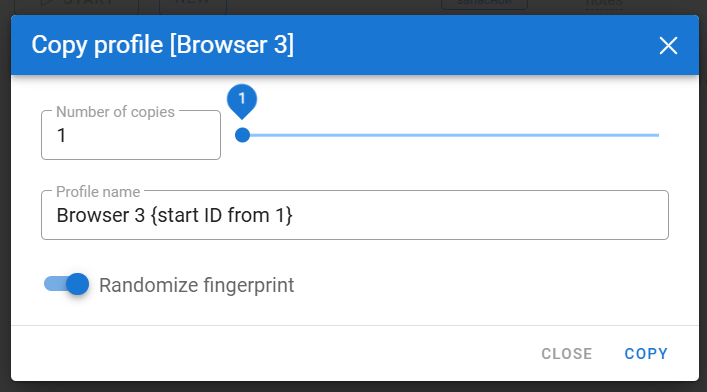
By default, the “Randomize fingerprint” option is enabled, so each browser will have a separate digital fingerprint.
Scenarios
They allow you to automate routine actions and reduce the amount of manual work. Scenarios are especially helpful when working with dozens or hundreds of accounts. They function as follows:
- You create a scenario — a sequence of routine operations;
- You save this scenario;
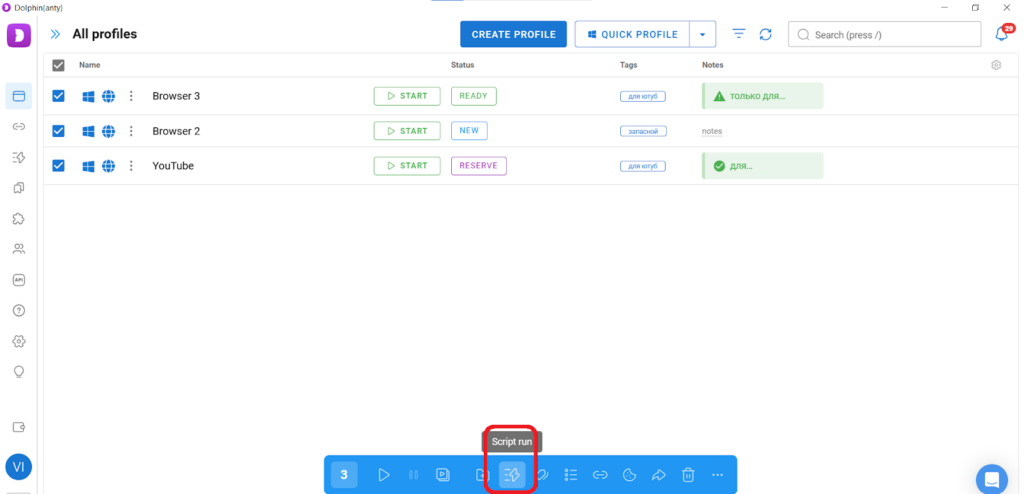
- Then you select browsers from the list and run this script on them.
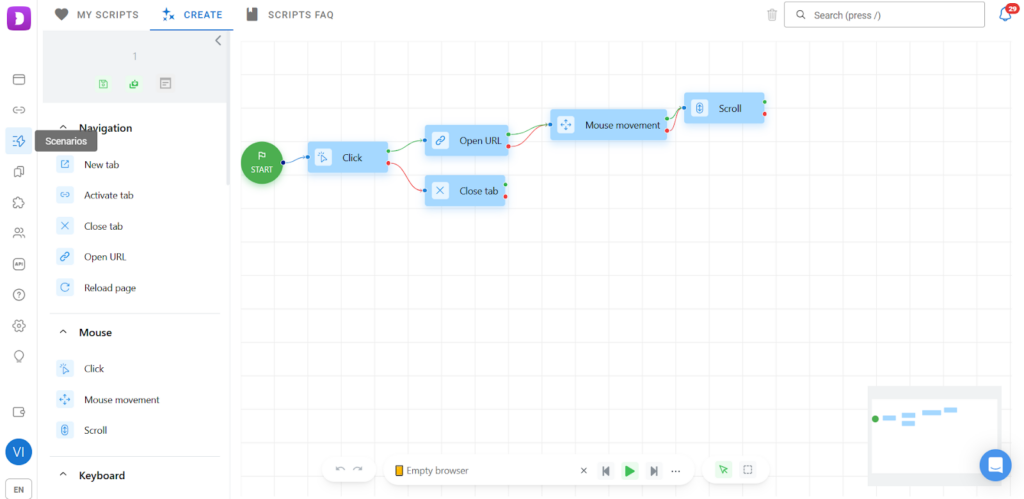
Using scripts, you can register accounts, prepare them for advertising, build up a social profile history, and perform other repetitive tasks — in any number of browsers simultaneously.
Synchronizer
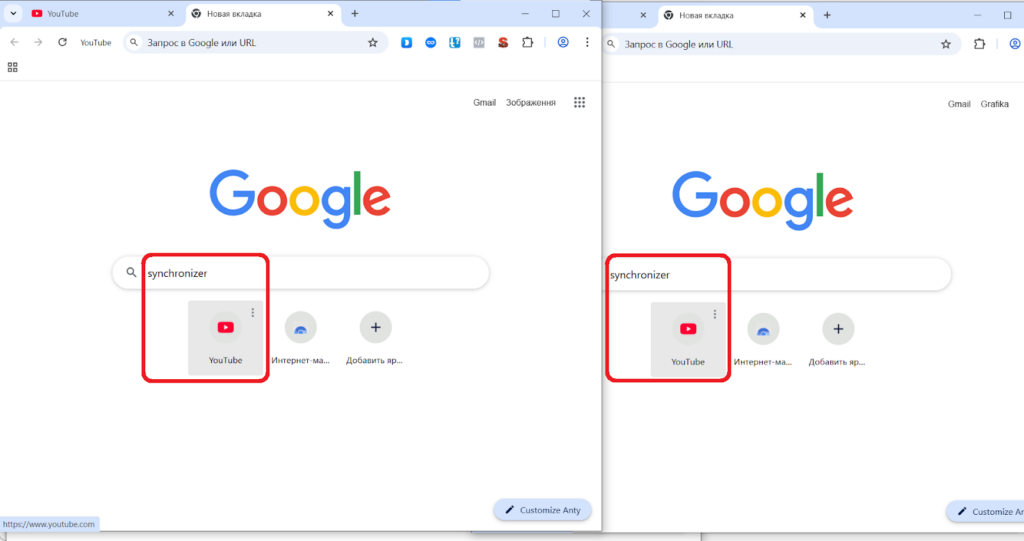
It allows you to duplicate manual actions across multiple browsers at the same time. In this way, it extends the range of actions that cannot be performed using scenarios.
The synchronizer works as follows:
- You select profiles from the list and open them via the Synchronizer (located in the lower panel);
- As a result, when you perform an action in one browser, it is duplicated in the others.
How to integrate proxies into an anti-detect browser?
First, you need to select the anti-detect browser directly in your MangoProxy dashboard.
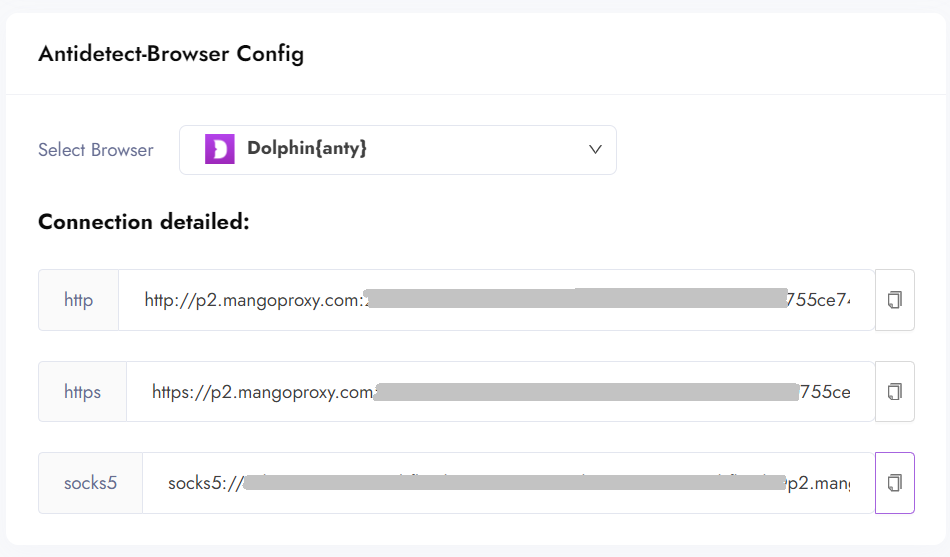
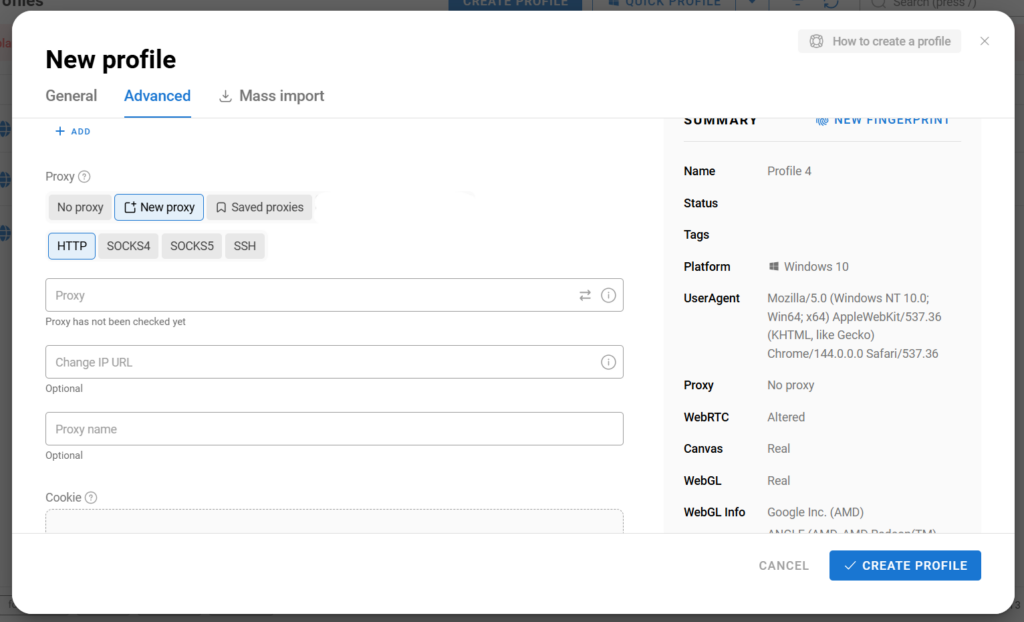
Choose Dolphin Anty and receive the port in the appropriate format. Then simply copy this port and paste it into the browser profile or into the proxy list.
In conclusion
Dolphin Anty is the winner of the Affiliate Space Awards by Conversion Club 2023 in the category “Best Anti-Detect Browser for Affiliate Marketing.” However, even the best anti-detect browser can only reveal its full potential when combined with high-quality proxies.
Try the Dolphin Anty + MangoProxy setup. Also use the promo code MANGO20 to receive a 20% discount on your first payment.
FAQ
Can data center proxies be used instead of residential proxies, and when is this acceptable?
Data center proxies can be used if you need to access a website that is blocked in your country or if you want to analyze ads running in a specific region. However, residential proxies are required for multi-accounting.
Do I need a separate proxy for each browser profile in Dolphin Anty?
Yes, it is recommended to follow the 1 browser profile — 1 proxy rule.
How should a new profile be configured to reduce the risk of limits and bans?
All you need to do is add a proxy and cookies to the browser profile (or collect cookies using the Cookie Robot). Dolphin Anty will automatically select the remaining parameters based on real fingerprints.
Can profiles be transferred from another anti-detect browser to Dolphin Anty?
Unfortunately, no. You can only reuse the same cookies and proxies and configure fingerprint parameters as closely as possible.
What is the difference between paid Dolphin Anty plans and the free plan besides the limit on browser profiles?
Paid plans allow you to add team members and run Scenarios and the Synchronizer. Deleted browsers can also be restored from the trash. However, key features such as tags and the Cookie Robot are available on the free plan as well.