
How to Check Proxies Before Using Them
Proxy servers are used in dozens of tasks: automation, API interactions, increasing request volume, web scraping, and managing multiple accounts. However, one of the most common mistakes is launching projects without checking proxies beforehand.
In practice, even high-quality proxies for automation can behave differently depending on configuration, traffic load, and infrastructure. Sometimes problems only appear after a large number of requests are launched and errors begin to accumulate.
Therefore, before using proxies it is important to understand how proxy infrastructure works and which parameters actually indicate whether a proxy is functioning correctly. Proper testing helps avoid situations where automation starts producing errors, API requests are blocked, or scraping becomes unstable.
Why Proxy Testing Matters
Many users assume that if a proxy connects successfully and shows a different IP address, it means it is working correctly. In reality, this is not enough.
Proxy performance is determined by several parameters:
- connection stability
- server response time
- correct traffic routing
- absence of IP or DNS leaks
- stability under load
If these parameters are not checked in advance, problems often appear later during real workloads. For example, when using proxies for scraping, unstable connections may lead to interrupted requests and data loss. In automation systems this may appear as random execution errors in scripts.
Key Parameters of Proxy Performance
1. Response Speed
The first thing usually evaluated is the response time of the proxy server.
High latency increases the execution time of each request. With individual actions this may not be noticeable, but during large-scale automation delays start to accumulate. This becomes especially critical when working with APIs and large numbers of requests.
2. Connection Stability
Even a fast proxy can be unstable. In automated systems this often appears as unstable connections.
For example, when proxies are used for multi-account management, unstable connections may cause repeated logins or suspicious activity from the perspective of online services. Infrastructure stability becomes particularly important during long sessions.
3. IP Address Type
| Proxy Type | Key Characteristics | Common Use Cases |
| Residential proxies | IP addresses from real user devices | scraping, working with online services |
| ISP proxies | stable IP addresses provided by internet service providers | multi-account management, automation |
| Datacenter proxies | server-based IPs with high speed | high-volume requests, API usage |
Different tasks require different types of proxies.
For example:
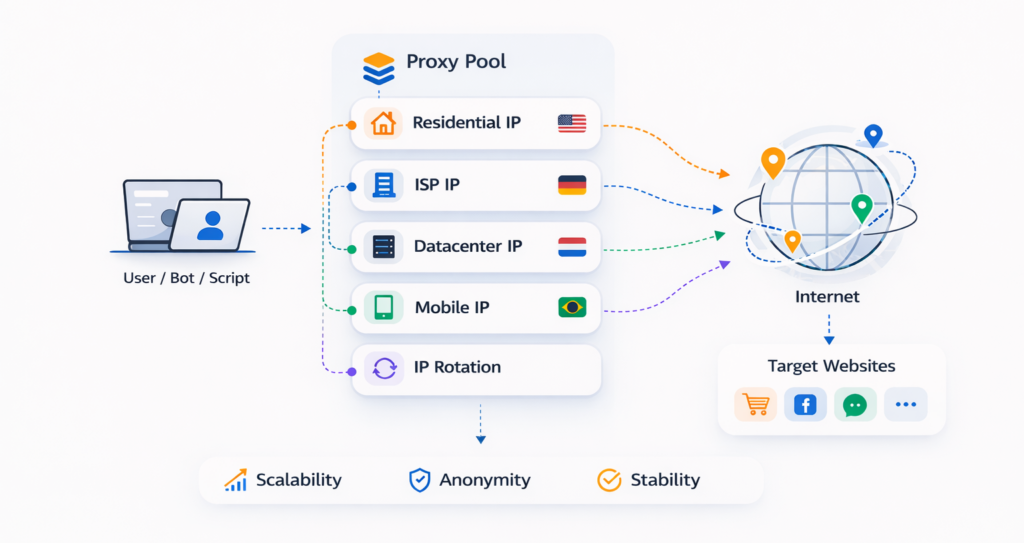
Residential proxies appear as regular user IP addresses and are often used for scraping and working with services that are sensitive to bot traffic.
ISP proxies combine the stability of server infrastructure with characteristics of residential networks.
Datacenter proxies are typically used in high-load tasks where speed is important.
Understanding the type of IP helps better evaluate the expected stability of a connection.
4. IP Reputation
Even a technically functioning proxy may have a poor reputation.IP addresses previously used for spam or aggressive scraping may already be blocked by certain websites. Therefore, when testing proxies it is important to consider not only their technical performance but also their reputation.
5. Behavior Under Load
Many proxy issues only appear when the number of requests increases.
For example:
- during large-scale scraping
- during massive API requests
- when working with large numbers of accounts
Proxies that perform well with single requests may start producing errors under heavy load.
Practical Recommendations
Proxy testing should not be viewed as a one-time procedure but rather as part of the overall project architecture.
Several principles can help avoid most problems.
Testing Before Increasing Load
Before launching a large number of tasks, it is important to test proxies with a small number of requests.
Using the Appropriate Proxy Type
For tasks that are highly sensitive to anti-fraud systems, residential proxies are often used, while high-load systems may rely on datacenter infrastructure.
Monitoring Stability
Even high-quality ISP proxies or residential networks may show different performance depending on geography and time of day. Regular monitoring helps detect such changes.
Checking Traffic Routing
Incorrect routing may reveal the user’s real IP address. Therefore, when testing proxies it is important to verify how traffic is transmitted through the proxy.
Conclusion
Testing proxies before use is an important stage in preparing any automated infrastructure. It helps detect connection issues, evaluate IP stability, and understand how proxies behave under load.
For projects related to automation, API integrations, or web scraping, such testing helps avoid many technical errors and increases the overall stability of the system.
Proxies are only one part of the infrastructure, but their proper operation directly affects the stability of the entire system.

Frequently asked questions
Here we answered the most frequently asked questions.
Should every proxy be tested before use?
Ideally, yes. Even in stable proxy pools individual IP addresses may behave differently depending on load and geographic routing.
Why does the proxy work but the website still blocks requests?
The reason is often not the proxy itself but the IP reputation or the behavior of automation tools.
Is testing residential and datacenter proxies different?
The main principles are the same, but residential networks usually require additional evaluation of stability and IP rotation.
Is it possible to completely avoid blocks when using proxies?
No. Proxies help distribute traffic, but anti-fraud systems analyze many factors: user behavior, request frequency and structure, device and browser characteristics, digital fingerprint, connection geography, and account activity history. Therefore, stable operation depends not only on proxies but also on how the entire automation infrastructure is built.
Simple and clear explanation on how to check proxies before using them, especially useful to avoid wasting time on dead ones