
How to Buy GTA 6 on PS5 and Xbox: Account Region, Store, and Codes
Published: ≈ 7 min read
Rockstar has set November 19, 2026, as the release date for Grand Theft Auto VI on PS5 and Xbox Series X|S. A store page is easy to open; placing an order depends on the country attached to your account and on the payment options there. A boxed copy adds one more detail: its download code has to suit your platform account. You can use a browser proxy to look at a public page from another IP location, but that view cannot make a payment or code valid.
Before you choose a store
- Launch is announced for PS5 and Xbox Series X|S; Rockstar has given no date for a PC version.
- Rockstar lists pre-order countries separately for PlayStation Store, Xbox Store, and Rockstar Store. Find your country under the store you plan to use.
- You cannot change the country of an existing PlayStation account. GTA 6 PlayStation download codes must match an eligible account region.
- You can change the country setting on Xbox Series X|S, but that does not guarantee that the game is available or that payment will go through. Rockstar says GTA 6 download codes for Xbox have no region lock.
When would you need a proxy here?
If you want to see how a public store page appears from another country, a browser proxy can give that request an IP from the chosen location. That only helps you inspect the page. It does not change your account country or guarantee that payment or code redemption will work.
Which stores are taking GTA 6 pre-orders in your country?
Rockstar’s support page has a separate country list for each storefront: PlayStation Store, Xbox Store, and Rockstar Store. A country shown under PlayStation may be missing from the Xbox list. Find the entry for the store connected to your account; Rockstar says more countries may be added later. A game page opening through a link from another country does not establish that you can place an order from your own account.
The announced launch platforms are PS5 and Xbox Series X|S. The Rockstar Store pre-order is also for the announced console versions. A Rockstar Store listing does not confirm a Windows version for sale.
What should you check for each platform?
| Platform | Before paying | If you buy a code |
|---|---|---|
| PlayStation 5 | Look for GTA 6 in the store linked to your account; check whether your payment details match its country | Ask the seller for the code’s region before ordering |
| Xbox Series X|S | Look for the game under the console’s selected location; check how you can pay in that store | Rockstar lists GTA 6 Xbox codes as region-free; still read the seller’s offer |
| Rockstar Store | The offer’s country and stated console platform | Confirm which platform the code is for and how it will be delivered |
Can you change the country on your PlayStation account?
No. Sony fixes the country when you create a PlayStation account. It controls which PlayStation Store content is available to you and affects payments and code redemption. You can check your account country in Account Management. Sony also recommends that it match your billing information.
According to Rockstar, the boxed edition of GTA 6 contains a digital download code, not a disc. PlayStation codes have regional groups. Take the North American group: Rockstar lists the US and Canada as the eligible account countries. If your account belongs to another group, having that box delivered to you will not change the code’s terms. Get the code region from the seller before paying.
What changes when you switch the Xbox store location?
Xbox Series X|S has a Location setting, so you can choose another country on the console. Microsoft advises making that change when you move for a long period, since purchases and account funds may work differently afterward. Your existing balance stays in its original region. At checkout in the new store, you may also be asked for updated billing details. Changing Location, then, is not the same as having a working way to pay.
GTA 6 download codes have a separate rule. Rockstar calls its Xbox codes region-free. That says nothing about a gift card you might use to fund the account, or about a subscription or bank card. If a seller tells you that redeeming the game code requires an IP from one particular country, ask where that requirement comes from. Rockstar’s code guidance is the place to check the answer.
What can a browser proxy tell you about a GTA 6 store page?
It can show you a public page from a chosen IP location. Open MangoProxy’s What Is My IP page in the browser where you set up the proxy. Once the reported country matches the one you intended to inspect, use that same browser to view the GTA 6 listing. Rockstar’s country list remains the reference for where pre-orders are officially offered.
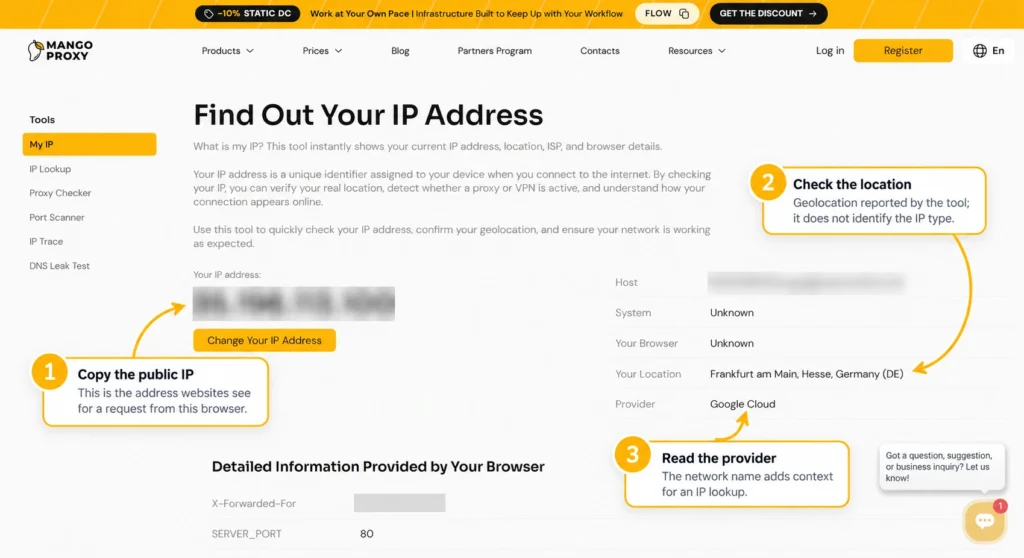
This example stops at the browser. We have not tested a GTA 6 checkout with a proxy, and a signed-in store may use the account country regardless of the browser IP. A visible game listing says nothing about whether payment will clear or a code will redeem. Nor does an IP checker tell you which route a console uses or what latency you will get in a game.
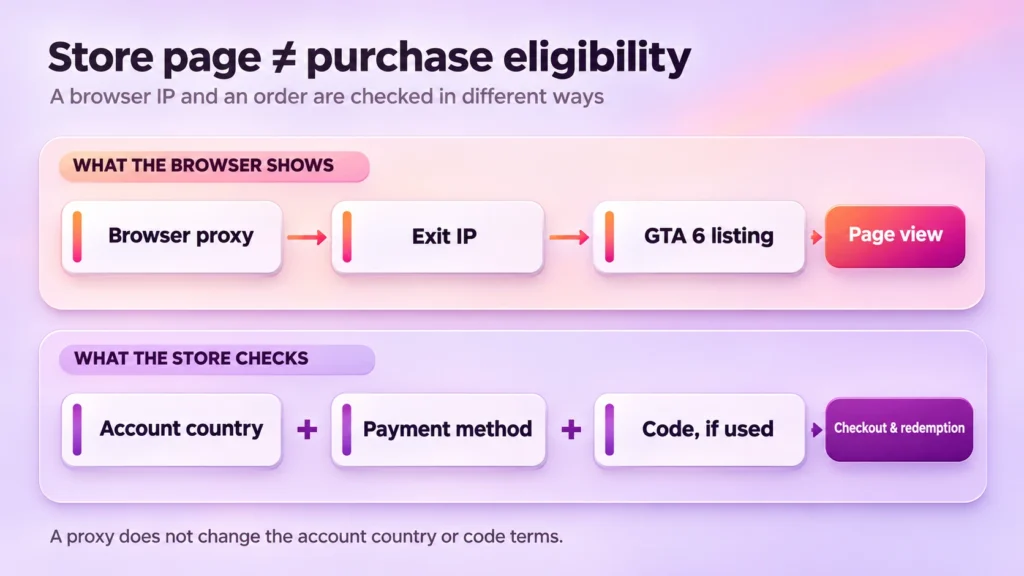
For a one-time page check from a particular country, MangoProxy’s new stock of static ISP proxies offers a one-day rental; the IP stays fixed for that rental period. For recurring checks or comparisons across GEOs, residential proxies let you select a country. Check location availability and product terms before ordering. Once the proxy is connected, open What Is My IP in the same browser, confirm the exit IP and reported country, then view the public store page. None of this changes Sony, Microsoft, or Rockstar’s purchase and code rules.
What if Rockstar does not list your country?
Make sure you are reading the list for the platform you own. If your country is absent, look for a newer Rockstar update or ask the store’s support team whether local sales are planned. Pause before paying a reseller for a promise based solely on a foreign store page. With a boxed copy, ask for the platform and code region in writing so you can compare them with your account.
Glossary
Exit IP: the public address shown to a website when your browser reaches it through a proxy.
Code region: the country or group of countries whose accounts can redeem a code.
Final thoughts
Seeing GTA 6 in a storefront is useful, but the purchase still has to work on your account. Keep the store’s country, your payment method, and any code terms in view before you order. A proxy may help you inspect a public listing; it cannot settle what happens at checkout.
Information is current as of November 4, 2026. Before buying, recheck the terms published by Rockstar, PlayStation, or Xbox.
Frequently asked questions
Here we answered the most frequently asked questions.
When does GTA 6 pre-loading begin?
According to Rockstar’s updated pre-load FAQ, digital pre-loading begins on November 10, 2026: at local midnight on PlayStation 5 and at 12 a.m. GMT worldwide on Xbox Series X|S. Boxed copies containing a download code are expected from November 12. After receiving and redeeming a code, check pre-load availability on your platform. Confirm the latest schedule with Rockstar before buying.
Can I upgrade from the Standard Edition to Ultimate later?
Rockstar says Standard Edition owners can buy a separate Ultimate Edition Upgrade through their platform’s store. Availability and payment remain subject to that store’s conditions.
Does a foreign IP mean the store will accept my order?
No. You might see a different public listing, yet the signed-in store can still use your account country and billing details. If the purchase involves a code, its redemption conditions apply as well.