
Connection Refused vs Connection Timed Out: What’s the Difference?
Published: ≈ 11 min read
Quick Answer
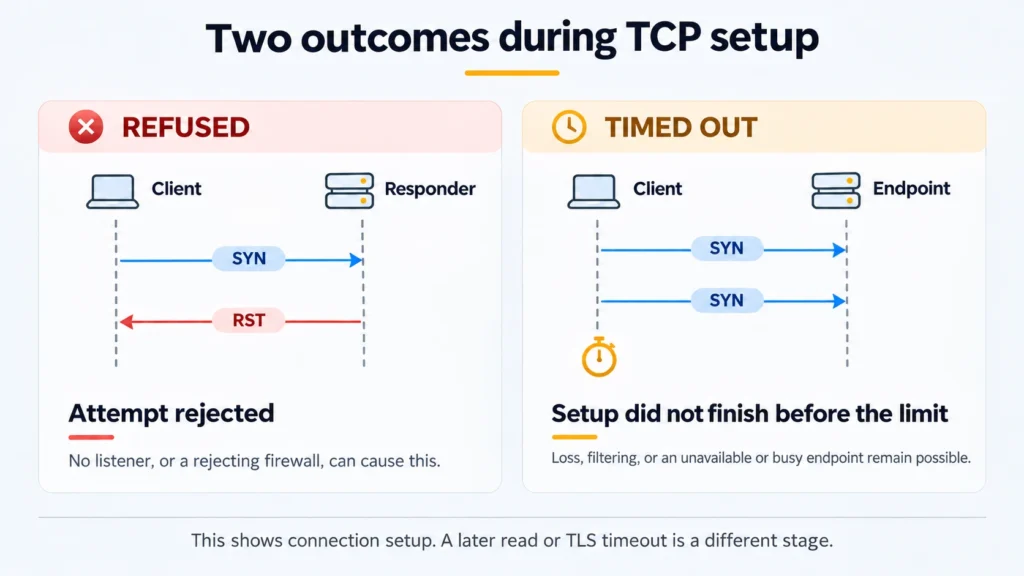
With TCP, connection refused reports a rejected attempt to open a connection. Connection timed out reports that setup remained incomplete when the waiting period ended. For a refusal, start with the destination saved in the client and the service listening there. For a connection timeout, investigate whether packets can travel to that destination and return.
Read the surrounding log before choosing a fix. The program may have connected successfully and timed out later, during TLS or while awaiting data. An error label alone cannot locate the fault, especially when a proxy sits between the client and the website.
Key Takeaways
- Compare the IP and port actually used with the current connection details. A working service on another port will not receive that attempt.
- A running process still needs a socket bound to the address clients use.
- Receiving an HTTP reply from a proxy establishes more than simply reaching its TCP port. Record that reply before investigating the website.
- Keep the source environment fixed during your first checks. A browser on your laptop and an application inside a container can take different routes.
Why Can a Running Server Refuse a Connection?
The server may have no listener for the address and port in the client’s log. Its operating system can be running normally while the required application is stopped, using another port, or accepting local connections only.
Consider the TCP exchange. The client begins with a SYN segment. A stack with no listener for the destination can send back RST. At this stage, the client reports a refusal rather than continuing to wait. There has been no HTTP request to the application on that connection, so investigating page content would be premature.
An explicit rejection can also come from a firewall along the path. An RST segment received by the client does not, by itself, establish which device rejected the attempt. Check rejection rules alongside the listener.
There is a simpler mistake to rule out first: reaching the wrong machine. DNS may have supplied an address you did not expect, or the saved configuration may be outdated. A prompt rejection from that address provides no evidence about the server you meant to reach. Compare the actual destination with the current service details before restarting anything.
Why Can the Same Attempt End in a Timeout?
The required connection exchange may never complete. Losing the outgoing attempt, losing the return traffic, and silently discarding packets can all leave the client waiting. An endpoint struggling to accept new connections can produce a similar wait.
You cannot tell these cases apart from the delay alone. A client-side packet capture lets you inspect outgoing SYNs, returned segments, and retransmissions. When it shows unanswered attempts, a matching observation at the receiving side helps locate whether the loss was on the outward or return path.
There is no fixed waiting period shared by every program. The operating system and application settings affect when the attempt ends. A brief limit may expire even where a longer attempt would complete; extra time will not correct a wrong address or a persistent filtering rule.
When reading a system error, keep its name and number together. ECONNREFUSED and ETIMEDOUT are common symbolic names. Windows Sockets uses 10061 for refusal and 10060 for timeout. The Windows timeout code also covers some failures of established connections, so it is not evidence that setup necessarily failed. Numeric values from another operating system may differ.
What Does the Last Reply from a Proxy Tell You?
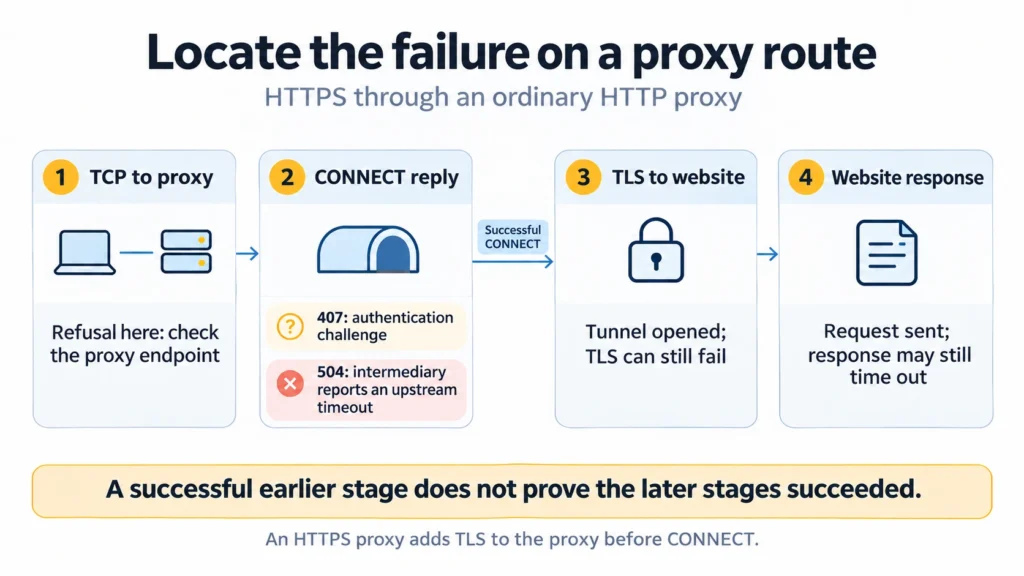
It tells you which part of the route to inspect next. For an HTTPS destination reached through an HTTP proxy, the first TCP connection ends at the proxy. The client then asks for a tunnel using CONNECT. After the proxy accepts that request, TLS with the website takes place through the tunnel.
An immediate refusal while reaching the proxy address belongs to that first connection. HTTP password authentication has not happened yet. Replacing the password does not explain why the port rejected the attempt.
A 407 Proxy Authentication Required response takes the investigation further: the proxy has received an HTTP request and issued an authentication challenge. Look at the method, credentials, and following exchange. The challenge can be followed by successful authentication.
A 504 Gateway Timeout returned for CONNECT is also a reply received by the client. It reports an upstream wait at the intermediary; the local connection to that intermediary already exists. Save the status instead of describing the entire route as a failure to reach the proxy.
Once CONNECT succeeds, a later error needs a later explanation. The TLS handshake or the website response may still fail. Using an HTTPS proxy adds a separate TLS handshake with the proxy before CONNECT.
Use the issued proxy endpoint for these checks. Its exit IP is the address seen by the website and can differ from the connection address, particularly with rotation. Selecting a port on that exit address does not test the gateway your client was given.
Practical Examples: Investigate the Address That Failed
Suppose your application receives a refusal on port 8443. In this conceptual example, the service was moved to 443, but the client retained its previous setting. The useful comparison is between the attempted port and the current listener. Increasing a waiting limit cannot bring the old listener back.
For a web request, collect a verbose curl result from the environment where the failure occurs. Use curl 8.x and replace the example destination below with your service, retaining its scheme and port. Run checks only against your own systems or destinations you are authorized to test. These commands send GET; they do not reproduce an upload or form submission.
Linux and macOS: Bash
Check the installed release and make the request:
bash
curl --version
curl -q --noproxy "*" --http1.1 -v --connect-timeout 5 --max-time 12 --output /dev/null "https://example.com/"
Windows: PowerShell
Invoke the executable directly:
powershell
curl.exe --version
curl.exe -q --noproxy "*" --http1.1 -v --connect-timeout 5 --max-time 12 --output NUL "https://example.com/"
Here, -q skips the default curl configuration file, and –noproxy with an asterisk prevents curl from selecting a proxy. A transparent intermediary on the network can remain. This is a direct-route check; on a network requiring a proxy, its failure may be expected.
Curl allows five seconds for its connection phase and twelve for the attempt overall. Its connection phase includes DNS lookup and protocol handshakes. A timeout within those five seconds can therefore occur after TCP has connected.
Keep the diagnostic text next to the exit value. Curl 7 covers an unsuccessful connection to a host or proxy; it does not identify every such failure as a refusal. Curl 28 records a time limit being reached. The preceding messages tell you whether the attempt was still connecting, negotiating TLS, or waiting after sending a request.
Remove credentials, tokens, and private addresses before forwarding the output. Also retain the timestamp and time zone so the operator can find the matching server or firewall records.
Linux: Find the Server Listener
On a Linux server you control, use ss to inspect listening TCP sockets:
bash
ss -ltnp
The options select listeners, TCP, numeric addresses, and process details. Permissions may restrict information about other users’ processes. Find the required port and its local address: a binding to 127.0.0.1 accepts local IPv4 connections, while 0.0.0.0 covers the machine’s local IPv4 addresses. An IPv6 entry requires a separate settings check before assuming it also handles IPv4.
Windows: Find the Server Listener
With the NetTCPIP module available, inspect the receiving Windows server:
powershell
Get-NetTCPConnection -State Listen | Select-Object LocalAddress, LocalPort, OwningProcess
Read LocalAddress and LocalPort together. OwningProcess gives the identifier of the process holding the socket. These commands inspect the machine on which they run; they cannot list a remote provider’s processes. A local listener still needs a working path for incoming traffic.
Return to the 8443 example. If the only matching service is listening on 443, correct the configuration according to your intended setup. If the required address and port do have a listener, check the filtering rules for the client’s source. Disabling the entire firewall changes too many conditions to make a useful comparison.
An absent application log entry is inconclusive. The application may never record a rejected TCP attempt; use network observations or filtering logs to investigate that stage. Conversely, a log that confirms completed TLS and a sent request puts the remaining wait after connection setup on that leg.
For a second conceptual case, imagine that the request was sent and the overall limit expired while awaiting its answer. Investigate request handling and response delivery. If the operation creates an order or starts a job, establish whether it completed before submitting it again. Losing the reply can leave a successful operation looking like a failure to the caller.
The code in this article is provided for illustration. It may behave differently or fail to run depending on your environment settings, software and library versions, or changes to the services and APIs it uses. Before using the examples, test them in your own environment and adapt them as needed.
Compare Your Static Proxy with a Separate Check
MangoProxy’s Proxy Checker can provide another observation for an existing static proxy. Its public page is limited to static proxies, and testing uses proxy traffic. Retain the application result as well: the checker’s outcome cannot explain a refusal on your local route or guarantee that your particular website will load.
If those results disagree, keep their conditions with them. Establish which connection needs attention before deciding whether a replacement proxy would help.
Glossary
TCP: a transport protocol providing a reliable byte stream that an application receives in order.
Listening socket: a socket placed in a state where it can accept incoming connection requests.
Port: a number in a transport header that, with address information, identifies a communication endpoint.
SYN: the TCP flag used when synchronizing sequence numbers to establish a connection.
RST: the TCP reset flag; its effect on the application depends on the state of the connection.
IP address: an address used for packet delivery by the Internet Protocol, including its IPv4 and IPv6 versions.
DNS: the Domain Name System, used for tasks such as resolving hostnames to IP addresses.
Firewall: a traffic filter applying rules that permit, discard, or reject packets.
HTTP: a protocol through which clients send requests and servers return responses.
HTTPS: HTTP carried over a TLS-protected connection.
TLS: a protocol providing confidentiality and integrity for data exchanged over a connection.
GET: the HTTP method for retrieving a representation of the resource identified by the request target.
CONNECT: an HTTP method asking an intermediary to open a tunnel to a specified host and port.
Exit IP: the source address the destination observes on the proxy’s outgoing connection.
Localhost: a name for the local host; with isolated container networking, it belongs to the container’s own network environment.
Final Thoughts
Keep enough evidence to make the next action specific. A saved port can be corrected, a listener’s binding inspected, and a completed request traced in a server log. Changing several settings after reading one error label loses that connection between the observation and the fix.
Frequently asked questions
Here we answered the most frequently asked questions.
Does a Successful Ping Rule Out a Port Problem?
No. Ping asks for diagnostic replies without testing the application’s TCP port. A host can answer those probes while the service is stopped or its port filtered. It can also serve web requests while refusing to answer ping.
What Should I Compare When Only One Computer Fails?
Compare the IP selected for the hostname, the port, IP version, proxy selection, and source network. Keep the destination unchanged during the comparison. Switching the address and route together makes it harder to tell why the result changed.
How Is Connection Reset by Peer Different?
It usually describes a reset after the connection has been established. A refusal concerns opening it. Preserve that distinction in the incident record: a missing listener does not automatically explain the interruption of a connection that had been working.
Why Does Localhost Fail When the Service Is Running Elsewhere?
With an isolated container network, localhost addresses that container’s environment. It does not automatically reach a service on the host or in a neighboring container. Also check the port and whether the process listens on IPv4, IPv6, or both.
Is a Longer Timeout Ever the Right Fix?
It can be appropriate when the address and route are correct and the task permits a longer operation. Extend the relevant stage’s allowance while keeping an overall limit. An explicit refusal still needs its underlying address, listener, or filtering problem resolved.