
Connection Reset by Peer When Using a Proxy
Published: ≈ 13 min read
Quick Answer
This error reports an aborted TCP connection. Read backward from the message to find out how far the request got. Did the gateway answer CONNECT? Had TLS finished? Was the response already arriving? Those details narrow the investigation far more than the error label.
Save a single failed attempt before enabling retries. A failure on every new connection calls for checking the issued proxy settings; one that follows a period of inactivity calls for examining the connection pool.
Key Takeaways
- Your program’s connection ends at the gateway. The gateway handles the next connection, so a client log gives you only part of the exchange.
- Read past CONNECT’s 200 reply to find the TLS result and the website’s own response.
- A transfer that breaks after response headers can leave a partial file. Check completion before using that file as a finished result.
- Extending a proxy session does not by itself preserve the socket your client is using.
Who Is the Peer When You Use a Proxy?
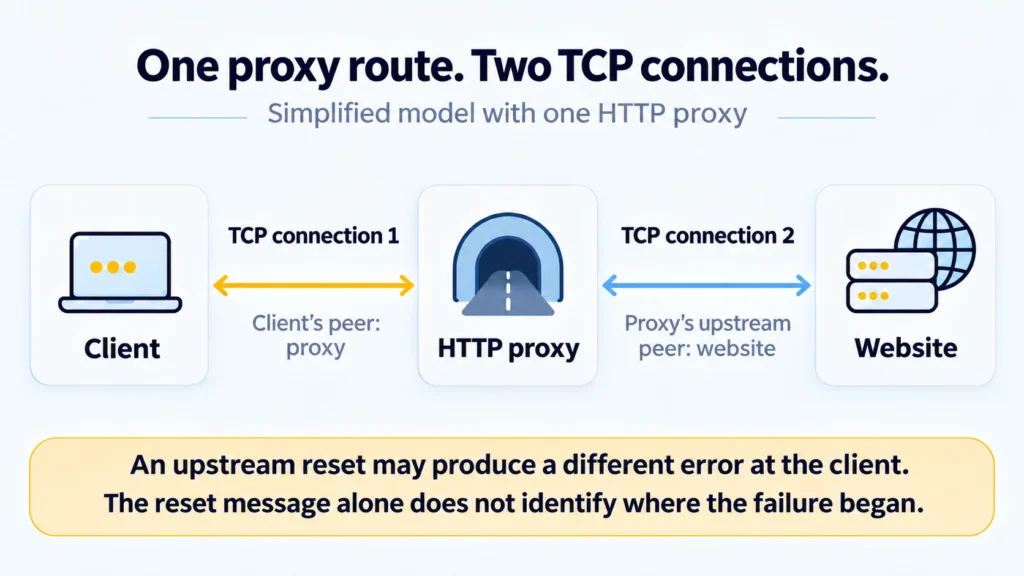
In the usual HTTP-proxy arrangement, your program’s peer is the gateway. Its connection to the requested site, or to a further intermediary, is separate. The client reports what happened on its own socket.
For an HTTPS visit, CONNECT names the host and port the gateway should reach. The request itself travels over the existing client-to-gateway connection. Once a tunnel is accepted, the website’s TLS negotiation takes place through it. A log can therefore show successful tunnel setup followed by a later failure.
An upstream interruption need not arrive at the client under its original name. The gateway can close its client socket or report the problem another way. Network equipment can generate resets too. To identify where the interruption began, you need evidence beyond the client’s error line.
A reset differs from an orderly close and from a refusal to open a connection. Connection refused describes a rejected connection attempt; with Connection reset by peer, the exchange has usually already begun. This article focuses on an existing connection being interrupted, rather than every reason a port might be unreachable.
Where Did the Request Stop?
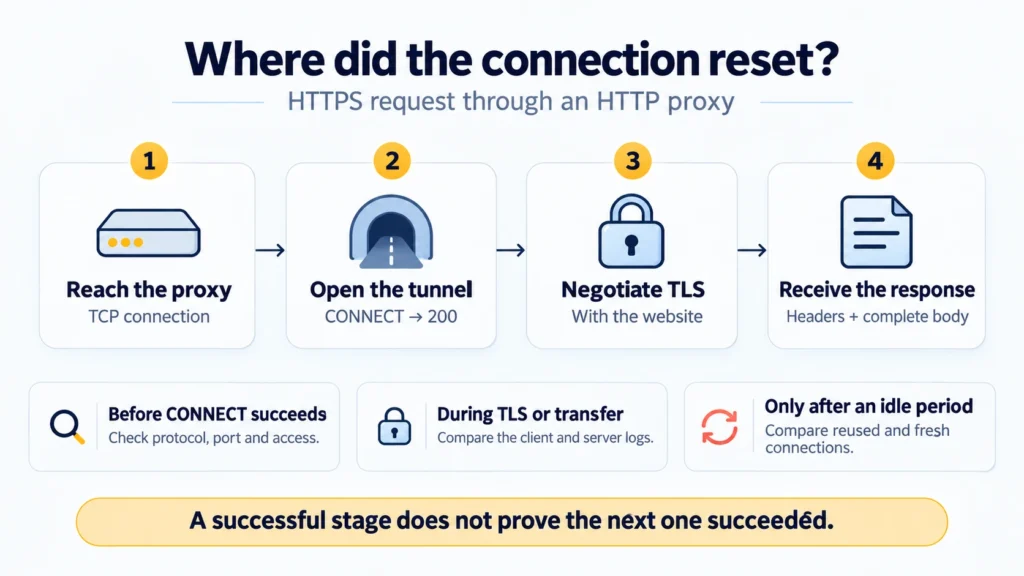
Find the last completed action in the log, then read the lines that follow. This gives you a useful next check even before you know the exact source of the reset.
|
Point of failure |
Evidence to collect |
|---|---|
|
Connected to the gateway; CONNECT never succeeded |
Compare the listening port and protocol with the issued settings, then check access requirements and any gateway reply. The tunnel is still unconfirmed |
|
A 407 reply |
Read the authentication exchange, including later login attempts. The gateway has answered an HTTP request; that reply alone is not a reset |
|
CONNECT succeeded; TLS then failed with a reset |
Check the destination name and TLS settings against proxy and server logs. Separate this failure from the completed tunnel setup |
|
Headers arrived; the body was cut short |
Establish how much content arrived and look up events at that time. Receiving the status line is only the beginning of the response |
|
A request fails after sitting idle |
Compare a reused connection with a fresh one and examine idle limits. This pattern makes the pool worth checking |
|
More failures during parallel work |
Reduce simultaneous activity while keeping the request unchanged, and compare the results with documented limits. The cause and any applicable limit still need confirmation |
An HTTPS proxy adds another TLS connection, from the client to the proxy itself, before CONNECT. Distinguish that exchange from the later TLS negotiation with the website. SOCKS5 starts differently: its own connection negotiation does not contain HTTP CONNECT lines or a 407 reply.
You may see ECONNRESET in Node.js, a ConnectionResetError exception in Python, or the system error WSAECONNRESET 10054 on Windows. An application may wrap the underlying problem in another error, so retain the nested cause and nearby log messages.
In cURL, a reset during TLS negotiation may accompany error 35, while a reset during a read may accompany error 56. Neither number is a universal code for Connection reset by peer; the libcurl error reference defines their scope. In particular, cURL can also exit with 56 for a failed CONNECT that received 407. Read the reason alongside the number.
What Should You Check If the Connection Resets Immediately?
Start with the record for this proxy endpoint. Match the saved protocol and listening port, then confirm whether access requires credentials or an allowed source address. How to Find Your Proxy Server Address and Port can help locate a configuration you have lost track of.
Read the two addresses in the command separately. The page address selects HTTPS for the website; the scheme supplied to –proxy selects how cURL contacts the gateway. Keep the gateway’s documented protocol, including HTTP when that is what it accepts. Support for CONNECT lets an HTTP gateway carry the website’s TLS exchange. HTTP and SOCKS5 also need a matching listener.
A wrong protocol can leave the listener unable to interpret the incoming bytes. The result may be an immediate abort, another error, or no reply. Resolve the discrepancy in the settings before trying unrelated changes.
Then try another destination through the unchanged endpoint. Keep both records if one succeeds and the original fails: access rules, the onward route, and the two servers’ behavior may differ. That result gives you a comparison, rather than evidence of an IP ban.
Why Do Resets Appear After a Pause or Under Load?
After a pause, an application may try to use a connection the other side has already closed. HTTP clients often keep open connections in a pool so later requests do not need a new connection. A saved connection’s state can change between the client selecting it and sending data.
Check whether the failed attempt reused a connection. For example, requests made through Node.js’s built-in HTTP module expose request.reusedSocket. It records socket reuse; it does not prove what caused the reset. Do not assume another client exposes the same property because its error has a similar name.
Compare the request in the running application with the same operation over a fresh connection. If the difference consistently appears after an idle period, examine your client’s pool settings: how long unused connections are retained, how they are removed, and how errors are handled. Align those settings with the other side’s known limits. There is no single idle duration that suits every proxy.
Keep HTTP connection persistence separate from TCP keepalive, which probes the state of an idle transport connection. cURL’s –no-keepalive option disables TCP keepalive. It does not prevent HTTP connection reuse, so it is not a general way to test without a pool.
If failures track parallel activity, temporarily reduce the number of simultaneous requests while keeping other conditions unchanged. Compare the failure rate and logs, then consult the documented limits for your proxy connection and destination. An improvement under lighter load gives you a direction to investigate, but does not yet distinguish a website limit from a proxy or intermediary limit.
Practical Examples: Capture the Failure and Read the Result
Begin with one diagnostic attempt. The following commands use Bash and cURL 8.x; no additional libraries are needed. They make an ordinary GET, so use an accessible page or another address that is safe to request again. They are not a substitute for reproducing an arbitrary operation such as creating an order.
Check the installed version:
bash
curl --version
Request Through an HTTP Proxy
Replace proxy.example.com:8080, USERNAME, and the page address with your values. The proxy hostname is fictional. If access is granted by source IP and no login is needed, remove the –proxy-user ‘USERNAME’ pair. When you provide only the username, cURL prompts separately for the password.
bash
curl -q --silent --show-error --verbose \
  --proxy 'http://proxy.example.com:8080' --noproxy '' \
  --proxy-user 'USERNAME' \
  --connect-timeout 5 --max-time 30 \
  --output 'proxy-body.bin' --stderr 'proxy-debug.log' \
  --write-out 'connect=%{http_connect} http=%{http_code} curl_exit=%{exitcode}\n' \
  'https://example.com/'
The initial -q skips cURL’s default configuration file. The explicit address selects the proxy, and the empty –noproxy value clears destination exclusions for this attempt. Diagnostics go to proxy-debug.log, while received content goes to proxy-body.bin. Running the command again overwrites those files; choose different names for the next comparison.
Redirects and transfer retries are left disabled in this command. Read its three output fields separately: connect records the gateway’s last CONNECT status; http records the destination response status; curl_exit reports how the transfer ended. Their definitions are in the cURL manual. A printed 000 means no code was obtained for that field. Also read the response when curl_exit is 0: cURL can finish receiving a 404 page without a transfer error.
With Basic authentication, an ordinary HTTP proxy does not encrypt the password on the connection to the proxy. If that connection needs protection, use an HTTPS proxy connection supported by both your client and the service. Before sharing the log, remove passwords, authorization headers, cookies, and secret parameters in the address.
Make a Direct Request for Comparison
If the network permits direct access, make the same GET without the proxy:
bash
curl -q --silent --show-error --verbose \
  --noproxy '*' \
  --connect-timeout 5 --max-time 30 \
  --output 'direct-body.bin' --stderr 'direct-debug.log' \
  --write-out 'http=%{http_code} curl_exit=%{exitcode}\n' \
  'https://example.com/'
The asterisk in –noproxy excludes every destination from proxy use for this command. Keep the same page address as in the previous request. A direct success alongside a proxy failure points to differences between the routes, including how the website responds to them, without establishing the cause. If direct access is prohibited or unavailable, compare two permitted proxy routes instead and record what differs.
Each separate cURL invocation starts with its own set of connections. A successful command therefore provides a comparison using a fresh connection, but does not automatically reproduce a long-running application’s pool history, headers, or authentication.
Interpret a Failure After the Response Starts
Consider a hypothetical case, rather than a MangoProxy test result. The proxy returns 200 to CONNECT, TLS negotiation completes, and the website sends 200 OK headers with Content-Length: 100000. The client receives only part of the content before reporting a reset.
Concluding that the request succeeded because the website returned 200 would be wrong: the declared transfer did not finish. The proxy-body.bin file may contain only a fragment. Do not automatically treat it as a complete export or pass it onward as a finished result.
Save another set of files for the next attempt and compare where the transfer breaks. If the failure repeats during data transfer, the operator needs the time, destination, and logs for that attempt. If it occurs only in the application after an idle period, return to the pool investigation. Keep those observations instead of reducing the result to a single “proxy working” flag.
When Is It Safe to Retry?
Retry when you understand the consequences of repeating the operation. For reading a page, a limited retry over a fresh connection may be appropriate. For an operation that changes data, first check whether it completed before the connection broke: a missing reply does not mean nothing happened on the server. HTTP’s retry rules take the operation’s idempotency into account.
If you can look up the first attempt, use that result before deciding to resubmit. Where an idempotency key is supported, use the documented resubmission procedure. Keep retries bounded: repeated submissions can multiply the work while leaving the original reset unexplained.
The code in this article is provided for illustration. It may behave differently or fail to run depending on your environment settings, software and library versions, or changes to the services and APIs it uses. Before using the examples, test them in your own environment and adapt them as needed.
Send Support the Evidence Around the Reset
For MangoProxy support, describe one operation you can reproduce. Put its timestamp and time zone first, followed by the gateway address, listening port, and protocol. Leave out the password. Name the destination and its port, identify your client version, and say where the log stops. Add the redacted log and any comparison using a fresh connection, another destination, or less parallel activity.
This gives support a specific interruption to investigate and compare with server events. Buying another proxy type does not automatically correct a protocol mismatch or the application’s pool settings.
Glossary
TCP: a transport protocol that provides applications with a reliable, ordered stream of bytes.
RST: the flag TCP uses to signal a reset, processed according to the receiver’s connection state.
HTTP: the request-and-response protocol used for the web exchanges discussed here.
HTTPS: HTTP communication carried over TLS.
TLS: the protocol that provides encryption, integrity protection, and authentication for a connection.
CONNECT: an HTTP method with which a client requests a tunnel to a specified host and port.
SOCKS5: a protocol for reaching destinations through an intermediary, with its own connection negotiation.
Connection pool: a set of connections a client retains and allocates to requests.
HTTP keep-alive: HTTP connection persistence, allowing later exchanges to use an existing connection.
TCP keepalive: transport-level probes of an idle connection’s state.
Idempotency: the property of an operation whose repeated execution has the same intended effect as a single execution.
Exit IP: the source IP address from which a connection through a proxy reaches the destination.
Final Thoughts
A useful diagnostic result is a statement such as “the tunnel was accepted, and the reset occurred during content transfer” or “the failure occurs when a connection is reused after an idle period.” It identifies the next check and gives you a way to evaluate a correction against the original operation.
Frequently asked questions
Here we answered the most frequently asked questions.
Does Connection Reset by Peer Mean My IP Was Blocked?
No. A destination’s access-control log recording a denied exit address would support that diagnosis. The reset message supplies no such evidence. A stopped process, network filtering, or a failed attempt to reuse a closed socket can produce the error without establishing an IP ban.
Will Increasing the Timeout Fix the Error?
A longer wait will not reopen that socket. If a particular idle or processing limit on the other side has been identified, adjust the relevant setting or the application’s behavior. First establish which limit is being reached.
Will Changing the IP or Extending the Proxy Session Help?
A different exit changes the address seen by the destination. Session duration concerns the provider’s rules for retaining that address assignment. Neither guarantees that an existing TCP connection will stay open. Use an address change as a controlled comparison when there is a reason to investigate it.
Why Did Disabling Certificate Verification Leave the Error Unchanged?
Disabling certificate verification changes a trust check; it does not resolve an arbitrary TCP reset. If the log identifies a certificate problem, correct the trust chain or server-name settings. If it shows a reset, investigate the stage and cause of the interruption. Keeping certificate verification disabled is not required for that investigation.
Why Does a Proxy Checker Succeed While My Application Fails?
A checker performs its own operation, from its own environment, against a particular destination. The application’s request duration, parallel activity, and connection history may differ. Compare those conditions: one successful check does not establish that every application operation works.