


DNS over HTTPS and Proxies: Can DNS Bypass Your Proxy?
Published: ≈ 10 min read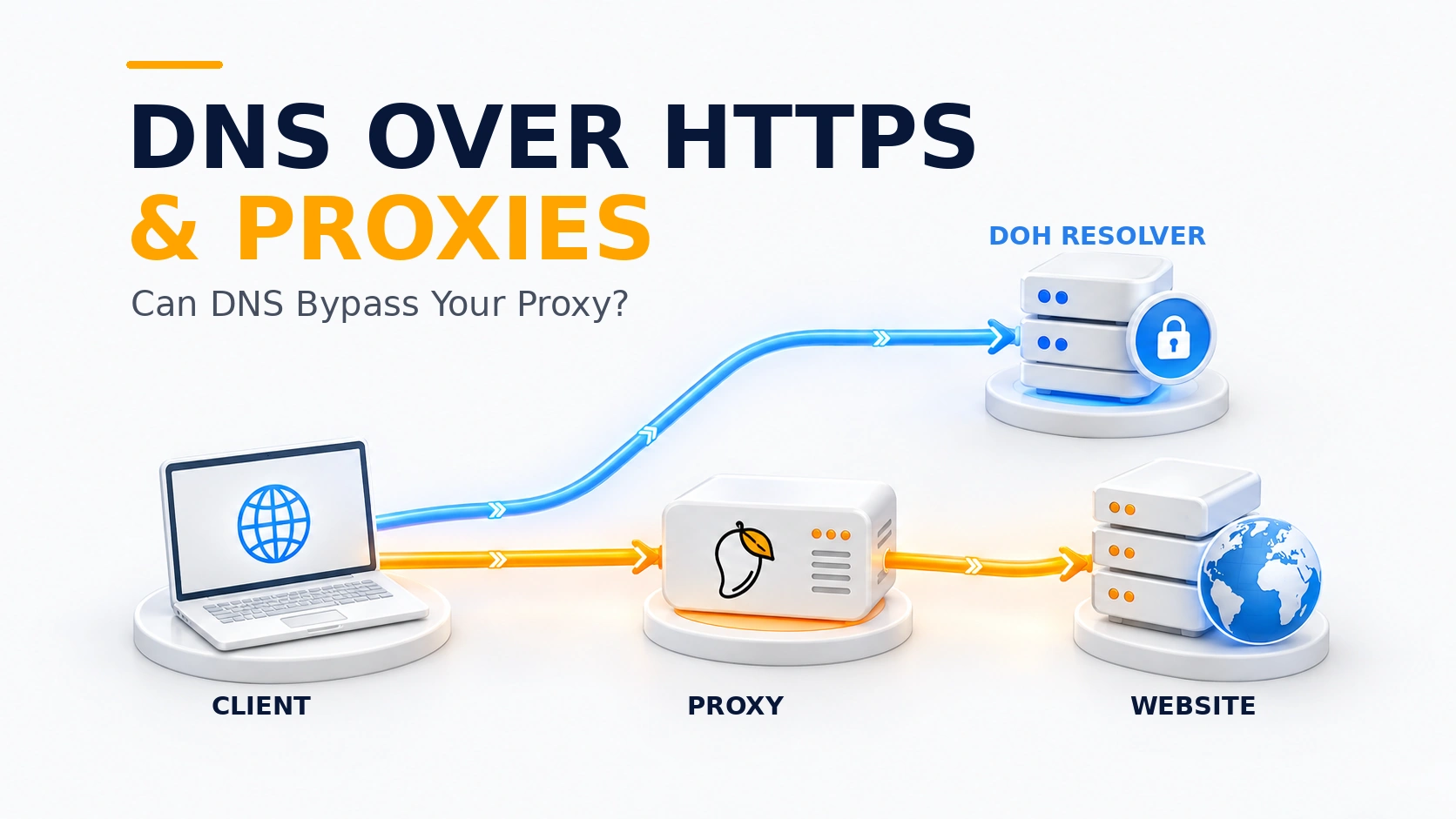
Quick Answer
Yes. A website can load through your proxy while the DNS lookup for that site goes directly from your device to a DNS over HTTPS (DoH) server. The DoH connection might also travel through the proxy. In some setups, the browser simply gives the hostname to the proxy and leaves the lookup to the proxy side, so no separate DoH query for that site is needed on the device.
DoH protects the DNS exchange with encryption. What it does not reveal is the network path used to contact the resolver. To figure that out, check the behavior of the browser profile you are using. Some profiles send the hostname to the proxy, while others resolve it first and only then make the connection. Then check how it reaches the DoH server. An IP-check page can confirm the web exit, but it cannot answer either DNS question.
Key Takeaways
- Web traffic and DoH traffic do not necessarily follow the same proxy route.
- If DoH goes out directly, someone monitoring the local network can see a connection to the resolver, though not the domain name protected inside HTTPS. The resolver, however, receives the query and can see the IP address that opened the connection.
- DNS may also be needed just to locate services such as proxy.example or dns.example. Those preliminary lookups should not be confused with resolving the site you are visiting.
- Firefox’s Default protection may switch to the default DNS resolvers when DoH fails. Other clients set their own fallback rules.
- A browser DNS test identifies resolvers seen during its own test. The test does not reveal how the browser established its HTTPS connection to the DoH resolver.
Which connections should you distinguish?
Using a proxy for example.com does not always mean your device performs a DNS lookup for example.com. With remote resolution, the hostname is simply passed to the proxy. If the browser resolves it through DoH first, that creates another connection — this time to the resolver — and that connection may take a different path.
Two other hostnames can complicate the investigation. A connection to proxy.example cannot start until the client has an IP address for that name. The same applies to a DoH service called dns.example: the address has to be available before the HTTPS connection is opened. Some clients handle this first step through ordinary DNS. Libcurl, for example, documents that behavior for the hostname of its DoH server. Lookups for these service hostnames do not establish that example.com was resolved outside the proxy.
When does DNS actually bypass the proxy?
Now take a setup where both browsing traffic and access to the DNS service are supposed to use the proxy. The website may still leave through the proxy even when the DoH connection does not. So the useful question is what happened to example.com before the website connection was made. The three paths below cover the main possibilities.
Path 1: The client does not resolve example.com first. It gives the hostname to the proxy, which performs the lookup before connecting to the site. It may still look up the proxy gateway or other names.
Path 2: The client obtains an address for example.com from its DoH server and passes the IP to the proxy. When the DoH HTTPS connection is direct, only the later website connection uses the proxy. That is a bypass of the intended route. The DoH server receives the query and sees the source of the direct connection, even though the website sees the proxy’s IP.
Path 3: The application reaches its DoH server through the same proxy and then connects to the website through that proxy. The DNS exchange remains encrypted up to the DoH server. The resolver still learns the queried name: the proxy and the DNS service have different jobs.
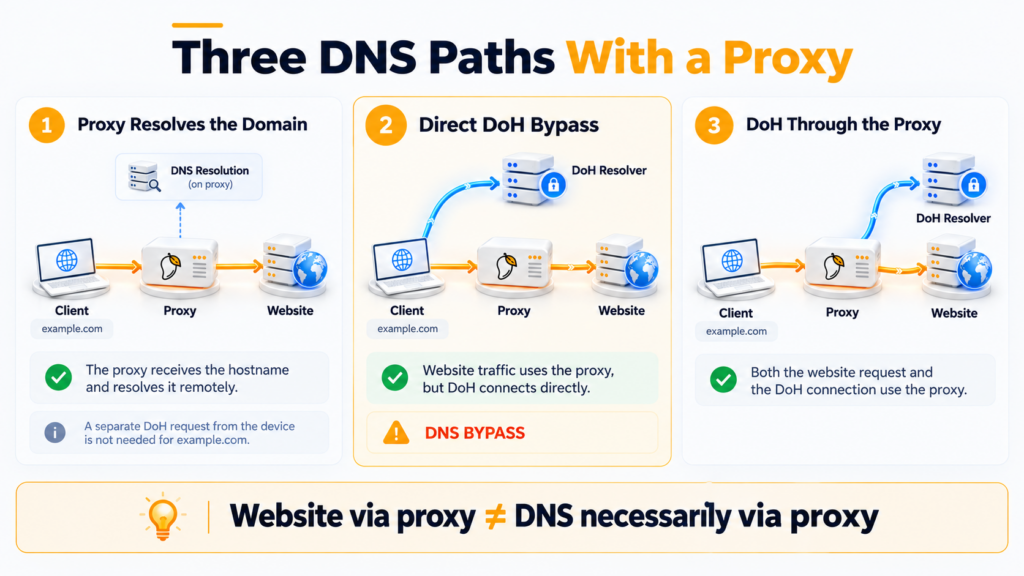
A switch marked “DoH enabled” cannot tell you which path a particular request took. It selects a resolution method, not a record of every request’s route.
Why doesn’t an enabled DoH setting cover every lookup?
Firefox makes this distinction visible in its DNS over HTTPS settings. Under Default protection, a problem with DoH can lead to a lookup through the default resolvers. Max protection instead shows a warning when the secure resolver is unavailable, with an option to make an exception for a domain. Automatic DoH can also be inactive because of network conditions. Record both the protection level and the status shown there — Active, Not active, or Off — before interpreting a DNS test result. A cached address or a domain exception can also explain why one name produced no DoH query.
Software clients can behave differently. In libcurl, setting CURLOPT_DOH_URL on a transfer does not carry that transfer’s proxy options over to its DoH lookup. Libcurl also documents exceptions that still use its default resolver. If an IP-check endpoint reports your proxy address, inspect the DoH connection separately; that web response says nothing about its route. These details describe libcurl, not a browser’s DNS policy.
What does a browser DNS test actually establish?
Use the browser profile you normally browse with and run the DNS test there. Keep the result together with the browser’s current DoH state: note the public IP and which resolvers appear. Then open that profile’s proxy settings and take a look at the bypass or exception list too. If you use Firefox, review the Firefox proxy settings and exclusions. This matters because not every request is guaranteed to follow the main proxy rule. An extension, a system proxy setting, or a PAC file may send one request differently while everything else appears normal.
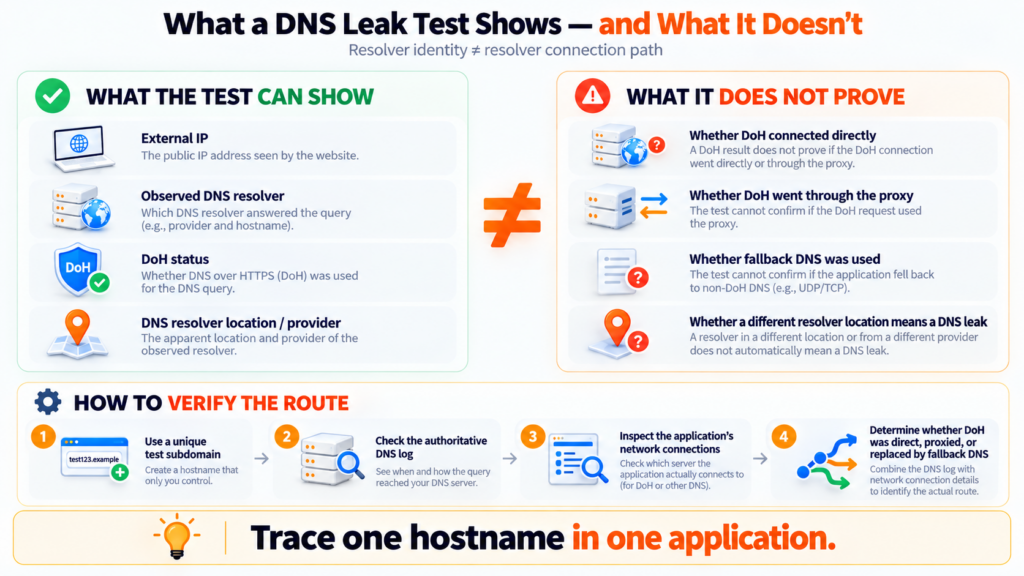
A resolver in the result answers a fairly narrow question: which DNS service handled the test request. It says much less about the journey to that service. The browser’s HTTPS session with the resolver could have used the proxy or skipped it entirely. Nothing in the resolver name settles that. Its reported country doesn’t settle it either; the DNS service and the web exit are two different endpoints.
Caching can easily muddy a controlled check, so avoid reusing the same hostname. Generate a fresh random subdomain under a domain you own for each attempt. Write down when you made the request and which profile was open. Around that same time, compare the authoritative DNS log with whatever connections you can observe from the client. The log should reveal the recursive resolver that came for the record. It won’t tell you how the browser reached that resolver, though; that part of the route has to be observed closer to the client.
What can you change once you know where DNS is happening?
If you want the lookup to happen at the proxy, the application needs to hand the proxy a hostname rather than an IP it resolved earlier. Check the proxy-related options in the client for anything that controls hostname handling or remote DNS. Different applications use different labels, and some offer no such switch. After changing the setting, repeat the same test in the same client. Pointing the operating system at another DNS server changes who answers the client’s query, but the lookup is still happening before the request reaches the proxy.
The DoH connection needs its own check if you expect that traffic to use the proxy too. Make sure the application’s proxy rules include the HTTPS connection to the DoH service instead of covering only ordinary page requests. A setting limited to page loads will not cover that connection. Retest after the change, including what the client does when its DoH provider is unavailable. System DNS fallback can break the route you intended.
Direct DoH can be perfectly acceptable when the goal is simply to keep DNS queries encrypted on the local network. In that situation, the DoH connection does not necessarily need to follow the proxy route. The DNS resolver and proxy exit can therefore be different. The thing to verify is whether the application is reaching the resolver you actually chose.
Practical Examples
Case 1
One possible scenario is that the IP-check page shows the proxy address you expected, while the DNS test lists the public resolver configured in the browser. This is only an example and not a result from a live test performed by us. That pairing fits both proxied and direct DoH.
That result is not enough to conclude that the proxy is wrong. Check the browser’s current DoH mode, look through its proxy exclusions, and inspect how the connection to the resolver is being made.
Case 2
A libcurl job sets a proxy for its web transfer and supplies a DoH URL separately. The web response arrives through the expected proxy exit. That does not verify the DNS route: the DoH lookup does not inherit the parent transfer’s proxy options. The developer needs to inspect the DoH connection and the initial lookup of the DoH server’s hostname separately. This script test says nothing about a browser profile.
Check the browser profile you use
After configuring the proxy and DoH, run the MangoProxy DNS Leak Test in that same profile. Save the public IP, the resolver list, and the current DoH mode. Its WebRTC and IPv6 results address separate questions. If the resolver list surprises you, return to that profile’s DoH provider, fallback setting, and proxy exclusions. A script or another browser profile needs its own check.
Glossary
DoH — DNS queries and responses exchanged between a client and a resolver over HTTPS.
Resolver — a service that retrieves DNS information for a requested hostname.
Remote resolution — passing a hostname to a proxy so it can be resolved on the proxy side.
DNS fallback — another way to resolve a name that a client may use under its own rules.
Final Thoughts
The IP-check result tells you where the web request exited. DNS may have taken another route. Trace the hostname from the beginning: was the name passed to the proxy untouched, resolved through DoH before the proxy was used, or sent to the system resolver after a fallback? Then inspect the DoH connection on its own.
Once you have both pieces, you can troubleshoot a specific routing choice instead of trying to reconstruct the path from the resolver name.
Frequently asked questions
Here we answered the most frequently asked questions.
Can the DoH server itself require a normal DNS lookup?
Yes. A client cannot open HTTPS to dns.example until it knows an address for dns.example. Libcurl, for example, uses its default lookup mechanism for the DoH server’s name. This is a separate lookup, not evidence that the visited site’s name leaked.
Does blocking port 53 force DoH through the proxy?
No. A firewall rule for ordinary DNS cannot make an HTTPS connection to a DoH server follow your proxy settings. It can also disrupt fallback resolution or the lookup of the proxy gateway.
Why did Firefox's DoH status change to Not active after I enabled a proxy?
Firefox can turn off automatically enabled DoH under certain network conditions. Its implementation documentation lists detection of a proxy among the reasons. In Firefox, go to Settings → Privacy & Security and look at the DoH status together with the protection level currently selected.