
How to Configure a Proxy in Docker and Containers
Published: ≈ 17 min read
Quick Answer
For requests made by an application inside a container, pass the proxy address through environment variables or the application’s own settings. Use build arguments for network commands during an image build. If Docker cannot download the image itself, configure Docker Engine or the proxy settings in Docker Desktop.
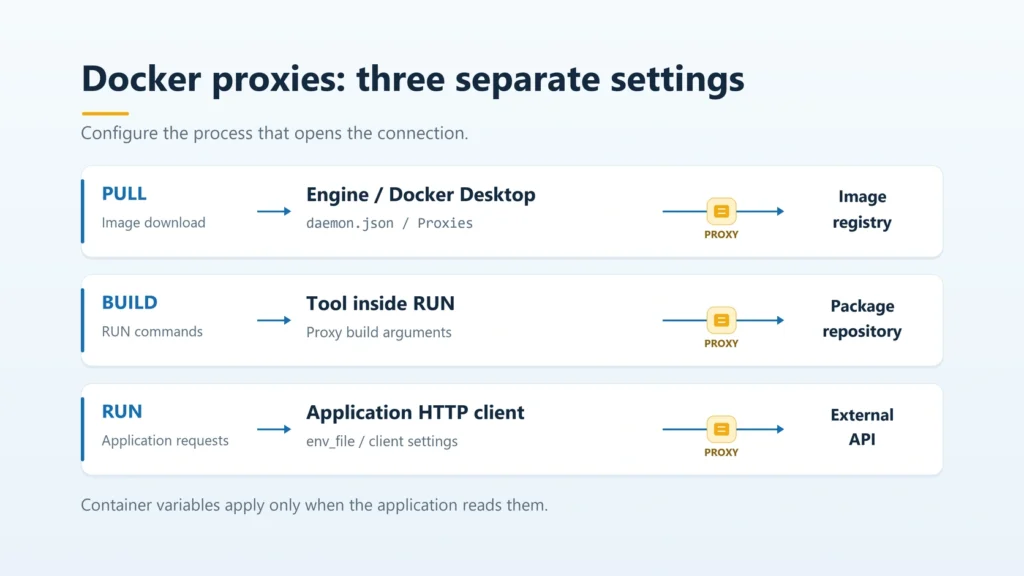
Start with the operation you need to route: pulling an image, installing dependencies, or calling an external service from a running application. Each reads its settings from a different place. A single file containing a proxy address does not configure all three.
Key Takeaways
- Docker Engine’s proxy settings apply to its own connections. They do not configure the HTTP client inside your application.
- The proxies sections in the client’s config.json and the daemon’s daemon.json use different property names.
- A password set with ENV in a Dockerfile can remain in the image. Pass build and runtime settings separately.
- A successful image pull does not show how the application sends requests. Check that from inside the container.
Where Should You Set the Proxy?
Configure the component that opens the connection. A Docker command can hand the work to another process: the engine, for example, downloads images.
|
Traffic to send through the proxy |
Where to configure it |
How to check |
|---|---|---|
|
Image downloads from a registry |
Docker Engine on Linux or Docker Desktop settings |
A separate docker pull command |
|
Package downloads in a build's RUN instruction |
Predefined proxy build arguments |
A build that actually downloads dependencies |
|
HTTP requests from a running container |
The container's environment or HTTP client settings |
A request from the application itself |
|
HTTP requests from a Docker Compose service |
That service's environment or env_file |
A new run of the service |
These examples use Linux containers and Bash commands. For the Docker Engine example, use version 23.0 or later on Linux with systemd and access to the system service configuration. Docker Desktop has its own instructions below. Docker and Compose should already be installed.
The sample address proxy.example.com:3128 is fictional. Replace it with your server’s connection details. These may come from your network administrator or an existing proxy subscription. You do not need to buy another proxy to change Docker’s configuration.
How Do You Prepare the Proxy Address and Credentials?
Confirm the connection protocol, server address, port, and authentication method first. HTTPS_PROXY selects a proxy for HTTPS destinations; its value does not have to begin with https://. An HTTP proxy that supports CONNECT can use an http:// address in both variables.
Use https:// when the proxy accepts a TLS-protected connection from the client. The destination website using HTTPS is not a reason to change the proxy’s scheme. SOCKS5 also needs support in the client you use. The configuration below is for an HTTP proxy.
With Basic authentication over a plain HTTP connection to the proxy, TLS does not protect the proxy password on that connection. To protect this part of the route, use an HTTPS proxy connection supported by both the server and client.
Create a file named proxy.env in your working directory for the one-off container and Compose example:
dotenv
http_proxy=http://proxy.example.com:3128
https_proxy=http://proxy.example.com:3128
HTTP_PROXY=http://proxy.example.com:3128
HTTPS_PROXY=http://proxy.example.com:3128
no_proxy=localhost,127.0.0.1,::1
NO_PROXY=localhost,127.0.0.1,::1
The uppercase and lowercase names have matching values. This accommodates clients with different environment-variable rules. Curl, for example, accepts http_proxy only in lowercase. Providing the variables does not force every program to use them.
If your server accepts a username and password in the URL, the general form is:
text
http://USER:[email protected]:3128
Replace both placeholders. Encode special characters within the username and password separately before assembling the URL. An @ in a password, for instance, becomes %40. Do not encode the entire URL, including its separators. Support for this format and authentication method depends on the client and proxy.
The proxy.env file is plain text. Keep real credentials out of your repository and build context. On Linux and macOS, restrict access to the file:
bash
chmod 600 proxy.env
Users who can inspect the container can read values passed into its environment. An env_file does not turn those values into Docker secrets. For a long-running service, choose a credential-storage method supported by the application.
How Do You Configure a Proxy for Image Pulls?
If docker pull or the base-image download fails, start with the engine. The future container’s environment is not involved in that operation yet.
Docker Engine on Linux
For Docker Engine 23.0+ running as a system service, add a proxies section to /etc/docker/daemon.json. Back up an existing file and merge the settings while retaining its other keys. This complete-file example is suitable only when there are no other settings to preserve:
json
{
  "proxies": {
    "http-proxy": "http://proxy.example.com:3128",
    "https-proxy": "http://proxy.example.com:3128",
    "no-proxy": "localhost,127.0.0.1,::1,registry.internal.example.com"
  }
}
The last hostname represents an internal registry that should be contacted directly. Replace it with your registry’s name or remove it if you do not need that exception. Keep Docker Hub out of the bypass list if it must be reached through the proxy.
Validate the configuration without starting a second daemon:
bash
sudo dockerd --validate --config-file=/etc/docker/daemon.json
This checks the file without connecting to the proxy. If validation succeeds, apply the settings when the service can be interrupted. Restarting Docker can affect running containers.
bash
sudo systemctl restart docker
docker pull curlimages/curl:latest
The daemon’s configuration takes precedence over its environment variables. Avoid specifying the same options in both the file and dockerd’s startup flags: a conflict can prevent startup. The alternative service-environment method is covered in Docker’s daemon proxy instructions.
The diagnostic commands use the latest image tag. Pin a checked tag or image digest in a working project. If your Docker client connects to a remote engine, configure and check proxy access on the machine running that engine.
Docker Desktop
In Docker Desktop, open Settings → VM resources → Proxies. The current documentation separates Docker Desktop proxy from Containers proxy. Older releases may arrange these controls differently.
For image downloads, check Containers proxy. Select Same as host proxy to use the configuration from Docker Desktop proxy. Alternatively, choose Manual configuration and enter your addresses under Web Server (HTTP) and Secure Web Server (HTTPS). Use System proxy when the connection should follow your system’s corporate proxy settings.
Docker Desktop proxy handles Desktop’s own requests and provides a fallback for image pulls when Containers proxy is not configured separately. Apply the changes and repeat the image-pull command from the previous subsection. Docker Desktop ignores the proxies settings in daemon.json.
Containers proxy also governs outbound traffic from running containers when the enterprise network-enforcement mode is enabled. That policy differs from passing variables to an individual application. See Docker Desktop’s proxy settings for the scope of each mode and its authentication options.
How Do You Pass a Proxy to an Image Build?
Use the predefined proxy build arguments for RUN commands. They let build steps download dependencies without setting the proxy through ENV in the finished image.
Create a separate, empty directory for this example and save the following as Dockerfile:
dockerfile
FROM debian:bookworm-slim

RUN apt-get update \
    && apt-get install -y --no-install-recommends ca-certificates curl \
    && rm -rf /var/lib/apt/lists/*

ENTRYPOINT ["curl"]
CMD ["-q", "--silent", "--show-error", "--fail", "--connect-timeout", "5", "--max-time", "20", "https://api.ipify.org?format=json"]
This installs curl and trusted CA certificates from Debian’s repositories. Open Bash in that directory and pass the connection settings to the build:
bash
export http_proxy='http://proxy.example.com:3128'
export https_proxy="$http_proxy"
export no_proxy='localhost,127.0.0.1,::1'

docker build \
  --build-arg http_proxy \
  --build-arg https_proxy \
  --build-arg no_proxy \
  -t docker-proxy-demo .
With this form, Docker takes each argument’s value from the current environment. If your launch system already supplies the credentials there, use those values rather than entering them again. Keep real passwords out of shell history.
You do not need to declare these variables with ARG in the Dockerfile. Docker gives predefined proxy arguments special treatment: by default, they are excluded from image history and the build cache. Referencing them explicitly in the Dockerfile changes that protection. A tool run during the build can also expose values if it prints its environment or a detailed log.
Do not put a password in ENV and rely on clearing it later to remove the traces. Supply runtime proxy settings separately, even after a successful build.
For an ordinary local build, Docker’s infrastructure handles the FROM download. Arguments passed to RUN do not fix that infrastructure’s registry access. A separate or remote BuildKit service also needs its own network configuration. A file on your laptop does not change the environment of a remote process.
When a build step comes from cache, its success does not demonstrate a fresh download through the proxy. For another diagnostic attempt, you can add –no-cache to the build command. This reruns the instructions and consumes time and network traffic.
How Do You Run a Container Through a Proxy and Check the Result?
Pass proxy.env when creating the container, then make a request from inside it. The following command uses the curl image downloaded earlier. The –pull=never flag keeps this application check separate from any new image download:
bash
docker run --rm --pull=never \
  --env-file ./proxy.env \
  curlimages/curl:latest \
  -q --silent --show-error --fail \
  --connect-timeout 5 --max-time 20 \
  --write-out '\nproxy_used=%{proxy_used}\n' \
  'https://api.ipify.org?format=json'
Run it from the directory containing proxy.env. The proxy_used field requires curl 8.7.0 or later. If the image is not available locally, return to the image-pull step first. The -q option is curl’s first argument and disables its user configuration file.
On a successful request, the external ipify service returns JSON containing the public IPv4 address from which it received the request. Ipify is a separate service from MangoProxy. The line proxy_used=1 means curl used a proxy for that transfer. If the command fails, examine its error and exit code first. A value of 1 alone does not establish that a response was received successfully.
The returned address and the container’s internal address serve different purposes. The proxy gateway address may also differ from the exit IP, particularly with rotation. A result matching the host’s public IP does not, by itself, rule out a local proxy sharing that internet connection.
To run the image you built above with the same environment file, use:
bash
docker run --rm --pull=never --env-file ./proxy.env docker-proxy-demo
Curl is already its entrypoint, so it returns ipify’s response without the extra diagnostic line. For your actual project, repeat the relevant operation in its HTTP client. A curl request inside the container does not verify the settings of a Python, Node.js, or browser process running alongside it.
How Can You Save Defaults for New Containers?
If many launches through the Docker CLI need the same route, add proxy settings to ~/.docker/config.json:
json
{
  "proxies": {
    "default": {
      "httpProxy": "http://proxy.example.com:3128",
      "httpsProxy": "http://proxy.example.com:3128",
      "noProxy": "localhost,127.0.0.1,::1"
    }
  }
}
Preserve any existing settings, including auths and credsStore. Watch the property names: the client uses httpProxy, while the daemon uses http-proxy. The two sections are not interchangeable.
The client file supplies environment variables to new containers and arguments to new builds. It does not configure the engine’s own connections or change existing containers. There is no need to restart Docker for this file. See the Docker client proxy configuration for its rules and limitations.
How Do You Configure a Proxy in Docker Compose?
Add env_file to the services that need the route. A .env file normally supplies values for Compose interpolation. Simply placing it beside compose.yaml does not automatically pass every value into the container.
Save this compose.yaml beside proxy.env to repeat the check. This example requires Docker Compose 2.30.0 or later:
yaml
services:
  probe:
    image: curlimages/curl:latest
    pull_policy: never
    env_file:
      - path: ./proxy.env
        format: raw
    command:
      - -q
      - --silent
      - --show-error
      - --fail
      - --connect-timeout
      - '5'
      - --max-time
      - '20'
      - --write-out
      - '\nproxy_used=%{proxy_used}\n'
      - 'https://api.ipify.org?format=json'
The raw format passes file values without Compose interpolation, including dollar signs. The proxy.env shown above has no quotes around its values. Ordinary env_file parsing follows different rules; these are described in the Compose env_file reference.
Check the syntax without printing the resolved configuration, then create a one-off container:
bash
docker compose version
docker compose config --quiet
docker compose run --rm probe
The image must already be downloaded. This service uses an existing image, so there are no build settings. For a service with a build section, pass the proxy for RUN through build.args and the running service’s environment through environment or env_file.
If a variable appears in both environment and env_file, account for environment taking precedence. After changing the file for an existing long-running service, recreate its container. An ordinary restart does not load a new environment. Before recreating it, retain the application’s data in its designated volumes or external storage.
How Do You Reach a Proxy on the Host or in Another Container?
Use an address reachable from the container’s network. In a typical isolated container network, localhost points to the container itself. If the proxy runs on the Docker host, localhost:3128 may therefore contact the wrong process.
Docker Desktop provides host.docker.internal for reaching the host. On a regular Linux Engine installation, you can add that mapping at launch. Use the following example only when an HTTP proxy is already running on the host’s port 3128 and is reachable from the container:
bash
docker run --rm --pull=never \
  --add-host=host.docker.internal:host-gateway \
  curlimages/curl:latest \
  -q --silent --show-error --fail \
  --connect-timeout 5 --max-time 20 \
  --proxy 'http://host.docker.internal:3128' \
  --noproxy '' \
  'https://api.ipify.org?format=json'
The empty –noproxy value clears curl’s bypass list for this request. The host-gateway mapping supplies a host address; it does not change the interface the proxy listens on or open a firewall port. Check those conditions separately. See Docker’s host-access reference for the mapping mechanism.
If the proxy runs in another Compose service, attach both services to a shared user-defined network and use the service name and internal port, such as proxy:3128. You do not need to publish that port on the host just for this connection. The application container can use that name. The engine downloading images does not automatically gain the same service-name access.
Add the actual names of internal HTTP services to no_proxy and NO_PROXY. A localhost entry does not bypass a neighboring service named internal-api. Domain and network-range matching vary by client, so start a short exception list with the exact names the application uses.
Practical Example: Why Does the Failure Move After Each Fix?
Consider an illustrative sequence: the launch command cannot download an image; after the engine is configured, the build stops while installing packages; once the application starts, it calls the API directly. These are three successive problems with different configuration owners, rather than one recurring failure.
First, the image-download operation needs registry access. Editing the application’s env_file cannot resolve this stage because the container has not been created yet. Record success for the download operation, without treating it as a result for a future HTTP request.
Next, the build needs to execute its network-dependent RUN command. If the base image is available but the package manager cannot download dependencies, inspect the supplied proxy arguments and the package manager’s own rules. A cached build step does not provide that observation.
Finally, launch the application with the intended environment and check its outbound operation. If curl uses the proxy but the application does not, examine the library’s environment-variable support and explicit client settings. External destinations and internal services may need different routes.
For troubleshooting, retain the stage name, the time of the failure, and an error message with credentials removed. There is no need to share a full environment dump or docker inspect output containing passwords.
What Should You Check for Authentication and Certificate Errors?
Separate access to the proxy from the destination service’s response. If the final response is a 407 authentication failure, examine the proxy login. The docker login command authenticates to an image registry. Check the authentication method, issued username, password encoding, and allowed source address.
For an IP allowlist, you usually need the public address from which the Docker host’s connection reaches the proxy. A container’s internal address, such as 172.17.x.x, is not automatically visible to an external proxy. With a remote engine or corporate gateway, the source address may differ from your laptop’s.
If no connection is established, start with the proxy address and port’s reachability from the relevant environment. A website’s 403 response after tunnel setup belongs to the later exchange and is not equivalent to a proxy-password error.
HTTPS requests in a corporate network may fail because of an untrusted certificate. If the network deliberately inspects encrypted traffic, an approved root certificate may be needed on both the Docker host and in the image or application. Trusting it in the host’s browser alone does not configure the container’s trust store. Follow Docker’s CA certificate instructions. Disabling TLS verification hides a trust problem without fixing the route.
The code in this article is provided for illustration. It may behave differently or fail to run depending on your environment settings, software and library versions, or changes to the services and APIs it uses. Before using the examples, test them in your own environment and adapt them as needed.
Look Up the Address Seen by the External Service
For more information about the returned IP, copy the address from the container’s response into MangoProxy IP Lookup. The lookup examines the address you enter independently of your browser’s connection. Database information about that address supplements the check; it does not reveal the route of every application request.
Keep the working settings for the relevant service, then repeat its normal operation. If you use a MangoProxy connection, carry over its actual address, port, and credentials rather than the placeholder values from these examples.
Glossary
Container: an isolated process environment with its own filesystem and network settings.
Image: prepared filesystem layers and settings used to create a container.
Docker Engine / Docker daemon: the service that manages containers and image operations.
Image registry: a server that stores and distributes container images.
Dockerfile: a file containing instructions for building an image.
Build argument: a value supplied to a build separately from the image’s persistent environment.
BuildKit: an image-build engine that can run as a separate service.
Docker Compose: a tool for describing and running related services from a configuration file.
Environment variable: a named string value available to a process.
HTTP / HTTPS: the protocol for web requests and its secure form.
CONNECT: an HTTP method for establishing a tunnel through a proxy to a specified server.
TLS: a protocol used to secure HTTPS connections.
CA: a certificate authority; trust in its certificate is used when verifying connection certificates.
SOCKS5: a protocol for connecting to destinations through a proxy, requiring client support.
URL: an address containing a scheme, server name, and other components that identify a resource or connection.
IP / IPv4: IP refers here to a network address; IPv4 is version four of the Internet Protocol.
API: a service’s software interface for making defined requests.
JSON / YAML: text formats for data and configuration used in these examples.
Build cache: saved build-step results that allow those steps to be reused.
Image digest: a content identifier that lets you pin a specific image version.
Final Thoughts
Confirm success for the operation you need: downloading an image, installing dependencies, or receiving an application response through the selected proxy. Keep those checks separate when moving the project to another machine. That makes it easier to identify the configuration behind a new failure and verify a change without reconfiguring the other components.
Frequently asked questions
Here we answered the most frequently asked questions.
Can HTTP_PROXY Guarantee That a Container Never Connects Directly?
No. A program may ignore the variable or take a direct route for an exception. Preventing bypass requires network restrictions and a verified outbound architecture. Application environment variables do not enforce that restriction themselves.
Do You Need to Publish a Container Port for an Outbound Proxy Connection?
Usually not. Port publishing lets the container receive connections from the host or outside its network. An outbound connection to an already reachable proxy does not require opening an inbound application port.
Will a Rotating Proxy Give Each Container a Permanent, Separate IP?
Not necessarily. Creating a separate container does not control the provider’s rotation rules. If a task needs a stable address, check the session mode or use a suitable fixed-IP connection. A shared gateway address does not mean every request has the same exit IP.
Can You Apply These Commands to Rootless Docker Unchanged?
Not for configuring the engine itself. Rootless Docker runs as a user service with different configuration paths and service-management commands. The application environment settings have the same purpose, but the system-service restart shown here does not manage that user service.
How Do You Remove the Proxy Settings?
Remove only the settings you added, from the source where you added them. Apply the updated service configuration for the engine, or create a new application container without those values. Check the client’s config.json, Compose’s environment section, and the image’s own environment too: another source may supply the values again after you remove them from one location.