


How to Read Proxy Checker Results: Proxy Type, Anonymity, Latency, Country, and ASN
Published: ≈ 9 min read
Quick Answer
Start with the status: did the request get through? Then find the exit IP – the address seen by the receiving server – and compare it with the address or range you expected. Use “Type” to choose the protocol in your app. Anonymity, response time, and country help you decide what to investigate next; ASN adds information about the network. Once you have read the report, try the website you need from your usual app.
Key Takeaways
- A “working” status means the test request succeeded at the time of the check. It does not confirm access to the service you plan to use.
- Use the “Type” value when choosing HTTP, HTTPS, SOCKS4, or SOCKS5 in your software. Residential and datacenter describe a different characteristic: where the address comes from.
- An anonymity label applies to the information visible in that particular request. A high rating does not rule out leaks in your browser or other apps.
- Response time is a measurement taken under the checker’s own test conditions. A few readings taken under the same conditions are more useful than one unusually fast result.
- Country and ASN provide information about the exit IP. Neither field proves a server’s physical location. A regional service may also classify the address differently.
How Do You Read the Status and Exit IP?
Before treating a failed row as an outage, compare your entry with the details issued by the provider. A wrong port, a mistyped login, or the wrong protocol can account for the failure. Fix any mismatch and run it again. If the settings match, a retry can help show whether the problem persists. Empty address and location cells do not identify the cause.
With a successful result, read the exit IP next. This is the address the test server saw during that check. Traffic can enter the provider’s network at one address and leave through another. Compare the reported exit with the address or range you were told to expect. A rotating service needs an additional consideration: when does the session end, and when should a different exit appear?
Which Protocol Should Your App Use?
Use the protocol shown under “Type” to configure your app. The client and endpoint have to agree on how to communicate. An HTTP-only service will not understand a client configured to use SOCKS5. Change the client setting to a supported protocol and retry before replacing the endpoint.
The product category answers a separate question. SOCKS5 and HTTP describe communication methods; residential and datacenter describe address origin. With HTTPS, ask which connection the label describes. You need to know where encryption starts and ends, as well as how the client sets up the tunnel to the destination.
How Is Anonymity Assessed?
A tool may grade anonymity by inspecting the information delivered with the request. X-Forwarded-For is a useful example: it can carry the sender’s original address. Detecting an intermediary is another possible finding, even when that address stays hidden. These observations only explain the grade if you know the criteria the service uses.
Review the forwarding path and received headers if your own address appears. A high score reflects only the signals covered by that service’s method. It says nothing about a browser session’s other activity. DNS, WebRTC, IPv6, and traffic from other apps require their own investigation in the software you actually use.
How Should You Interpret Response Time?
A duration is easier to interpret when the tool explains its timer. Time to first byte and total request time use different stopping points. Connection setup may be measured on its own, too. Until you know what was timed, the number cannot stand in for page load time. It also does not tell you how much data the connection can carry per second.
Take a few readings close together from the same network, keeping the destination and protocol unchanged. If the numbers vary widely, try the task in your usual app. Its secure connection settings, retries, and timeouts can affect what you experience. The useful benchmark is whether your task finishes within the time you can accept.
What Do Country and ASN Tell You About the Exit IP?
The country comes from a geolocation database’s record for the outgoing address. A different database can place it elsewhere. For regional work, the practical question is how the intended service classifies the connection. Open that service through the configured route to find out. Its own data source and other signals may affect the result.
Use the ASN and operator name to find out which network is associated with the exit address. You may see the same ASN for several different addresses. The Autonomous System Number alone cannot establish whether an individual IP is residential, mobile, or hosted in a datacenter, and it is not a reputation score.
MangoProxy’s public results table includes location but has no separate ASN column. IP Lookup provides country and provider details. For ASN information, use a service that explicitly reports it, such as RIPEstat. Copy the outgoing address rather than assuming it matches the endpoint you connected to.
Practical Example – An Illustrative Result
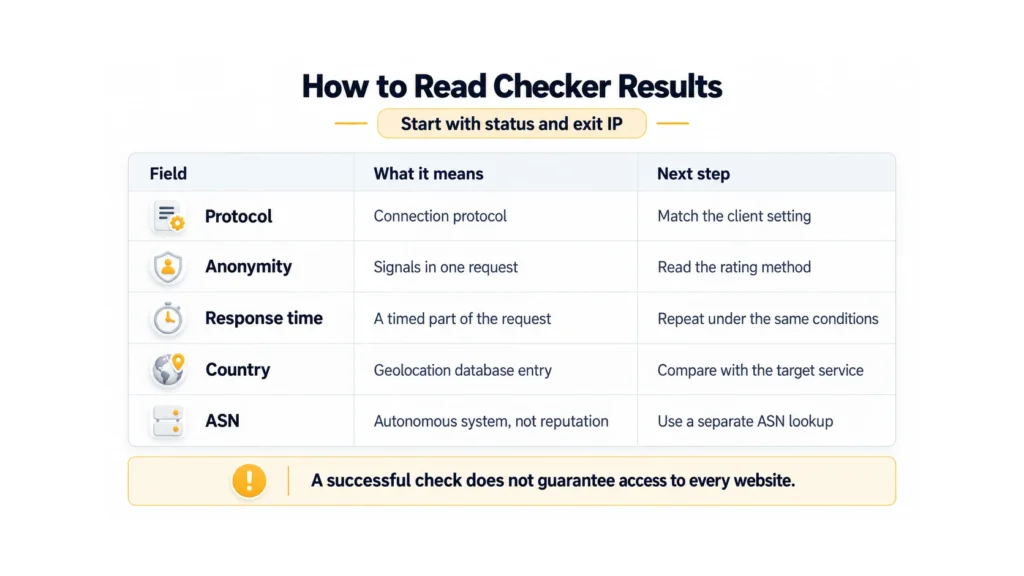
In this hypothetical report, the checker shows a working SOCKS5 endpoint, the expected country, and a high anonymity rating. The delay is longer than you expected. Before discarding it, try your actual task with SOCKS5 selected in the app. The country and anonymity results cannot replace that request, and one timing measurement does not establish that the proxy will be slow all day.
If the protocol differs from your app’s settings, correct the settings first. An unexpected country calls for a closer look at the outgoing address and the location included in your order. For a network question, use the ASN lookup. This gives you a short list of actions: adjust a setting, confirm a location, or repeat a measurement.
Check Your Own Results
The public MangoProxy Proxy Checker is intended for static proxies and reports status, type, anonymity, location, and response time. For residential proxies, the tool’s page directs users to the checker in their dashboard. Checks consume proxy traffic because test requests are sent through the supplied server. The screenshot below shows a completed check, with marker 4 highlighting the result row. The legend beneath it explains the numbered controls. Then try your task in the app you intend to use.
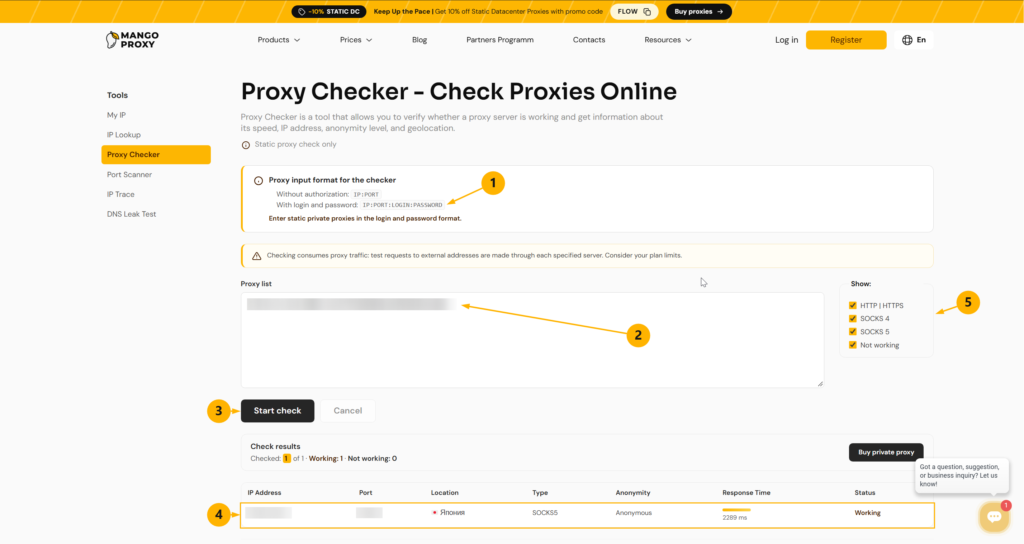
2. Proxy list – paste the issued connection string. Credentials are hidden in this image.
3. Start check – run the test.
4. Result row – read the location, connection type, anonymity rating, response time, and status.
5. Show – filters which protocol results and non-working entries are displayed. This controls the display, not the connection protocol.
Glossary
IP address: an address for a device or network node. IPv6 is an Internet Protocol version with longer addresses than IPv4.
Exit IP: the public address from which a request sent through a proxy reaches its destination.
Port: a number identifying a network service at an address.
Client: the app sending a request through the proxy. An endpoint is the address and port it connects to.
Anonymity rating: an assessment of signs that can reveal the original address or the use of an intermediary to the receiving server.
Proxy protocol: the rules an app uses to communicate with an intermediary. HTTP carries web requests; HTTPS is HTTP protected by encryption. In a checker, those labels need context about which connection is being tested. SOCKS4 and SOCKS5 are versions of another protocol for relaying connections.
Residential address: an IP classified as belonging to an internet access provider’s network; a datacenter address belongs to a hosting or data center network.
Rotation: a change of exit address under the service’s rules. A session is the period during which a service keeps an assigned exit, when that mode is supported.
HTTP header: a field carrying information with a request or response. X-Forwarded-For can carry client and intermediary addresses along a request’s path.
Tunnel: a connection through an intermediary that carries the client’s exchange with the destination server.
DNS: the system used to find network addresses for domain names. WebRTC is a browser communication technology whose network routes need separate consideration.
Response time: the duration measured by the tool’s method; latency in the report refers to that measurement. A timeout is the point at which an app stops waiting for a response.
IP geolocation: an estimate of location based on a database record for an address.
Autonomous system: a network or group of networks with a common routing policy for choosing data paths. ASN is its unique number in routing exchanges between networks.
Final Thoughts
A protocol mismatch calls for a settings correction; an unexpected location calls for an address lookup. Timing needs repeated measurements with a clear method. The final decision comes from whether your own workflow runs as required.
Frequently asked questions
Here we answered the most frequently asked questions.
Why Does a Proxy Pass the Check but Fail on a Specific Website?
The checker contacted its own test destination. The intended destination can behave differently. Your software also brings its own connection settings and timeout. Try the failing request there and use the returned error to guide the next step.
Can an Anonymity Rating Confirm That My IP Is Never Exposed?
No. The rating covers the signals a particular checker observed in its request. Test browser mechanisms and other apps separately when they are part of your workflow.
Why Is There No ASN Next to the Country in MangoProxy’s Results?
The public table has no separate ASN column. Find the exit IP for the connection you want to investigate and enter it in an ASN lookup service, such as RIPEstat. Avoid assuming that the entry address is also the exit.