
Linux Proxy Settings: Environment Variables, Applications, and Connection Checks
Published: ≈ 12 min read
Quick Answer
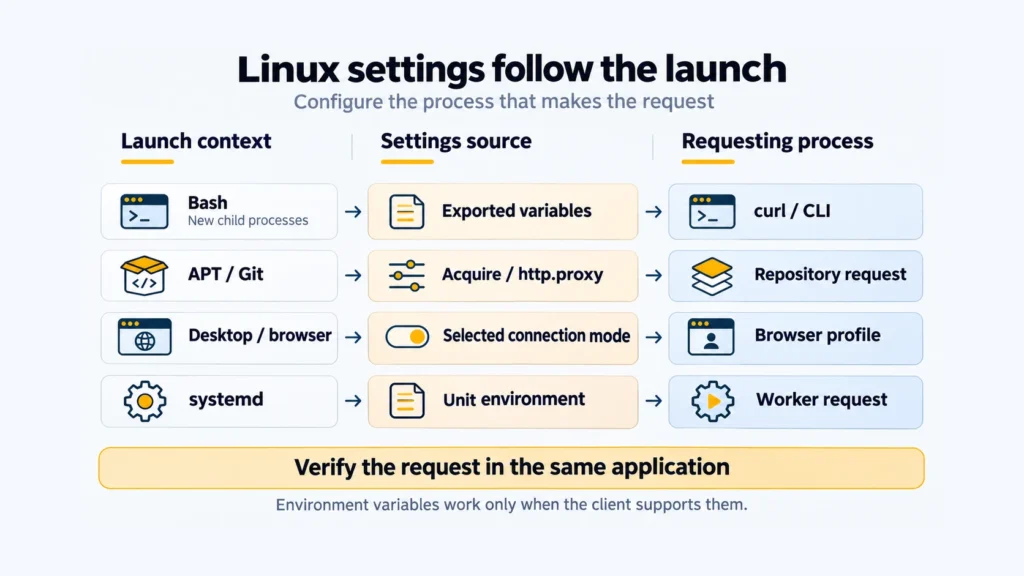
Set connection details in the configuration read by the program you intend to run. For a Bash-launched HTTP client, that usually means exported http_proxy and https_proxy values. For a browser or systemd worker, it may mean a desktop preference, browser entry, or service override.
Key Takeaways
- Running through sudo can change which proxy variables reach the program.
- A worker started by systemd needs settings in its unit or application configuration.
- A no_proxy entry sends a matching destination through the client’s direct connection.
- proxy_used reports proxy use, including some failed transfers. Check curl_exit too.
Which Configuration Should You Inspect First?
Use the successful attempt as a control. The differences below point to the next configuration to inspect:
| Explicit curl option works; exported values do not | inspect inherited variables and destination exclusions. |
| The problem appears in a later terminal session | check which Bash startup files that session reads. |
| The failure happens under sudo | examine its environment policy and the privileged tool’s own configuration. |
| Git keeps contacting an old gateway | look for http.proxy and any per-remote override. |
| A desktop browser differs from the terminal | identify the source selected in its connection dialog. |
| A worker behaves differently as a systemd service | inspect the unit’s environment and the application’s settings. |
Get the issued connection details before editing a file. Our guide to finding your server address and port covers that preparation. Replace the sample hostname and port below with those values; the example endpoint is fictional.
These are Bash examples. The package commands are for Debian/Ubuntu, and the service commands require systemd.
How Can You Set a Proxy in the Current Terminal?
bash
export http_proxy='http://proxy.example.com:8080'
export https_proxy="$http_proxy"
export no_proxy='localhost,127.0.0.1,::1'
Keep this shell open for the three comparisons below. A command started here receives the exported values; one launched elsewhere may receive a different set.
Read the website address and the gateway address separately. For an HTTPS destination, curl checks https_proxy. The value in our example begins with http:// because the first connection uses HTTP; CONNECT then carries the website’s TLS session through that gateway.
Any Basic login exchange with a plain HTTP gateway happens outside the website’s encrypted session. To protect that first connection too, use an HTTPS endpoint supported by both your client and the service.
For curl, retain the spelling http_proxy in the shell. Its uppercase counterpart is deliberately ignored; the remaining supported names can also be uppercase. The curl environment reference documents the supported forms.
What Should You Do with Exclusions and Existing Variables?
Before replacing a value, check which names already exist. This loop reports their presence without printing connection strings:
bash
for name in http_proxy https_proxy all_proxy no_proxy HTTP_PROXY HTTPS_PROXY ALL_PROXY NO_PROXY; do
  if [[ -v $name ]]; then
    printf '%s is set\n' "$name"
  fi
done
Inspect any conflicting values privately. Curl uses all_proxy for a protocol that has no specific proxy value.
Treat exclusions as routing decisions for individual destination names. The loopback entries in the sample keep local development requests on the machine. An internal hostname belongs there only if you intend to contact it without the external gateway.
Where Should You Save Persistent Settings?
Edit the file for the type of Bash session you actually start. Interactive sessions without login mode read ~/.bashrc; place the existing export lines there and reload it:
bash
source ~/.bashrc
Login mode uses a different search: ~/.bash_profile first, followed by ~/.bash_login and ~/.profile. Bash reads the first readable one. Put the exports into that file, following the Bash startup reference.
If your login setup reads /etc/environment through pam_env, an administrator can use the assignment form below for new sessions:
text
http_proxy=http://proxy.example.com:8080
https_proxy=http://proxy.example.com:8080
no_proxy=localhost,127.0.0.1,::1
These lines are data for the login setup. They do not refresh a shell or worker that is already running. Begin a new login session to check the change.
Keep login credentials out of shared shell files and /etc/environment. When a client accepts an authenticated URL, URL-encode each credential field before joining it to the address. Prefer the application’s supported credential handling, and review environment dumps before sharing them.
Why Can APT Fail When Curl Works?
APT may start with different settings, particularly when invoked through sudo. The sudo policy controls which environment values survive. A successful unprivileged curl request therefore says little about the environment available to a privileged package operation.
APT on Debian and Ubuntu
For a persistent APT-specific route, create or edit a dedicated file:
bash
sudoedit /etc/apt/apt.conf.d/80proxy
For the example HTTP endpoint, give it these contents:
text
Acquire::http::Proxy "http://proxy.example.com:8080/";
Acquire::https::Proxy "http://proxy.example.com:8080/";
The two Acquire entries send HTTP and HTTPS repository requests to this gateway. Exceptions can be defined for individual hosts, using DIRECT where a direct connection is required. See the APT proxy documentation for the available options. Environment variables remain another supported source of APT proxy settings.
Next, ask APT to refresh its repository indexes:
bash
sudo apt-get update
Check the refresh output for each repository. Look for failed downloads even if APT still has an old package list to use. This operation refreshes repository metadata without upgrading installed packages.
APT’s supported auth.conf mechanism provides a separate place for proxy credentials. Store that file with restricted access, and match its entry to the gateway address.
What Overrides the Proxy for Git?
Look for a saved http.proxy value when Git keeps contacting an old gateway after you have changed the terminal variables. That value can override the environment for HTTP and HTTPS remotes.
Git over HTTP and HTTPS
Inside the relevant repository, inspect the setting matching the destination URL:
bash
git config --get-urlmatch http.proxy https://github.com/
A saved connection string can expose a password, so review this output privately. No matching value does not establish a direct connection: environment variables can still apply. Also check any per-remote proxy override when investigating an existing repository.
Run a single Git operation with an explicit endpoint:
bash
git -c http.proxy='http://proxy.example.com:8080' ls-remote https://github.com/git/git.git HEAD
This asks for a remote reference without cloning the repository. Git’s proxy configuration documents the override and its supported URL format. If inherited no_proxy exclusions match the destination, account for those as well.
If this should be the default for your user’s HTTP and HTTPS Git connections, save it globally:
bash
git config --global http.proxy 'http://proxy.example.com:8080'
For an SSH remote such as [email protected]:owner/project.git, work on SSH’s connection setup. Git’s HTTP proxy option applies to HTTP and HTTPS remotes.
Why Didn’t the Browser Pick Up the Exports?
A browser started from a desktop launcher can have a different environment from the terminal where you ran the exports.
GNOME Desktop
In GNOME’s proxy panel, select Manual and enter the address and port. The location of that panel depends on the desktop version.
Firefox
Firefox lets you choose whether the desktop owns the endpoint or the browser stores a separate one. Select Use system proxy settings for the first arrangement. For the second, use Manual proxy configuration, then review the HTTPS choice and exclusions alongside the address you entered.
The Firefox connection guide covers the dialog. If an extension or organizational policy manages the connection, your selection may be restricted.
Chrome and Chromium
Chromium documents several Linux proxy sources. The relevant one may be GNOME/KDE preferences, a launch flag, or the environment inherited at startup.
For Chrome, inspect both the desktop preferences and its launcher. The Chrome configuration guide covers the browser steps. Keep the same profile open when verifying the result.
How Do You Configure a Systemd Service?
Set the proxy in an override for the unit that runs your worker. Systemd starts an ordinary system service independently of your interactive Bash session.
Systemd Service
Here, worker.service stands for an existing service on your machine. Substitute the actual unit name, and first confirm that its application reads these proxy variables. Open an override:
bash
sudo systemctl edit worker.service
Add this service section:
ini
[Service]
Environment="http_proxy=http://proxy.example.com:8080"
Environment="https_proxy=http://proxy.example.com:8080"
Environment="no_proxy=localhost,127.0.0.1,::1"
Each value is written out because Environment= does not perform shell variable expansion. The assignment rules are in Systemd’s execution-environment documentation. Keep passwords out of Environment=. Choose the credential method supported by that worker when the endpoint requires authentication.
Apply the override when the worker can be restarted without disrupting a job:
bash
sudo systemctl daemon-reload
sudo systemctl restart worker.service
daemon-reload rereads the unit files. The restart is what gives the worker its updated environment; check an outbound request from that new process.
Practical Examples: Which Connection Are You Checking?
The first command supplies a gateway explicitly, removing variable discovery from that attempt. The next one lets curl choose from the values it receives. Compare the selected route before comparing the returned addresses.
The examples print proxy_used, which curl introduced in version 8.7.0. Check your installation:
bash
curl --version
ipify is separate from MangoProxy. For each request, its IPv4 endpoint returns the source address it sees. The initial -q keeps curl’s default configuration file out of each check; the time limits bound the wait.
Check 1: Select the Endpoint Explicitly
Replace the example endpoint and run:
bash
curl -q --silent --show-error --fail \
  --connect-timeout 5 --max-time 20 \
  --proxy 'http://proxy.example.com:8080' --noproxy '' \
  --write-out '\nhttp=%{http_code} proxy_used=%{proxy_used}\n' \
  'https://api.ipify.org?format=json'
printf 'curl_exit=%s\n' "$?"
An inherited exclusion could spoil the first comparison by sending the request directly, so this command clears that list. For username/password authentication, supply the login name with –proxy-user and type the password at curl’s prompt. With an IP allowlist, authorize the source address from which this machine reaches the gateway.
Read the result in three parts. A 200 reply with an ip field is the check service’s answer. curl_exit=0 means the transfer completed without a curl error; proxy_used=1 records the gateway route. Inspect any failure before interpreting the address. The curl output reference lists the available fields.
Check 2: Let the Environment Choose
For the second attempt, keep the exports in place but let curl discover the endpoint itself:
bash
curl -q --silent --show-error --fail \
  --connect-timeout 5 --max-time 20 \
  --write-out '\nhttp=%{http_code} proxy_used=%{proxy_used}\n' \
  'https://api.ipify.org?format=json'
printf 'curl_exit=%s\n' "$?"
If the first request uses the gateway and the second goes directly, inspect https_proxy and the destination exclusions in this shell. If a different gateway is contacted, check the inherited values and case variants before replacing the endpoint.
Check 3: Compare a Direct Request
Use a direct control request only where your network permits it:
bash
curl -q --silent --show-error --fail \
  --connect-timeout 5 --max-time 20 --noproxy '*' \
  --write-out '\nhttp=%{http_code} proxy_used=%{proxy_used}\n' \
  'https://api.ipify.org?format=json'
printf 'curl_exit=%s\n' "$?"
This control should show proxy_used=0 when it completes. If your network requires a proxy and the direct request fails, skip the IP comparison.
A different returned IP shows that ipify observed different source addresses. Both requests can show the same IP when a local proxy shares your internet connection. The issued gateway address may also differ from the exit address ipify sees.
Return to the original task next: refresh the repository, query the Git remote, or make a request from the worker or browser. An IP check establishes nothing about access to a different destination or about another process’s connection.
How Do You Stop Using the Proxy?
Clear the shell values now and remove their saved copies so a later session doesn’t restore them.
To clear the common proxy variables from the current Bash shell and future children it starts:
bash
unset http_proxy https_proxy all_proxy no_proxy HTTP_PROXY HTTPS_PROXY ALL_PROXY NO_PROXY
Remove your added exports from the relevant startup file too. An existing shell keeps the values until you unset them or close that shell. Editing /etc/environment affects later login sessions.
In APT’s configuration file, delete the proxy options you added. If you added the global Git setting shown above, remove that setting with:
bash
git config --global --unset-all http.proxy
Restore a previous value instead if your change replaced one. Repository-specific Git settings and inherited environment variables can still select a proxy.
For the worker, remove the proxy entries from its override and repeat the reload/restart steps. In the browser, switch to the connection mode you want to keep. Run its connection check once more to see whether another proxy setting remains.
The code in this article is provided for illustration. It may behave differently or fail to run depending on your environment settings, software and library versions, or changes to the services and APIs it uses. Before using the examples, test them in your own environment and adapt them as needed.
Verify the Browser Profile
Open MangoProxy’s What Is My IP in the browser profile you configured. Compare the displayed address with the expected exit. If you already have issued connection details, use those in the application. Keep this browser observation separate from the terminal and worker checks.
Glossary
Environment variable: a value stored under a name in a process’s environment.
Endpoint: the hostname or IP address, with its port, that the client connects to.
URL: an address identifying a resource or connection endpoint and its scheme.
IP address: a network address; IPv4 is the version used by the public check in this article.
HTTP and HTTPS: web request protocols; HTTPS uses TLS to secure the connection.
CONNECT: the HTTP method for requesting a proxy tunnel to a specified host and port.
TLS: the protocol used to protect an HTTPS connection.
Basic authentication: an HTTP login method whose credential encoding does not itself provide encryption.
APT: Debian’s package-management tools, also used by Ubuntu and related distributions.
SSH: Secure Shell, used for remote login and Git connections.
Systemd unit: systemd’s representation of a managed service or other resource.
Drop-in: a supplementary unit configuration file used to add or override settings.
Exit IP: the public source address observed by the destination for a proxied request.
SOCKS5: a proxy protocol supported by compatible clients.
DNS: the system for looking up network addresses by hostname.
Final Thoughts
Keep a note of which application used which file. When the endpoint changes, rerun that application’s check after editing the recorded file.
Frequently asked questions
Here we answered the most frequently asked questions.
Will a Scheduled Job Read My .bashrc?
Usually it won’t. Non-interactive Bash normally skips that file. Supply the proxy when the scheduler launches the job, or use the application’s settings, then check the job log for the request result.
Can I Use a SOCKS5 Proxy Instead?
Yes, if the client can use SOCKS5. Curl resolves destination names locally with socks5://; socks5h:// leaves that lookup to the proxy. Confirm the SOCKS endpoint and client options before replacing an HTTP configuration.
Does Ping Verify an HTTP Proxy?
No. Ping’s probes don’t exercise the proxy login or HTTP CONNECT exchange. A curl request through the endpoint is the relevant check here.