
How to Prepare Infrastructure for Advertising Campaigns Across Multiple GEOs: Pages, Domains, and Proxies
Published: ≈ 13 min read
Quick Answer
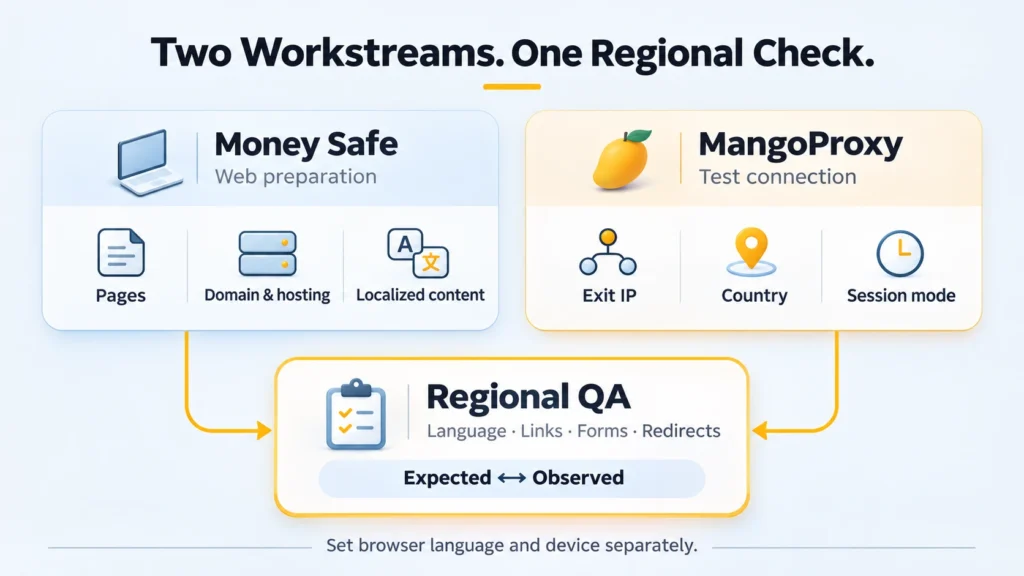
Advertising campaigns across multiple GEOs need two parts prepared together: the web infrastructure and the network environment used to test it. The first covers the page, domain, hosting, and localization. Open the live campaign link through an IP from the intended market. Submit a test form too: the first page may be correct while its confirmation belongs to another language version.
In the Money Safe × MangoProxy approach, the roles are distinct. Money Safe helps prepare the web side, while MangoProxy supplies proxies for regional checks. The launch check brings their work together on the actual site visitors will use.
Key Takeaways
- Specify what visitors should see after submitting the form. The language can be correct on arrival and wrong after submission.
- Test the published page on its working domain. A template preview leaves part of the journey unchecked.
- IP country, browser language, and a saved market preference are separate test conditions.
- Keep one exit IP throughout a connected journey. Change addresses between completed checks.
- Report the failing step with its URL and starting conditions, so a colleague can reproduce it.
What Goes Into the Brief for a New Market?
Name the country or region you plan to advertise in; this is the campaign’s GEO. Then describe what you are offering there. “A page for Europe” leaves too much open: markets can have different languages, products, and offer conditions.
Before building your multi-GEO campaign infrastructure, record:
- Audience and offer, including the countries where it is available.
- The language and currency to display, plus examples of the required date, phone, and address formats.
- What the ad asks someone to do, whether requesting a consultation, leaving contact details, or buying.
- Entry URL, regional destinations, and links between language versions.
- Hosting, editing access, and responsibility for renewals.
- Local contacts, images, delivery details, and variations in the offer.
- IP country, network type, and enough session time to finish the test.
- The expected result of the visit, including where submitted data goes.
Store the brief alongside the copy and page files. Changes to the offer belong there too, so the builder and tester do not work from different instructions.
A country label in the ad account will not tell either of them that delivery terms have changed.
Preparing the Web Side With Money Safe
Begin with the visitor’s path: reading the consultation offer, opening the form, and sending a request. It determines the copy, the form, and what should happen after submission.
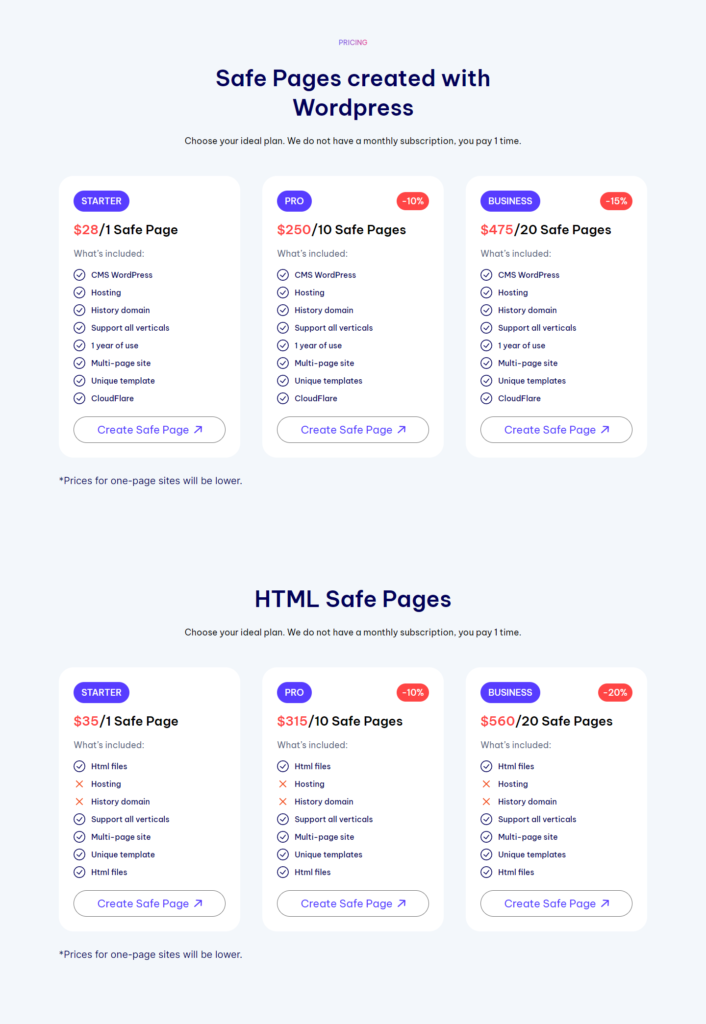
WordPress and HTML are the page formats offered by Money Safe. The service also lists domain and hosting options and content in different languages. For a new project, these can be ordered together. For an existing site, agree with Money Safe which parts of the setup it will supply.
Localizing the Whole Page
The translation files need room for error messages and confirmations. In landing page localization, these are easy to miss because they appear only after someone interacts with the form. Add menu items, field labels, and wording inside images to the same review.
Provide the actual offer for each country. A translator cannot decide whether delivery is available or whether a consultation is the only option. Those differences affect the button and form as well as the copy. Check prices embedded in images against the regional offer.
Planning the Addresses
Decide how the versions will share a site before putting URLs into the page. Subdomains and regional sections work under one domain; separate domains give each market its own address. The choice also leaves you with a set of links to maintain.
Write down the landing, contact, form, and confirmation destinations for each version, along with its language-switch links. Then follow them on the published site. This catches a common copying error: translated button text with the original market’s URL still underneath.
After the Page Is Delivered
Money Safe can work with a customer’s domain or hosting by prior arrangement. Include that in the order discussion, together with who can edit the pages and how corrections will be handled.
At handover, load the HTTPS site and test the form. Look for browser warnings and missing images. Record who handles domain and hosting renewals and when they are due, so these tasks remain assigned after the page is delivered.
What Selects the Country Version?
First establish how your site selects a market. It might follow the URL directly, use IP or browser language, or restore a saved choice. The test needs to match that rule.
Suppose someone in Germany picks English. The next page might retain English or suggest the German section. Decide which outcome you want, then check whether the site follows it.
Their IP country alone cannot answer the language question.
Currency and offer availability need their own checks. So do local contacts, advertising blocks, and links to other country versions. A remembered market can explain why these stay the same after an IP change. The hosting server and the visitor can also be in different countries.
For the first visit, use a fresh test profile without stored data for that site.
Test returning visitors separately with a known saved market. These are two useful scenarios with different starting conditions.
Proxies in GEO Infrastructure: MangoProxy’s Role
A proxy routes requests through an intermediary connection. The destination receives those requests from the proxy’s exit address.
MangoProxy offers residential, ISP, datacenter, and mobile proxies; ISP addresses come from internet-provider networks. Start with the country you need, then compare the session options in products that offer it. For a form check, the connection must last through submission without a planned IP change.
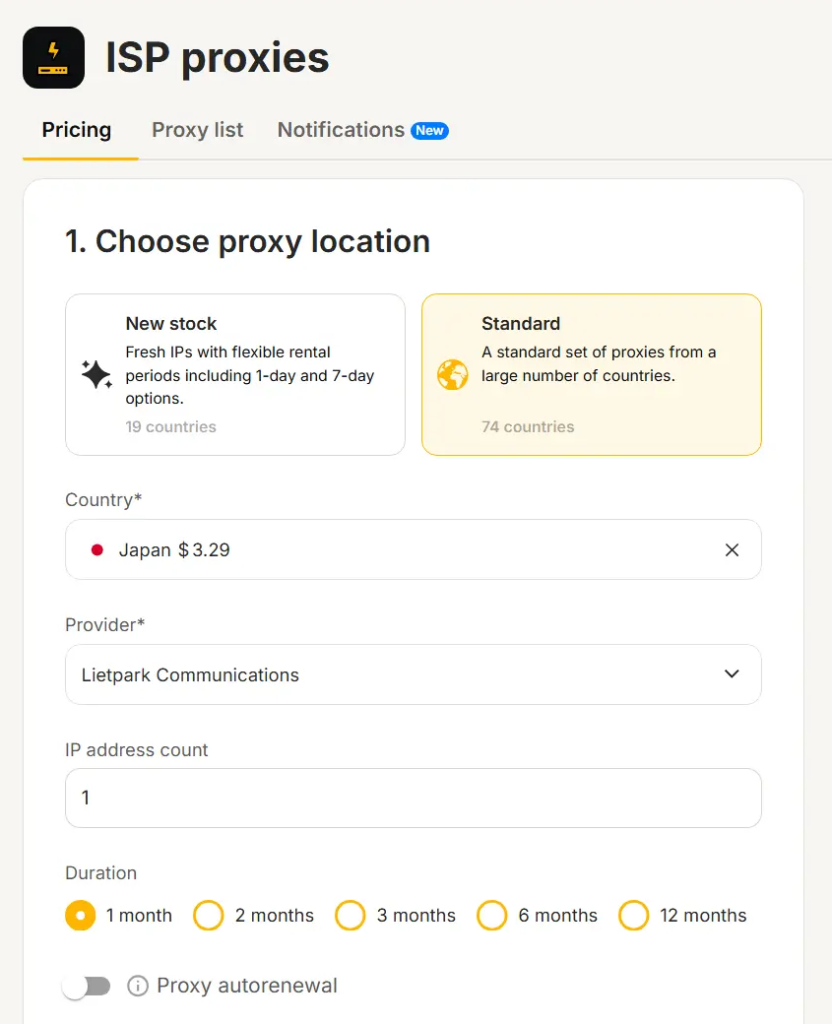
Keep the exit fixed while completing a form, so an address change does not become another possible cause of a different result. A static connection provides an assigned address. On a dynamic product, a sticky session can retain an exit for a period, where that mode is offered. Session expiry or a disconnected exit node can interrupt that continuity. If the run becomes uncertain, look up the exit again.
Record the completed visit before switching exits. Start the next check after the address changes.
Choose network type and rotation behavior separately. “Residential” alone does not mean the address will remain unchanged throughout your work.
These advertising proxies support checks of your own pages. Record the browser language and screen size alongside the connection details. If the site asks for device location, include the permission state in your notes. The proxy does not itself change GPS coordinates. Even with a mobile operator’s IP, a desktop browser still renders the site as a desktop browser. Regional behavior and mobile rendering need their own checks.
How Do You Check the Project Before Launch?
Follow the entire journey on a known site version and keep expected and observed results together. The sequence is: page → domain → selected GEO → proxy connection → website check → comparison with expectations.
1. Record the page version and entry URL.
Use the approved campaign link or test URL. Note which regional destination should open and which link parameters should survive. Checking the destination does not require generating clicks on live paid ads.
2. Review the publication on its domain.
Load the published HTTPS address and compare it with the approved page. Open its navigation links and buttons too, including contacts and supporting pages. That tests both the visible content and the destinations behind it.
3. Set up the regional connection.
In MangoProxy, choose the country and session mode needed for the run. Add the issued server address, port, and authentication details to the supported client or browser settings. Use an IP lookup in that browser before opening the landing page, and save the reported exit.
If the site then chooses an unexpected market, keep both observations. Its location data may differ from the lookup’s. Check the site’s selection rules as part of the investigation.
4. Try the form, including its errors.
Read the offer as you work through the page. Does the currency match the brief? Do the links stay in the intended market? Try submitting with a required field blank and read the error. Submit the agreed test data next. Locate that lead at the receiving end and confirm that it arrived in the intended place with a test label. Save the final URL reached after redirects.
5. Open the page on the target devices.
A longer translated label may fit on a desktop and cover a button on a narrow screen. Try the navigation and form at the sizes your campaign needs. Use the actual mobile browser for behavior that depends on it. Resizing the desktop window can reveal cramped labels, but leaves that browser behavior untested.
6. Save the evidence for any failure.
Save the entry and final URLs with the page version, test time, market, and exit IP. Note the browser language and whether the profile had a saved market selection. Attach reproduction steps and a screenshot of the failure. Before sharing either, check that no customer details or proxy passwords are visible.
Which Connection Fits the Test?
Use the test requirements to narrow the options below. Repeated journey checks need consistency. Comparisons across markets need the right countries. Mobile-network checks need an exit belonging to a mobile operator.
|
Proxy Type |
When to Use It |
Characteristics |
|---|---|---|
|
Rotating residential |
Independent checks of regional versions through different exits |
Uses residential connections; schedule address changes between completed tests. |
|
Static ISP |
Repeated checks of a longer journey using one address |
ISP means Internet Service Provider. The static product supplies an assigned address; confirm the required country separately. |
|
Datacenter |
Availability, link, and resource checks on your own site; a static option supports repeats with one IP |
Exits through a server network. This does not cover behavior specific to residential or mobile networks. |
|
Mobile |
Comparing page behavior through a mobile carrier network |
Check the product's rotation settings. A carrier IP says nothing about which device or screen you are testing. |
Start with one concrete website check. For a form retest, establish the required session length before comparing suitable products. A larger pool does not, by itself, make that one form check more useful.
Where Do Launch Checks Go Wrong?
Stopping the translation at the main copy. Navigation, images, and form messages retain content from the original market. Follow the whole journey, including validation errors and confirmation.
Testing a template instead of the working URL. Publication introduces different links or redirects. Repeat the scenario on the final domain using the approved campaign link.
Treating IP country as the visitor’s language. The site shows an unexpected version while following a saved user preference. Check first and returning visits separately.
Changing IP halfway through a form. The test combines different network conditions. Repeat the entire journey with a verified exit and a session long enough to finish.
Checking one country and one screen. Expansion exposes long labels, incorrect contacts, or unavailable regional elements. Repeat the review for each market, including its smaller screens.
Practical Example: A Lead Form for Germany and the UK
For a hypothetical example, take a project collecting leads in Germany and the United Kingdom. The following is a proposed test plan, with no live results claimed.
The team asks Money Safe to prepare German and English pages. It supplies the copy and field labels for each, plus local contacts and the URLs that visitors should reach after submitting a lead. Once prepared, the team reviews the published versions on their agreed domains or regional sections.
The tester prepares MangoProxy connections for the two countries, subject to availability in the selected product. First comes the German journey, using German browser preferences and a fresh test profile. A separate UK run follows. Each has an expected result defined in advance.
|
Market |
Expected Behavior |
Additional Check |
|---|---|---|
|
Germany |
German page, approved offer, German confirmation |
Links stay within the intended version; the lead carries the correct market label. |
|
United Kingdom |
English page, UK contacts, English confirmation |
The form does not send the visitor to a shared section with a different offer. |
|
Germany, English browser preference |
Behavior follows the project's agreed rule |
An explicit language choice works without an unexpected redirect reversing it. |
If the UK form leads to German confirmation, inspect the destination URL and page settings. For differences on the same URL with the same browser language, compare the regional rules and saved market choices. Give the person investigating both runs, including their starting conditions. That is more useful than a screenshot described only as “wrong language.”
Where Do Money Safe and MangoProxy Meet in the Launch Plan?
The handoff happens at the published page. Money Safe helps prepare the content and web setup, including the domain and hosting where these are part of the order. The team then has a destination it can review and correct.
MangoProxy supplies the connections for testing that destination through regional exit IPs. Each run pairs that connection with the page version being reviewed, so the team can trace a finding back to its conditions.
The shared reference is the market brief. Give the builder and tester the same version, including later changes to the offer. A failed check then refers back to something both have seen: the requested behavior for that version.
Final Thoughts
Keep the checked page version and final destination with each market’s launch notes. Use the findings to correct unfinished web work or repeat an inconclusive regional check before sending traffic. That record connects the prepared page with its observed behavior.
Frequently asked questions
Here we answered the most frequently asked questions.
Can We Add a Country Without Buying Another Domain?
Yes. You can add a regional section or subdomain to the existing setup, or use a separate domain. Choose based on how the team will maintain the pages, then include the new addresses in its link checks.
Why Does an English Page Still Appear Through a German IP?
An English URL, browser preference, or remembered selection may explain it. Try that URL once without saved site data and once with a known market selection. Compare the results with the rules used by the site to choose a version.
Does This Also Check Ad Delivery?
No. Opening a campaign destination does not show whether its ad appeared. Check delivery, targeting, and ad status in the advertising platform separately. Proxies for ad verification can assist regional checks, but a successful page visit only records what happened at that destination.