
Open Port vs Closed Port: What the Difference Means for a Server
What a Network Port Actually Is
When a computer communicates over the internet, it does not simply send traffic to a device – it sends it to a specific service running on that device.
Network ports act as communication endpoints that allow operating systems to route incoming traffic to the correct application.
Think of a server as a building and ports as doors leading to different departments. One door may lead to a web server, another to a database service, and another to a remote administration tool.
Each service listens on its own port number so that the operating system knows where the request should go.
For example:
| Port | Typical Service |
| 80 | HTTP web server |
| 443 | HTTPS secure traffic |
| 22 | SSH remote access |
| 21 | FTP file transfer |
| 25 | Mail transfer |
When traffic arrives at the correct endpoint and a program is listening there, communication can begin.
What Engineers Mean by an Open Port
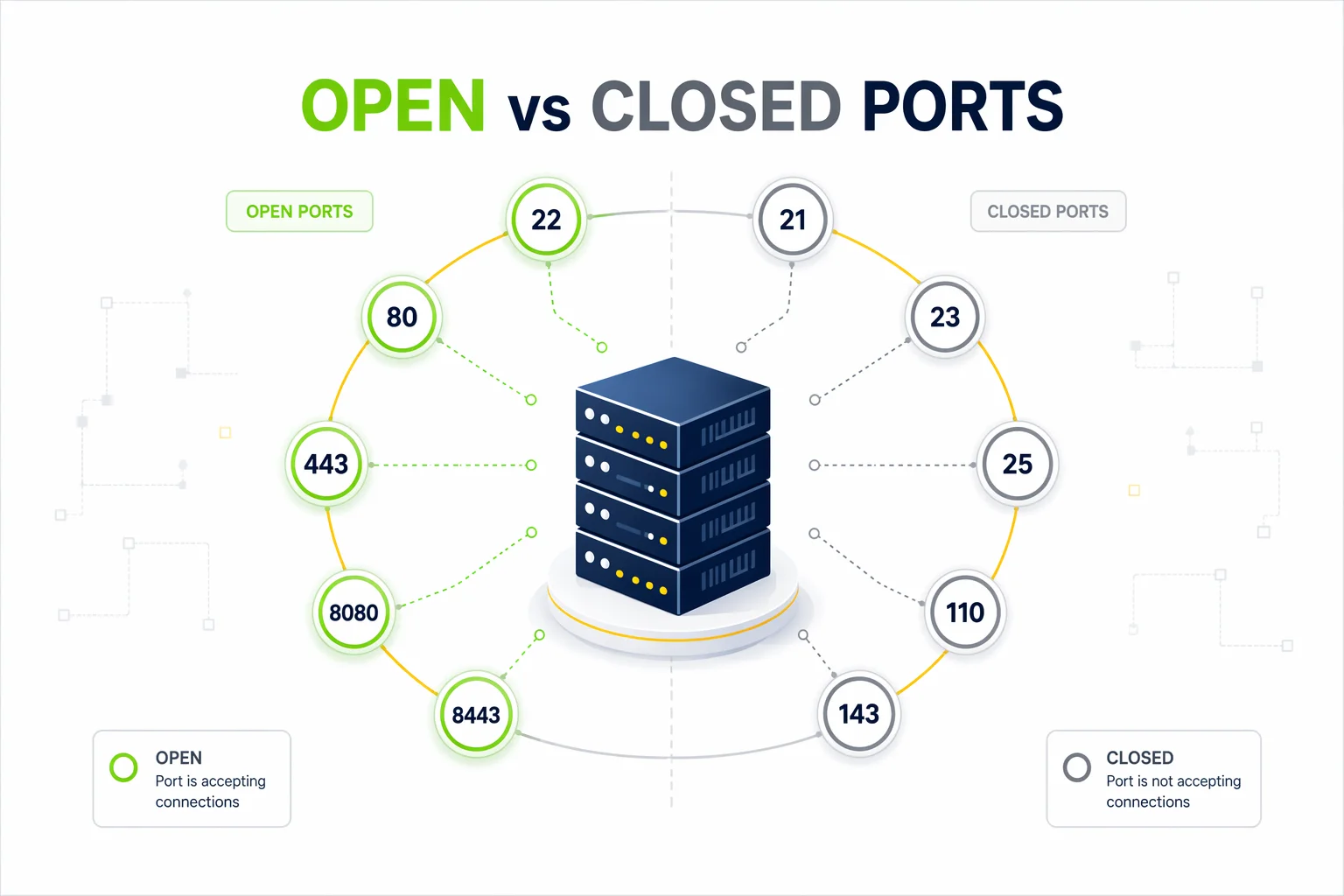
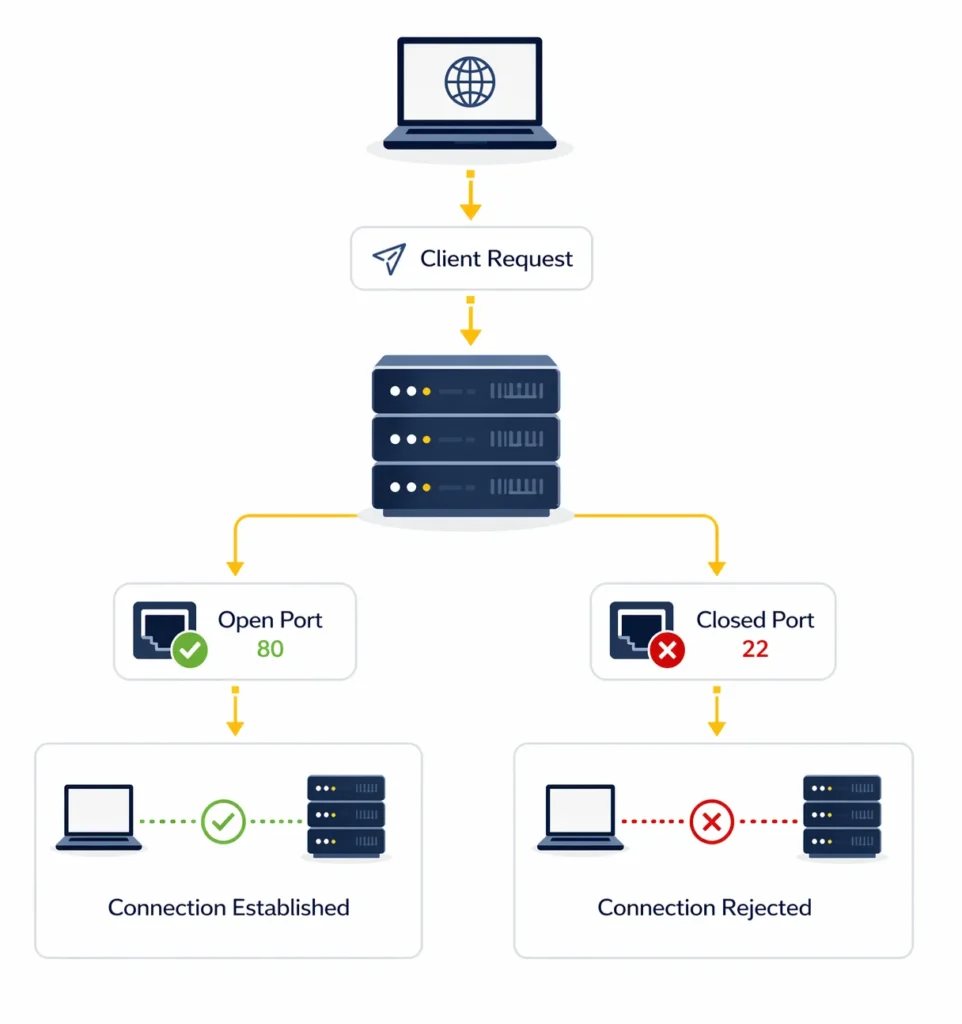
An open port indicates that a process on the server is actively waiting for incoming network connections.
If another system tries to reach that endpoint and receives a response, the port is considered open.
In practical terms this usually means:
- a web server is ready to serve pages
- a remote administration service is available
- an API endpoint is accepting requests
For infrastructure teams, open ports are not unusual – they are necessary for services that must interact with external users or systems.
However, administrators typically try to keep the number of exposed services as small as possible.
What a Closed Port Indicates
A closed port means that the operating system received the connection request but found no service listening on that endpoint.
The system responds by rejecting the request.
Closed ports are completely normal and actually desirable from a security perspective. They indicate that no unnecessary applications are exposed to the network.
On most servers the majority of ports remain closed because only a handful of services need to be reachable.
A Third State: Filtered Ports
In real infrastructure environments there is often a third situation.
Sometimes connection attempts never reach the service at all because firewall rules block them.
In this case scanners may report the endpoint as filtered.
This usually means that:
- firewall rules deny the connection
- network security policies hide the service
- cloud infrastructure blocks external access
Filtered ports are common when systems are protected by security groups or network firewalls.
Open vs Closed Ports: Quick Comparison
Understanding port states becomes important when diagnosing connectivity issues or reviewing server exposure.
| Port State | What Happens | Typical Cause |
| Open | Service accepts connection | Application running |
| Closed | Connection rejected | No service listening |
| Filtered | Request blocked | Firewall rules |
This information allows administrators to determine whether a service is accessible from outside the system.
Why Developers Check Port Status
Checking port availability is a routine part of infrastructure management.
Engineers often run port tests when launching new services or investigating network issues.
Some common situations include:
• verifying that a newly deployed application is reachable
• checking whether firewall rules allow external access
• diagnosing connection failures between services
• confirming that cloud security groups are configured correctly
For example, after deploying a web application to a cloud instance, developers may verify that ports 80 or 443 respond to external requests.
If the port does not respond, the problem may lie in the firewall configuration rather than the application itself.
How to Check Whether a Port Is Open
There are several practical ways to determine whether a server endpoint accepts connections.
Using an Online Port Scanner
One of the easiest methods is to use a web-based scanner.
These services attempt to connect to the target server from an external location, which closely reflects how the system appears from the internet.
You can test any host using MangoProxy Port Scanner.
The tool will attempt connection requests and report whether the endpoint is open, closed, or filtered.
Using Command Line Utilities
Developers often perform quick checks directly from the terminal.
Utilities such as telnet, netcat, or nmap can attempt connections to specific ports and display the response.
Example:
telnet example.com 443
If the connection is established, the service is reachable. If the connection fails, the endpoint may be closed or blocked.
Reviewing Server Configuration
Sometimes the service is running but cannot be reached externally.
This may happen if:
- the application listens only on internal interfaces
- firewall rules block incoming traffic
- cloud network policies restrict access
Checking configuration files and firewall rules can help identify these situations.
Ports Commonly Found on Public Servers
Most production systems expose only a small number of service endpoints required for normal operation.
Some of the most frequently encountered ports include:
| Port | Typical Purpose |
| 80 | Web traffic (HTTP) |
| 443 | Secure web traffic (HTTPS) |
| 22 | Remote server administration |
| 21 | File transfer services |
| 25 | Email delivery |
| 3306 | Database connections |
| 3389 | Remote desktop |
Recognizing these ports makes it easier to understand which services are running on a system.
Additional Tools That Help Diagnose Network Issues
Port scanning is only one part of understanding network behavior.
Other diagnostic tools can provide additional context when investigating connectivity problems.
For example:
• My IP – identifies the public IP address visible to external services
• IP Lookup – reveals geolocation and network provider information
• Proxy Checker – tests whether proxy servers respond correctly
Using several diagnostic tools together helps engineers analyze connectivity problems more effectively.
Glossary
- Port
A numbered endpoint used by applications to exchange network traffic. - Open port
An endpoint where a program accepts incoming connections. - Closed port
An endpoint where no application is currently listening. - Filtered port
A port hidden or blocked by firewall or network security rules.

Frequently asked questions
Here we answered the most frequently asked questions.
What does an open port mean on a server?
It means that a program on the server is listening on that endpoint and is ready to accept incoming connections.
Are open ports dangerous?
Not necessarily. Many services require open ports to function, but unnecessary services should not be exposed.
Why would a port appear filtered?
This typically happens when firewall rules or network security policies block connection attempts.
How can I check port status quickly?
You can use an online scanning tool or command-line utilities to test whether a server endpoint responds to connection requests.