
Playwright Browser Contexts and Proxies: How to Build Stable Automation Sessions
Published: ≈ 4 min read
Quick Answer
Browser Contexts are one of Playwright is most powerful features. Combined with quality proxy infrastructure, they allow developers to isolate sessions, manage multiple identities and build more stable automation workflows.
Key Takeaways
- Browser Contexts act like separate browser profiles
- Different contexts can isolate cookies and storage
- Proxy quality affects session reliability
- Stable sessions often outperform aggressive IP rotation
- Residential and ISP proxies work well for long-lived automation
- Context isolation helps manage multiple accounts
Why Do Developers Use Browser Contexts?
Browser contexts are one of Playwright’s most powerful features.
Instead of launching multiple browser instances, Playwright can create isolated sessions inside the same browser.
Common benefits include:
- independent cookies
- separate local storage
- isolated login sessions
- parallel testing
- multi-account workflows
Browser contexts help developers simulate multiple users without opening multiple browsers.
What Makes Playwright Different?
Unlike many automation frameworks, Playwright introduces Browser Contexts.
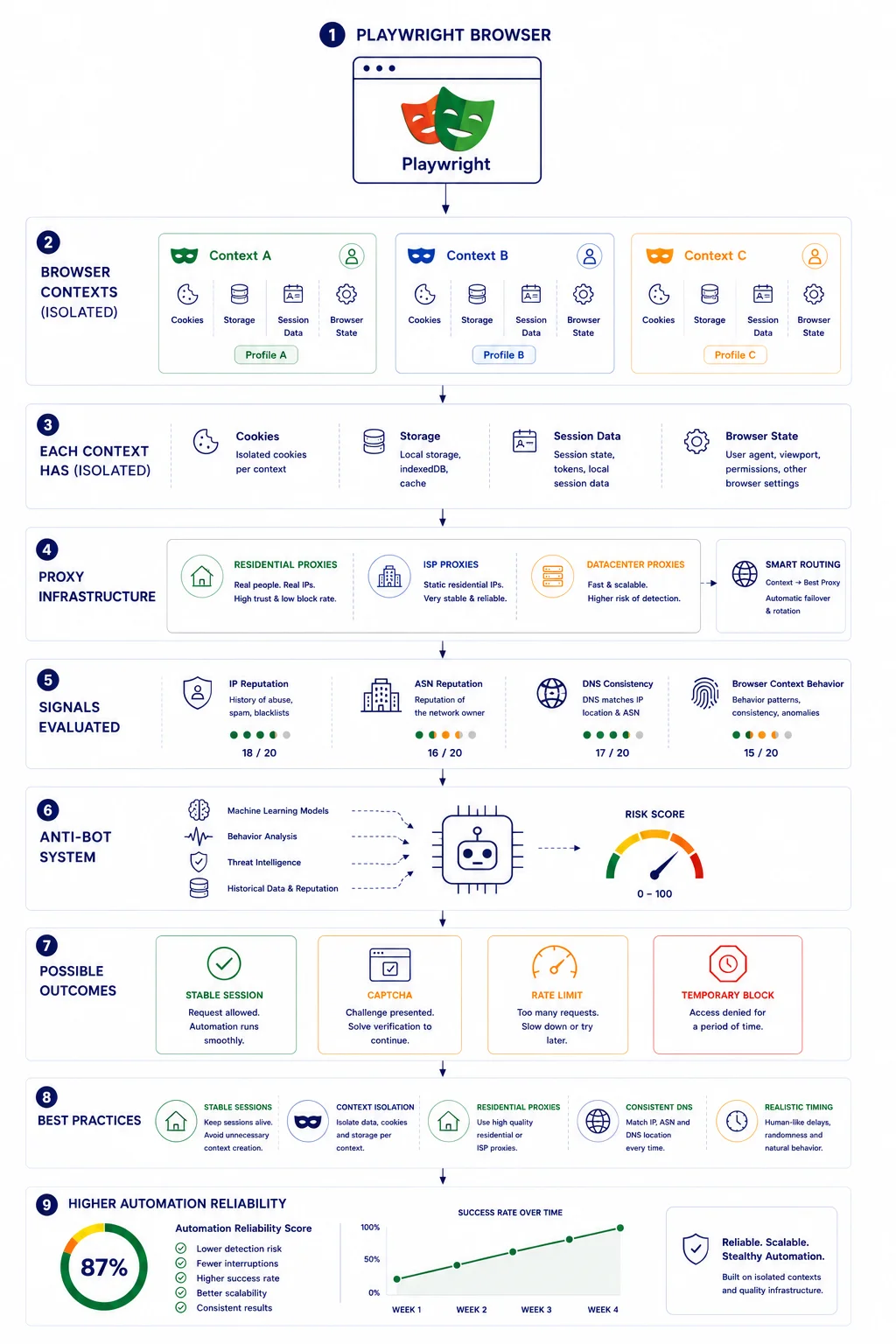
Think of a Browser Context as an independent browser profile.
Example:
Browser
├── Context A
├── Context B
└── Context C
Each context can have:
- cookies
- local storage
- sessions
- permissions
without affecting the others.
When Should You Choose Playwright?
Playwright is particularly useful for modern browser automation projects.
Good choices include:
✅ Multi-account workflows.
✅ JavaScript-heavy websites.
✅ Parallel browser sessions.
✅ Browser testing.
✅ Dynamic content.
✅ Session isolation.
Playwright may not be necessary for:
❌ Simple APIs.
❌ Static HTML pages.
❌ Lightweight HTTP requests.
Choosing the right tool often improves both performance and resource efficiency.
Why Browser Contexts Matter
Without contexts:
One Browser
↓
One Session
↓
One Identity
With contexts:
One Browser
↓
Multiple Contexts
↓
Multiple Independent Sessions
This architecture is one reason Playwright is popular for automation.
Code Example 1
Create a Browser Context
from playwright.sync_api import sync_playwright

with sync_playwright() as p:

   browser = p.chromium.launch(
       headless=False
   )

   context = browser.new_context()

   page = context.new_page()

   page.goto("https://example.com")

   print(page.title())

   browser.close()
Expected Result
A separate browser context is created and operates independently from other sessions.
Code Disclaimer
The code examples in this article were tested at the time of publication. Browser versions and Playwright releases change regularly. Always verify functionality before production deployment.
Why Proxies Matter
Contexts isolate browser data.
Proxies isolate network identity.
Combined:
Browser Context
+
Proxy
=
Independent Session
Code Example 2
Browser Context with Proxy
from playwright.sync_api import sync_playwright

with sync_playwright() as p:

   browser = p.chromium.launch(
       proxy={
           "server":"http://123.45.67.89:8000"
       }
   )

   context = browser.new_context()

   page = context.new_page()

   page.goto("https://httpbin.org/ip")

   print(page.text_content("body"))

   browser.close()
Expected Result
Traffic is routed through the configured proxy.
The visible IP should match the configured infrastructure.
Verify Your Setup
Recommended workflow:
Playwright
↓
Proxy
↓
My IP
↓
IP Lookup
↓
DNS Leak Test
Use:
Multiple Browser Contexts
One Playwright browser can create multiple isolated sessions.
Example:
Browser
↓
- Context A
- Context B
- Context C
Useful for:
- testing
- multiple accounts
- automation
- scraping
Code Example 3
Multiple Browser Contexts
from playwright.sync_api import sync_playwright

with sync_playwright() as p:

   browser = p.chromium.launch()

   context1 = browser.new_context()
   context2 = browser.new_context()

   page1 = context1.new_page()
   page2 = context2.new_page()

   page1.goto("https://example.com")
   page2.goto("https://example.org")

   print(page1.title())
   print(page2.title())

   browser.close()
Expected Result
Both browser contexts maintain independent sessions.
Cookies and storage remain isolated.
Persistent vs Temporary Browser Contexts
Playwright supports different session strategies.
Temporary Contexts
Useful for:
- testing
- isolated tasks
- short-lived automation
Persistent Contexts
Useful for:
- saved logins
- long-running sessions
- repeated browser workflows
Choosing the appropriate context type depends on project requirements.
Stable Sessions vs Constant Rotation
Many beginners assume:
More IP changes = Better.
Not always.
Stable sessions often appear more natural than constant rotation.
Bad:
- US
- Germany
- Japan
- Brazil
within seconds.
Better:
Stable Context
Stable Proxy
Stable Session
Why Residential Proxies Often Work Well
Residential infrastructure may provide:
- stable reputation
- real ISP networks
- fewer CAPTCHAs
👉 Need residential proxies for Playwright automation? Explore our Residential Proxy plans.
Why Stable Sessions Often Work Better
Many beginners assume rotating IP addresses as often as possible is always the best strategy.
In practice, many browser automation projects benefit from stable sessions.
Stable browser contexts combined with consistent proxy infrastructure can simplify authentication workflows and reduce unnecessary session resets.
The optimal strategy depends on the target website and automation goals.
Common Playwright Mistakes
Too Many Contexts
Creating unnecessary contexts wastes resources.
Ignoring DNS
Check DNS consistency.
Ignoring Reputation
Fast proxies can still have poor reputation.
Rotating Too Frequently
Aggressive changes may increase detection.
Real Example
Environment A:
- One browser
- One IP
- One huge session
- Result:
- Lower stability.
Environment B:
- One browser
- Multiple contexts
- Stable proxy
- Consistent sessions
- Result:
- Higher reliability.
Choosing Infrastructure
Browser Contexts improve isolation.
Quality proxies improve network trust.
The combination creates more reliable automation.
👉 Looking for stable proxy infrastructure for Playwright? Browse available proxy locations and plans.
Frequently asked questions
Here we answered the most frequently asked questions.
What is a Browser Context?
An isolated browser profile inside Playwright.
Can Playwright use proxies?
Yes.
Why use Browser Contexts with proxies?
They help separate sessions and identities.