
Proxies for Ad Verification: How Location-Based Ad Checking Works
Published: ≈ 12 min read
Quick Answer
Proxies for ad verification route browser or testing-tool requests through an exit IP in a selected market. This lets you inspect regional ad placements and landing pages from a different network location: check the offer, read the creative, and investigate unexpected redirects.
A site may remember the market chosen on your last visit. Check that setting when a German connection still opens the UK store: the ad verification proxy has changed the route, while the saved choice may remain.
Key Takeaways
1. Check the placement to establish whether the ad appeared. Opening its destination separately tests the store page alone.
2. The country in a connection generator is a setting. Read the exit IP in your browser before using that connection for a regional comparison.
3. Finish the page and redirect sequence on one exit. Save it as a separate run before switching to another market.
4. Include the expected offer in the report. A screenshot is easier to investigate when the reviewer knows what should have appeared.
How Do Proxies Change the Location Used for Ad Checking?
With a rotating service, the server in your settings is an entry point into the provider’s network. The onward request leaves through an exit IP, whose address need not match the entry point. The receiving site can look up a country or city for that exit.
Keep the generated country setting and the observed result side by side. Germany in the generator describes your selection. The ad server’s own location data determines how it classifies the exit you receive.
Google Ads also considers device location and interest in a place. Someone searching for a business in another city may receive ads related to that city. The IP you select is therefore only part of the conditions behind a Google ad impression. The table below separates the network change from the settings you need to handle in the browser.
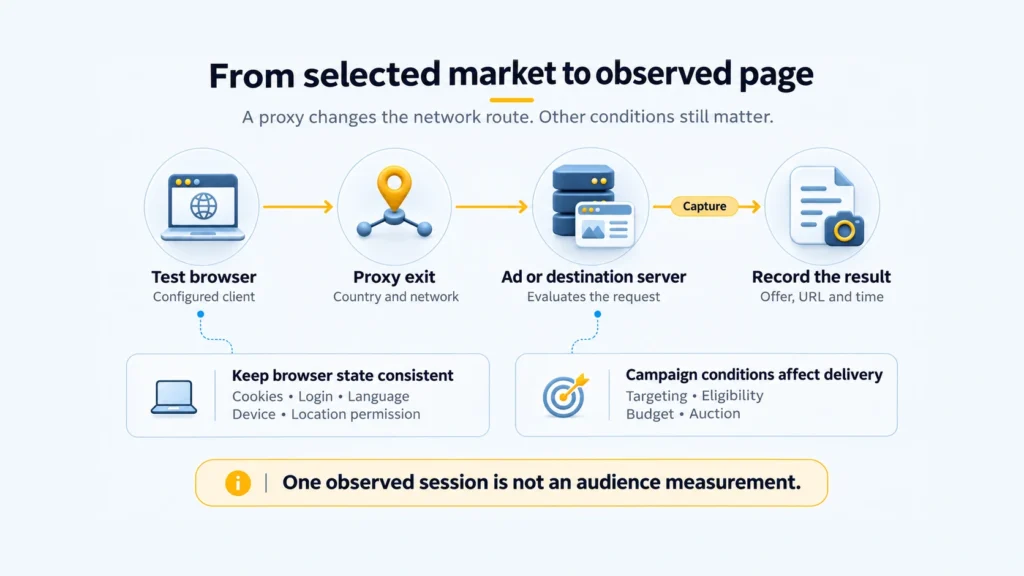
| Signal | Changed by the proxy? | Control separately |
|---|---|---|
| Exit IP | Yes, for requests routed through it. | Confirm the observed exit and check routing exceptions. |
| IP-based location estimate | Indirectly: the destination evaluates a different IP. | Record the lookup result; the ad platform may classify it differently. |
| Cookies and login | No automatic reset. | Use a defined signed-in or signed-out state for each run. |
| Browser language | Not automatically in a normal forwarding setup. | Record language preferences and any explicit site-language choice. |
| Device and viewport | No. | Specify the browser, device, and page dimensions being tested. |
| Location permission and device coordinates | The proxy does not itself change permissions or GPS coordinates. | Record whether the site can request device location. |
Two lookup tools may agree on Germany and name different cities. MaxMind documents variations in accuracy by network and region, as well as differences between providers’ databases. For a city-level brief, save the disputed classifications. An IP lookup cannot locate a visitor’s home.
What Can a Location-Based Ad Check Actually Verify?
Compare the ad’s promise with the page that opens. For example, a UK discount might lead to the correct product but disappear on arrival. Save the advertised terms alongside the final URL, price, and product availability.
For a placement review, widen the capture to include the surrounding publisher content. That lets the reviewer assess where the offer appeared as well as what it said.
Viewability needs measurements of the ad’s visible area over time. A still image cannot supply the duration. Checking whether the wider campaign received genuine traffic takes additional measurement too; a browser visit cannot establish who generated the other impressions.
Ad verification companies may provide those broader services. A proxy supplier provides network access for the checks. When choosing a measurement service, review the metrics and environments it actually covers; MRC accreditation listings distinguish between them.
Which Proxy Type and Session Mode Fit the Check?
Choose a network that fits the audience condition you need to examine, then choose how long the exit should remain consistent. Geographic coverage and session continuity solve different problems.
| Task | Suitable option | Trade-off |
|---|---|---|
| Check an offer aimed at a country or city. | Residential exits available for that area. | Check the city assigned to each exit when the brief calls for more than country-level coverage. |
| Repeat a destination check after a site update. | A static ISP address kept for both runs. | Useful for comparing releases from one network address; sample other exits separately to broaden coverage. |
| Check a destination from a particular mobile operator’s network. | A proxy exiting through that operator. | Test the app or phone environment too when the fault concerns in-app behavior or mobile layout. |
| Test redirects or availability from a hosting network the site accepts. | A datacenter proxy. | It can cover that technical check; use a consumer-network connection separately when that is the audience condition under investigation. |
For a page load followed by several redirects, keep the exit consistent. Changing it between steps makes a regional comparison harder to interpret. A sticky session is intended to retain an exit for a period; a residential peer can disconnect, so record the actual exit rather than assuming continuity.
Save the complete sequence before changing exits. If the IP changes between the first page and its redirect, repeat that run.
How Do You Run a Repeatable Location-Based Check?
Define the Market and the Expected Result
A useful brief names an observable outcome: “The UK campaign link should open the UK store, display GBP prices, and retain the campaign parameters.” Add the starting URL or placement, device, language, and time window.
Use Google’s Ad Preview and Diagnosis to look for your own Search ads. It can explain why an ad is absent and avoids the impressions your manual searches would add. Keep the preview findings beside your destination-check notes.
Use approved preview or test links for destination checks when available. If you open a landing page directly, label the observation as a destination check: it does not demonstrate that a paid ad appeared or that its full click path worked.
Confirm the Exit IP in the Same Browser
Configure the proxy, then open MangoProxy My IP in that browser. Read the public address, Your Location, and Provider fields before collecting campaign evidence.
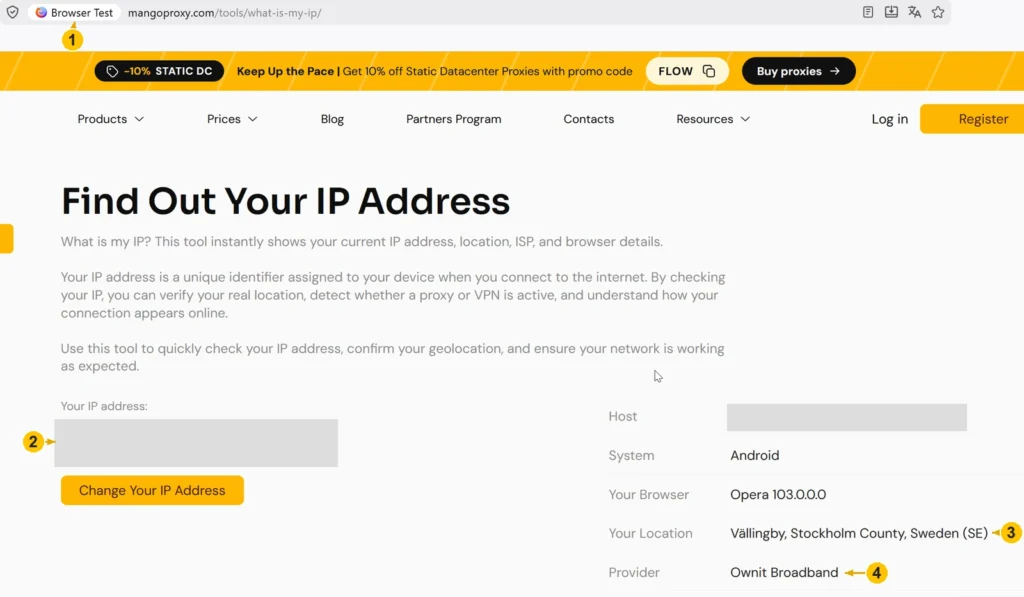
In the example screen, the location field reads Sweden and the provider is Ownit Broadband. Read them together with the public IP when checking your chosen route. The screen comes from an earlier browser session and shows the IP tool’s output, with no ad placement or campaign result.
Save the address privately with your run identifier. If the store later opens an unexpected country version, inspect the browser’s routing rules. My IP and the store can take different routes if a domain rule sends one of them directly.
Keep the Session and Browser State Consistent
For both markets, decide whether the browser starts clean or carries saved site data. Use matching login and consent choices, language, viewport, and location permission. A fresh profile suits checks without saved site preferences; use a separate run if you need to investigate a returning customer’s state.
An English page on a German exit calls for a separate language check. Hold the exit fixed and change the language preference, then compare. Look for a saved country choice or a market-specific starting URL before attributing the result to the proxy.
Capture and Compare the Evidence
Use one run identifier to connect the following records:
1. Date, time, expected market, and observed exit country.
2. Browser/device details and the starting state described above.
3. Campaign, creative, or placement IDs that let the owner identify what you checked.
4. Starting and final URLs, with the redirect steps between them.
5. A screenshot of the offer and its language and currency, plus the question to investigate.
Select Preserve log in Chrome’s Network panel before opening the link. Requests will remain available as you move between pages. Review any export for tokens and personal identifiers before sending it; keep the original private.
If another IP check reveals a changed exit, mark that run as interrupted and start again. Save the two records separately so the reviewer can tell which requests belong together.
Why Can the Ad or Landing Page Differ from What You Expected?
Use the campaign account to investigate a missing ad. For a wrong destination, follow the browser requests to see where the path diverges from the brief. Buying another IP before identifying that difference may leave the cause untouched.
| Observation | Possible explanation | Next check |
|---|---|---|
| Your ad is absent from the loaded page. | The campaign may be outside its schedule, out of budget, ineligible, or unsuccessful in that auction. Some formats also have frequency limits. | Look for a delivery explanation in the platform account before replacing the exit. |
| You receive the ad while outside the campaign’s intended country. | In Google Ads, an interest in the destination can make someone part of the target audience. | Check Presence or Interest versus Presence in the campaign’s location options. A travel campaign may deliberately reach people researching a destination from abroad. |
| The country version or currency is wrong. | A saved market choice, browser language, regional URL, or IP classification may influence the page. | Compare clean, equivalent browser states and change one setting at a time. |
| The final domain or offer is unfamiliar. | A market-selection rule or tracking redirect may send the browser along the wrong path. The redirect could also be unwanted. | Compare the recorded hops with the path approved by the campaign owner. |
| The exit differs when you check it again. | Rotation, session expiry, or a disconnected residential peer may have changed the address. | Review how the session was generated and repeat from a newly verified exit. |
Practical Example: One Store, Two Markets
Use a fictional online store advertising in the UK and Germany. Its test brief expects UK visitors to receive GBP prices and German visitors to receive EUR prices. The following results are illustrative, not measurements from a MangoProxy test.
Run A uses a UK exit, a fresh signed-out browser state, English preferences, and denied device-location permission. The approved test URL opens the UK store in English with GBP prices.
Run B uses a German exit with equivalent starting conditions, including English preferences. The same starting URL opens the German store with EUR prices, while the interface remains in English.
Run C repeats the German route with a fresh equivalent profile and German language preferences. The interface now appears in German, while the destination market and currency stay the same.
Expected: The UK route opens the GBP store; the German route opens the EUR store. Language is checked in a separate comparison.
Observed in this hypothetical example: A and B reach different stores despite matching English preferences. Changing to German in C affects the interface language without changing the store or currency.
Interpretation: Market and language selection deserve separate checks. On a live store, its configuration would need to confirm what caused each change.
Next step: Send the recorded URLs to the store team for comparison with its market and language settings, then repeat the affected checks.
Suppose B instead ends at the UK store. Save that final address and its redirect path for the store team: the German route did not produce the destination specified in the brief. You would still need a separate placement check to investigate how the German ad was served.
Choose a Proxy Location for Your Next Check
Start with the markets and network conditions in your test brief. MangoProxy Residential Proxies offer geographic targeting for regional checks. Use the first run to confirm the exit and the comparison fields. Then apply the same procedure to the remaining markets.
Glossary
Exit IP: The public IP (Internet Protocol) address used by the proxy when connecting to the destination.
Geotargeting: Location-based rules for selecting an audience or local content.
Sticky session: Reusing an exit for a session, within the provider’s limits and the peer’s availability.
ISP: Internet service provider.
GPS: Global Positioning System, used to determine position.
Viewport: The part of the browser window available to the page.
Geolocation API: A browser feature through which a site requests device location with permission.
Creative: The ad material: its text, image, video, or a combination of these.
Redirect: A response or page action that sends the browser to another URL.
Viewability: An ad’s measured on-screen visibility, including area and duration.
MRC: Media Rating Council, which publishes measurement standards and accredits specific services.
Final Thoughts
Put the advertised terms and the destination screenshot in the same handoff. Include the browser state and exit used for that run. The campaign or store team can then investigate a specific failed expectation instead of trying to interpret “the ad looked wrong.”
Frequently asked questions
Here we answered the most frequently asked questions.
Can a Proxy Help Me Check Ads Without Logging into an Ad Account?
Yes, for placements and pages available to signed-out visitors. To explain a missing ad, ask its owner to check eligibility, budget, and delivery reports. A public page visit does not give you access to those account records.
Can a Mobile Proxy Replace a Real Phone for In-App Testing?
No. It supplies a mobile-network exit, while a native app has its own runtime and advertising integrations. Chrome’s device emulation is also an approximation. Use the relevant app and device environment when the question concerns in-app behavior.
What Should I Ask Ad Verification Companies About Geographic Coverage?
Give the provider your actual market list and ad formats. Ask which combinations it can measure, what happens when a location is unavailable, and whether a discrepancy report includes the time, placement, and supporting capture. For accreditation, look up the particular service and metric in MRC’s listings, then confirm separately which countries your plan includes.
Does a Proxy Change the Location Permission Reported by My Browser?
No. Browser location permission controls access to the Geolocation API. Changing the network route does not itself grant permission or rewrite device coordinates. Record the permission state when comparing pages that request location access.