


Why a Proxy Works in Your Browser but Not in Another App
Published: ≈ 6 min read
Quick Answer
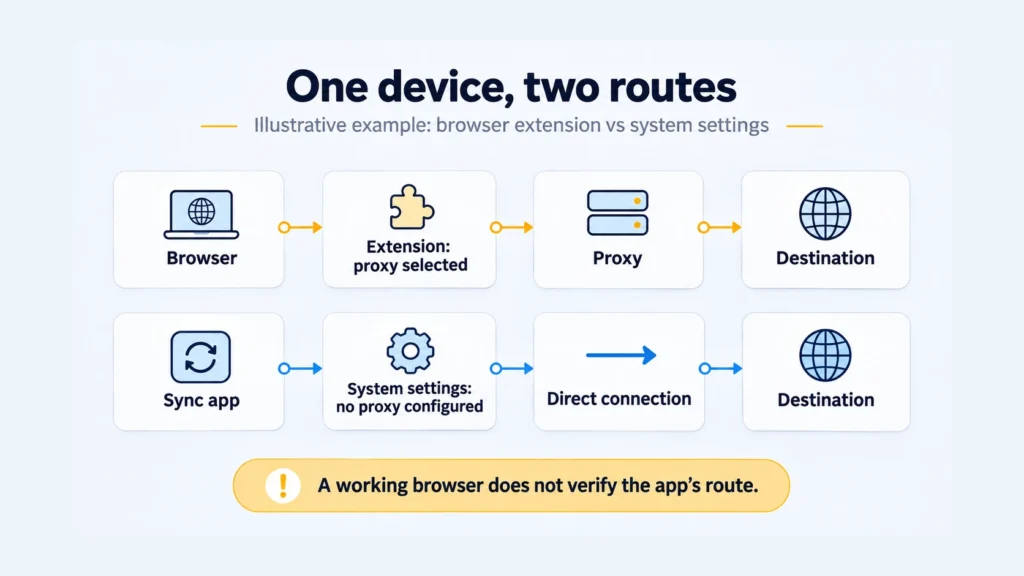
Browsers and apps may read separate settings and authenticate differently. Inspect the app’s actual inputs, supported protocols and full error message.
Key Takeaways
- Confirm that background services can retrieve the required login details.
- Review bypass rules for sign-in and synchronization separately.
- Match SOCKS5 capabilities to DNS and transport requirements.
- Repeat the required operation after confirming its exit IP.
Page Load Limits
A fresh request confirms only that URL and profile; a cached copy does not verify a current route.
Open MangoProxy’s What Is My IP in the relevant profile. Compare its result with the expected exit IP, allowing any variation permitted by your service. The supplied connection address may differ.
After web sign-in, identify the process performing synchronization.
Initial Comparison Checklist
|
Compare |
Browser |
App |
|---|---|---|
|
Configuration source |
System settings, manual entries, extensions or automatic selection |
Own fields or files, environment variables and any global preferences it reads |
|
Connection details |
Protocol, host and port |
Same details in the accepted syntax |
|
Proxy access |
Credentials or approved source IP |
Supported method with accessible credentials, or source IP permission |
|
Destination |
Successful page URL |
Failing destination, including hostname and port |
|
Execution context |
Device, network and signed-in user |
Location, launch account and background status |
|
Bypass and automatic selection |
Exceptions for that page |
Exclusions and any implemented automatic selection |
See our guide to locating a proxy’s host and port.
Settings Sources and Precedence
Follow the client’s precedence rules; global defaults do not always win.
Firefox offers system, direct, manual and automatic modes. Manual browser entries do not update global preferences. See Firefox Proxy Settings for setup steps.
The application configures WinHTTP. For a background service, inspect its logon account and profile availability.
Inspect the running instance’s environment. Changes in another terminal do not update it automatically. Correct the startup configuration, then restart the relevant component.
Check NO_PROXY and PAC handling separately. Compare exclusions with browser bypass rules per URL. PAC selects routes without relaying traffic; unevaluated scripts cannot substitute for explicit endpoint details.
Locating the Failure
Authentication
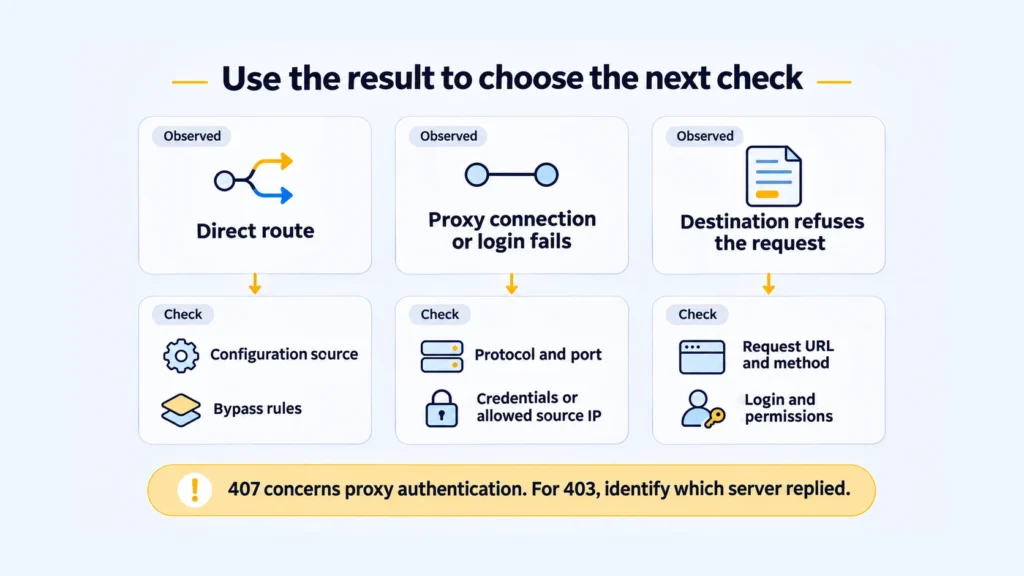
HTTP 407 requests proxy authentication. Successful retries resolve the challenge. Inspect offered methods and supplied credentials before diagnosing a password error.
Follow the client’s escaping rules for URLs containing login details; delimiter characters can alter parsing. Fill separate username and password fields directly, without automatically applying URL encoding.
For IP allowlisting, verify the source seen by the proxy. Home and remote runs may require different permissions.
Protocol and Port
Match the provider’s type and port exactly: HTTP and SOCKS5 exchanges are not interchangeable.
An HTTP proxy can tunnel website TLS after CONNECT succeeds. The HTTPS variant additionally encrypts communication with the client. Check the supplied endpoint’s type.
DNS and Certificates
Identify the unresolved name: proxy hostname or target domain. Chrome delegates SOCKS5 destination lookup to the intermediary. Python Requests selects local resolution with socks5 and remote resolution with socks5h. These labels describe library behavior, not different SOCKS versions; verify accepted notation before reuse.
For certificate errors, locate the affected TLS leg. Inspect the certificate and the verifying client’s trust store, including any approved corporate inspection authority. Ordinary CONNECT tunneling without inspection requires no separate proxy certificate for website verification.
Disabling validation hides verification failures without correcting underlying trust or name mismatches.
Task Failures
Uploads and synchronization can require different URLs, HTTP methods or permissions from a homepage fetch. Compare these for the specific task.
A saved browser login does not guarantee synchronization permissions. Identify who returned 403: the target service or proxy. This response does not establish a reachability failure.
For UDP-based calls, verify support in both the application and the intermediary. SOCKS5 specifies UDP relaying; Chrome’s implementation handles TCP-based URL requests only. Successful web fetches do not validate voice channels.
Verifying the Fix
Reproduce the original problem, such as an interrupted file-list refresh. Complete the comparison table from effective runtime values. Save the full error, nested causes and a timestamp with time zone.
Next, correlate that timestamp with any available receiver logs. Establish which stage completed: initial contact, tunnel acceptance or forwarding. Interpret an IP-checking result only for the exchange sent to that checker.
Change one value and retest. For missing controls or unclear routing, consult the developer. Assess external routing tools for traffic coverage, authentication and protocol compatibility.
Practical Examples
These examples are hypothetical.
An Extension and a Sync Client
Chrome uses the extension’s selected proxy; the sync utility still connects directly. Enter the supplied connection details in the utility’s own configuration, then repeat the transfer.
Foreground Success, Background 407
Foreground refresh: a password prompt appears and the file list loads. Background retry: HTTP 407; the password is unavailable. Both reach the same proxy. Configure noninteractive authentication for the service and rerun.
SOCKS5 Name Resolution
Chrome loads a page through SOCKS5; Requests fails during destination-name lookup. Diagnostics identify local resolution. With SOCKS dependencies installed, choose socks5h if lookup must occur at the intermediary. The change affects DNS placement, not the exit server.
Information for Support
Send MangoProxy support the completed comparison, diagnostic notes and exact outcome of each attempt. Include software names, versions and operating systems.
Redact passwords, access keys and other secrets before sharing material.
Glossary
Proxy: server forwarding a client’s traffic.
SOCKS5: proxy protocol for TCP connections and UDP relaying; feature coverage depends on implementation.
Exit IP: source address observed by the destination after proxying.
DNS: Domain Name System; here, resolving domain names to IP addresses.
PAC file: script choosing a proxy or direct access for a URL.
HTTP CONNECT: method requesting a tunnel to a specified host and port.
NO_PROXY: environment variable listing destinations to reach directly in supporting software.
WinHTTP: Windows component exposing HTTP-request functions for applications and services.
Final Thoughts
Document the fix, execution account and effective values. Retain that record for restarts and upgrades.
Frequently asked questions
Here we answered the most frequently asked questions.
Will Reinstallation Help?
Reserve reinstallation for verified file damage or developer advice. Simultaneous changes can obscure diagnosis.
Why Did the Proxy Stop Working After an App Update?
An update may change accepted schemes, configuration precedence or certificate handling. Compare release notes against the saved working setup; timing alone does not establish an update defect.
Should I Disable Security Software?
Keep protection enabled. Filter its logs by process, destination and timestamp; discuss any confirmed blocking rule with the administrator.
Can Failure Trigger Direct Access?
Fallback rules may stop the operation, select another endpoint or allow direct access. Reproduce a controlled failure and verify any required block remains enforced.
Is Increasing the Timeout Enough?
Only when the deadline caused the failure. Identify the unfinished operation first. Extra time will not supply credentials, repair a protocol mismatch or override a bypass rule.