


SSL/TLS Handshake Failed Through a Proxy: Common Causes
Published: ≈ 15 min read
Quick Answer
A proxy can accept a tunnel request and still leave you with an SSL/TLS handshake failure. The next exchange may stop because a certificate check fails or the two peers cannot agree on security settings. An incorrect proxy scheme can stop the attempt even earlier: a plain HTTP port cannot handle a client that starts by speaking TLS to it.
Use the log to locate the failed exchange. For an HTTPS proxy, its own TLS connection comes before CONNECT; for the website, negotiation happens beyond the accepted tunnel. Check the named peer, the certificate verdict and any TLS alert at that point. An unexplained disconnection needs investigation too, but supplies no certificate verdict by itself.
Key Takeaways
- Read the proxy URL and website URL separately. They describe two different connections, so their schemes need not match.
- Choose the CA option for the failing connection: –proxy-cacert for the HTTPS proxy, –cacert for the destination reached through it.
- Compare the browser’s selected proxy and trust source with the application’s before treating their results as equivalent.
- Keep certificate verification enabled for the repaired request. Passing only with verification disabled does not establish the endpoint’s identity.
Where Does the TLS Handshake Take Place?
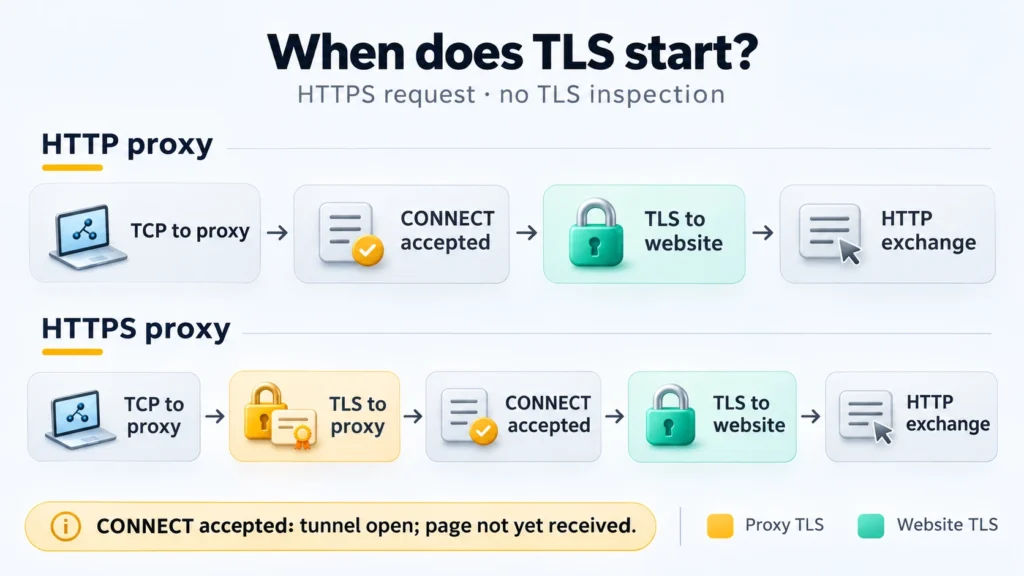
The proxy transport determines the order of the exchanges. A plain HTTP proxy opens a tunnel before TLS to the website can begin. An HTTPS proxy must first complete its own TLS exchange with the client, before it can accept the tunnel request.
Once connected to the proxy over TCP, the client asks for a tunnel by sending CONNECT. An address such as example.com:443 tells the proxy where that tunnel should lead. The proxy must accept the request before the client proceeds with TLS along the new path. This sequence follows the HTTP semantics of CONNECT.
A 200 response to CONNECT does not mean the website’s certificate has been accepted. A 407 response asks for proxy authentication; that exchange needs to be completed first. If the tunnel has not been established, adding a root CA certificate for the website will not resolve the failure observed at this stage.
When the proxy URL starts with https://, the client verifies the proxy first. A rejected proxy certificate stops the attempt before CONNECT and before the website’s certificate is presented. Once the tunnel is open, the client checks the TLS connection to the destination.
TLS inspection changes this arrangement. A corporate gateway or traffic inspection tool can terminate TLS and present a certificate for the website issued by its own certificate authority. The intermediary then establishes a separate connection to the website. A plain tunnel instead carries encrypted traffic without decrypting it.
Does an HTTPS Website Require an HTTPS Proxy?
No. The client needs the correct protocol for each connection. HTTPS in the destination URL does not automatically require https:// in the proxy URL.
If the client starts TLS on a port where the proxy expects plain HTTP, the two sides exchange incompatible data. Some TLS libraries report wrong version number in this situation. Despite that wording, the first things to check are the proxy scheme and port.
Check the connection details supplied for that endpoint: which protocol does this particular host and port support? A port number or a label such as “HTTPS traffic” is not enough to choose the scheme. If you need to locate the active settings, use How To Find Your Proxy Server Address and Port, then compare those values with the application’s configuration.
A SOCKS5 proxy starts with its own protocol negotiation rather than HTTP CONNECT. Configuring an HTTP proxy against a SOCKS port will not become valid by adding a certificate. The rest of this article uses HTTP and HTTPS proxies so that the logs remain comparable.
Why Does the Browser Work While the Application Rejects the Certificate?
The two clients may use different sources of trusted certificates. They may also take different routes. Check those differences before changing certificates without a clear reason.
The client needs to validate a certificate path to a trusted certificate authority. It must also check the requested hostname and certificate validity period. A self-signed certificate, or one issued by an authority the client does not trust, does not become trusted merely because a proxy is involved. Labels such as SSL certificate error or invalid SSL certificate cover several possible failures; the detailed message identifies the check to investigate.
For example, a browser on a corporate network may already trust the authority used for TLS inspection, while the application reads its own CA file. Find out where that application gets its trusted authorities and whether a setting overrides that source. A successful browser check does not change another client’s trust configuration.
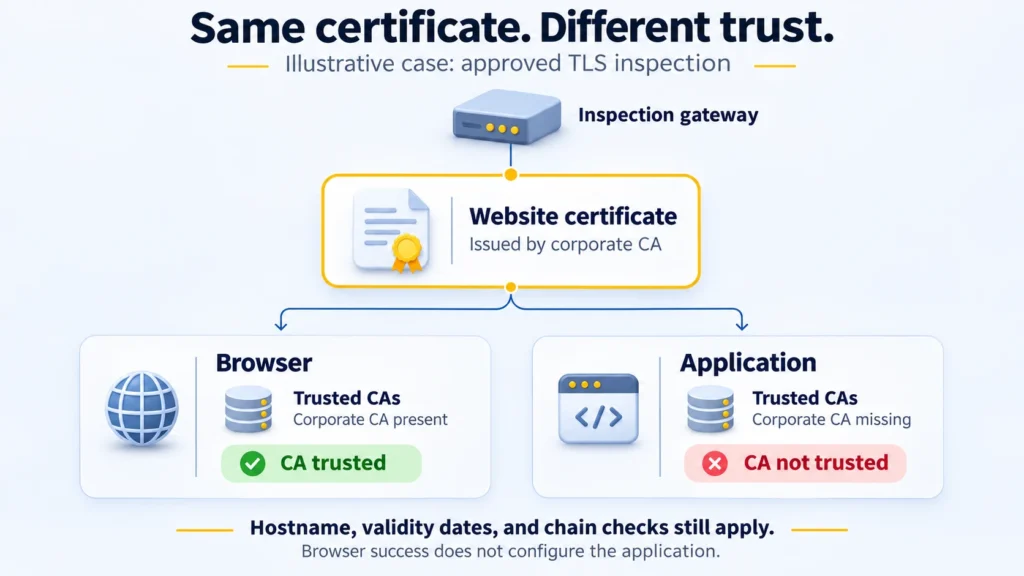
Compare the certificate issuer and chain seen by the application with what you expect for that connection. An unexpected issuer is a reason to investigate inspection, rather than proof of an attack or a broken proxy. For approved corporate inspection, obtain the CA certificate from the administrator and configure trust in the relevant client. Avoid adding an arbitrary certificate from an error message to the system trust store.
A missing intermediate certificate needs attention from the operator of the TLS endpoint serving the chain. With a plain tunnel, that will usually be the website operator; with inspection, it may be the intermediary. Adding a new root certificate on the client should not substitute for fixing an incomplete server chain.
An expired or not-yet-valid certificate message calls for comparing the certificate dates with the clock in the environment running the application. The time zone alone does not invalidate a certificate; the actual current time must be correct. If the certificate has expired, the operator of the endpoint presenting it needs to renew it.
The client may also check whether the certificate has been revoked. For example, cURL with Windows Schannel checks revocation, and unavailable revocation information can cause a separate verification failure. Adding a trusted CA does not automatically satisfy every other certificate check.
In cURL, the trust option depends on which connection is being verified:
|
Connection being checked |
Certificate presented to the client |
cURL option for a custom CA file |
|---|---|---|
|
Website through a plain HTTP proxy |
The website certificate, or one presented by an inspecting intermediary |
–cacert |
|
HTTPS proxy itself, before CONNECT |
The certificate for the proxy endpoint |
–proxy-cacert |
|
Website inside an HTTPS proxy tunnel |
The destination certificate on the inner TLS connection |
–cacert, independently of –proxy-cacert |
The cURL certificate verification documentation explains this separation. A custom file must contain the appropriate trusted authorities. It does not necessarily supplement every trust source in your cURL build; the behavior depends on the TLS backend and platform.
Can the Website Name or TLS Settings Cause the Failure?
Yes. A trusted issuer does not make a certificate valid for every hostname, and a valid certificate does not guarantee agreement on the rest of the TLS settings.
The Requested Name and the Certificate Name
If you replace a website’s domain with its IP address, the client checks the certificate against that IP address. A certificate covering only the domain will not pass that check. The server may also need SNI, the name sent during TLS negotiation so it can select the appropriate configuration and certificate. TLS server name extensions define that role.
Keep the domain name in the request URL and check that the application sends the intended name during the handshake. Changing the HTTP Host header alone does not fix SNI or the name used for certificate verification. That header is sent inside the secure connection, after the handshake.
If the failure started after a website migration, check which server the proxy route reaches and which certificate it presents. Different routes can reach different endpoints. Confirm a certificate mismatch from the actual connection rather than attributing every failure to an IP change.
Versions, Algorithms, and Client Certificates
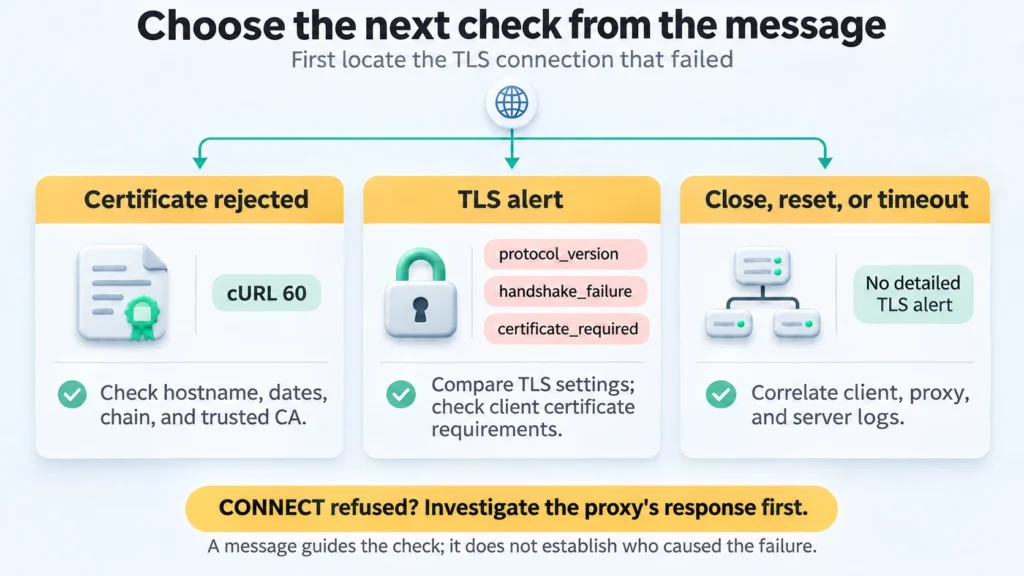
A protocol_version alert points to a version negotiation problem. The broader handshake_failure alert means its sender could not negotiate acceptable security parameters; it does not identify a single cause. Check the permitted TLS versions, cipher suites, and signature algorithms on both sides.
Check what the client build and its TLS backend support, then compare that with the requirements at the server or proxy endpoint. Leave retired protocols and weak algorithms disabled while making this comparison. If you restrict a version for diagnosis, follow cURL’s TLS version selection rules: –tlsv1.2 sets a minimum, while testing only TLS 1.2 also requires –tls-max 1.2. This pair controls TLS to the destination; consider TLS settings for the HTTPS proxy separately.
Also check whether the server requires a client certificate. Proxy credentials cannot replace it. Configure the certificate and private key issued for that service. The TLS 1.3 alert certificate_required means the server required a client certificate but did not receive one. The alert definitions appear in RFC 8446.
A reset or timeout does not explain why the TLS exchange stopped. Mark the last message in the trace, then check the endpoint and intermediary logs for that attempt. An endpoint may have ended the session, or the route may have been interrupted or filtered. Those observations alone cannot establish a CA problem or an exit-IP block.
Worked Example: The Browser Opens the Page, but the Proxied Request Fails
Consider a hypothetical case: a page opens in a browser, but an application reports a certificate error. The task is to find where their conditions differ and check the relevant trust configuration. This scenario is illustrative, not a report of a MangoProxy test.
Capture One Attempt with Certificate Verification Enabled
These examples require cURL 8.x with HTTPS support. No additional script is needed. The commands use Bash syntax. First, check the installed version and TLS backend:
bash
curl --version
Replace proxy.example.com:8080, USERNAME, and the page URL with your own values. The proxy hostname is a placeholder. When given only a username, cURL prompts for the password. If your connection permits access by source IP without a password, remove –proxy-user and its value.
bash
curl -q --verbose --show-error --silent \
  --proxy 'http://proxy.example.com:8080' --noproxy '' \
  --proxy-user 'USERNAME' \
  --connect-timeout 10 --max-time 30 \
  --output 'tls-body.html' --stderr 'tls-debug.log' \
  'https://example.com/'
The command requests the page and saves its body and diagnostic log in separate files. Running it again overwrites those files. The first option, -q, skips cURL’s default configuration file, and the empty –noproxy value clears proxy bypass rules for this attempt. Certificate verification stays enabled. The cURL verbose output guide explains the log and its markers.
Find the CONNECT response and the TLS exchange that follows it. Suppose the tunnel is accepted, then the client reports that it cannot find a trusted issuer for the certificate. This narrows the investigation to the chain and trust source for the inner connection. It does not yet establish that installing a corporate CA is the answer. First identify who presented the chain and which authority is supposed to validate it.
If a request using an https:// proxy URL fails before CONNECT, check the proxy’s own certificate. If CONNECT instead receives an access refusal, investigation of the destination certificate is premature.
Before sharing logs, remove passwords, authorization headers, cookies, and secret URL parameters. Basic authentication to a plain HTTP proxy does not encrypt the password on the client-to-proxy connection. Protecting that connection requires TLS to the proxy, supported by both the client and service, or another approved secure channel.
Compare the Route, Then Configure the Relevant Trust
If the network allows direct access, request the same URL without a proxy:
bash
curl -q --verbose --show-error --silent --noproxy '*' \
  --connect-timeout 10 --max-time 30 \
  --output 'direct-body.html' --stderr 'direct-tls.log' \
  'https://example.com/'
Keep both logs and compare the endpoints and certificates each request reached. Different outcomes do not, on their own, identify a faulty proxy. The extra route can lead to another server or pass through an approved inspection gateway. Include the browser’s actual proxy selection in the comparison as well.
For the next part of this example, assume the administrator has confirmed that inspection is intended and provided its verified CA certificates in trusted-ca.pem. Point –cacert at that file to validate the certificate seen beyond CONNECT:
bash
curl -q --proxy 'http://proxy.example.com:8080' --noproxy '' \
  --proxy-user 'USERNAME' --cacert './trusted-ca.pem' \
  --connect-timeout 10 --max-time 30 \
  --output 'trusted-body.html' 'https://example.com/'
Check that ./trusted-ca.pem can be read and holds the CA certificates approved for this connection. It should not contain a private key. If verification now succeeds, apply the corrected trust configuration in the original application using its supported settings. A successful cURL request does not change another program’s configuration.
An HTTPS proxy with a separate authority for its own certificate needs a different setup. In the following example, proxy-ca.pem applies to the proxy, while target-ca.pem applies to the inner TLS connection to the destination:
bash
curl -q --proxy 'https://proxy.example.com:8443' --noproxy '' \
  --proxy-user 'USERNAME' \
  --proxy-cacert './proxy-ca.pem' --cacert './target-ca.pem' \
  --connect-timeout 10 --max-time 30 \
  --output 'https-proxy-body.html' 'https://example.com/'
This command requires HTTPS proxy support in your cURL build and at the supplied proxy endpoint. Do not switch http:// to https:// merely to add a trust option. If the normal trust store already validates the relevant certificate, a separate CA file for that connection is unnecessary.
The code in this article is provided for illustration. It may behave differently or fail to run depending on your environment settings, software and library versions, or changes to the services and APIs it uses. Before using the examples, test them in your own environment and adapt them as needed.
Make the Support Request Specific
Identify the failing connection at the start of a MangoProxy support request: TLS to the proxy, or the exchange after CONNECT. Alongside the redacted trace, give the requested hostname, client version, proxy endpoint, and timestamp with its time zone. Leave credentials and session secrets out of the attachment.
An expired certificate presented by the website needs its operator’s attention. Trust in an approved inspection CA belongs in the application’s configuration, with help from the administrator. Name the rejected certificate in the request so these investigations can be directed to the right person.
Glossary
TLS: a protocol for secure communication. It provides encryption and integrity protection, and supports peer authentication.
SSL: the obsolete predecessor to TLS. The term “SSL certificate” remains common, although modern HTTPS connections use TLS.
TLS handshake: the exchange that prepares a secure connection. The peers select parameters, perform the required authentication, and derive connection keys.
TCP: the transport protocol used here to carry an ordered, reliable stream of bytes between applications.
HTTP: the application protocol used for web requests and the responses sent back for them.
HTTPS: HTTP exchanged within a connection protected by TLS.
CONNECT: an HTTP method that asks a proxy for a tunnel to a specified host and port.
SOCKS5: a protocol in which client and proxy agree on an authentication method before the client requests a connection to its destination.
Certificate authority, CA: an entity that issues and signs certificates. The client’s trust configuration determines whether it accepts that authority.
Certificate chain: certificates linked by issuer signatures, connecting an endpoint certificate to an authority the client trusts.
TLS inspection: examination of traffic after decryption at an intermediary. The client and website each have a separate TLS connection to that intermediary.
SNI: the TLS extension through which the client names its intended server. That name can guide the server’s choice of configuration and certificate.
Cipher suite: a named set of cryptographic algorithms chosen for a connection; the components of the set vary by TLS version.
Client certificate: a certificate used to authenticate a client to a server when the service requires that form of authentication.
PEM: a way to represent certificates and other cryptographic objects as text.
IP address: a network address used when delivering packets through the Internet Protocol.
Basic authentication: an HTTP authentication scheme that sends an encoded username and password. The encoding does not prevent someone from reading the credentials.
Final Thoughts
After making a change, repeat the original request with certificate verification enabled. Completing TLS does not establish that the entire operation succeeded; read the website’s response as well. Logs from before and after the change help show which stage the request can now complete.
Frequently asked questions
Here we answered the most frequently asked questions.
What Is the Difference Between cURL Errors 35 and 60?
Code 35 indicates a failure while establishing an SSL/TLS connection. With code 60, the client rejected the certificate being checked. The libcurl error reference lists both codes. Read the detailed message in either case: the number alone does not identify whether the certificate belongs to the website or the HTTPS proxy.
Why Does –insecure Not Resolve an HTTPS Proxy Error?
In cURL, –insecure controls verification of the destination, while –proxy-insecure controls verification of the HTTPS proxy. The failure may also be unrelated to certificates. These options do not repair trust; avoid leaving certificate verification disabled in a working connection.
Is Cloudflare Error 525 a Problem with My Client's Proxy?
According to Cloudflare’s error 525 documentation, this code reports a failed TLS handshake between Cloudflare and the website’s origin server. That is a different part of the route. If you receive this page, changing the local application’s trusted certificates does not address that failure. The site’s operator needs to check the TLS endpoint serving Cloudflare.
Should I Keep Retrying the Same Certificate Failure?
Repeating a request leaves a fixed verification failure in place when the certificate, requested name, clock and trust configuration have not changed. If some attempts pass, keep one successful trace and one failed trace, then compare the server and chain each reached. A hostname can lead to more than one endpoint, so alternating results call for a configuration comparison.