
Traceroute Online: Master Your Network Path Analysis
Traceroute Online: Check Network Path to Any IP or Domain
Quick Answer
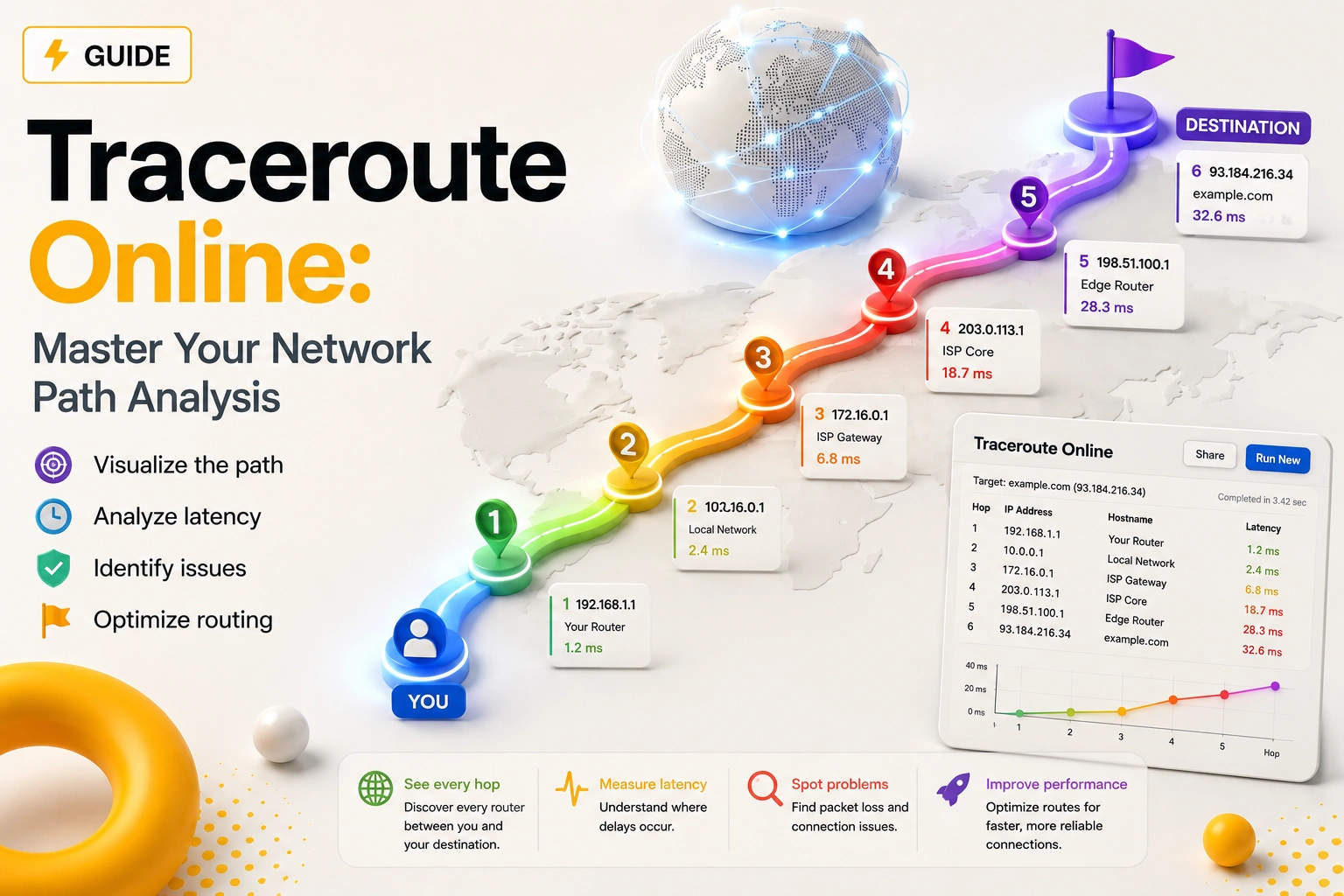
Traceroute Online is a diagnostic utility designed to map the specific trajectory that data packets follow from a server to a target IP or hostname. It records each “hop” through intermediary routers, logs Round-Trip Time (RTT), and exposes connectivity gaps. This allows network administrators and proxy users to pinpoint exactly where lag or packet loss originates.
Key Takeaways
- Hop-by-Hop Visibility: Track every router your data crosses from start to finish.
- Latency Troubleshooting: Isolate the exact network node responsible for high ping.
- Stability Monitoring: Identify packet loss at specific ISP handoffs or backbones.
- Routing Validation: Verify if your traffic is being blocked or diverted by an upstream carrier.
If your web application feels sluggish or a remote server connection keeps dropping, simple speed tests won’t tell the whole story. The issue usually hides within the complex web of routers between you and your destination. Traceroute Online serves as your network’s X-ray machine.
Using the IP Trace tool by MangoProxy, you can bypass the command line and get a visual breakdown of your data’s journey across the globe.
The Mechanics: How IP Trace Actually Works
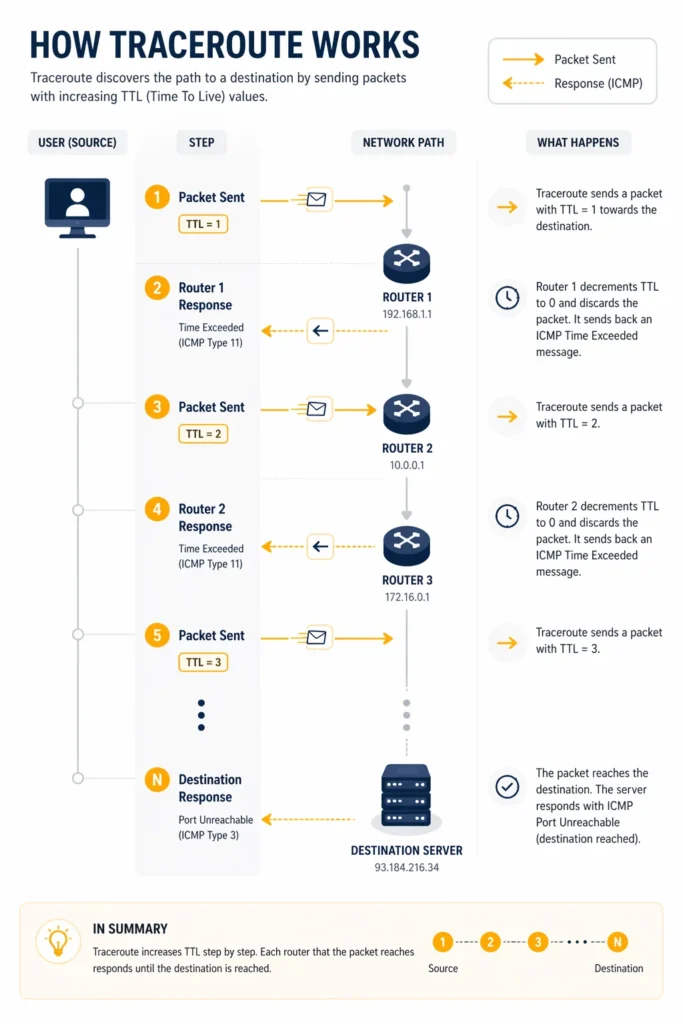
Traceroute doesn’t just measure distance; it manipulates the “TTL” (Time To Live) field within IP packets to force a response from every router on the path.
- The Probe: Our system sends a series of packets with a TTL starting at 1.
- The Decay: As each router receives the packet, it decrements the TTL. When it hits zero, the router discards the packet and sends an “ICMP Time Exceeded” message back to us.
- The Identity: This return message reveals the router’s IP, which we then log as a “Hop”.
Pro Tip: If you encounter * * * in your results, don’t panic. This often indicates a router is configured to drop ICMP probes for security, even though it’s successfully forwarding your main traffic.accessible from outside the system.
Deciphering the Trace Data
Our tool presents results in a structured table designed for quick diagnostic reading:
| Metric | Context | Interpretation |
| Hop Index | The step count in the chain. | Expect 7–18 hops for most global routes. |
| IP / Hostname | The identity of the node. | Tells you which carrier (Level3, Tata, Cogent) owns the link. |
| Geo-Location | Physical site of the router. | Large jumps in RTT often align with transoceanic jumps. |
| Loss (%) | Dropped packet ratio. | High loss at the final hop means the target is unreachable. |
| RTT (ms) | Total signal round-trip time. | Sudden spikes (e.g., 30ms to 200ms) signal a congested link. |
Strategic Use Cases for IP Tracing
1. Identifying “Bad Neighbors” in Routing
If latency remains low until it reaches a specific peering point and then triples, you’ve found a bottleneck. This is common when ISPs have poor peering agreements. With this data, you can contact support with proof of where the lag starts.
2. Auditing Proxy Performance
When running Residential Proxies, the route is rarely a straight line. Tracing helps you confirm that your proxy isn’t adding 500ms of latency by routing your “local” US traffic through a European server by mistake.
3. Bypassing “Silent” Blocks
Sometimes a website isn’t down; it’s just blocking specific IP ranges. If your trace reaches the last few hops before the destination and then dies, you’re likely being filtered by the target’s firewall or an anti-DDoS layer like Cloudflare.
Advanced Workflow: Proxy Optimization
When managing high-volume scraping, connection speed is everything.
- Optimal Route: Minimal hops, RTT increases proportionally with distance, 0% final loss.
- Sub-Optimal Route: Loops in the path (traffic going back and forth) or high jitter. If you see this, use MangoProxy to switch to an ISP Proxy for a more stable, “static” route that bypasses residential instability.
Glossary
- Hop: A single transition between routers.
- RTT: Time in milliseconds for a packet to go out and come back.
- TTL: An IP packet value that limits its lifespan across the network.
- ICMP: The protocol used by Traceroute to communicate operational info.

Frequently asked questions
Here we answered the most frequently asked questions.
Why is my trace results exportable?
We offer .txt and .csv downloads because technical support teams often require raw trace data to investigate routing issues.
Can a domain name change the route?
Yes. Different domains (e.g., google.com vs. google.co.uk) resolve to different IPs, often leading to entirely different geographic paths.
Why do some traces take 10 seconds and others 30?
The tool waits for each hop to respond. If routers along the path are slow or non-responsive, the tool must wait for a timeout before proceeding.
I usually rely on Ping first, but an online traceroute is a nice addition when you want to see where latency starts to build up. Definitely a handy tool to keep around.
Always easier to just drop a host into an online tool than firing up the terminal every single time, especially when testing from different locations
Good write-up! Most people freak out when they see asterisks, completely forgetting that half the intermediate routers just drop ICMP packets on purpose.