


WebRTC Leak Explained: What It Can Reveal About Your Network
Published: ≈ 6 min read
Quick Answer
Browser calls and direct data transfers can use WebRTC. When preparing a connection, the browser gathers possible addresses it can use. A page may receive your internet provider’s public IP among them, even when an ordinary IP check shows your proxy. That disclosure counts as a leak when you expected the original IP to remain hidden.
A report may also contain an address from your home network or a relay used for communication. Neither entry, on its own, shows that your original public IP was disclosed.
Key Takeaways
- A page can use your proxy while connection setup takes another route.
- A name ending in .local can replace a local IP. You still need to check any public entries in the report.
- Disabling this technology can interrupt browser calls. Try a browser call afterwards if you rely on that feature.
Why Can the Browser Use Another Route?
The browser needs possible ways to reach the other participant. ICE gathers these options, called candidates. Some candidates come from the device itself. A STUN reply tells the browser which address the server saw. For a relayed connection, TURN can provide an address at the relay. The browser checks candidate pairs using ICE to establish a connection.
A proxy configured for web pages may not cover that process. RFC 8828 describes a setup where a conventional proxy is configured but direct internet access remains allowed. STUN can then reveal the original public IP.
VPN settings matter too. An exclusion can leave the browser using your regular connection even with the VPN switched on. Browser controls and system routes determine which paths remain available.
Which Entries Deserve a Closer Look?
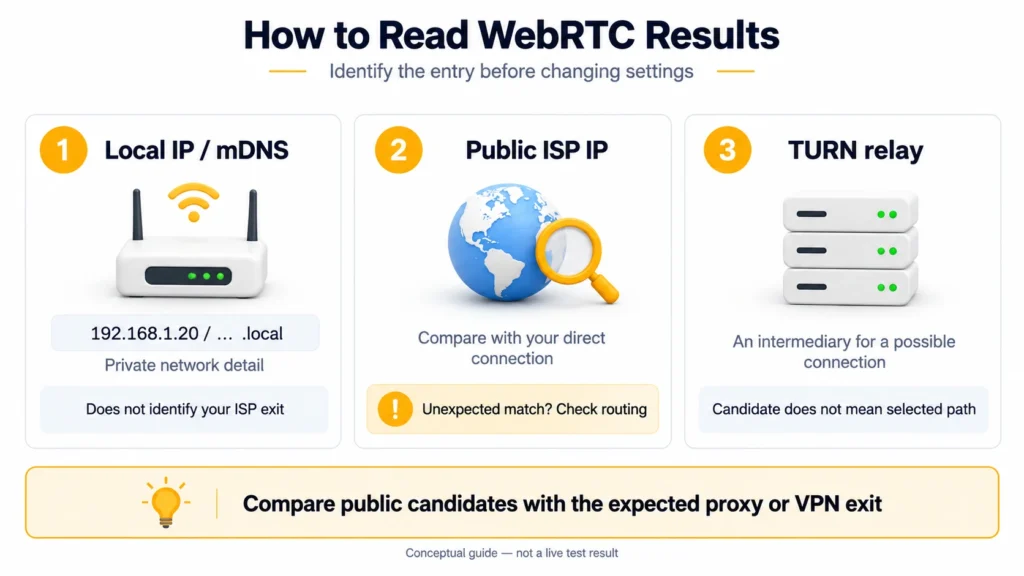
192.168.1.20 could appear in your report and in a report from someone across the country: private networks can reuse that address. It is a private entry, not the public IP of either internet connection. With mDNS, a .local name can take the place of this numeric entry.
Your ISP’s public IP lets a site associate your original connection with a session using a proxy. This is the entry to investigate when hiding that connection was your aim.
A TURN address belongs to a relay server. It may differ from the IP shown by an ordinary check without indicating a leak. A relay candidate in the list also does not prove that the connection used it.
Do not count every listed candidate as a leak. Identify their types first. If nothing appears, all you know is that the page received no candidates on that attempt. The empty report does not explain the cause.
How Do You Trace the Exposed Connection?
Use the browser profile in which you noticed the problem. Moving the check to another profile could mean testing a different proxy configuration.
- Record the IP shown for an ordinary web request and the public entry you want to investigate. Save its candidate type too, if the tool provides one.
- Look for the proxy or VPN exit you expected. An additional public entry needs an owner. Check it against your connection’s public IP without the proxy, if you already know that value. If they match, the browser reported your direct connection’s public IP.
- Open the proxy settings for this profile. VPN users should also look through the client’s exclusions for the browser. If these are as intended, review any leak protection options and browser controls for peer connections.
- Apply the setting and rerun the check before touching anything else. This keeps the comparison tied to one adjustment.
Illustrative Example: Reading Three Entries
Suppose an ordinary IP check shows the configured proxy, while a detailed WebRTC report contains three entries:
- 192.168.1.20 – an address on the local network.
- A different public IP – matching the connection used without the proxy.
- A candidate marked relay – a TURN server address.
The second entry discloses the original connection even though the web request used the proxy. Neither the private entry nor the relay identifies that original public IP. The three entries here are a worked example; no particular service was tested for this scenario.
Checking with MangoProxy
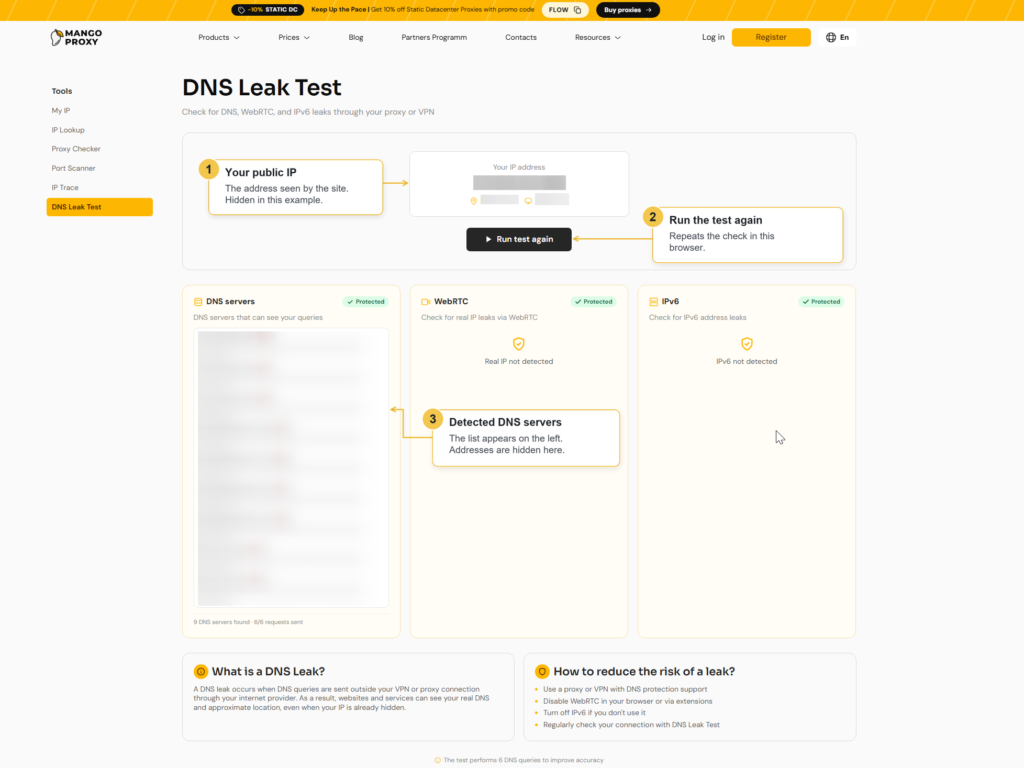
Open MangoProxy’s DNS Leak Test in that same browser profile and run it. Look at the WebRTC card for the outcome. Here you get a status rather than the detailed list in our example. Save that status for comparison after your next settings change. DNS and IPv6 have their own cards on the page; read those as separate test results.
Glossary
WebRTC: the browser technology used for calls and direct data exchange.
IP address: an interface’s numerical address on an IP network.
Proxy: an intermediary that receives client traffic and forwards it on.
VPN: short for virtual private network. Its client configuration determines which traffic enters the tunnel.
DNS: Domain Name System. A DNS lookup finds the IP address associated with a domain name.
IPv6: Internet Protocol version 6; its addresses are 128 bits long.
ISP: Internet Service Provider, the company supplying your internet access.
ICE and ICE candidate: a mechanism for finding and checking connection options, and an individual address option.
STUN: a protocol that lets a client discover its address as seen from outside the network.
TURN: a protocol for relaying data through an intermediary server.
mDNS: a local naming system; a browser can use such a name in place of a candidate’s numeric address.
Final Thoughts
The useful finding is a public IP you recognise from your direct connection. If the proxy check shows one IP and connection setup reveals your original one, investigate that route through the browser. Keep the earlier report handy when you test the revised settings.
Frequently asked questions
Here we answered the most frequently asked questions.
What location information does an exposed IP provide?
A lookup can suggest the ISP and an approximate region, but it is not a reliable way to find a home address. The private value 192.168.1.20 tells you even less about location: separate local networks can use it independently.
Can a page gather candidates without access to my camera or microphone?
Yes, candidate gathering can take place for a data connection without capturing sound or images. Blocking those devices therefore does not necessarily stop a page from receiving candidates. Browser settings and permission policies can still limit what is shared.
Does this result cover my other apps too?
It cannot tell you how they connect: you have checked one browser profile. A separate meeting app, for example, may use its own network settings.
Should I switch proxy servers after a leak?
Start by tracing the traffic that revealed the IP. If it bypassed the proxy entirely, choosing a new endpoint leaves that direct route in place. Correct the routing in your client and check the outcome before replacing the service.