


Why Am I Not Receiving Verification Codes? Check the Number, the IP and the Platform
Published: ≈ 8 min read
You enter a phone number, press “Send code” and wait. Nothing arrives, or the app says the code was sent and the inbox stays empty. Most people try the same number again, then a different one, and burn through attempts without knowing what went wrong. In practice there are only three places where an SMS verification code gets stuck: the phone number, the IP address you are connecting from, and the platform’s own rules. This guide shows how to tell them apart and fix each one.
Key takeaways
- If the platform shows an error before sending, the problem is usually the IP or the number type, not delivery.
- If the platform says “code sent” but nothing arrives, look at the number first: its range, its country and whether it was already used for that service.
- A datacenter IP, or an IP in a different country than the number, makes many platforms block or delay the code.
- Too many code requests in a short time trigger a cooldown; waiting is often the only fix.
- Some platforms send the code by voice call or inside the app instead of by SMS.
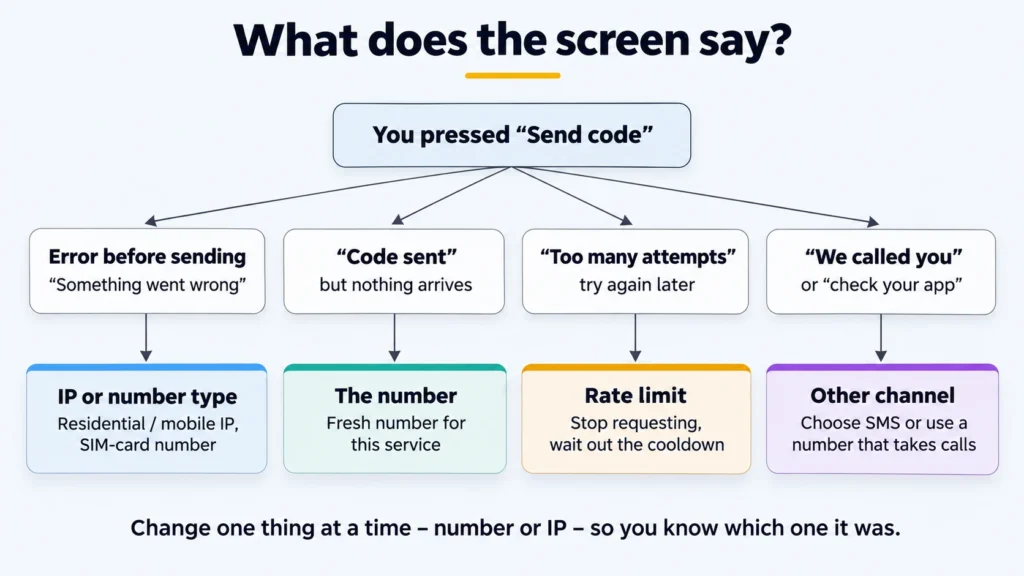
Quick diagnosis: what the symptom tells you
|
What you see |
Most likely cause |
What to do |
|---|---|---|
|
"This number can't be used" or "invalid number" |
The platform rejects the number range or type |
Use a number from a real SIM card, or another provider |
|
"Something went wrong" before any code is sent |
The platform distrusts the IP |
Switch to a residential or mobile IP in the number's country |
|
"Code sent", but nothing arrives |
Delivery to that number failed or was filtered |
Wait two minutes, then try a fresh number for that service |
|
"Too many attempts, try later" |
Rate limit on the account, number or IP |
Stop requesting; wait out the cooldown |
|
"We called you" or "check your app" |
The code went by voice call or to another device |
Choose "send SMS" if offered, or use a number that takes calls |
Cause 1: the phone number
Platforms do not treat all numbers the same. Before they send a code, many check what kind of number it is and how it has been used.
The number range is marked. Many low-quality virtual numbers come from ranges that platforms already know. The platform either refuses the number or accepts it and never delivers the code. Numbers from real SIM cards on mobile carrier networks are accepted far more reliably.
The number is public. Free numbers that anyone can open have usually been used for the same service many times. They are handy to receive SMS online for a quick test, but popular services often block them.
The number was already used for this service. A number can work for one service and be blocked for another. If a number has verified an account on that platform before, the next attempt is likely to fail.
The country does not fit. Some services only send codes to certain countries, and some treat foreign numbers with more suspicion.
How Anosim handles this: Anosim is a marketplace for phone numbers used for SMS verification. You pick the country, the service and the provider, and the provider selection shows whether a number is a SIM-card number or a virtual one. With a one-time SMS verification you get a number for one code within 20 minutes; if no SMS arrives in that time, the activation is refunded to your balance automatically. If a code does arrive but the platform demonstrably rejects it, support refunds it as well.
For an account you want to keep, a single code is not enough: the platform will ask again at the next suspicious login. Rent a number for one service instead, for example for WhatsApp verification, and the service on that number stays reserved for you. If you need one number for several services, rent a virtual phone number as a whole.
Cause 2: the IP address
Most people never connect a missing SMS with their IP address, but platforms do. The risk check runs before the SMS is sent, and the IP is one of its strongest signals.
Datacenter IPs look automated. A signup from a server IP range is often refused before any code is sent, or the code is silently held back. Residential and mobile IPs look like ordinary users. MangoProxy offers residential proxies with targeting down to city level and mobile proxies on carrier networks for exactly this reason.
The IP and the number are in different countries. A German phone number requested from a US IP is a classic risk signal. Keep the proxy exit, the number and the browser’s time zone in the same country.
The IP changes in the middle of the flow. If the IP rotates between “send code” and “enter code”, the platform may see two different users. Use a sticky session or a static ISP proxy for the whole signup.
Before you request the code, check which address the platform actually sees with MangoProxy’s What is my IP tool, in the same browser profile you use for the signup.
Cause 3: the platform
Sometimes the number and the IP are fine and the platform simply does not send an SMS.
Rate limits. Every platform limits how often a code can be requested, per number, per account and per IP. Each extra tap on “resend” extends the wait. After two failed attempts, stop and wait before trying again.
The code goes somewhere else. Telegram often sends the code to an existing session in the app first, and WhatsApp, Google and others may offer a voice call. If the code arrives by call, an SMS-only number cannot receive it. A Mobile VoIP number on Anosim is a rented number that also receives incoming calls, currently in Germany.
The account is under review. If the platform has already flagged the account, it may withhold codes altogether. A new number will not fix that.
A checklist before you request the next code
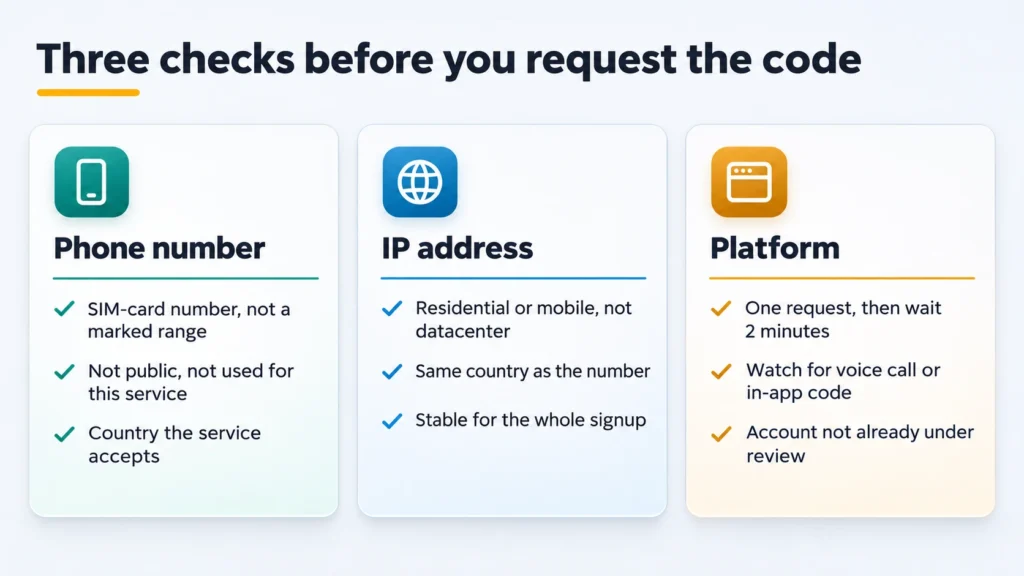
- Check the IP. Residential or mobile, in the same country as the number, stable for the whole flow.
- Check the number. Right country for the service, not public, not used for this service before.
- Enter the number correctly. International format with the country code, no leading zero.
- Request once. Wait at least two minutes before pressing “resend”.
- Watch for alternatives. Voice call, in-app message or email instead of SMS.
- Change one thing at a time. If the code still does not come, change either the number or the IP, not both, so you know which one was the problem.
For developers: testing OTP flows
If you test your own signup flow, a missing code is a test result, not a dead end. The Anosim SMS verification API lets your test script order a number, rent numbers and retrieve inbound SMS by polling; there are no webhooks, so poll with a timeout and record “no SMS” as a result of its own. An API compatible with the SMS-Activate standard is also available for existing tools. Run each test through a fixed proxy IP so that the network is not a hidden variable in your results.
What if you are travelling?
Codes often fail abroad because the home SIM has no roaming or the network is weak. Your regular SIM can stay in the phone while you buy an eSIM with a data plan for your destination; Anosim eSIM plans carry data only, so SMS codes still go to your regular or rented number.
Frequently asked questions
Here we answered the most frequently asked questions.
Why does the app say the code was sent, but I never get it?
The platform accepted the number but delivery failed or was filtered. This is common with public or heavily used numbers. Wait two minutes, then try a fresh number from a real SIM card for that service.
Can a proxy stop me from receiving SMS codes?
Not the delivery itself, but the platform’s decision to send. A datacenter IP or an IP in a different country than the number can make the platform refuse or hold back the code.
How long should I wait before requesting a new code?
At least two minutes for a resend. After several failed attempts, platforms often impose a cooldown of hours; further requests only extend it.
Why do I get a phone call instead of an SMS?
Some platforms switch to a voice call after a failed SMS or as their default. Choose “send SMS” if the option exists, or use a number that can receive calls.
Do I pay if no code arrives?
With a one-time SMS verification on Anosim, no: if no SMS arrives within 20 minutes, the activation is refunded to your balance automatically.
About the author: The Anosim team runs Anosim (anosim.net), a marketplace for phone numbers used for SMS verification, with numbers from real SIM cards and virtual numbers in many countries. They write about verification, account security and 2FA.