


Country vs City vs ASN Targeting: What Level of Proxy Targeting Do You Need?
Published: ≈ 7 min read
Quick Answer
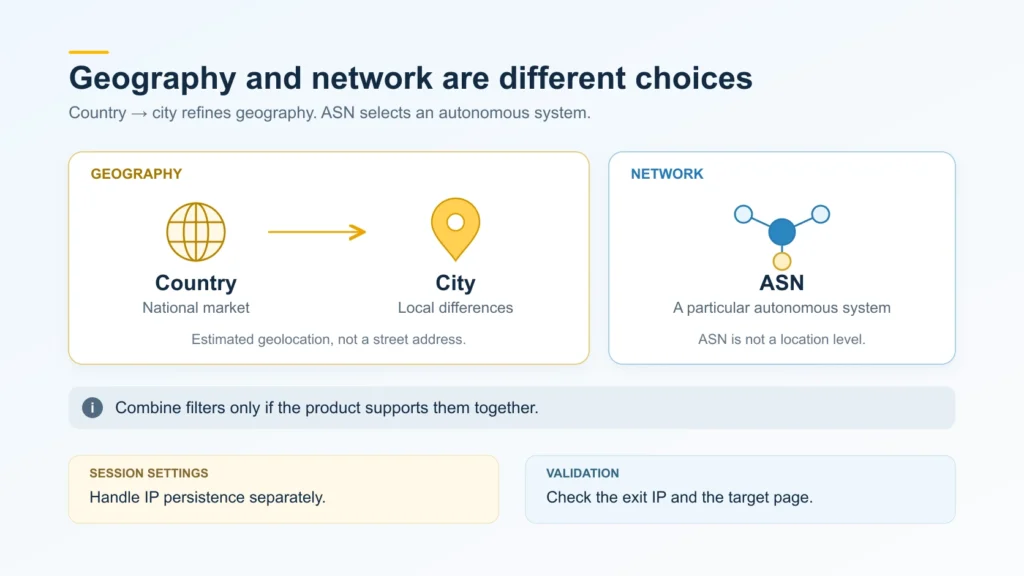
For a national website check, leave the city open. City targeting is for a local comparison. Use ASN targeting to choose an exit network. ASN stands for Autonomous System Number; it is a routing identifier, not a way to specify a smaller location.
Key Takeaways
- A country filter is enough if the task accepts any city and network within it.
- The IP lookup is only half the check. Try the target page too: it may use a different region from the one in the lookup.
- Configure IP persistence separately from targeting. An IP can change without leaving the selected country, city, or network.
When Is Country Targeting Enough?
For a national catalog check, an address from any city may do. There is no need to name a city unless the comparison depends on it.
The country label comes from the proxy provider’s location data. It applies to the exit, which is not necessarily the address you entered in the proxy settings. That address can be a gateway. Look up the IP seen by the receiving server instead.
When Does the City Matter?
City targeting gives you a way to separate local results within one country. Otherwise, the provider can choose an exit anywhere in that country’s available pool.
MaxMind explicitly says its data cannot locate a specific person or household, and may differ from other geolocation databases. An accuracy radius describes an estimated area around the coordinates. The point in the result marks that area’s center, not an exact device position.
An IP lookup can tell you whether a database places the address in Berlin. A street address needs a separate check of how the service records and verifies it.
Why Specify an ASN?
The ASN tells the service which network to choose an exit from. Country targeting alone will not select that network for you.
Several IP networks can share one defined routing policy and form an autonomous system. The ASN identifies that system. An operator’s name can refer to several ASNs.
You can use those exits to investigate an access issue. They won’t recreate the subscriber’s home router or device settings, and the site may still reject the request even when the ASN matches.
The background is covered in What Is ASN and Why It Matters for Internet Routing.
Can City and ASN Targeting Work Together?
Only where the product supports it. MangoProxy’s documentation describes geography and ASN as modes you switch between. Check the product’s rules for combining them.
Both filters must match the same IP. That may leave few exits, or none available when you connect. If you relax a filter, record the change and check the returned IP against the original conditions.
Choose your session settings separately. Targeting defines the properties of a suitable exit, while session rules determine whether the assigned IP stays the same or changes. A sequence of actions that requires one address needs the appropriate session mode. A fresh address can still match the same filters.
How Do You Check Your Targeting?
First, look up the IP you actually received. Then test the actual page.
1. Record the required conditions
Write down the required location or ASN before making requests. Also decide what response you expect. Set the rule for nearby cities upfront; a failed request should not change it.
2. Find the IP used by your client
Open What Is My IP in the browser profile using your proxy. Copy the public address shown there. The result applies to that request: client rules may route other websites differently. With a script or another app, run the check there. A separate browser check won’t confirm that application’s route.
3. Look up that address
Check the country and city in a geolocation lookup. Save the service name and lookup date with the result. For the ASN check, use RIPE NCC’s RIPEstat service. Compare the numeric ASN if your requirements specify one.
Two services may put the same IP in different cities. Save the two answers and find out which database your proxy service uses.
4. Try the intended action on the target site
The website can have its own location settings. A store’s catalog may follow a pickup point or delivery address. Google also uses location sources beyond IP; language and search context affect its results too.
For each comparison, hold the language and login state steady while you vary the chosen parameter. Include the search page’s reported location in your notes. For a store, record the selected region and delivery settings.
5. Repeat the check across rotating exits
Requests that keep using one IP cannot show how other exits behave. With each new exit, record the IP, location, ASN, timestamp, and page response. Keep any conclusions within that sample.
Three Ways to Apply the Checks
The following are hypothetical scenarios, not test results.
National catalog: the city is outside the scope
A team is comparing product categories for the French and Italian markets. Start with country targeting. If the store uses a selected delivery region, record it separately. Add a city filter only if the task expands to checking local catalogs.
Local search: a country is too broad
You need to compare one search query in Berlin and Munich. Read the location on the search results page for each exit. If switching exits leaves the old city on screen, investigate why. It is too early to record that result as a check of the second city.
An error in one operator’s network: a city filter may be unnecessary
Subscribers of one operator report a problem with your website. Compare requests through several exits in the relevant ASN with requests from another network, keeping the page and client settings the same. Different countries could explain the response difference. Use a city filter only for a suspected local issue. Keep the report specific to the addresses and conditions you tested.
Which MangoProxy Product Fits Your Targeting Needs?
MangoProxy’s comparison table lists country targeting for Residential Light. The standard residential product has state, city, and ASN options as well. If country selection covers your task, check Light’s other conditions. For city or ASN targeting, look at MangoProxy residential proxies.
Glossary
IP address: an address used to send data between network hosts.
Exit IP: the public address from which a receiving server gets a request through a proxy.
Proxy gateway: the endpoint a client connects to in order to access a proxy network.
IP geolocation: a database estimate of the geographic area associated with an IP.
ASN (Autonomous System Number): the numeric identifier used for an autonomous system in Internet routing.
ISP: Internet Service Provider.
Proxy pool: the set of exit resources a proxy service draws from under its availability and connection rules.
IP rotation: a change of exit address according to the service’s rules and the selected mode.
Sticky session: a mode intended to keep the assigned exit under the provider’s conditions; it is separate from a website login session.
Final Thoughts
Save the filters, connection settings, and verification steps as a reusable template, omitting credentials and other secrets.
Frequently asked questions
Here we answered the most frequently asked questions.
Is an ISP Proxy the Same as ASN Targeting?
No. ASN targeting is a filter for an autonomous system. ISP proxies are a product category associated with Internet service provider addresses. The label on the product does not mean that every ASN is available to select.
Does a City Match Mean Lower Latency?
A city label is not a speed test. Use timed requests to the same website under matching conditions; the city shown in a database won’t tell you the route or response time.
Do City and ASN Targeting Always Cost Extra?
Whether you need another product depends on the filters already included in your plan. Add failed requests and retries to the cost estimate too. A targeting filter does not automatically mean an extra fee.