
Troubleshooting cURL Errors 28 and 52: Timeouts, Empty Responses, and Proxies
Published: ≈ 13 min read
Quick Answer
cURL error 28 is a timeout: a limit expired before the transfer finished. Error 52, “Empty reply from server,” means the expected reply never arrived. Check for an HTTP status line before calling a response empty. Headers followed by no body can be a successful response.
For HTTPS through an HTTP proxy, read past the CONNECT status. Even after the proxy accepts the tunnel, TLS or the website request may fail.
Key Takeaways
- Read the words following error 28. A name lookup that times out needs a different investigation from a download that stalls.
- Save the HTTP status and curl exit code together. They describe different parts of the result.
- Reproduce the method and payload of a failed upload or API call when testing it.
- A lost reply can hide a completed order or job. Check its status before submitting again.
Was There an HTTP Response?
An empty body file is only part of the evidence. Look in the headers file too. A 204 response ends after its headers. A 200 response may also have a body length of zero. Neither result requires curl to report error 52.
For a local check, we used an HTTP/1.1 server and Windows curl 8.13.0. Closing the connection without sending anything gave exit code 52. Sending 204 with no body gave exit code 0. The test covered response handling on the local machine; it measured no external proxy service.
The official libcurl error list uses CURLE_GOT_NOTHING for 52. To locate the failure on a proxied route, examine the exchange with the gateway as well as the destination.
CURLE_OPERATION_TIMEDOUT (28) covers timeouts during name resolution, connection setup, and data transfer. The phrase “0 bytes received” does not tell you which of these was taking too long. The application may already have the request. A timeout can also interrupt a body that has partly downloaded.
If you received HTTP 504, a gateway has answered. Inspect the message it returned. Save that status alongside curl’s exit code.
Which Part of the Request Failed?
Check which host curl says it connected to. For an HTTP proxy, that first connection is to the gateway address.
Curl next requests a tunnel to the HTTPS host and port using CONNECT. A successful tunnel reply allows curl to begin TLS with that destination. The website request follows the handshake. Destination DNS lookup may happen at the proxy, outside the detail visible in the local log. With an HTTPS proxy, TLS to the proxy comes before CONNECT.
Match the point where your log ends to the observations below:
- No connection to the proxy – verify the address and port against the issued connection details. Check local name lookup and whether the machine can reach that port.
- CONNECT has no successful reply – look at access to the requested destination and the proxy’s upstream connection. Save any returned status.
- 407 Proxy Authentication Required – examine the required authentication method, credentials, and any subsequent authentication attempt. An initial challenge may be followed by success.
- CONNECT accepted, but TLS never completes – investigate the handshake and path through the tunnel. A larger body-download allowance will not explain this stage.
- TLS completes and the request is sent, but no response headers arrive – compare target-specific behavior and correlate the attempt with application or gateway logs.
- Headers arrive, then the transfer times out – inspect the body transfer, expected size, and any configured speed threshold.
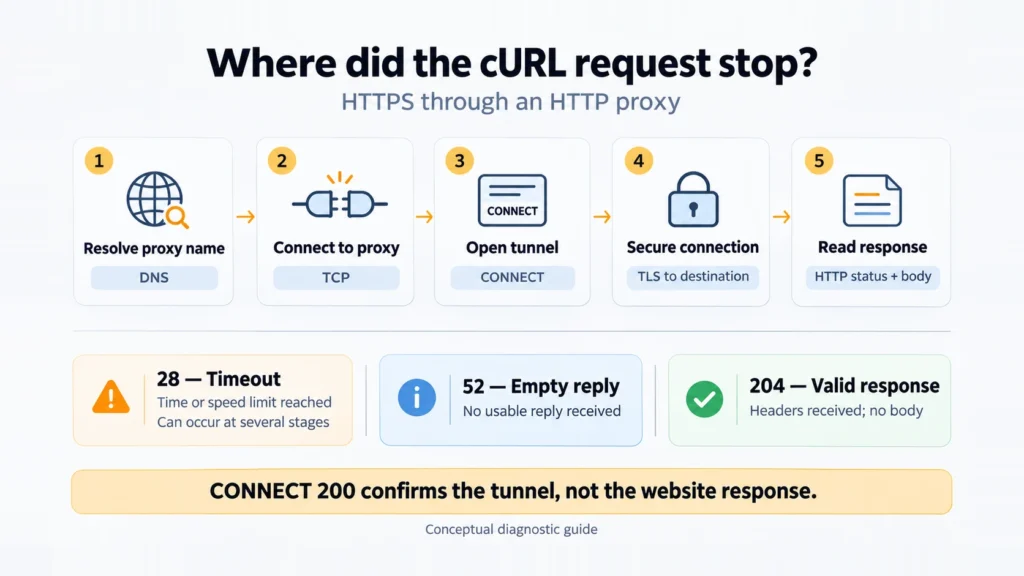
Write down both outcomes when they differ: the proxy accepted the tunnel, and the later transfer failed. That distinction helps the person reading the incident log investigate the correct part of the route.
Which Timeout Should You Change for Error 28?
Connection setup has its own limit, –connect-timeout. Name resolution and protocol handshakes use this allowance. It does not limit the later body download.
–max-time covers the entire attempt, with connection setup included. With limits of five seconds to connect and twenty overall, four seconds spent connecting leave about sixteen for everything else.
Check for a speed threshold too. –speed-limit sets the byte-rate threshold and –speed-time sets how long a transfer may remain below it. Reaching that low-speed condition returns 28; the overall –max-time need not have elapsed.
Curl’s timeout documentation is useful when an application appears to impose a mysterious thirty-second cutoff. Libcurl’s built-in connection timeout is 300 seconds, and its total-transfer timeout is disabled by default. An application can set different values. The timeout configured in that application is the next setting to inspect.
Allowing longer may help a slow operation finish. Verify the host and port before extending the wait, so a configuration mistake is not left unresolved.
Where Should You Look for the Cause of Error 52?
Look up which protocol the chosen port accepts. A plain HTTP request arriving at an HTTPS listener may get no reply, although some servers return an HTTP error for the mismatch.
An http://PROXY_HOST:PROXY_PORT endpoint can carry the HTTPS page request through CONNECT. To add TLS on the client-to-proxy connection itself, the proxy address needs https://. Use that scheme only for an endpoint supplied as an HTTPS proxy.
If the endpoint values match, locate the failed request in the application or gateway log by its timestamp. Look for a worker exit or an upstream connection being closed. Compare a working path on the same host with the failing one to make that search more specific.
Preserve the original error message during these checks. A reset, an interrupted body transfer, and an empty reply are different observations. If the outcome depends on the HTTP version, retain both logs for the operator to compare.
How Can You Tell Whether the Proxy Is Involved?
Compare a direct request with one that explicitly selects your proxy, using the machine where the failure occurs. Use the same URL and request contents. Then try a second, known working HTTPS destination through that proxy.
- Direct works, proxied request fails – investigate the added route, including proxy access, tunnel setup, destination resolution, and how the destination handles that exit. This comparison alone does not prove the proxy server is broken.
- Both routes fail – check shared conditions such as the destination URL, request contents, and local network. The failures can still have different causes, so compare their logs.
- Proxy reaches a simple test page but fails on the original URL – investigate the original operation and its destination-specific behavior. General connectivity has been demonstrated only for the successful request.
- Direct fails, proxy works – your network may require a proxy, or the direct route may have its own problem. A failed direct control is still useful information.
A SOCKS comparison also needs the exact scheme: socks5:// has curl resolve the target locally, whereas socks5h:// gives that task to the proxy. The lookup therefore takes a different route if you switch modes. See SOCKS5 vs SOCKS5h: Where Does DNS Resolution Happen? for the details.
Practical Examples: Capture One Attempt at a Time
Choose a directory for the results and replace https://example.com/ with the URL that failed. Paste each curl command on one line. Its named output files will be replaced when it runs.
Use curl 8.x for these examples. Run curl –version in Bash, or curl.exe –version in PowerShell, to check the installed release. No additional libraries are needed.
When reproducing the application request, include its method, relevant headers, and payload. These GET commands do not recreate a failed upload or authenticated API operation. Remove tokens, cookies, proxy credentials, and private URLs before sharing logs.
Linux and macOS: Bash
Run the direct control first:
bash
curl -q --silent --show-error --verbose --connect-timeout 5 --max-time 20 --noproxy '*' --dump-header direct-headers.txt --output direct-body.bin --write-out 'status=%{http_code} proxy_connect=%{http_connect} dns=%{time_namelookup} tcp=%{time_connect} tls=%{time_appconnect} first_byte=%{time_starttransfer} total=%{time_total}\n' 'https://example.com/' 2>direct-debug.txt
printf 'curl_exit=%s\n' "$?"
PROXY_HOST and PROXY_PORT take the endpoint values from your connection details; PROXY_USERNAME takes the issued proxy username. Retain any session or location suffix in that login. The password is entered separately at curl’s prompt. How to Find Your Proxy Server Address and Port can help locate the endpoint.
bash
curl -q --silent --show-error --trace-ascii proxy-debug.txt --trace-time --connect-timeout 5 --max-time 20 --proxy 'http://PROXY_HOST:PROXY_PORT' --noproxy 'localhost' --proxy-user 'PROXY_USERNAME' --dump-header proxy-headers.txt --output proxy-body.bin --write-out 'status=%{http_code} proxy_connect=%{http_connect} dns=%{time_namelookup} tcp=%{time_connect} tls=%{time_appconnect} first_byte=%{time_starttransfer} total=%{time_total}\n' 'https://example.com/'
printf 'curl_exit=%s\n' "$?"
Windows: PowerShell
Call curl.exe explicitly. Run the exit-code line immediately after its request:
powershell
curl.exe -q --silent --show-error --verbose --connect-timeout 5 --max-time 20 --noproxy '*' --dump-header direct-headers.txt --output direct-body.bin --write-out 'status=%{http_code} proxy_connect=%{http_connect} dns=%{time_namelookup} tcp=%{time_connect} tls=%{time_appconnect} first_byte=%{time_starttransfer} total=%{time_total}\n' 'https://example.com/' 2>direct-debug.txt
$LASTEXITCODE
For the proxy attempt, supply your endpoint and username as in the Bash example. Enter the password when prompted:
powershell
curl.exe -q --silent --show-error --trace-ascii proxy-debug.txt --trace-time --connect-timeout 5 --max-time 20 --proxy 'http://PROXY_HOST:PROXY_PORT' --noproxy 'localhost' --proxy-user 'PROXY_USERNAME' --dump-header proxy-headers.txt --output proxy-body.bin --write-out 'status=%{http_code} proxy_connect=%{http_connect} dns=%{time_namelookup} tcp=%{time_connect} tls=%{time_appconnect} first_byte=%{time_starttransfer} total=%{time_total}\n' 'https://example.com/'
$LASTEXITCODE
The code in this article is provided for illustration. It may behave differently or fail to run depending on your environment settings, software and library versions, or changes to the services and APIs it uses. Before using the examples, test them in your own environment and adapt them as needed.
If your account uses only an IP allowlist, remove –proxy-user and ‘PROXY_USERNAME’ together. The public source address of this connection must be on the account’s allowed list.
How to Read the Saved Results
The initial -q keeps settings from curl’s default user configuration out of these checks. The two –noproxy values serve the comparison: ‘*’ bypasses proxy use for every destination, while ‘localhost’ leaves example.com outside the exception list. Its request therefore goes to the proxy specified by –proxy. If testing a localhost destination, remove that exception rather than copying this command unchanged.
The .bin files contain response bodies. The headers files contain HTTP response headers and may include a proxy’s CONNECT response. Read each status in its context. The direct-debug.txt file holds verbose diagnostics and error text. For the proxied request, open proxy-debug.txt to see the trace and its timestamps. The password prompt and final error stay in the terminal. Review the trace before sharing it: it can contain the request and response contents.
The commands intentionally omit –fail and automatic redirects. This leaves error responses and initial redirects available to inspect. Receiving 404 or 504 can still give curl_exit=0 here; use the status field to see what the HTTP server returned. If the original operation follows redirects, investigate the subsequent URL separately or reproduce that redirect behavior deliberately.
The timing values are seconds measured from the start, rather than independent durations to add together:
- dns – completion of curl’s name lookup. With a proxy hostname, this can concern the proxy rather than the destination.
- tcp – completion of the TCP connection to the contacted peer, which may be the proxy.
- tls – completion of the relevant secure handshake.
- first_byte – curl’s reported first-byte milestone. Read the log to identify the exchange; do not assume it measures only the origin application’s work.
- total – elapsed time for the attempt.
The curl manual’s write-out reference documents these fields. A zero timing value can mean the milestone was not reached or was not applicable. A zero by itself cannot confirm that the stage succeeded.
Consider this illustrative combination: proxy_connect=200, status=000, curl_exit=28. The proxy accepted CONNECT. Curl then timed out before obtaining a website HTTP status. Look between those events in the log: did TLS finish, and was the HTTP request sent? That is the part of the exchange to investigate. This is an example for interpreting the fields, rather than a result from a proxy test.
Before rerunning a command, give its existing files new names if you need to retain them.
When Are Retries Appropriate?
Curl’s normal –retry behavior covers timeouts. Including error 52 requires –retry-all-errors alongside –retry. Check the other errors this enables before using that broader policy.
For a GET that is safe to repeat, –retry 2 permits the initial attempt plus two more. Keep –max-time as the limit for an individual attempt. With –retry-max-time 45, no further retry starts once the retry timer reaches forty-five seconds. An attempt started earlier can continue past that point.
An order submission needs more care. A missing reply can leave you uncertain whether the order was created. Check for that order first, or follow the API’s documented idempotency procedure when resubmitting. Apply the same check to job creation.
Check the Proxy, Then Escalate the Specific Failure
For an additional static-proxy check, open MangoProxy Proxy Checker. The page sends residential-proxy users to the checker in their dashboard. Compare its result with your local attempt, allowing for the different location from which the check runs.
Attach the redacted log to your MangoProxy support request and give the time with its time zone, the curl release, and the exit code. Identify the proxy endpoint and destination host and port, with credentials removed. Note whether another destination worked through the same endpoint. This gives support a concrete exchange to investigate.
Glossary
cURL / curl: the transfer tool discussed here; curl is the command used in the examples.
Libcurl: the transfer library also used inside other applications.
HTTP / HTTPS: the web request protocol and its secured form.
DNS: the system used to resolve hostnames to network addresses.
TCP: the transport protocol carrying the connections in these examples.
TLS: the security protocol used for HTTPS connections.
CONNECT: an HTTP method used to establish a tunnel through a proxy.
SOCKS5: a protocol used by a client to establish connections through a proxy.
IP address: the numerical address of a network interface.
API: a software interface with defined calls for requesting data or actions.
Idempotency: one execution and repeated identical executions have the same intended effect.
Final Thoughts
Confirm the correction in the original application by repeating the operation that failed, using the settings established with curl.
Frequently asked questions
Here we answered the most frequently asked questions.
Why Does My Browser Work While curl Fails?
The browser may use another proxy configuration, DNS path, cookie state, or HTTP version. Compare the actual URL and connection settings first. A successful browser visit does not show that a background curl process uses the same route or credentials.
Can –insecure Fix Error 28 or 52?
A certificate trust error calls for checking the server chain and the certificate authorities your client trusts. –insecure skips verification; it does not adjust routing or timeout values. Correct the trust settings for the connection you intend to use.
Will –location Fix an Empty Reply?
–location follows an HTTP redirect that curl has received. Error 52 on the first exchange leaves it without that response. Check the saved headers for a redirect status and Location before investigating redirect handling.
How Should I Check a Suspected DNS Problem Without Breaking HTTPS?
For the direct test, give –resolve a verified IP address for the host and port. Keep the hostname in the URL so TLS and HTTP still use it. A URL containing the raw IP can select another server or fail the certificate check. This override concerns local resolution, without checking the resolver used by a proxy.
Does HTTP Status 000 Mean the Server Returned an Error?
No HTTP status was obtained for that transfer. Curl prints 000 in the status field. Read curl_exit and the saved diagnostics to find out why.