


SOCKS5 vs SOCKS5h: Where Does DNS Resolution Happen?
Published: ≈ 7 min read
Quick Answer
Use socks5h:// in curl or Python Requests when you want the server to look up the website. Choose socks5:// to have the requesting machine find the address first.
Key Takeaways
- If the gateway’s name cannot be resolved, the request has not reached it. Read which name the error mentions.
- A browser and a scheduled script can make different choices even when they share connection details.
- When comparing settings, keep the first error from each attempt. A final timeout often leaves out the most useful clue.
Which Name Failed: the Gateway or the Website?
Look at the hostname quoted in the error. Does it belong to your proxy provider or to the site you were opening? Start with the lookup for that name.
For example, a stock-checking job may log in to a proxy successfully but fail when opening a supplier’s catalogue. Replacing that server at this point could leave the original problem untouched. With the plain scheme in curl, the job still needs an answer for the supplier’s domain from its own machine.
The opposite problem occurs earlier. The h option cannot help the computer find a missing gateway address. Until that lookup succeeds, there is nowhere to send the catalogue’s name.
Send support the original curl message, including the name it failed to look up. The tool reports lookup trouble for the proxy and for the remote host separately. Reporting only “DNS failed” leaves support guessing which part to examine.
Which Part of the Request Does h Affect?
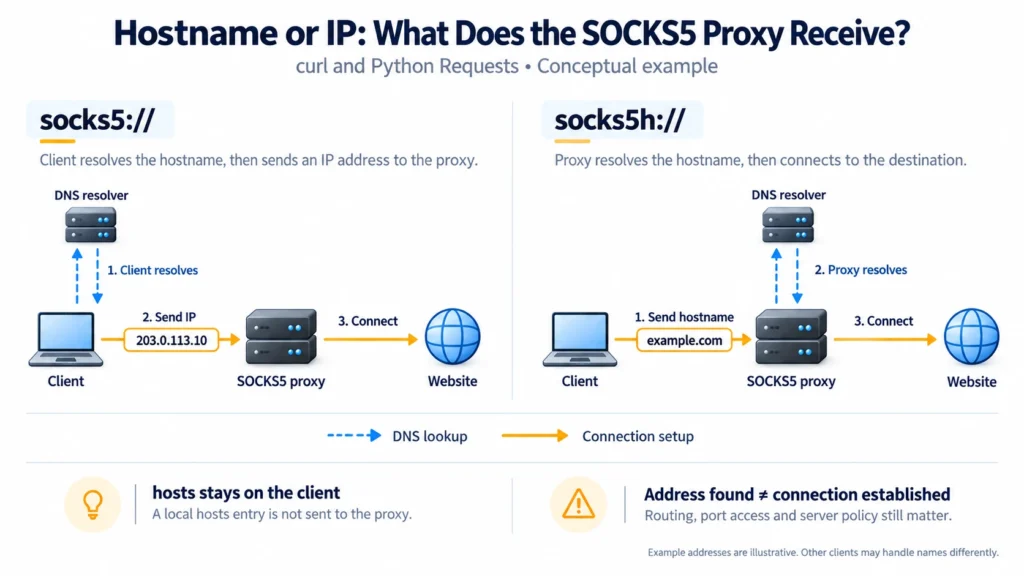
The address field changes. You can fill it with a domain name, an IPv4 address or an IPv6 address. A name leaves the address lookup to the receiving side.
The h is a client setting; it does not change the SOCKS5 protocol or your account.
Even after a workstation chooses the address, its web request can still travel through the gateway.
“Local” describes who arranges the lookup. That resolver could be elsewhere on the network. If the machine already has an answer in its cache or hosts file, it may not send a new query at all.
Which Application Setting Controls the Lookup?
In curl or Requests, change the scheme in the saved proxy URL. Keep the remaining connection details in place while comparing the two modes.
Replace proxy.example:1080 with your server’s address and port. If the target is excluded through NO_PROXY, remove that exclusion for the comparison. Use curl.exe in Windows PowerShell if curl invokes another command.
curl --verbose --proxy socks5://proxy.example:1080 https://example.com

curl --verbose --proxy socks5h://proxy.example:1080 https://example.com
curl also exposes this choice through its named SOCKS options. Its verbose output may label the attempted connection as locally or remotely resolved. Read beyond that label: the following exchange tells you whether the server accepted the request. A line announcing the remote mode can appear before a later failure. Wording and available messages depend on the installed version.
locally resolved
remotely resolved
For Requests, check the value associated with the destination’s URL type. An HTTPS key selects requests to secure web addresses; it does not, by itself, choose remote name handling. That choice belongs to the scheme inside the value. Install the SOCKS extra for the interpreter used by this job.
python -m pip install "requests[socks]"

import requests

proxies = {
    "https": "socks5h://proxy.example:1080",
}

response = requests.get(
    "https://example.com",
    proxies=proxies,
    timeout=20,
)
response.raise_for_status()
print(response.status_code)
For HTTP destinations, add an “http” key with the appropriate proxy URL. Change socks5h:// to socks5:// in the value to compare lookup modes.
Chrome provides a useful contrast. Chrome’s built-in SOCKS5 connection uses remote lookup. curl may still resolve the name on your computer.
Practical Examples: A Company Export and a Local Override
In both hypothetical cases below, the gateway connection and login are working.
Case 1: A company service works only after adding h
An employee runs an export from home. The reporting service has an internal name, and the company’s gateway can reach both its DNS service and the reporting application. The employee’s home resolver has no record for that name.
With client-side lookup, the export cannot obtain an address to request. Delegating the lookup gives the company’s infrastructure the name it knows how to handle. If a connection error follows, the next investigation belongs inside that network: can the gateway reach the application’s listening port?
Case 2: A development site stops working after adding h
The developer’s hosts file maps the staging domain to a public test address. The plain mode can use that mapping and submit the resulting address. The gateway also has network access to the staging server.
Remote lookup drops that local override from the process. That hosts entry stays on the developer’s machine. For remote lookup to work, the same name needs a DNS record visible to the gateway. Otherwise, use the original local mapping.
The export needs a record available inside the company; the staging example depends on one workstation’s override.
Can the Page Look the Same in Both Modes?
That is entirely compatible with different lookup locations. Both environments may obtain an address that serves the same content. A successful response cannot identify which one supplied it.
For a closer check, inspect the connection request at a SOCKS server you control. Record whether its destination field contains a number or a domain. A resolver log answers a narrower question: whether a lookup appeared at that observation point. An empty log leaves caching and other sources of address information unresolved.
What Does Support Need to Reproduce This?
Send the failing URL along with the application version, chosen mode and first relevant error for each attempt. Describe what changed between runs. This gives support something more precise to reproduce than “the proxy works in my browser.”
Reproduce the failure in the program that will do the actual work. For a script, keep its configuration and request result together. For a browser, you can also run DNS Leak Test. A browser test does not establish how a separate Python process is configured, and a changed exit IP does not reveal who resolved the destination hostname.
Glossary
DNS resolver: a service that obtains DNS information for a requested name.
Gateway: the SOCKS server receiving the application’s connection request.
hosts file: a local source of name-to-address mappings used by supported lookup mechanisms.
Final Thoughts
Before switching modes again, keep the error from the current attempt. A note showing which name failed, in which application, is usually more actionable than a collection of replacement endpoints. Change the lookup location when the name belongs to a different environment.
Frequently asked questions
Here we answered the most frequently asked questions.
Can I Compare the Modes Using Only an IP Address?
A numeric target gives neither side a website name to look up. Use a domain for this comparison. Using an IP in place of an HTTPS name may also cause certificate verification to fail or bring back a different website response.
Does Adding h Protect the Traffic with Encryption?
Encryption needs its own mechanism. HTTPS uses TLS between the client and website; a SOCKS5h setting supplies no additional encryption.
Should I Expect the DNS Resolver and Exit IP to Be Identical?
No. The server carrying your connection may consult another DNS service. A DNS address identifies the service answering the lookup, while an exit address identifies the source of the onward connection. Seeing two different values is therefore insufficient evidence of a leak. For help investigating unexpected lookups, read What Is a DNS Leak and Why It Matters for Privacy and Proxies.