


Does SOCKS5 Encrypt Traffic?
Published: ≈ 5 min read
Quick Answer
No. A standard SOCKS5 setup changes the route, but adds no cipher to the data travelling through it. A visit to an HTTP page remains readable along an unprotected route. For an HTTPS page, protection comes from the site’s TLS connection, with no change to the SOCKS5 entry.
Your application may already have given the relay a destination and password by the time it starts website TLS. TLS to the site begins after that step. Encryption for the first exchange has to be provided separately.
Key Takeaways
- An IP check identifies the exit used by a request. It cannot tell you whether anyone could read that request on its way there.
- An HTTP page sends readable data through the relay. On an HTTPS visit, a certificate warning needs attention; the proxy setting cannot fix it.
- In the RFC 1929 login method, the password travels openly to the relay. An encrypted first hop keeps it unreadable in a capture of that link.
When Can the Website Exchange Begin?
The relay sends a success reply before any website exchange begins. The client has already negotiated an access method and told the relay which host or IP to contact. It can then send HTTP or begin TLS. The website usually sees the relay’s IP. The destination, meanwhile, was supplied to the relay before the website exchange began. Neither detail tells you whether that exchange is encrypted.
That sequence describes a typical connection, not every permitted one. RFC 1928 leaves protection of later data to the negotiated method. Under the GSS-API method in RFC 1961, the client and relay can agree to confidentiality. You would need evidence of that negotiation; an app’s SOCKS5 setting does not provide it.
Which Parts of a Web Visit Can the Relay Read?
Take an unencrypted form submission. At the relay, both the submitted values and the HTTP reply are readable unless another channel protects them.
For an https:// URL, the application starts TLS through the relay and verifies the site’s certificate. The relay forwards those TLS records. It still has the address and port supplied in the SOCKS request; without TLS interception, it cannot read the page or submitted forms.
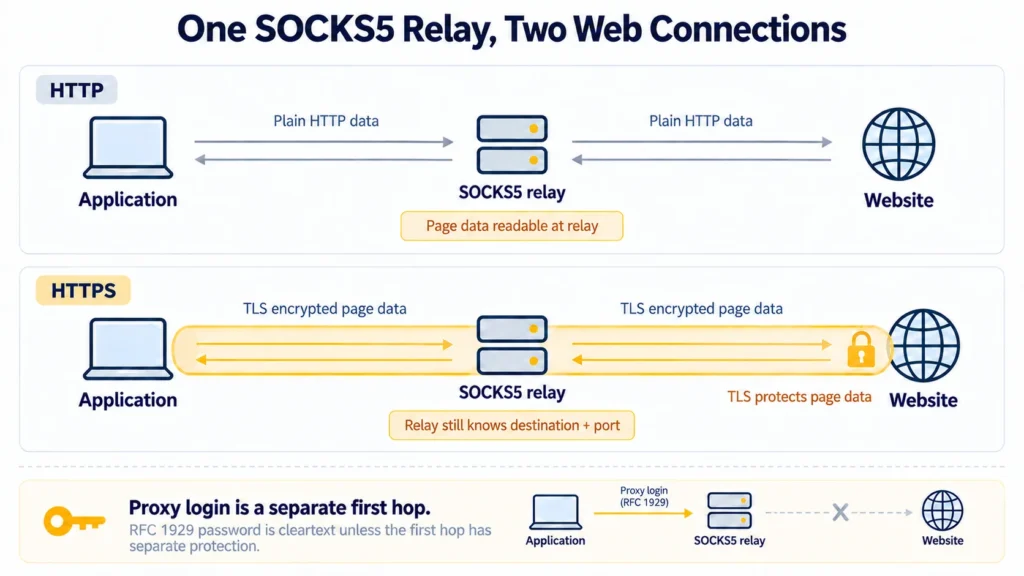
The address bar describes the website leg. It does not describe how credentials reached the relay. A certificate warning means the site’s identity needs checking before you trust that page exchange.
What Does Proxy Authentication Cover?
A proxy login decides who gets in. It offers no privacy for the later request to a website. RFC 1929 specifies a username/password exchange that sends the password in cleartext. A capture of an unprotected client-to-relay link can therefore expose it.
On shared Wi-Fi, find out what protects that first connection before entering the proxy password.
Can You Secure the First Hop?
Yes, if a protected transport covers the connection to the relay. OpenSSH can put a SOCKS listener on your own computer with dynamic forwarding. The app uses that local listener. SSH takes the connection to your remote server in an encrypted session; the remote server then opens the onward connection. If it uses HTTP, the portion beyond the SSH server remains readable.
Conceptual Example: One Setting, Two Visits
A monitoring script requests a public status page twice. The first fetch uses HTTP, the next HTTPS; the relay setting stays as it was. Both visits could show the same exit IP in an IP check. With the site’s certificate verified, the second fetch carries page data inside TLS; in the first, the request remains readable at the relay.
Before You Rely on the Setup
In the application that will make the request, verify the site’s certificate instead of relying on the URL alone. Next, identify the transport between the app and relay from their settings or documentation, and confirm that any required encryption is active. Check how any password is sent. An IP check answers only where the request emerged.
For help choosing a protocol your application supports, see MangoProxy’s HTTP versus SOCKS5 comparison.
Glossary
SOCKS5: the rules for asking a relay to open a connection and pass data over it.
TLS: protects the app’s HTTPS exchange with the site and lets the app verify who it reached.
GSS-API: the optional SOCKS5 method cited above; it can protect data if both ends agree on confidentiality.
DNS: a lookup system that turns a hostname such as site.example into an IP address.
Proxy authentication: a check that you are allowed to use a proxy. Authentication alone does not encrypt traffic.
Final Thoughts
An IP test checks the exit. A valid site certificate and a password prompt answer other questions. None tells you whether the connection to the relay is encrypted. That answer comes from its transport settings.
Frequently asked questions
Here we answered the most frequently asked questions.
Does the “h” in SOCKS5h Mean the Connection Is Secure?
No. In curl and Python Requests, socks5h sends the website’s name to the relay for DNS resolution. The name is looked up in a different place; the traffic gains no encryption from that setting.
What Can the Proxy Operator Read?
On an HTTP visit without other protection, the operator can inspect the request and response. With HTTPS to a site whose certificate the application has verified, the operator still sees the destination address and port supplied to the relay. The page contents remain unreadable to them unless they intercept TLS.
Is My Proxy Password Safe Just Because the Site Uses HTTPS?
No. The password is handled during the initial SOCKS exchange. Website TLS begins afterward and cannot shield it. Protect the first segment separately if those credentials must be hidden from network observers.