
HTTPX vs Requests vs aiohttp: Choosing a Python HTTP Client for Proxies
Published: ≈ 11 min read
Quick Answer
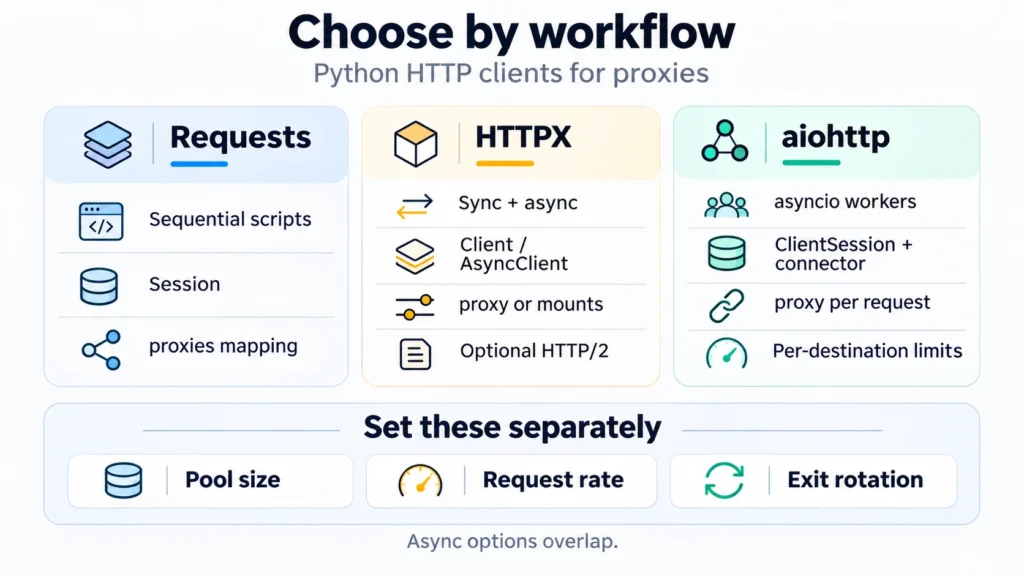
Requests is a practical starting point for a sequential proxy script. HTTPX covers projects that need both blocking and async calls, with HTTP/2 available as an extra. aiohttp lets an asyncio worker choose the proxy on the request and limit connections per destination.
Key Takeaways
- The Requests https entry may contain an `http://` proxy address.
- Requests and HTTPX inherit proxy environment settings by default. For aiohttp, enable trust_env on the session if those settings should apply.
- Reusing a client preserves its connection pool and cookies. The proxy provider separately controls which exit IP a connection receives.
- Ten open connections do not mean ten requests per second. Limit request starts and queued work as well as the pool.
- Keep the target, exit policy, and response checks fixed when comparing speed. A different allocation or workload can obscure what the library actually changed.
Which Client Fits Your Application?
The caller controls concurrency. A loop stays sequential when each iteration waits for the last response. Run blocking Requests work off the event-loop thread.
| Requests | HTTPX | aiohttp |
|---|---|---|
| Execution model: Synchronous. Concurrent use needs an external arrangement, such as a bounded thread pool. | Execution model: Use Client in blocking code and AsyncClient where calls can be awaited. | Execution model: Calls run as asyncio operations. There is no matching synchronous client. |
| Persistent client: Session. | Persistent client: Keep the selected Client or AsyncClient open for related requests. | Persistent client: ClientSession owns the request state and uses a connector for connections. |
| Proxy configuration: proxies mapping on a request or Session. | Proxy configuration: Set proxy when creating the client. Use mounts to attach a transport to each route. | Proxy configuration: Supply proxy with the request, or set the session’s default in a current version. |
| HTTP/2: No standard client option. | HTTP/2: Install the optional dependencies and enable http2=True to negotiate it with a supporting destination. | HTTP/2: The client version discussed here has no standard option to enable it. |
| Best reason to choose it: A straightforward synchronous integration, especially one already using Requests. | Best reason to choose it: A project can keep its blocking and async integrations in HTTPX. | Best reason to choose it: An asyncio application needs per-request proxy selection and connector limits per destination. |
The pinned versions are Requests 2.34.2, HTTPX 0.28.1, and aiohttp 3.14.5. For the optional dependencies and HTTP/2 setting, see HTTPX’s HTTP/2 documentation.
How Do Proxy Settings Differ?
The example uses two addresses:
Destination: `https://example.com/`
Proxy: `http://HOST:PORT`
Requests chooses the mapping key from the destination’s scheme. The same HTTP proxy can be the value for http and https. For HTTPS, the client requests a CONNECT tunnel, then performs the destination TLS handshake inside it.
Set proxy on the HTTPX Client or AsyncClient constructor. A one-off httpx.get can also take it, as shown in HTTPX’s proxy documentation. On an existing client’s get method, that argument is unavailable. Use transport mounts or a bounded set of configured clients for several routes. The old proxies argument was removed in HTTPX 0.28.
aiohttp accepts proxy on client.get, making the route visible beside the request. aiohttp’s proxy documentation also shows a default proxy on ClientSession. Check older installations before relying on that constructor option. The example below passes it per request, so the routing choice is easy to compare with the other clients.
Credentials belong to the proxy configuration. Authorization on the target request authenticates to the target. In proxy_url, username and password are URL-encoded separately, then joined into the proxy address. That keeps reserved characters in a login from becoming URL separators. Include any targeting or session suffix when copying the issued username.
With an `http://` endpoint, Basic proxy authentication is sent before the destination’s TLS handshake. That first exchange is unencrypted. The destination’s traffic is protected by TLS inside the tunnel, assuming no TLS interception. An `https://` proxy can protect that first connection too, provided both the client and its Python runtime support it.
Which Defaults Can Change a Migrated Script?
Proxy discovery, redirect handling, and timeouts are part of the migration too. Set them deliberately during a comparison.
| Proxy environment settings | Timeouts | Redirects for GET |
|---|---|---|
| Requests: Enabled by default through trust_env. | Requests: Without timeout, a call has no configured timeout. A (connect, read) tuple sets the two waiting limits separately. | Requests: Normally follows them. |
| HTTPX: Enabled by default through trust_env. | HTTPX: Connection, read, write, and pool waits are configurable. The documented default is five seconds of network inactivity. | HTTPX: Does not follow them unless enabled. |
| aiohttp: The session reads proxy environment values only with trust_env=True. | aiohttp: Its defaults combine a 300-second total timeout and a 30-second socket-connect timeout. | aiohttp: Normally follows them. |
| Migration consequence: Losing an inherited proxy setting can change the route; inspect the new process’s environment and the client’s defaults. | Migration consequence: A read timeout in Requests or a phase timeout in HTTPX does not cap the duration of the entire job. | Migration consequence: A migrated call may return the initial redirect instead of reaching its destination. All four modes reject redirects and require a 2xx status. |
An environment proxy can override the proxy mapping stored on a Requests Session. Its official proxy guide discusses that interaction. For the explicit configuration below, trust_env=False keeps ambient proxy settings out of the comparison.
That option can affect more than proxy discovery. For example, Requests and HTTPX also use environment-based certificate settings. A corporate deployment that depends on a custom certificate authority needs the appropriate explicit trust configuration. Keep certificate verification enabled while diagnosing the route.
What Changes When You Add Concurrency or Rotation?
A larger worker pool can reuse the same configured gateway.
Keep a client open for the requests that belong together, then close it. Its pool can then reuse connections across iterations. Consume or close a streamed response to release its connection. Also check which cookies the shared client will retain before letting unrelated accounts use it.
For async work, place a bounded number of workers around a queue of pending URLs. HTTPX Limits and aiohttp TCPConnector provide connection controls; application scheduling decides when to start the next job. A pool capped at ten connections can still issue many short requests per second. If a source allows a specific request frequency, enforce that separately and respect its retry instructions.
A gateway hostname may remain unchanged while the provider assigns different exits. Conversely, keeping a Python client open does not itself reserve an IP. Choose a provider session policy that fits related actions, and keep that allocation associated with the right application state. Cycling a list of proxy endpoints is another application decision; none of these libraries turns a list into a rotation policy automatically.
Avoid using a new proxy as the universal response to failure. A 407 points toward proxy authentication. A 429 calls for examining request frequency and the source’s instructions. A timeout while waiting for a free pool connection points toward locally occupied capacity. These observations lead to different changes.
When evaluating throughput, hold the proxy allocation and requested work steady. Record completed responses, failures, latency distribution, and resource use. Keep a sequential Requests run separate from an async run with many workers when describing what the measurements mean. Otherwise, an apparent library improvement can come from increased concurrency or a different exit.
Practical Examples: Check the Same Route in Each Client
Run proxy_check.py with a client name: requests, httpx, httpx-async, or aiohttp. Each mode uses one client for the IP check and target visit, in that order. The async modes also wait for the IP result before starting the target. This checks the route and client settings; it supplies no speed measurement.
Install the Libraries
Create .venv with Python 3.12 and install the listed versions. On Windows, use PowerShell:
powershell
py -3.12 -m venv .venv
.\.venv\Scripts\python.exe -m pip install requests==2.34.2 httpx==0.28.1 aiohttp==3.14.5
On macOS or Linux:
bash
python3.12 -m venv .venv
.venv/bin/python -m pip install requests==2.34.2 httpx==0.28.1 aiohttp==3.14.5
Supply the Connection Values
Use the issued HTTP address for MANGO_PROXY_SERVER. A proxy login supplies MANGO_PROXY_USERNAME and MANGO_PROXY_PASSWORD; preserve the full username, including any suffix. The dashboard login is separate. MangoProxy’s Proxy setup instructions explain generation, and How to Use a Proxy with Python Requests covers the detailed Requests setup.
In the terminal where you will run Python, set the variables. Windows PowerShell:
powershell
$env:MANGO_PROXY_SERVER = 'http://YOUR_PROXY_HOST:YOUR_PROXY_PORT'
$env:MANGO_PROXY_USERNAME = 'YOUR_PROXY_USERNAME'
$env:MANGO_PROXY_PASSWORD = 'YOUR_PROXY_PASSWORD'
On macOS or Linux:
bash
export MANGO_PROXY_SERVER='http://YOUR_PROXY_HOST:YOUR_PROXY_PORT'
export MANGO_PROXY_USERNAME='YOUR_PROXY_USERNAME'
export MANGO_PROXY_PASSWORD='YOUR_PROXY_PASSWORD'
For a connection authorized by an IP allowlist, omit both login variables. A missing server or incomplete login pair stops the check before any request. The example reads MANGO_PROXY values and configures the selected client explicitly. Keep the assignments out of version control and shared terminal captures.
Save and Run the Complete Script
Save this code as proxy_check.py:
python
import argparse
import asyncio
import ipaddress
import json
import os
from urllib.parse import quote, urlsplit

import aiohttp
import httpx
import requests


CHECK_URL = "https://api.ipify.org?format=json"


def proxy_url():
    server = os.environ["MANGO_PROXY_SERVER"].strip()
    endpoint = urlsplit(server)
    if (endpoint.scheme != "http" or not endpoint.hostname or not endpoint.port
            or endpoint.username is not None or endpoint.password is not None
            or endpoint.path not in ("", "/") or endpoint.query or endpoint.fragment):
        raise ValueError("Use an HTTP proxy endpoint: http://HOST:PORT")
    username = os.getenv("MANGO_PROXY_USERNAME", "")
    password = os.getenv("MANGO_PROXY_PASSWORD", "")
    if bool(username) != bool(password):
        raise ValueError("Supply both proxy credentials, or neither")
    credentials = ""
    if username:
        credentials = f"{quote(username, safe='')}:{quote(password, safe='')}@"
    return f"http://{credentials}{endpoint.netloc}"


def report(label, status, body):
    if not 200 <= status < 300:
        raise RuntimeError(f"{label}: HTTP {status}")
    result = {"stage": label, "status": status}
    if label == "exit_ip":
        result["observed_ip"] = str(ipaddress.ip_address(json.loads(body)["ip"]))
    else:
        result["body_bytes"] = len(body)
    print(json.dumps(result))


def with_requests(proxy, stages):
    with requests.Session() as client:
        client.trust_env = False
        for label, url in stages:
            response = client.get(
                url, proxies={"http": proxy, "https": proxy},
                timeout=(5, 15), allow_redirects=False,
            )
            report(label, response.status_code, response.content)


def with_httpx(proxy, stages):
    with httpx.Client(
        proxy=proxy, trust_env=False, follow_redirects=False,
        timeout=httpx.Timeout(15, connect=5, pool=5),
    ) as client:
        for label, url in stages:
            response = client.get(url)
            report(label, response.status_code, response.content)


async def with_httpx_async(proxy, stages):
    async with httpx.AsyncClient(
        proxy=proxy, trust_env=False, follow_redirects=False,
        timeout=httpx.Timeout(15, connect=5, pool=5),
    ) as client:
        for label, url in stages:
            response = await client.get(url)
            report(label, response.status_code, response.content)


async def with_aiohttp(proxy, stages):
    timeout = aiohttp.ClientTimeout(total=20, connect=5, sock_read=15)
    async with aiohttp.ClientSession(timeout=timeout, trust_env=False) as client:
        for label, url in stages:
            async with client.get(url, proxy=proxy, allow_redirects=False) as response:
                report(label, response.status, await response.read())


def main():
    parser = argparse.ArgumentParser()
    parser.add_argument("client", choices=["requests", "httpx", "httpx-async", "aiohttp"])
    parser.add_argument("--url", default="https://example.com/")
    args = parser.parse_args()
    if urlsplit(args.url).scheme not in ("http", "https"):
        parser.error("--url must be an HTTP or HTTPS URL")
    stages = [("exit_ip", CHECK_URL), ("target", args.url)]
    try:
        proxy = proxy_url()
        if args.client == "requests":
            with_requests(proxy, stages)
        elif args.client == "httpx":
            with_httpx(proxy, stages)
        elif args.client == "httpx-async":
            asyncio.run(with_httpx_async(proxy, stages))
        else:
            asyncio.run(with_aiohttp(proxy, stages))
    except (requests.RequestException, httpx.HTTPError, aiohttp.ClientError,
            TimeoutError, ValueError, KeyError, RuntimeError) as error:
        raise SystemExit(f"Check stopped: {type(error).__name__}; inspect the last completed stage") from None


if __name__ == "__main__":
    main()
On Windows, run each mode with the same supplied connection:
powershell
.\.venv\Scripts\python.exe proxy_check.py requests
.\.venv\Scripts\python.exe proxy_check.py httpx
.\.venv\Scripts\python.exe proxy_check.py httpx-async
.\.venv\Scripts\python.exe proxy_check.py aiohttp
Use .venv/bin/python for the same commands on macOS or Linux. To change the target, append –url and its permitted HTTP or HTTPS address. Choose a small response because the script buffers its body.
Read the Two Stages
Under stage exit_ip, observed_ip is the address returned by the IP service. Compare it with the expected exit for your allocation. The gateway is the entry endpoint and may have a different address. With rotation, the later target request can leave through another IP.
For stage target, body_bytes measures the decoded response in memory. It supplies no billing measurement or content validation; even a nonempty body can be the wrong page. Inspect the required content when adapting the check to a real integration.
A stopped run reports an exception class without printing a potentially sensitive connection URL. The last output line helps locate the failure: an exit_ip line followed by a stop means the first stage completed and the target stage did not. If nothing was printed, start with the supplied values and first connection. A redirect also stops this deliberately restricted check; review its destination before enabling redirect handling.
The code in this article is provided for illustration. It may behave differently or fail to run depending on your environment settings, software and library versions, or changes to the services and APIs it uses. Before using the examples, test them in your own environment and adapt them as needed.
Choose the Proxy Allocation Alongside the Client
If your project needs residential exits in selected locations, review MangoProxy Residential proxies and the session options available for your connection. Arrange related requests into the allocations they need before adding workers. Use that allocation policy when you configure the client.
Glossary
HTTP / HTTPS: Hypertext Transfer Protocol. HTTPS carries HTTP over Transport Layer Security (TLS).
CONNECT: The HTTP method for requesting a tunnel through a proxy.
Gateway / exit IP: The client reaches the gateway; the destination sees the exit’s Internet Protocol address.
SOCKS5: A proxy protocol requiring different extra packages in these clients.
DNS: Domain Name System, which resolves hostnames to IP addresses.
URL: Uniform Resource Locator, such as the destination or proxy address.
asyncio: Python’s framework for asynchronous programs.
Event loop: Schedules async tasks.
Connection pool: Connections kept for later requests.
Connector: aiohttp’s connection manager, including connection limits.
API: Application programming interface: callable operations and their arguments.
JSON: JavaScript Object Notation, the format of the example’s output.
Idempotency key: An identifier a supporting API uses to recognize another attempt at the same operation.
Final Thoughts
Save the exit observation alongside the target result for each run.
Frequently asked questions
Here we answered the most frequently asked questions.
Can I Use SOCKS5 with All Three Clients?
Install requests[socks] for Requests, or httpx[socks] for HTTPX. In aiohttp, a connector such as aiohttp-socks handles SOCKS. The supplied script validates only `http://` proxy URLs, so installing an extra does not complete the adaptation. Update the proxy handling and check where destination DNS is resolved.
Can I Run the Async Examples in a Notebook?
In a notebook with await support, import with_httpx_async or with_aiohttp and await a call using proxy and stages. Leave main for terminal runs: its asyncio.run call cannot be used in a thread that already has a running event loop.
Will HTTP/2 Make My Proxy Requests Faster?
Several request streams can share an HTTP/2 connection to the destination. Check response.http_version before comparing timings under the same proxy policy. The HTTP/2 setting does not enable HTTP/2 on the separate connection to the proxy.
Can I Retry a POST After a Timeout?
A reply can be lost after the server completes the POST. Follow the API’s retry policy, including its rules for idempotency keys when supported. Changing clients or rotating the proxy does not resolve that uncertainty. The demonstration sends GET requests and adds no automatic retry policy.