
How to Use a Proxy with Python Requests
Published: ≈ 15 min read
Quick Answer
The connection choice belongs inside the requests.get() call, under proxies. In this example, the https entry points to an HTTP proxy, and httpbin supplies the reply:
import requests

check = requests.get(
    "https://httpbin.org/ip",
    proxies={"https": "http://HOST:PORT"},
    timeout=12,
)
print(check.status_code, check.text)
Replace HOST:PORT with your issued endpoint. This first call omits a username and password; use the account format later in the article for a connection that requires them. Also notice the single https entry. Only HTTPS destinations are covered here. The longer diagnostic script includes an http entry for HTTP destinations as well.
Key Takeaways
- Two URLs appear in the first call: httpbin is the resource being requested, and the dictionary contains the proxy endpoint.
- The longer example names its attempts runtime baseline, selected exit and target response, so each result has a place in the investigation.
- After moving a file into a scheduler, verify that its account fields are available to the new process.
- Session retains cookies, while the provider’s configuration determines address rotation.
- A target status needs a content check too: the page returned may differ from the page expected.
- The diagnostic records leave out the gateway URL because that value contains the account password.
What Is the Connection Supposed to Achieve?
A proxy supplies the outbound route chosen for the task. For a catalogue check, that might mean reaching a product page from the required country. For another job, the requirement could be to use a connection reserved for its data collection.
Suppose the manual launch retrieves the product page, but the scheduled launch produces an error. You check the file: same URL, same request code. The difference could be in the process that launched it—its account, its environment or the machine it runs on. Those are the conditions to compare before changing the request itself.
The example below is built for that comparison. Each attempt writes a named record. Save the records from the manual and scheduled launches together; you can then see whether the difference first appears at the baseline, the proxy exit check or the target call.
The Python web scraping guide takes the workflow further into extracting data. At this stage, examine what was downloaded. If it is an error page, the next parsing step has the wrong input, regardless of whether the HTTP call completed.
Which Address Goes in Which Part of the Call?
Put the website URL in get() and the proxy URL in the mapping. The mapping key selects the destination protocol. In the short example, https selects the route for the httpbin HTTPS URL; a separate http entry would select a route for HTTP URLs.
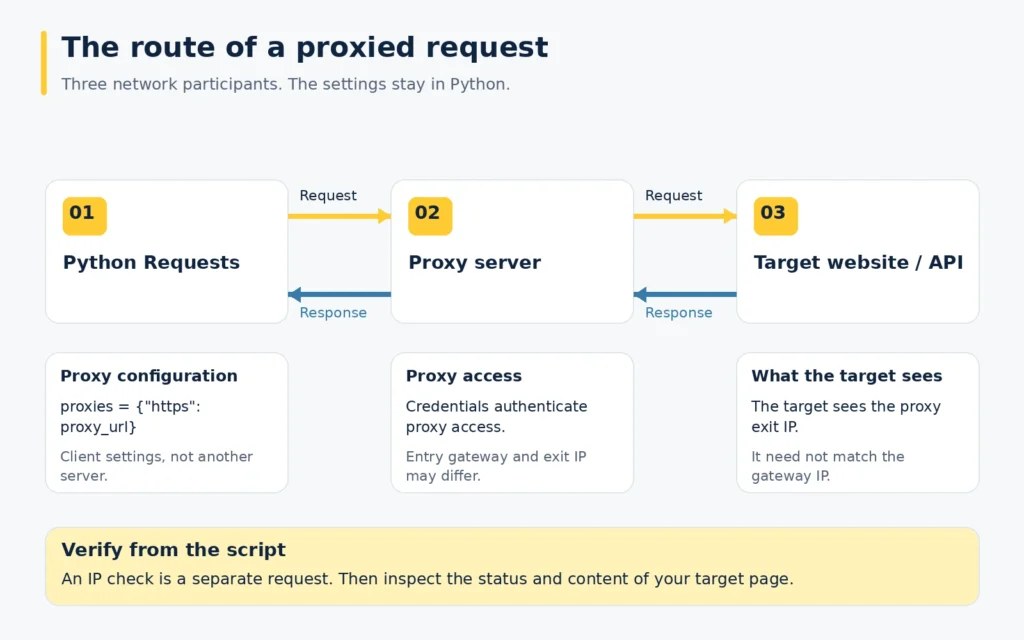
There are two addresses in the opening example. httpbin.org is where the request is meant to end. HOST:PORT is where Python connects to use your proxy service. Putting the website address in the proxy field would confuse those roles.
This explains the apparently mismatched prefixes: https as the key, http:// in the value. With a suitable HTTP endpoint, CONNECT establishes a tunnel to the destination. The client then negotiates TLS with the website over that tunnel. Changing the value to https:// would request TLS to the proxy endpoint too, so use that scheme only for an endpoint that supports it.
There can also be two different provider-side addresses. The gateway is the endpoint entered in the account settings; another node may make the onward connection. In that arrangement, the observed_address field later in this article identifies the outward connection as seen by httpbin. It need not be the IP obtained by resolving the gateway name.
Which Environment Will Launch the File?
Use the interpreter selected for the launch. If its environment lacks Requests, install the package there:
python -m pip install requestsFor the proxy fields, use one issued configuration from start to finish. This matters when you have several products or older connection examples open: taking a port from one and a username from another creates a combination the provider may never have issued.
Inspect the Python path in the scheduled command. Is it the one used for the successful manual run? If the paths differ, compare their installed packages and configuration. Record the interpreter and installed Requests version when comparing two machines.
The opening call uses timeout=12. That applies a twelve-second waiting limit at the connection and read stages. You can change it for your workload. Do not treat it as a twelve-second deadline for the entire download: incoming data can keep the read progressing over a longer period.
How Do You Fill the Account Portion of the URL?
For HTTP Basic proxy access, the username and password occupy the part before @HOST:PORT. Prepare each account value with quote(), then place the encoded values in the layout shown below.
Here is a deliberately synthetic password example:
from urllib.parse import quote

sample_password = "demo@pass/word"
encoded_password = quote(sample_password, safe="")
print(encoded_password)
The sample prints demo%40pass%2Fword. Its @ has become %40 and its slash has become %2F, so those characters remain inside the account value when the URL is read. Encode the username in the same way. Anyone able to read this representation can recover the password; keep the encoded value private too.
The combined address follows this layout:
http://ENCODED_LOGIN:ENCODED_PASSWORD@HOST:PORTMangoProxy’s developer page includes a Python integration example you can use to check the layout. Fill it with the full login issued for your connection, including any required suffix. The demonstration helps with the layout. The connection still needs the values issued to your account.
There may be a second account involved at the website. Requests’ auth argument handles destination authentication. The credentials inside the HTTP Basic proxy URL are checked for access to the proxy service, so enter the website account in the destination settings instead.
What Does Session Change?
A Session is the client that subsequent calls can reuse. Its cookies and common settings remain available, and its pool can reuse a suitable connection. This is useful when one call depends on state established by an earlier call.
In the diagnostic loop, the Session stays in place while settings changes between attempts. Passing proxies=settings at each call lets the same client make the baseline request and then the configured proxy requests.
If another script stores the mapping in session.proxies, include its inherited environment in your review. Requests documents that environment proxy values can overwrite that session-level mapping. A scheduler may supply different environment values from the terminal where you first ran the file.
Address retention is a provider setting. Review the sticky-session or fixed-address conditions if the sequence needs one exit throughout. A Session object cannot arrange that with the proxy network. For an account sequence, check the retention conditions of the selected connection as well as retaining the client cookies.
How Can You Check the Route Without Confusing It with Browser Settings?
Make the IP request from the job itself. For a comparison, make a second request from that same runtime with the explicit proxy configuration omitted and Requests’ inherited environment settings disabled.
Call the first reading a runtime baseline rather than your home IP. A server can have its own NAT, VPN or system routing in place. Disabling Requests’ environment handling does not remove any of those.
There is a further detail for managed networks. Setting trust_env=False also affects environment-supplied authentication and CA-bundle settings. If those are required, configure the diagnostic client accordingly before interpreting a failed call. Do not disable certificate verification to get a result.
MangoProxy’s What Is My IP tool is useful when checking a browser configured with a proxy. For this Python job, keep the reading inside Python. A browser success is useful evidence about that browser. Pair it with the Python records before drawing a conclusion about the job; the scheduled process may use another host or another set of client settings.
Review selected exit against the configured connection. A difference from runtime baseline establishes that the two readings differed. Identifying the expected provider exit is the further check needed to confirm your selection. Conversely, an equal reading calls for investigation rather than an automatic verdict that the proxy was ignored.
What Changes for SOCKS?
The configuration needs a compatible SOCKS endpoint and Requests’ optional dependency support:
python -m pip install "requests[socks]"The choice between socks5 and socks5h concerns the hostname lookup. Without h, the lookup is performed at the client; with h, it is performed through the proxy. Decide where you need that lookup to occur. The three records below contain IP and HTTP observations, with no DNS-test result.
Check the selected MangoProxy connection for an available SOCKS endpoint before changing the scheme. Use its assigned port. The optional package supplies the Requests-side support; it cannot add a new protocol to the server you selected.
What Must the Selected Connection Provide?
The practical requirements are the needed location, the expected traffic and whether several calls must retain one address. Decide those before choosing a proxy category.
The catalogue job may depend on a country selection. An account sequence may also depend on keeping the address unchanged until the sequence ends. If the pages are unrelated, you can evaluate the planned batch with a small page sample instead, noting the traffic consumed and the responses it produced.
The proxy types comparison covers the network categories when you need that background. Then check the offer against the job: does it provide the chosen location, and can it retain an address for the required sequence? These are connection conditions to confirm after narrowing the product options.
Which Record Describes the Failure?
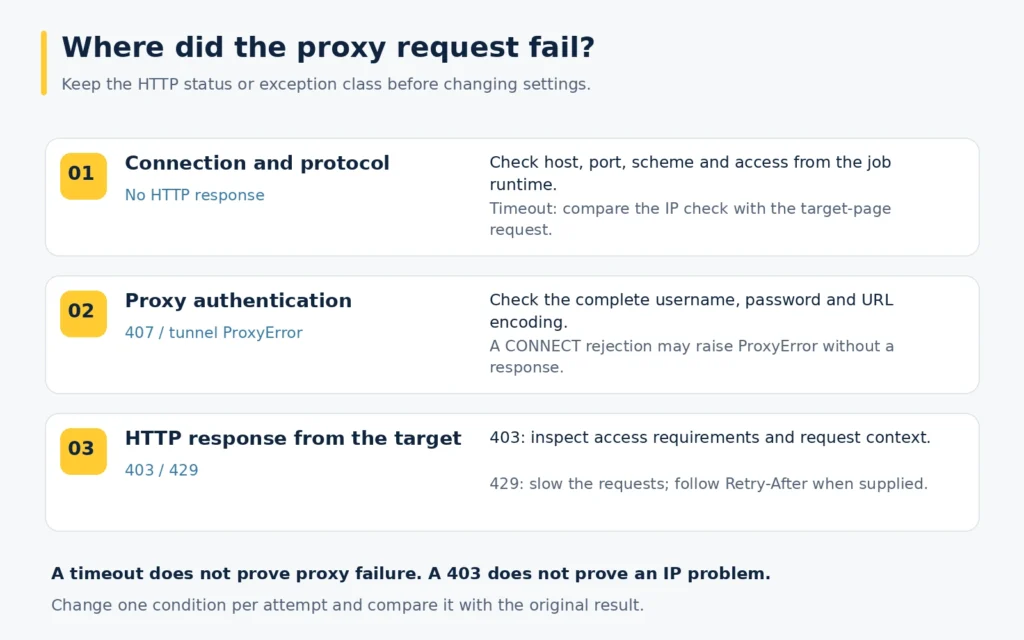
Find the affected check in the output. The script gives each attempt a status when a reply arrived, or an error_type when Requests raised an exception. Keep the output of the failed launch alongside the next launch so you can compare the same check.
407 or a rejected tunnel
Review the issued login, password and component encoding. For HTTPS destinations, an authentication rejection during CONNECT can become a ProxyError instead of an ordinary response with a readable status_code. The 407 troubleshooting guide goes further into this case.
No connection
Compare the configured server, port and scheme with the account details. An https:// value asks for TLS to the proxy. The TLS handshake cannot complete against an endpoint configured only for HTTP. After checking the fields, test access from the machine named in the failed run. A successful laptop attempt does not establish whether that server can reach the port.
Timeout
Use the labels to locate the timeout. With a completed selected exit check and a stalled target response, focus on the target request. If runtime baseline stalled too, investigate the environment’s connectivity as well. This comparison gives a reason for changing a waiting value; without it, a larger timeout may only delay the same failure.
403 or 429
Treat 403 as a response to examine against the resource’s access requirements. If the record shows 429, hold further batch calls or lower their frequency and observe the service’s Retry-After instructions when supplied. Rotation will not necessarily remove a limit imposed on an account or another shared condition.
TLS error
Check the hostname and trust chain at the failed connection. If the environment uses an approved inspecting proxy, its certificate setup may need attention. Keep verification enabled while resolving the cause.
A run through MangoProxy’s Proxy Checker adds another observation. If it succeeds while Python fails, compare the two environments and their settings. Compare that checker observation with the failing record, then return to the particular destination the job needs.
Practical Example: Read the Output by Attempt
The script below produces one record per attempt, named runtime baseline, selected exit or target response. Keep all three with the launch that produced them. This is the output you can compare when a scheduled launch behaves differently from a manual one.
Before launching the file, supply its four environment inputs privately. Put the connection’s HOST:PORT in MANGO_PROXY_ADDRESS and its full account values in MANGO_PROXY_LOGIN and MANGO_PROXY_PASSWORD. CHECK_TARGET_URL supplies the HTTPS destination for the last attempt. The gateway line constructs an HTTP proxy URL, which requires an endpoint that accepts that protocol.
import json
import os
from urllib.parse import quote

import requests

address = os.environ["MANGO_PROXY_ADDRESS"]
login = quote(os.environ["MANGO_PROXY_LOGIN"], safe="")
password = quote(os.environ["MANGO_PROXY_PASSWORD"], safe="")
gateway = f"http://{login}:{password}@{address}"
route = dict(http=gateway, https=gateway)
ip_service = "https://httpbin.org/ip"

attempts = (
    ("runtime baseline", ip_service, {}),
    ("selected exit", ip_service, route),
    ("target response", os.environ["CHECK_TARGET_URL"], route),
)

with requests.Session() as client:
    client.trust_env = False
    for label, destination, settings in attempts:
        record = {"check": label}
        try:
            reply = client.get(
                destination,
                proxies=settings,
                timeout=(4, 16),
                allow_redirects=False,
            )
            record["status"] = reply.status_code
            if label != "target response" and reply.status_code == 200:
                try:
                    payload = reply.json()
                    record["observed_address"] = (
                        payload.get("origin") if isinstance(payload, dict) else None
                    )
                    if not record["observed_address"]:
                        record["note"] = "No origin value in the reply"
                except ValueError:
                    record["note"] = "IP reply could not be read as JSON"
        except requests.exceptions.RequestException as error:
            record["error_type"] = type(error).__name__
        print(json.dumps(record))
The branch after client.get() copies the reply’s HTTP code into status. It also copies an error status, because this inspection never invokes raise_for_status(). The exception branch writes error_type instead. That difference lets you tell a received refusal from a call that raised a Requests error.
Redirects are disabled for this inspection. A recorded 3xx is the original endpoint’s redirect response. Examine its intended next destination before allowing the working job to follow it. Both HTTP and HTTPS entries are present in the route so that either destination scheme can be configured.
The first two records can include an observed address from the IP service. The target record reports a status, not a finding that the expected product data was present. Inspect that content separately. If the content is a login screen, an HTTP 200 record will not turn it into the product page you wanted. Check the content before accepting the result for data collection.
The file computes its records when executed; the article supplies no pre-recorded network results. Missing configuration variables stop execution before the network checks. The displayed records omit the gateway URL and password, but IP observations can still be operationally sensitive; store them accordingly.
This client deliberately ignores Requests’ environment configuration, as discussed above. If your network requires a custom trust bundle or authentication from the environment, supply the necessary client settings rather than copying that line into the working job without review.
Try the Setup with MangoProxy
MangoProxy residential proxies are an option when residential exits fit the task. Obtain the selected connection’s current details and enter them into the private configuration. Save the three check records with the run you are investigating. Before scheduling a batch, confirm the actual target content as well as its status.
Glossary
Gateway: The endpoint the Python client contacts to enter the proxy service.
Exit address: The source address observed at the destination end of the proxied connection.
Proxy authentication: The account check used to permit access to the intermediary.
Requests Session: A reusable client holding cookies and settings across calls, with connection pooling.
Sticky session: A provider option for retaining an exit address under the stated time and availability conditions.
IP rotation: A change in the address used for onward requests, according to the chosen provider configuration.
Read timeout: The waiting limit for incoming data during a read, rather than a deadline for the whole scheduled job.
Final Thoughts
A useful first run leaves enough information to compare with a second one. Keep the baseline, exit observation and target status together, then inspect the target content. If a scheduled run differs from a manual run, you will have a concrete place to start: the process configuration, the proxy check or the destination response.
Frequently asked questions
Here we answered the most frequently asked questions.
My HTTP request uses the proxy, but HTTPS does not. What should I inspect?
Check whether the mapping includes an https entry. An http entry selects a route for HTTP destinations; it does not configure every destination protocol. Environment settings can also affect a call that has no explicit entry.
Why does the example use one HTTP proxy for an HTTPS target?
The endpoint can open a CONNECT tunnel to the destination. The destination TLS exchange then travels through that tunnel. TLS on the separate client-to-proxy connection requires a compatible HTTPS proxy endpoint.
Can I put the proxy password in auth= instead?
That argument authenticates to the destination. For the HTTP Basic proxy configuration used here, encode the account components and include them in the proxy URL.
Why record an error class rather than the full exception text?
The class identifies the broad failure category without printing details that might contain connection information. If more diagnostics are needed, redact them before sharing or storing them.
Will a Session keep the same exit address for the whole job?
Only if the proxy configuration provides the required address retention. Session reuse handles the client side; the exit choice belongs to the provider.
Why was the IP check successful while the target returned 403?
The checks reach different services. Keep the target’s response and examine its access requirements. Successful connectivity to the IP endpoint does not settle the target’s decision.
Does socks5h verify that DNS never used the local resolver?
It selects proxy-side hostname resolution for that SOCKS connection. Verifying the complete application’s DNS behavior would require a separate test; this IP-check script does not perform one.
Can these checks run without Python installed on my laptop?
They can run in a private hosted Python environment with Requests installed and outbound proxy access available. Configure the account there and treat that runtime as the location of the test, rather than comparing it with a browser on your laptop.