
Python Web Scraping: Complete Guide for Beginners and Developers
Published: ≈ 8 min read
Quick Answer
Python web scraping is the process of automatically collecting publicly available information from websites using Python programs. Popular libraries such as Requests and BeautifulSoup make data collection straightforward, while proxy infrastructure helps distribute traffic and improve reliability for larger projects.
Key Takeaways
- Python is one of the most popular languages for web scraping.
- Requests and BeautifulSoup are common starting libraries.
- Browser automation is useful for JavaScript-heavy websites.
- Proxies help distribute requests across multiple IP addresses.
- Stable infrastructure often performs better than aggressive request patterns.
- Verification tools can help validate network configuration before scaling projects.
What Is Python Web Scraping?
Imagine manually checking hundreds of online stores every morning to compare product prices.
Now imagine writing a small Python program that performs the same task automatically.
That is the basic idea behind Python web scraping.
Python web scraping is the automated collection of publicly available information from websites.
A simple workflow looks like this:
Developer
↓
Python Script
↓
Website
↓
Collected Data
Instead of manually copying information, Python automates repetitive browser or network tasks.
Common examples include:
- product prices
- travel information
- business directories
- SEO research
- news aggregation
- market analysis
- public datasets
Python has become one of the most widely used languages for these tasks because it combines simplicity with a large ecosystem of libraries.
Why Do Companies Collect Public Website Data?
Web scraping is not only for programmers.
Many businesses use automated data collection to support everyday operations.
Price Monitoring
Online retailers compare competitor prices.
Travel Industry
Travel platforms monitor hotels and flight availability.
SEO Research
Marketing teams analyze search engine results and competitor visibility.
Real Estate
Companies collect publicly available property information.
News Aggregation
Media platforms gather information from multiple sources.
Market Research
Businesses monitor trends and publicly available industry data.
Different projects require different levels of infrastructure depending on the amount of data being collected.
Why Is Python So Popular?
Python has several advantages for beginners and experienced developers.
Easy to Learn
Python syntax is relatively straightforward.
Large Community
Thousands of open-source libraries and tutorials are available.
Flexible
Python supports simple scripts and large automation systems.
Cross Platform
Python works on Windows, Linux and macOS.
Extensive Ecosystem
Libraries exist for:
- HTTP requests
- HTML parsing
- browser automation
- databases
- machine learning
- reporting
This flexibility allows developers to combine several technologies within a single project.
Common Python Web Scraping Libraries
Python offers many libraries for collecting and processing website data.
Requests
Requests downloads webpage content using HTTP.
It is often the first library beginners learn.
Good for:
- APIs
- static websites
- lightweight projects
BeautifulSoup
BeautifulSoup parses HTML documents and extracts information.
Common use cases:
- titles
- links
- tables
- product information
lxml
lxml provides fast HTML and XML parsing.
Many larger projects use it for performance.
Selenium
Selenium automates web browsers.
Useful for browser testing and some dynamic websites.
Related:
Selenium Proxy Best Practices: Avoid Blocks, CAPTCHAs and Detection.
Playwright
Playwright supports modern browser automation and isolated browser contexts.
Related:
Playwright Browser Contexts and Proxies: How to Build Stable Automation Sessions.
Puppeteer
Puppeteer automates Chrome and Chromium browsers.
Related:
Puppeteer Proxies: Complete Guide for Browser Automation and Web Scraping.
Different websites may require different tools depending on complexity.
When Should You Use Python Web Scraping?
Python works well for many practical applications.
SEO Monitoring
Track search visibility and website changes.
Price Tracking
Monitor competitor pricing.
Product Availability
Watch inventory levels.
Market Research
Collect publicly available business information.
News Monitoring
Aggregate articles from multiple sources.
Public Data Collection
Build structured datasets for analysis.
Python is particularly effective when websites provide accessible HTML content.
Is Python Web Scraping Legal?
One of the most common beginner questions is whether web scraping is legal.
The answer depends on several factors, including local laws, website terms and the type of information being collected.
General best practices include:
- collecting publicly available information
- respecting applicable website policies
- reviewing relevant regulations
- avoiding unnecessary server load
- acting responsibly
Many organizations use web scraping for legitimate research, monitoring and business intelligence purposes.
Python Scraping vs Browser Automation
Not every website requires a browser.
Simple websites often work with HTTP requests.
Python Requests
↓
Website
↓
HTML
↓
Data
More complex websites may load information through JavaScript.
Browser Automation
↓
JavaScript
↓
Rendered Content
↓
Structured Data
Choosing the right approach depends on the target website.
Simple projects may work perfectly with Requests and BeautifulSoup.
JavaScript-heavy websites may benefit from Playwright or Puppeteer.
Why Use Proxies?
Without a proxy:
Python
↓
One IP
↓
Target Website
With a proxy:
Python
↓
Proxy
↓
Target Website
Proxies may help:
- distribute traffic
- manage sessions
- test locations
- reduce simple rate limiting
- separate workloads
However, proxies are only one part of a larger infrastructure.
Many websites also evaluate:
- IP reputation
- ASN
- DNS consistency
- request patterns
- historical activity
Working Example 1
Download a Webpage
import requests

response = requests.get(
    "https://example.com"
)

print(response.status_code)
print(response.text[:200])
Expected Result
Python downloads webpage content and prints the HTTP status code together with part of the HTML document.
Code Disclaimer
The code examples in this article were tested and verified at the time of publication. Website structures, Python libraries and network environments change regularly. Always review and test code in your own environment before production deployment.
Working Example 2
Route Traffic Through a Proxy
import requests

proxies = {

"http":"http://123.45.67.89:8000",

"https":"http://123.45.67.89:8000"

}

response = requests.get(

"https://httpbin.org/ip",

proxies=proxies

)

print(response.text)
Expected Result
Python routes requests through the configured proxy server.
The visible IP should match the proxy configuration.
Working Example 3
Parse HTML with BeautifulSoup
After downloading a webpage, the next step is extracting useful information.
BeautifulSoup helps navigate HTML documents and locate specific elements.
import requests
from bs4 import BeautifulSoup

response = requests.get(
    "https://example.com"
)

soup = BeautifulSoup(
    response.text,
    "html.parser"
)

print(
    soup.title.text
)
Expected Result
Python downloads the webpage and extracts the page title from the HTML document.
Working Example 4
Retry Failed Requests
Temporary network failures happen.
Retry logic can improve reliability.
import requests

from requests.adapters import HTTPAdapter

from urllib3.util.retry import Retry

session = requests.Session()

retry = Retry(
    total=3
)

adapter = HTTPAdapter(
    max_retries=retry
)

session.mount(
    "https://",
    adapter
)

response = session.get(
    "https://example.com"
)

print(
    response.status_code
)
Expected Result
Python automatically retries temporary connection failures before giving up.
Working Example 5
Rotate Proxies
import random

proxies = [

"http://proxy1:8000",

"http://proxy2:8000",

"http://proxy3:8000"

]

proxy = random.choice(
    proxies
)

print(proxy)
Expected Result
Python randomly selects a proxy from the available list.
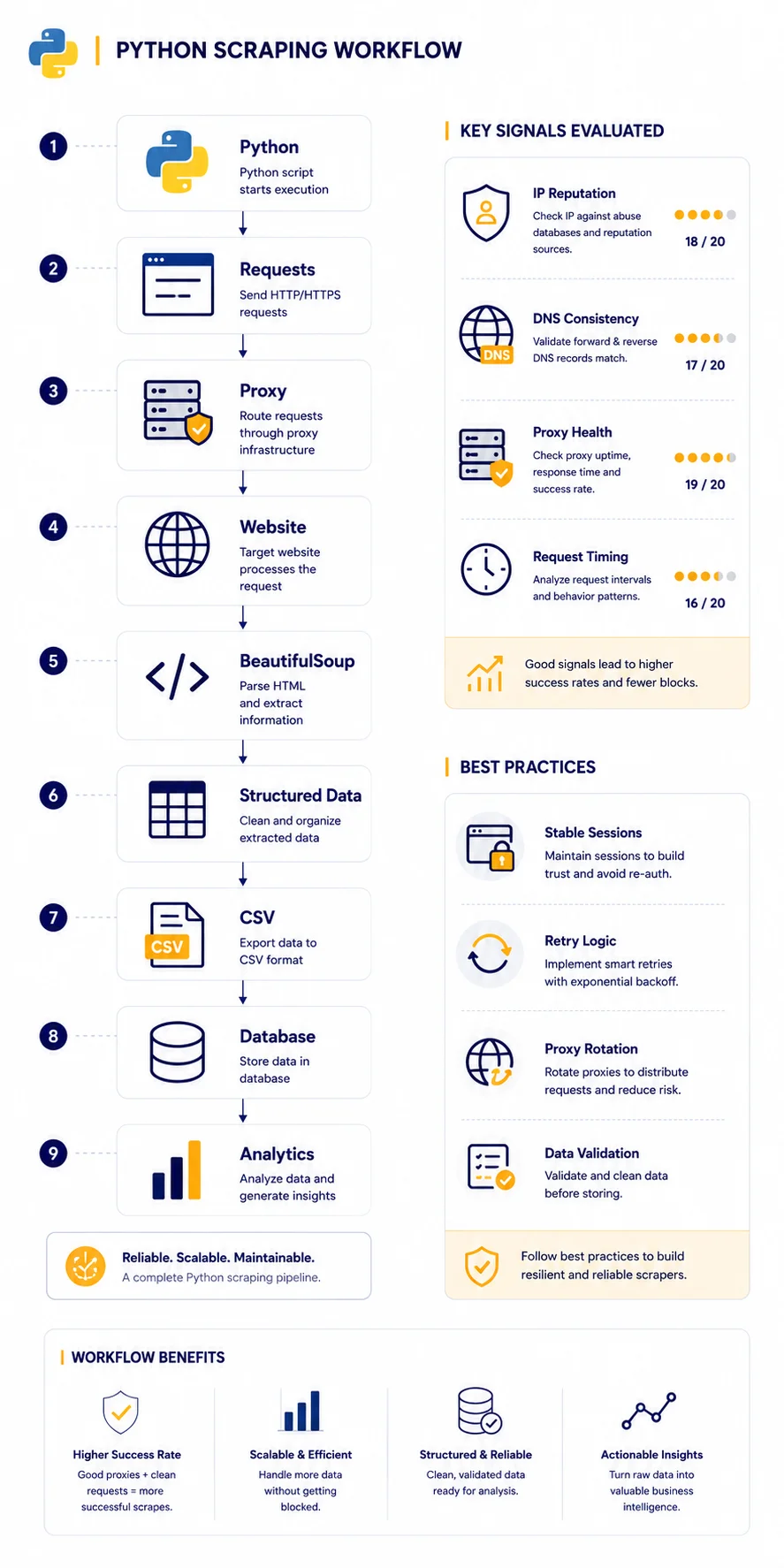
Typical Python Scraping Stack
Many projects combine several tools.
A typical workflow looks like this:
Python
↓
Requests
↓
Proxy
↓
Website
↓
BeautifulSoup
↓
Structured Data
↓
CSV or Database
Larger projects may add scheduling, monitoring and distributed infrastructure.
How Large Python Scraping Projects Work
A small project might collect information from a handful of pages.
Larger systems often include:
- multiple workers
- proxy pools
- retry systems
- monitoring
- scheduled jobs
- data validation
- database storage
A simplified workflow:
Python
↓
Proxy Pool
↓
Target Websites
↓
Parsers
↓
Database
↓
Reports
Scaling responsibly often improves long-term reliability.
Verify Your Infrastructure
Before launching larger scraping projects, verify your environment.
Recommended workflow:
Python
↓
Proxy
↓
My IP
↓
IP Lookup
↓
DNS Leak Test
↓
Proxy Checker
↓
IP Trace
Useful Mango tools:
My IP
Verify your visible public IP.
IP Lookup
Check geolocation and ASN information.
DNS Leak Test
Verify DNS, IPv6 and WebRTC behavior.
Proxy Checker
Confirm proxy availability.
IP Trace
Inspect routing paths.
Common Python Scraping Mistakes
Sending Too Many Requests
Aggressive request rates may trigger limits.
Moderate traffic patterns often work better.
Ignoring Website Structure
Websites change regularly.
Scrapers should be maintained and tested.
Ignoring DNS
DNS inconsistencies may create unexpected behavior.
Using Only One IP
Large projects often benefit from distributed infrastructure.
Assuming Fast Means Reliable
Stable connections often matter more than raw speed.
Choosing the Right Scraping Tool
Different projects have different requirements.
| Task | Recommended Tool |
| Static websites | Requests |
| HTML parsing | BeautifulSoup |
| Dynamic websites | Playwright |
| Chrome automation | Puppeteer |
| Cross-browser testing | Selenium |
Many developers combine multiple tools depending on project requirements.
Real Example
Imagine two projects.
Project A
One IP.
↓
Simple requests.
↓
Large request volume.
↓
Rate limits.
↓
Incomplete data.
Project B
Python.
↓
Stable proxies.
↓
Moderate traffic.
↓
Verified infrastructure.
↓
Reliable data collection.
For many practical projects, the second approach provides more stable long-term results.
Final Thoughts
Python web scraping combines simplicity with powerful automation capabilities.
Small projects may only require Requests and BeautifulSoup, while larger workloads can benefit from browser automation and stable proxy infrastructure.
Understanding when to use each tool helps developers build more efficient and reliable data collection workflows.
Many successful projects combine:
- Python
- HTML parsing
- browser automation
- proxy infrastructure
- verification tools
to create scalable scraping systems.
Frequently asked questions
Here we answered the most frequently asked questions.
What is Python web scraping?
Python web scraping automatically collects publicly available information from websites.
Is Python good for web scraping?
Yes. It is one of the world’s most popular scraping languages.
Is Python scraping legal?
The answer depends on local laws, website terms and the type of information being collected. Always act responsibly and review applicable requirements.
Can Python scrape JavaScript websites?
Sometimes. Simple websites often work with Requests. JavaScript-heavy websites may require browser automation.
Should I use Playwright or Puppeteer?
It depends on the target website and project requirements.
Why use proxies?
Proxies help distribute traffic and manage sessions.
How do I verify my setup?
Useful tools include:
- My IP
- IP Lookup
- DNS Leak Test
- Proxy Checker
- IP Trace