
Selenium Proxy Best Practices: Avoid Blocks, CAPTCHAs and Detection
Published: ≈ 6 min read
Quick Answer
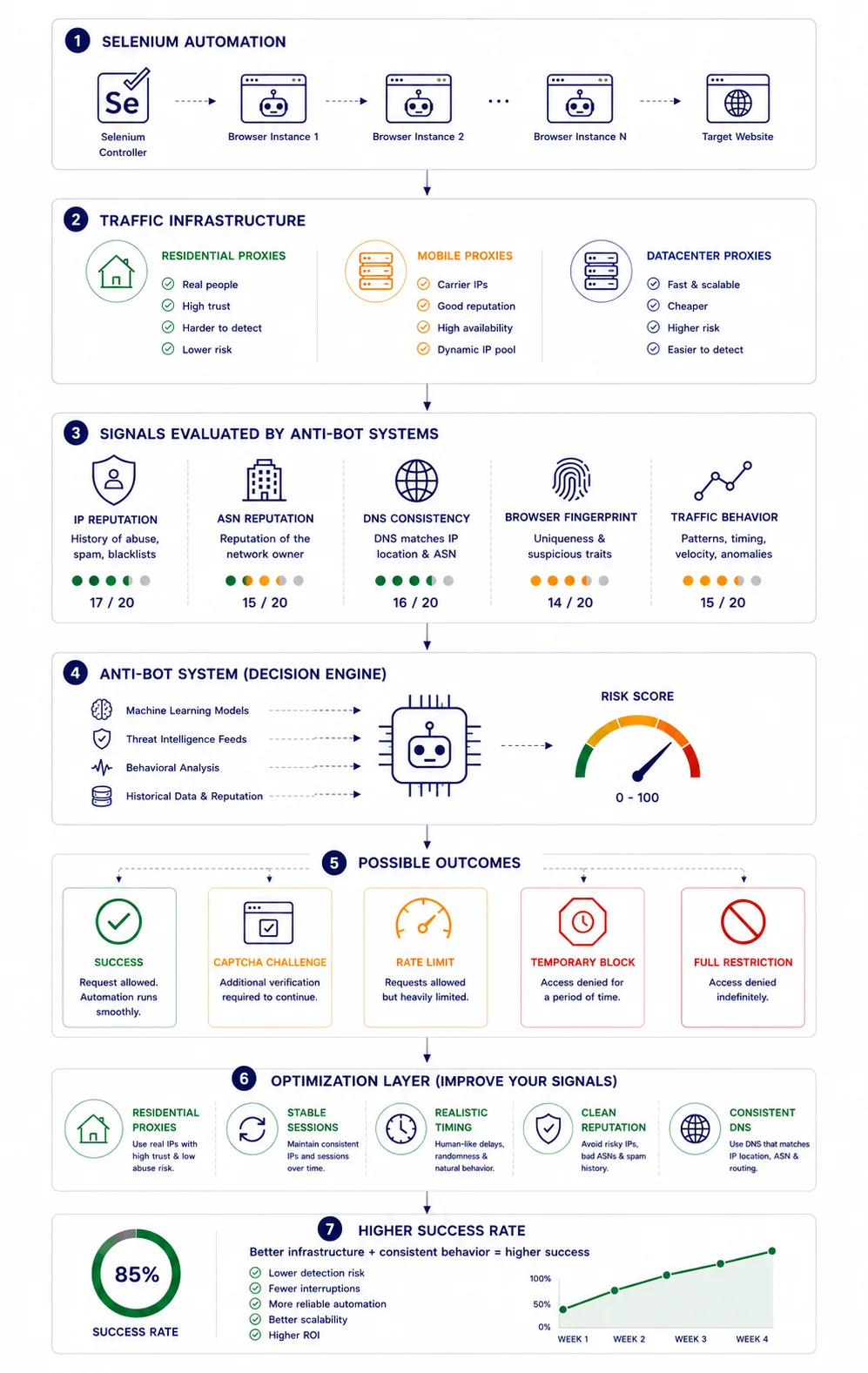
Using a proxy with Selenium is not enough to avoid blocks. Modern websites evaluate IP reputation, browser fingerprints, DNS consistency, ASN reputation and user behavior. Successful Selenium automation requires both quality proxy infrastructure and realistic browser activity.
Key Takeaways
- Proxies alone do not prevent detection
- IP reputation affects Selenium success rates
- Browser fingerprints often matter more than IP addresses
- Residential and ISP proxies usually receive higher trust scores
- DNS consistency plays an important role in anti-bot systems
- Success depends on infrastructure quality, not just proxy quantity
What Is Selenium?
Selenium is one of the most widely used browser automation frameworks.
Developers use Selenium to:
- automate browser actions
- test web applications
- scrape public data
- verify user journeys
- monitor websites
Unlike simple HTTP requests, Selenium controls a real browser such as Chrome or Firefox.
Because Selenium behaves like a browser, it is extremely powerful. It is also one of the most frequently detected automation tools on the internet.
Why Most Selenium Projects Fail
Many beginners assume the formula is simple:
Selenium + Proxy = Success
In reality, modern anti-bot systems evaluate dozens of signals simultaneously.
A more realistic formula looks like this:
Selenium + Quality Proxy + Browser Fingerprint + DNS Consistency + Human-Like Behavior = Higher Success Rate
If even one of these layers appears suspicious, websites may trigger CAPTCHAs, rate limits or outright blocks.
Basic Selenium Proxy Example
The simplest way to route Selenium traffic through a proxy is by configuring Chrome startup arguments.
options = webdriver.ChromeOptions()

options.add_argument(
    "--proxy-server=http://123.45.67.89:8000"
)

driver = webdriver.Chrome(options=options)

driver.get("https://httpbin.org/ip")

print(driver.page_source)

driver.quit()
Expected Result
Your browser traffic is routed through the configured proxy server.
The visible IP should match the proxy IP.
Code Disclaimer
The code examples in this article were tested and verified at the time of publication. Browser versions, Selenium releases, Chrome updates and website security mechanisms change regularly. Always review and test code in your own environment before deploying it to production systems.
How to Verify That the Proxy Works
After configuring Selenium, verify that traffic is actually using the expected IP address.
Recommended workflow:
Selenium
↓
Proxy
↓
My IP
If the visible IP matches your proxy, the configuration is working correctly.
You can also verify:
- routing behavior with IP Trace
- ASN ownership with IP Lookup
- DNS consistency with DNS Leak Test
Why IP Reputation Matters
Many websites maintain internal trust scores for incoming traffic.
Factors influencing reputation include:
- abuse history
- spam activity
- scraping behavior
- ASN reputation
- traffic patterns
Two proxies may have identical speed while producing completely different success rates.
For related context, see How IP Reputation Works.
Why Datacenter Proxies Often Get Blocked
Datacenter IPs are heavily used for:
- cloud hosting
- bots
- automation
- scraping
Because of this, many anti-bot systems automatically assign them lower trust scores.
Datacenter proxies remain useful for:
- testing
- large-scale crawling
- cost-sensitive projects
However, they often face more scrutiny.
Why Residential Proxies Usually Perform Better
Residential proxies originate from real ISP infrastructure.
To websites, they look similar to ordinary home users.
Benefits often include:
- fewer CAPTCHAs
- lower block rates
- higher trust scores
👉 Need residential proxies for Selenium automation? Explore our Residential Proxy plans.
Why ASN Reputation Matters
Websites frequently evaluate entire networks rather than individual IP addresses.
Example:
IP Address
↓
ASN
↓
Network Reputation
↓
Trust Score
If an ASN becomes associated with abuse or automation, trust may decrease across the entire network.
For related context, see What Is ASN and Why It Matters.
Why Browser Fingerprints Break Selenium Projects
One of the biggest mistakes is focusing entirely on proxies.
Modern websites analyze:
- browser version
- screen resolution
- WebGL
- fonts
- timezone
- hardware characteristics
A clean residential IP cannot compensate for an obviously automated browser environment.
For related context, see Proxy Fingerprinting Explained.
Why DNS Leaks Matter
Imagine this situation:
- Visible IP: United States
- DNS Resolver: Germany
- This inconsistency may immediately increase suspicion.
- Many Selenium projects fail because DNS traffic bypasses the intended infrastructure.
- Use DNS Leak Test before launching production workloads.
For related context, see What Is a DNS Leak and Why It Matters for Privacy and Proxies.
Why CAPTCHAs Appear Even with Good Proxies
CAPTCHAs are not always caused by poor proxies.
Common triggers include:
- repetitive navigation
- unrealistic timing
- browser anomalies
- fingerprint inconsistencies
- suspicious behavior
A high-quality proxy cannot compensate for obviously automated activity.
Why Human-Like Timing Matters
Humans behave inconsistently.
Bots often do not.
Example:
- Click
1 second - Click
1 second - Click
1 second - Click
1 second
This pattern is easy to detect.
Instead, introduce variation in delays and interactions.
Typical Production Selenium Stack
Most successful automation environments use more than Selenium and a proxy.
A common setup looks like this:
Undetected Browser
↓
Residential or ISP Proxy
↓
DNS Consistency
↓
Stable Session
↓
Human-Like Behavior
↓
Target Website
This is why two developers using the same Selenium version often experience dramatically different results.
Common Selenium Mistakes
Using a Single IP
Large workloads quickly become predictable.
Ignoring Reputation
Not all IP addresses perform equally.
Ignoring DNS
Infrastructure inconsistencies often increase detection risk.
Ignoring Fingerprints
A clean IP does not fix a suspicious browser.
Chasing Free Proxy Lists
Heavily abused proxies usually carry poor reputation.
How to Measure Selenium Infrastructure Quality
Do not evaluate proxies only by speed.
Also measure:
- success rate
- CAPTCHA frequency
- block rate
- session stability
- reputation quality
For related context, see Proxy Success Rate Explained: Why Requests Fail and How to Fix It.
Real Infrastructure Example
Environment A:
- datacenter proxy
- one IP
- repetitive timing
- default Selenium browser
Result:
- frequent CAPTCHAs
- lower success rate
Environment B:
- residential proxy
- stable sessions
- consistent DNS
- realistic behavior
Result:
- fewer restrictions
- higher completion rates
The difference often comes from infrastructure quality rather than Selenium itself.
Useful Tools Before Running Selenium at Scale
Recommended tools:
Together they provide a more complete view of how websites evaluate your traffic.
Choosing Infrastructure for Long-Term Automation
As projects grow, infrastructure quality becomes increasingly important.
A cheaper proxy may appear attractive initially, but constant blocks and CAPTCHAs often create higher operational costs later.
👉 Looking for reliable proxy infrastructure for Selenium? Browse available proxy locations and plans.
Frequently asked questions
Here we answered the most frequently asked questions.
Do I need proxies for Selenium?
Not always. However, proxies become important when running automation at scale, testing multiple locations or collecting large amounts of data.
Why do I still get CAPTCHAs?
CAPTCHAs may be triggered by fingerprints, behavior patterns, DNS inconsistencies or poor IP reputation.
Are residential proxies better for Selenium?
For many anti-bot environments, residential proxies often receive higher trust and encounter fewer restrictions.
Does changing an IP solve detection?
No. Modern anti-bot systems evaluate multiple signals beyond IP addresses.
Thanks for sharing these tips. It’s always helpful to see real-world guidance for building more stable Selenium workflows.