
Proxy Fingerprinting Explained: How Websites Identify Users
Published: ≈ 4 min read
Proxy Fingerprinting Explained: How Websites Identify Users
Quick Answer
Proxy fingerprinting is a method websites use to identify users based on multiple technical signals such as browser data, network behavior, and device characteristics – even if the IP address changes.
Key Takeaways
- IP address alone is not enough to stay anonymous
- Websites analyze browser, TLS, and behavioral signals
- Fingerprinting works across sessions and IP changes
- Detection is based on patterns, not a single factor
- Stable infrastructure matters more than just rotating proxies
What Is Proxy Fingerprinting
Many people assume that using a proxy hides their identity completely.
In reality, modern websites use fingerprinting techniques to recognize users beyond their IP address.
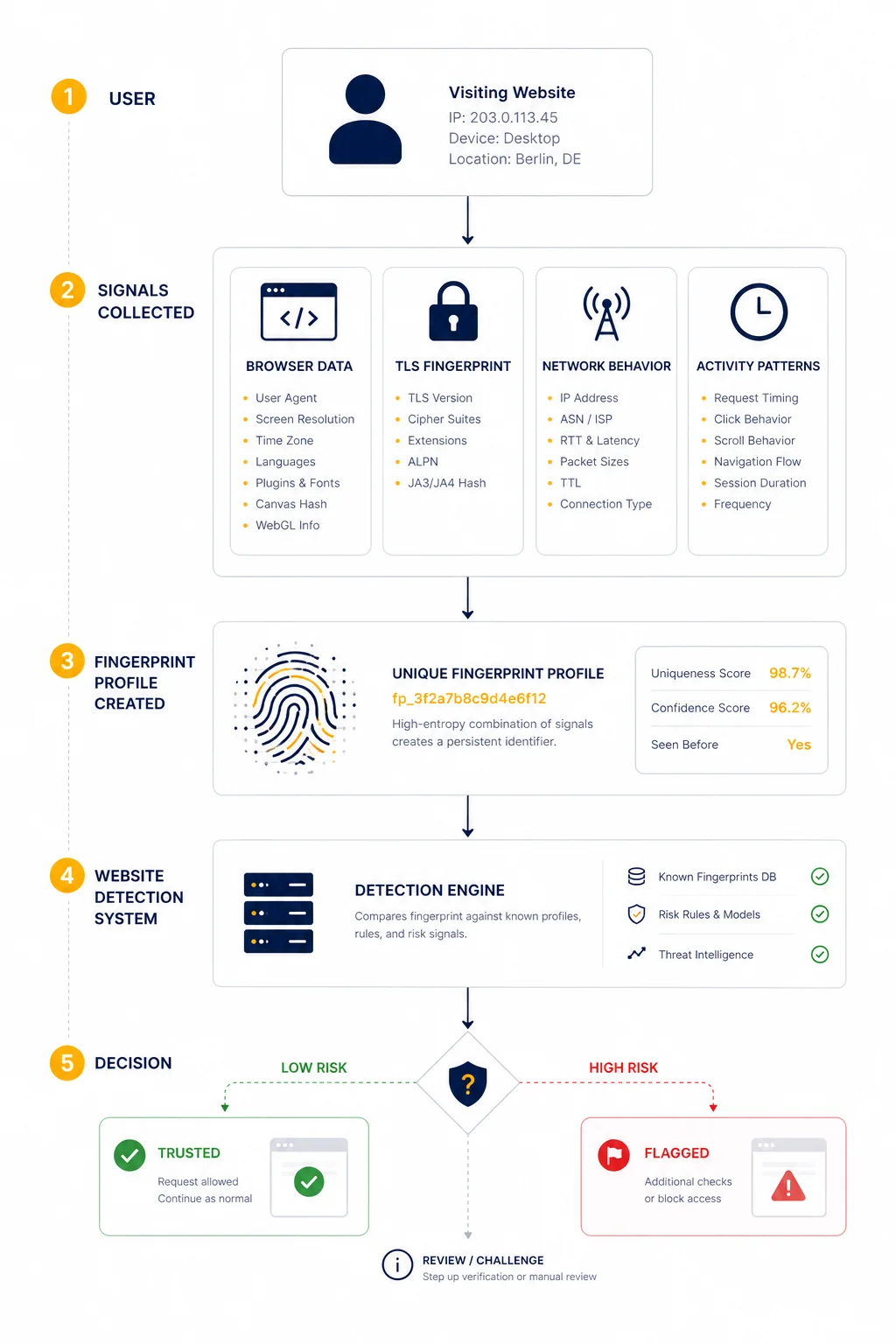
Proxy fingerprinting combines multiple signals to build a unique profile of a connection.
These signals include:
- browser characteristics
- network behavior
- TLS fingerprints
- request patterns
Even if the IP changes, the overall “signature” may remain consistent.
Why IP Address Alone Is Not Enough
In the past, IP was the primary identifier.
Today, it is only one part of the picture.
Websites now look at:
- consistency of requests
- device characteristics
- connection patterns
This is why simply rotating IPs does not always prevent detection.
For example, a system may see:
- different IPs
- but identical browser fingerprint
👉 and link them together.
Main Types of Fingerprinting Signals
Fingerprinting works by combining multiple layers of data.
Browser Fingerprint
Websites can collect detailed information from the browser:
- user agent
- screen resolution
- installed fonts
- timezone
- WebGL / Canvas data
This creates a unique browser profile.
TLS Fingerprint (JA3)
Each connection has a specific TLS handshake pattern.
This includes:
- cipher suites
- protocol versions
- extensions
These parameters form a JA3 fingerprint, which can identify:
- browser type
- automation tools
- proxy infrastructure
👉 even if IP changes.
Network-Level Signals
Websites also analyze how traffic behaves.
Examples:
- latency patterns
- packet timing
- routing consistency
This is why understanding Proxy Latency Explained is important.
Behavioral Patterns
One of the strongest signals is behavior.
Websites track:
- request frequency
- navigation flow
- interaction timing
For example:
- identical intervals between requests
- unnatural speed of actions
👉 these patterns are easy to detect.
How Websites Combine These Signals
Fingerprinting is not based on a single factor.
Instead, systems assign a “confidence score”.
Example:
| Signal | Risk Level |
| IP mismatch | low |
| browser fingerprint | medium |
| TLS signature | high |
| behavior pattern | very high |
Even if one signal looks normal, a combination may trigger detection.
Real-World Example
Imagine a system that:
- rotates IP addresses
- but uses the same browser setup
- sends requests at fixed intervals
From the outside:
- IPs look different
- but behavior and fingerprint remain identical
👉 websites group these sessions together.
Why Proxy Users Get Detected
Detection usually happens when signals do not match.
Common mismatches:
- mobile IP + desktop browser
- EU IP + US timezone
- rotating IP + static fingerprint
These inconsistencies are easy to spot.
How Fingerprinting Relates to Proxy Quality
Proxy quality is not just about speed or uptime.
It also affects how “natural” traffic looks.
For example:
- residential proxies blend better with real users
- datacenter proxies are easier to detect
- ISP proxies sit somewhere in between
You can test connectivity using Proxy Checker.
Practical Ways to Reduce Detection Risk
Important: this is about legitimate use cases like testing, QA, or analytics.
Keep Signals Consistent
Ensure that:
- IP location matches timezone
- browser matches device type
- headers look realistic
Avoid Perfect Patterns
Real users are not perfectly consistent.
Avoid:
- fixed request intervals
- identical session behavior
Use Stable Infrastructure
Instead of constantly rotating IPs, sometimes it is better to use:
- stable sessions
- realistic traffic flow
How Fingerprinting Connects to Network Behavior
Fingerprinting is not only about the browser.
Network characteristics also matter.
For example:
- routing paths
- latency consistency
- connection origin
You can analyze this using MangoProxy IP Trace Tool.
Why This Matters for Developers and Businesses
Understanding fingerprinting is critical for:
- QA testing
- geo-testing
- automation systems
- analytics validation
Without this knowledge, debugging issues becomes difficult.
Glossary
- Fingerprinting
A method of identifying users based on multiple technical signals. - JA3
A TLS fingerprint that identifies connection characteristics. - User agent
A string that describes browser and device information. - Behavioral analysis
Tracking how users interact with a system.
Frequently asked questions
Here we answered the most frequently asked questions.
What is proxy fingerprinting?
It is a method of identifying users using multiple signals beyond IP address.
Can fingerprinting track users across IP changes?
Yes, if other signals remain consistent.
What is JA3 fingerprint?
It is a unique identifier based on TLS handshake parameters.
Is fingerprinting always accurate?
No, but combined signals significantly increase detection reliability.