
Puppeteer Proxies: Complete Guide for Browser Automation and Web Scraping
Published: ≈ 9 min read
Quick Answer
Puppeteer is an open-source browser automation library developed by Google that controls Chrome and Chromium browsers programmatically. Unlike simple HTTP requests, Puppeteer executes JavaScript like a real browser, making it useful for web scraping, browser testing and automation of dynamic websites. Combined with quality proxy infrastructure, Puppeteer can support more reliable browser sessions and large-scale automation projects.
Key Takeaways
- Puppeteer automates Chrome and Chromium browsers.
- It executes JavaScript and renders dynamic content.
- Proxies help distribute browser traffic.
- Residential and ISP proxies often improve long-running automation.
- Stable sessions generally work better than constant IP rotation.
- DNS consistency and IP reputation still affect browser automation.
What Is Puppeteer?
Puppeteer is an open-source browser automation library created by Google.
Instead of manually opening Chrome and interacting with websites, Puppeteer allows developers to automate those actions through JavaScript.
Think of Puppeteer as a programmable Chrome browser.
A typical Puppeteer workflow looks like this:
Developer
↓
Puppeteer
↓
Chrome Browser
↓
Website
Developers use Puppeteer for:
- web scraping
- browser testing
- SEO audits
- screenshot generation
- PDF creation
- browser automation
- website monitoring
- workflow automation
One of Puppeteer’s biggest advantages is that it can execute JavaScript exactly like a real browser.
Why Did Google Create Puppeteer?
Puppeteer was originally developed by Google to simplify Chrome browser automation.
Many websites today rely heavily on JavaScript to display content.
Traditional HTTP requests often receive incomplete pages.
Google designed Puppeteer to provide direct control over Chrome and Chromium, making it easier to automate browser actions and test modern web applications.
Today Puppeteer is widely used by:
- developers
- QA engineers
- SEO specialists
- data collection teams
- automation projects
What Can Puppeteer Do?
Puppeteer supports many browser automation tasks.
Common capabilities include:
✅ Opening websites.
✅ Clicking buttons.
✅ Filling forms.
✅ Scrolling pages.
✅ Executing JavaScript.
✅ Taking screenshots.
✅ Creating PDF documents.
✅ Collecting dynamically loaded content.
✅ Monitoring websites.
✅ Automating repetitive browser workflows.
Because Puppeteer controls a real browser, it can interact with websites much like a human user.
Why Do Companies Use Puppeteer?
Although Puppeteer is popular among developers, many businesses use it to automate repetitive browser tasks and collect publicly available information.
Common use cases include:
Price Monitoring
Track product prices and availability across online stores.
SEO Audits
Analyze rendered pages, metadata and dynamic content.
Website Monitoring
Check website changes and availability automatically.
Automated Screenshots
Generate visual reports and previews.
Browser Testing
Validate web applications before deployment.
Public Data Collection
Gather publicly available information for research and analytics.
Different projects may require different proxy strategies depending on scale and target websites.
When Should You Use Puppeteer?
Puppeteer is particularly useful for websites that rely on JavaScript.
Good use cases include:
Web Scraping
Collecting publicly available information from modern websites.
SEO Audits
Checking rendered content, titles and metadata.
Browser Testing
Automating repetitive testing tasks.
Screenshot Generation
Creating website previews and reports.
Price Monitoring
Tracking products and availability.
Workflow Automation
Automating browser-based business processes.
When Puppeteer May Not Be the Best Choice
Puppeteer is extremely capable, but it is not always necessary.
Simple HTTP requests may work better for:
- REST APIs
- static HTML pages
- lightweight scripts
- small automation projects
Launching a full browser consumes more resources.
Choosing the right tool often improves both speed and efficiency.
Puppeteer vs HTTP Requests
One of the most common beginner questions is:
Why not simply use HTTP requests?
A standard HTTP request usually downloads raw HTML.
HTTP Request
↓
HTML
↓
Missing Dynamic Content
Many modern websites load information after JavaScript execution.
Puppeteer works differently.
Puppeteer
↓
Chrome
↓
JavaScript Execution
↓
Rendered Page
This is one of the main reasons Puppeteer is popular for modern web scraping projects.
Why JavaScript Rendering Matters
Many modern websites load content after the initial page request.
A simple HTTP request may only receive part of the information.
HTTP Request
↓
HTML
↓
Missing Dynamic Content
Puppeteer launches a real browser and executes JavaScript.
Puppeteer
↓
Chrome
↓
JavaScript
↓
Rendered Page
↓
Complete Data
This is one of the main reasons developers choose Puppeteer for modern web scraping and browser automation.
Puppeteer vs Selenium vs Playwright
Although all three frameworks automate browsers, they have different strengths.
| Tool | Common Use |
| Selenium | Cross-browser testing |
| Playwright | Browser contexts and session isolation |
| Puppeteer | Chrome automation and JavaScript rendering |
If your project focuses primarily on Chrome and JavaScript-heavy websites, Puppeteer is often an attractive option.
Related articles:
Playwright Browser Contexts and Proxies
Why Use Proxies with Puppeteer?
Without a proxy:
Browser
↓
One IP
↓
Target Website
With a proxy:
Browser
↓
Proxy
↓
Target Website
Proxies can help:
- distribute traffic
- test different locations
- manage sessions
- reduce simple rate limiting
- separate automation environments
However, a proxy alone does not guarantee successful automation.
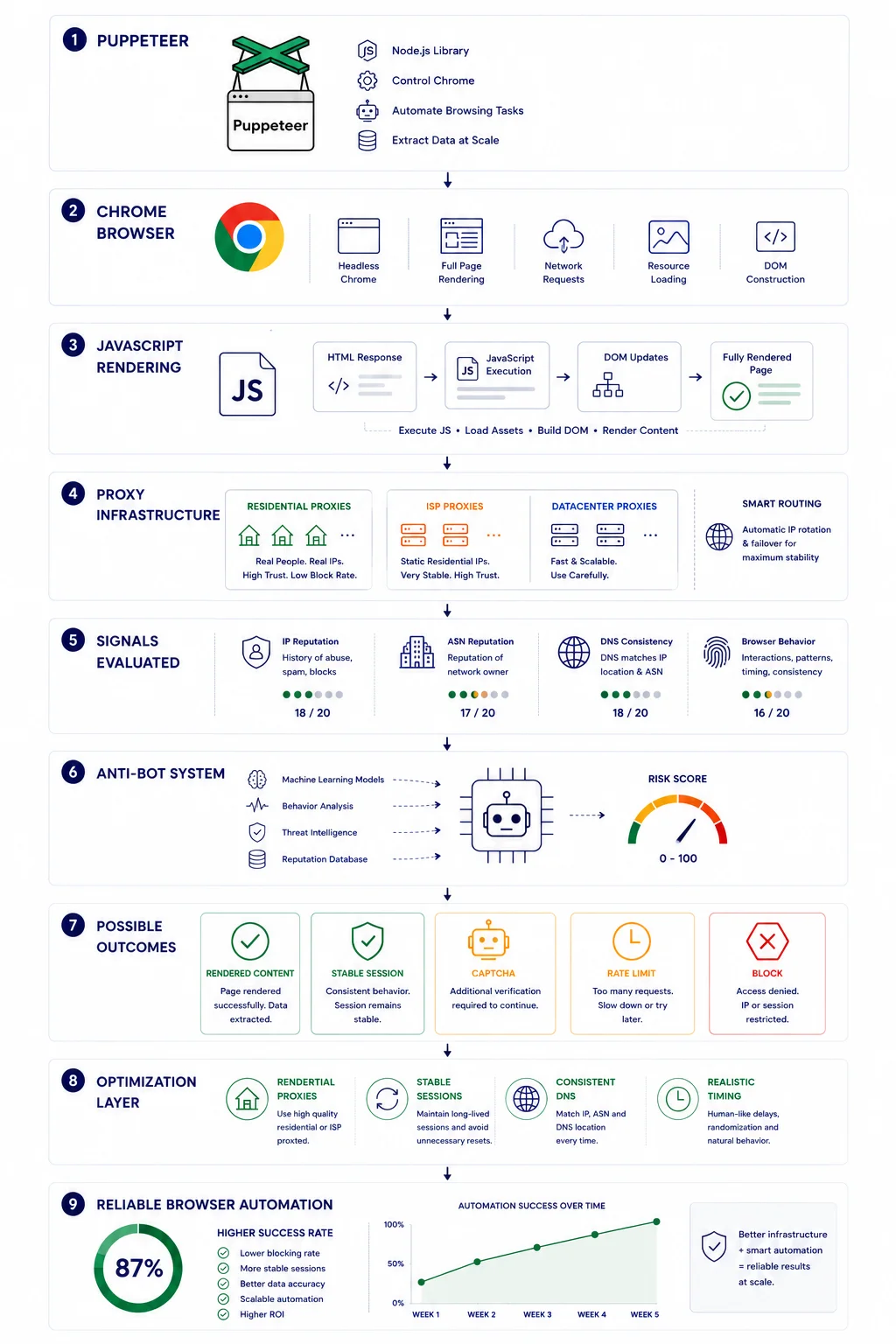
Modern websites also evaluate:
- IP reputation
- ASN reputation
- DNS consistency
- browser behavior
- traffic patterns
Working Example 1
Launch a Puppeteer Browser
const puppeteer = require('puppeteer');

(async () => {

const browser = await puppeteer.launch({
headless:false
});

const page = await browser.newPage();

await page.goto("https://example.com");

console.log(await page.title());

await browser.close();

})();
Expected Result
Chrome launches automatically and opens the target website.
The script prints the page title and closes the browser.
Code Disclaimer
The code examples in this article were tested and verified at the time of publication. Browser versions, Puppeteer releases and Chrome updates change regularly. Always review and test code in your own environment before production deployment.
Working Example 2
Configure a Proxy
const puppeteer = require('puppeteer');

(async () => {

const browser = await puppeteer.launch({

headless:false,

args:[
'--proxy-server=http://123.45.67.89:8000'
]

});

const page=await browser.newPage();

await page.goto("https://httpbin.org/ip");

console.log(await page.content());

await browser.close();

})();
Expected Result
Browser traffic is routed through the configured proxy server.
The visible IP should match the configured proxy infrastructure.
Working Example 3
Wait for Dynamic JavaScript Content
const puppeteer = require('puppeteer');

(async () => {

const browser = await puppeteer.launch();

const page = await browser.newPage();

await page.goto("https://example.com");

await page.waitForSelector("body");

console.log("Page loaded");

await browser.close();

})();
Expected Result
Puppeteer waits until the page finishes rendering before executing the next action.
This approach is useful for JavaScript-heavy websites that load content dynamically.
Headless vs Headful Mode
Puppeteer supports two browser modes.
Understanding the difference helps developers choose the right setup.
Headless Mode
The browser runs without displaying a graphical window.
Advantages:
- faster execution
- lower resource usage
- suitable for automation
- ideal for production workloads
Headful Mode
The browser window remains visible.
Advantages:
- easier debugging
- observing browser behavior
- troubleshooting automation issues
- development and testing
Many developers build scripts in headful mode and deploy them in headless mode.
Typical Puppeteer Proxy Workflow
A typical browser automation workflow looks like this:
Developer
↓
Puppeteer
↓
Proxy
↓
DNS Check
↓
Target Website
↓
Rendered Content
Before launching large projects, developers often verify every layer of this chain.
Verify Your Infrastructure
Before running Puppeteer at scale, verify that your environment behaves as expected.
Recommended workflow:
Puppeteer
↓
Proxy
↓
My IP
↓
IP Lookup
↓
DNS Leak Test
↓
IP Trace
Useful Mango tools:
Check your visible public IP address.
Verify ASN and network ownership.
Check for DNS, IPv6 and WebRTC leaks.
Inspect routing paths.
Validate proxy availability.
Why Residential Proxies Often Work Better
Many automation projects rely on residential infrastructure.
Benefits may include:
- real ISP networks
- cleaner reputation
- lower CAPTCHA frequency
- more stable long-term sessions
Residential traffic often resembles normal user behavior more closely than heavily shared datacenter infrastructure.
👉 Need residential proxies for Puppeteer automation? Explore our Residential Proxy plans.
Why IP Reputation Still Matters
A browser alone does not prevent detection.
Many websites analyze:
- IP reputation
- ASN reputation
- DNS consistency
- browser behavior
- request timing
- historical traffic patterns
For related context, see:
Why Websites Block IP Addresses and How Detection Systems Work
Common Puppeteer Mistakes
Ignoring JavaScript Timing
Dynamic websites often need rendering delays.
Trying to scrape data immediately after loading may produce incomplete results.
Rotating IP Addresses Too Frequently
Constant IP switching may create suspicious behavior patterns.
Stable sessions often work better.
Ignoring DNS
DNS inconsistencies may increase detection risk.
Verify DNS behavior before running large projects.
Testing Only Speed
Fast proxies are not always reliable.
Success rate and stability are often more important.
Assuming Puppeteer Solves Detection
Puppeteer is a browser automation framework.
It does not automatically bypass anti-bot systems.
Infrastructure quality still matters.
When Puppeteer Is Not the Best Choice
Although Puppeteer is extremely capable, it is not always the right solution.
Simple HTTP requests may work better for:
- REST APIs
- static HTML pages
- lightweight scripts
- small data collection tasks
Puppeteer becomes particularly useful when websites rely heavily on JavaScript and dynamic content.
Selecting the appropriate tool often improves both speed and resource usage.
Real Example
Imagine two scraping environments.
Environment A
Simple HTTP requests.
↓
Static HTML.
↓
Missing dynamic content.
↓
Failed data collection.
Environment B
Puppeteer.
↓
JavaScript rendering.
↓
Stable proxy.
↓
Consistent DNS.
↓
Complete page content.
↓
Higher reliability.
For many modern websites, the second approach provides significantly better results.
Choosing Proxy Infrastructure
Different projects have different requirements.
Datacenter Proxies
Good for:
- testing
- low-cost automation
- lightweight workloads
Residential Proxies
Good for:
- JavaScript-heavy websites
- long-running sessions
- account management
- advanced automation
ISP Proxies
Good for:
- stable identities
- persistent sessions
- browser automation
Choosing infrastructure based on project requirements often produces better results than simply selecting the cheapest option.
👉 Looking for stable proxy infrastructure for Puppeteer? Browse available proxy locations and plans.
Final Thoughts
Puppeteer has become one of the most widely used browser automation frameworks for Chrome and Chromium.
Its ability to execute JavaScript and interact with modern websites makes it valuable for:
- scraping
- testing
- monitoring
- browser automation
- SEO workflows
At the same time, successful automation depends on more than simply launching a browser.
Proxy quality, DNS consistency, IP reputation and realistic session behavior all influence long-term reliability.
Understanding how these components work together helps developers build more stable browser automation projects.
👉 Need proxy infrastructure for Puppeteer automation? Explore available proxy locations and plans for your next project.ht? Browse available proxy locations and plans.
Choosing the Right Browser Automation Tool
Different projects have different requirements.
| Task | Recommended Tool |
| Static websites | HTTP Requests |
| Chrome automation | Puppeteer |
| Browser contexts | Playwright |
| Cross-browser testing | Selenium |
| Dynamic JavaScript | Puppeteer or Playwright |
Many developers combine several tools within the same project to balance speed, flexibility and compatibility.
Frequently asked questions
Here we answered the most frequently asked questions.
What is Puppeteer?
Puppeteer is an open-source browser automation library developed by Google for Chrome and Chromium.
Is Puppeteer hard to learn?
Puppeteer is considered beginner-friendly for developers familiar with JavaScript. Its API is relatively simple and well documented.
Can Puppeteer scrape JavaScript websites?
Yes. One of Puppeteer’s primary strengths is executing JavaScript and interacting with dynamically loaded content.
Does Puppeteer support proxies?
Yes.Puppeteer can route browser traffic through proxy servers.
Why use Puppeteer instead of HTTP requests?
Because Puppeteer executes JavaScript and renders dynamic websites.
Is Puppeteer better than Selenium?
Neither tool is universally better. Selenium is commonly used for cross-browser testing. Puppeteer is popular for Chrome automation and JavaScript-heavy websites.
Can Puppeteer scrape JavaScript websites?
Yes. This is one of its primary use cases.
Why do I still get CAPTCHAs?
Modern websites analyze many signals beyond IP addresses, including browser behavior and traffic patterns.
How do I verify my proxy?
Use:
- My IP
- IP Lookup
- DNS Leak Test
- IP Trace
to inspect visible network information.