
407 Proxy Authentication Required: Causes and Solutions
When configuring network routing through an intermediary server, developers may encounter the 407 Proxy Authentication Required response.
This message appears when the intermediary server refuses to forward a request because it expects authentication credentials that were not included or were rejected.
Unlike blocking errors returned by websites, this response originates from the routing infrastructure itself.
Understanding the authentication mechanism used by proxy networks makes it easier to diagnose configuration issues and restore connectivity.
Quick Answer
The 407 Proxy Authentication Required response appears when a proxy gateway requires authentication credentials before allowing traffic to pass.
This usually happens when:
- login details are incorrect
- authentication headers are missing
- proxy settings are misconfigured
- the request format is incompatible with the proxy service
Correcting the authentication configuration typically resolves the issue immediately.
Key Takeaways
- the 407 response is generated by the proxy server, not the target website
- incorrect login credentials are the most frequent cause
- automation tools often trigger this error due to configuration mistakes
- verifying connection format and authentication method usually fixes the problem
- gateway-based authentication can simplify proxy configuration
What the 407 Status Code Means
The HTTP protocol defines multiple status codes used during network communication.
| Code | Meaning |
| 401 | authentication required by website |
| 403 | request blocked by server |
| 407 | authentication required by proxy |
When a request is routed through a proxy server, the proxy may require authentication before forwarding traffic to the destination server.
If authentication data is missing, the proxy interrupts the request and returns a 407 response.
Learn how proxy routing works in What Is Proxy Server.
How Proxy Authentication Works
Proxy providers restrict access to their infrastructure to authorized users.
Authentication ensures that only valid accounts can route traffic through the network.
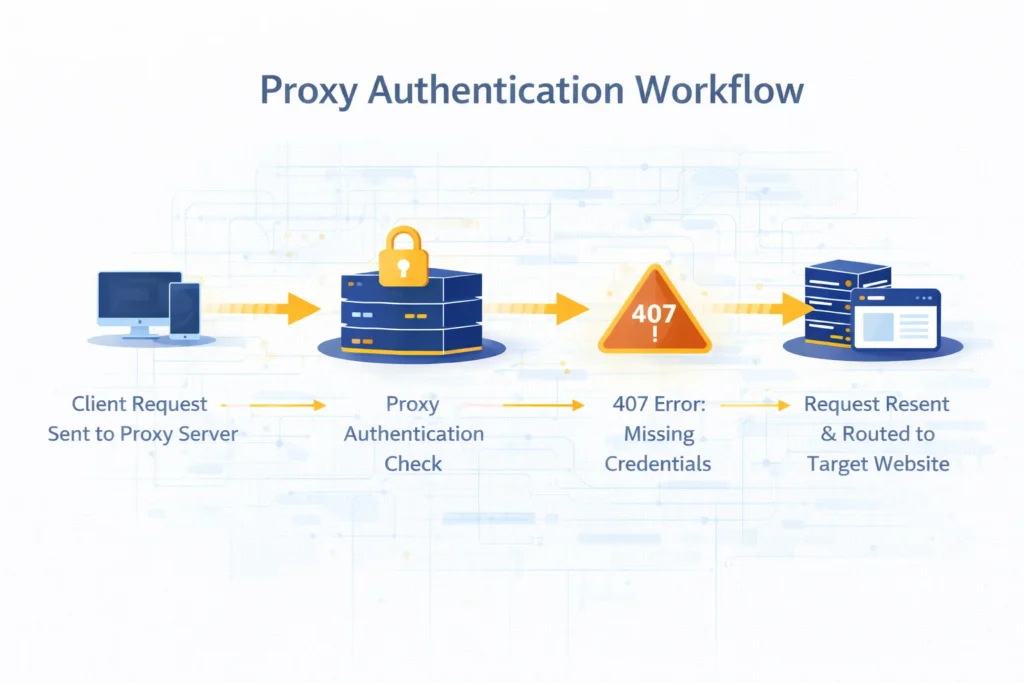
The process typically works like this:
| Stage | Description |
| request sent | client sends traffic to proxy gateway |
| authentication check | proxy verifies credentials |
| authentication failure | proxy returns 407 response |
| authenticated request | client retries with credentials |
| forwarded traffic | proxy forwards request to destination |
Once credentials are accepted, the connection proceeds normally.
Typical Reasons for a 407 Response
Incorrect Login Credentials
Authentication failures most often occur because login details were entered incorrectly.
Developers should verify:
- username spelling
- password format
- credential encoding
Even minor formatting issues may cause authentication to fail.
Incorrect Connection Format
Different applications expect different proxy configuration formats.
Examples include:
host:port
host:port:username:password
username:password@host:port
If the software expects one format but receives another, authentication may fail.
Missing Authentication Headers
Certain tools require explicit authentication headers when connecting to a proxy gateway.
If these headers are not included, the proxy will reject the request.
Expired or Disabled Credentials
Some proxy providers rotate or disable credentials for security reasons.
If authentication tokens or passwords change, previously configured connections may stop working.
How to Fix the Error
Verify Authentication Details
Start by confirming that login credentials match those provided by the proxy service.
Incorrect characters, spaces or encoding errors can break authentication.
Test the Connection
Before launching automation tasks, it helps to test whether the connection works correctly.
Tools such as:
allow developers to verify that the request successfully passes through the proxy infrastructure.
Review Proxy Settings
Many automation environments require proxy configuration in a specific format.
Examples include:
- browser network settings
- scraping frameworks
- command-line tools
Ensuring that the correct configuration syntax is used often resolves the problem quickly.
Consider Gateway Authentication
Some providers support gateway-based authentication where credentials are embedded in the username rather than tied to individual IP addresses.
This method simplifies configuration and reduces connection errors.
Authentication Errors in Scraping Workflows
Proxy authentication issues frequently appear during automation and data collection tasks.
Typical scenarios include:
- configuring a new scraping environment
- switching between proxy providers
- deploying scripts on new servers
- migrating scraping frameworks
See infrastructure design in Best Proxy for Web Scraping.
Understanding authentication flow helps prevent repeated configuration mistakes.
Final Thoughts
The 407 Proxy Authentication Required response indicates that the proxy infrastructure expects authentication before allowing traffic to pass.
Unlike blocking responses generated by websites, this error almost always points to a configuration issue.
Verifying credentials, connection format and software settings typically resolves the problem and restores normal routing.
Glossary
Proxy Authentication
A security mechanism that verifies whether a user is authorized to access a proxy network.
Authentication Header
A request header containing credentials used to validate access.
Proxy Gateway
An entry point that manages authentication and routing for proxy connections.
Credential Verification
The process of validating username and password data during a connection attempt.

Frequently asked questions
Here we answered the most frequently asked questions.
Is a 407 error generated by the website?
No. The response is generated by the proxy server before the request reaches the destination website.
Why does this error appear in scraping tools?
Most often because authentication credentials were not configured correctly.
Can proxies work without authentication?
Some providers support IP-based authentication instead of username and password.
How can I check whether authentication works correctly?
Testing the connection through diagnostic tools or simple HTTP requests helps verify whether authentication succeeds.
Always URL-encode special characters in the proxy password string; unencoded symbols consistently trigger instant 407 failures