


PhoneGrid: Android Cloud Phones for Automation and Proxy Workflows
Published: ≈ 9 min read
Running dozens of Android environments involves more than using the apps. Phones need to be assigned, software installed and settings kept straight across projects. PhoneGrid brings those environments into one cloud workspace, so the team can manage them without maintaining a collection of handsets.
Internet access is separate: PhoneGrid supplies the Android environment, and you connect a proxy of your own.
What Is PhoneGrid?
PhoneGrid hosts Android phones in the cloud. You control them from your computer, run apps inside them and share access with colleagues. A separate environment doesn’t require another smartphone on your desk.
Persistent sessions let staff return to an existing Android environment. App logins are a separate matter: an app may still require you to sign in again.
Key PhoneGrid Features
App Installation and Environment Management
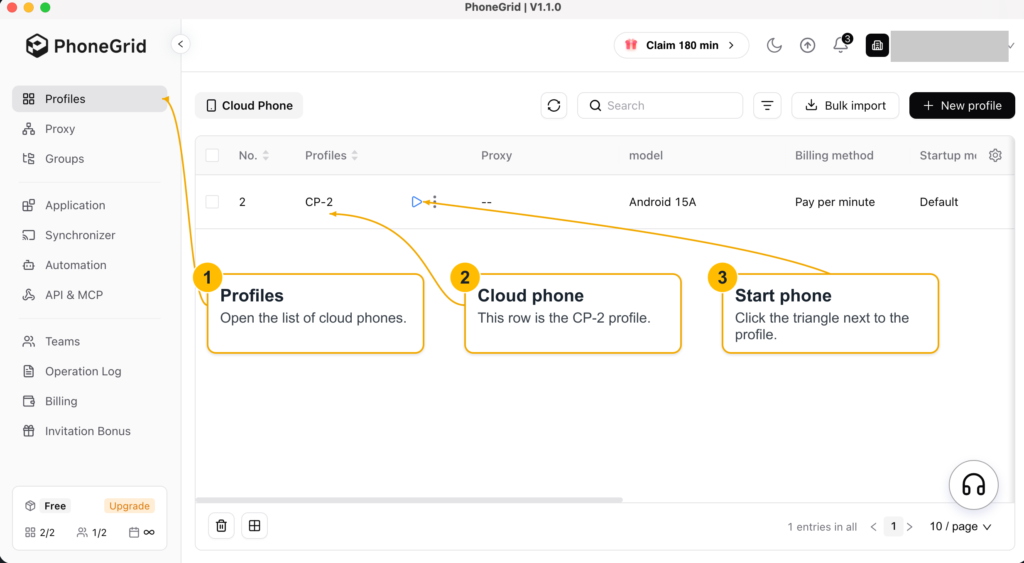
On an individual cloud phone, apps can be installed directly within Android. When several phones need the same apps, prepare them in Application Center. You can upload your own APKs there too; an APK is an Android app installation file.
Assign phones by project and give colleagues access to the environments they need. An operator can then handle day-to-day work on a phone while an automation specialist prepares recurring tasks.
Syncer and RPA
Syncer mirrors actions from one cloud phone across other selected windows. Use it when you want to carry out the same short action on several phones yourself. Check that the apps show the same screen first: a tap intended for one control may hit something else if an app is in a different state.
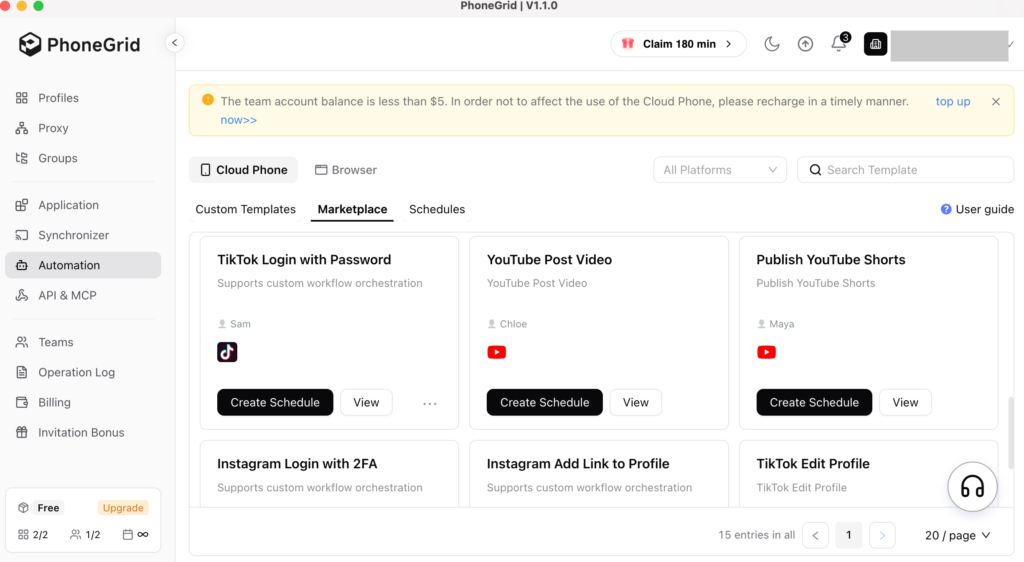
RPA runs a predefined workflow. Users can build one in a visual editor, adding taps, swipes and text input, along with conditions and loops. Ready-made templates and scheduled tasks are also available. One example is running through the same sequence in an app at regular intervals.
API and MCP
Developers can create phones, list environments, install apps and start them through the PhoneGrid API. These operations can be integrated into a team’s own systems.
MCP connects PhoneGrid to compatible AI tools so users can give them instructions in a conversation. The current guide covers browser profile management and actions on web pages. MCP support alone does not confirm that Android apps can be controlled this way: mobile workflows should rely on the documented RPA and API capabilities.
Paid Services You Can Offer with PhoneGrid
Clients pay for the work your team delivers through a cloud phone. That might be a release check, a market report or a workflow their team can run again. Here are five ways to package that work.
Content checks for a brand. A social media agency could include an Android review in its content package. Before handing over a batch of posts, a reviewer checks how the app crops the cover image, whether the caption is visible and whether the agreed link opens if the platform makes it clickable. The client gets a list of fixes with screenshots. The agency can include the review in its fee for the batch.
Release testing. An app studio preparing a release for two markets hires a QA contractor to check sign-up and checkout. The contractor runs the agreed steps in two PhoneGrid profiles with proxies for the markets under test. They keep each profile’s settings for the next round after fixes. The report records the build, test conditions and steps where problems occurred. The studio and contractor can agree on a fixed fee per release for a defined set of checks.
Mobile ad verification. An advertiser gives its agency campaign links for several countries. The reviewer opens them on a cloud phone using a proxy in the selected region and checks where the redirects lead and whether the intended page or app screen loads. The client gets a table organized by link and country, with screenshots of failures. The agency can quote per batch of links and price a follow-up round separately. The report describes the links tested under those specific conditions.
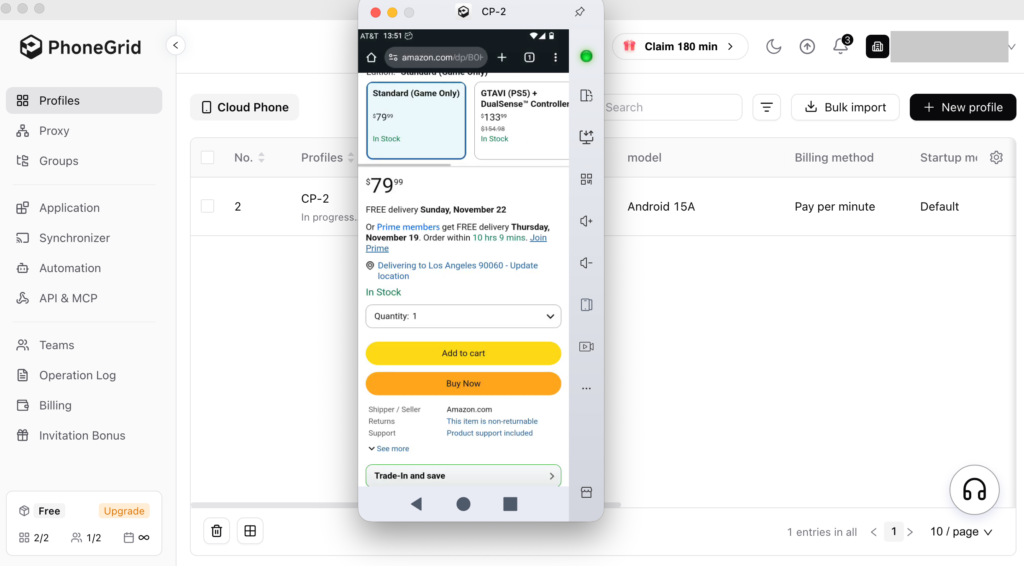
Price and availability monitoring. A retailer could commission a weekly comparison of public catalogs in two markets. The analyst opens the agreed listings on a cloud phone using a proxy for the region and records the price, currency and stock status shown at the time of each check. A monthly fee can cover a defined list of items and one report a week.
Automation for recurring checks. An app team could hire a contractor to set up an RPA check for a form in a test environment. The contractor builds a workflow with test data, checks it on one cloud phone and hands over the template with instructions for running it. The initial setup can be a fixed project, with separate terms for maintaining it after interface updates.
Before quoting, estimate staff time, cloud phone usage and proxy costs. Agree upfront on what the client will receive and whether a repeat check is included.
Why Does PhoneGrid Need Proxies?
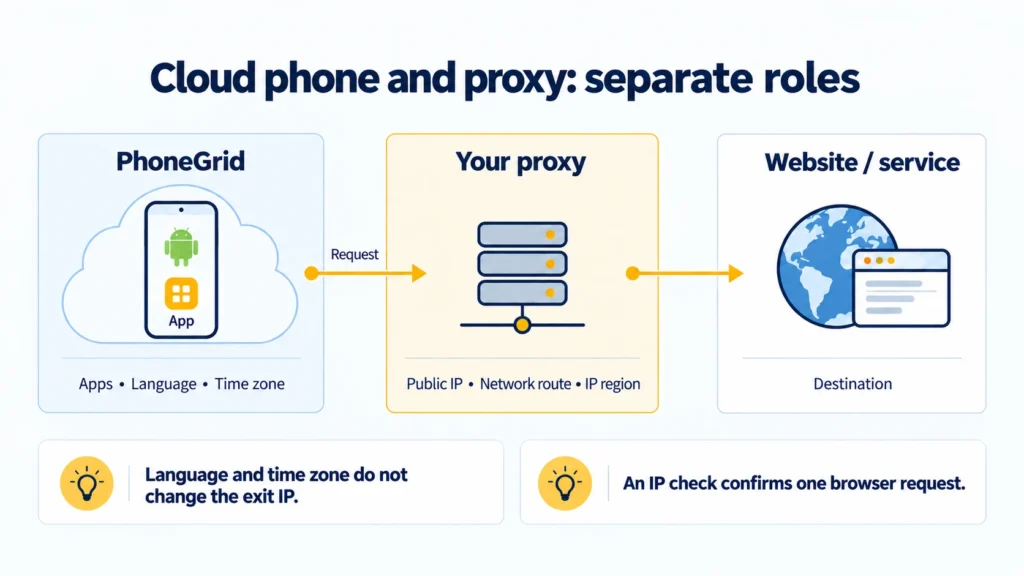
In PhoneGrid, a cloud phone needs a proxy to access the internet. The service provides the Android environment but does not sell proxies. Bring a proxy of your own and assign it to the cloud phone.
The proxy supplies the route out to the internet and the public IP used by requests that pass through it. Services may use that address to estimate the connection’s region. This is a separate setting: choosing a country in the phone’s settings does not by itself change the country of its exit IP.
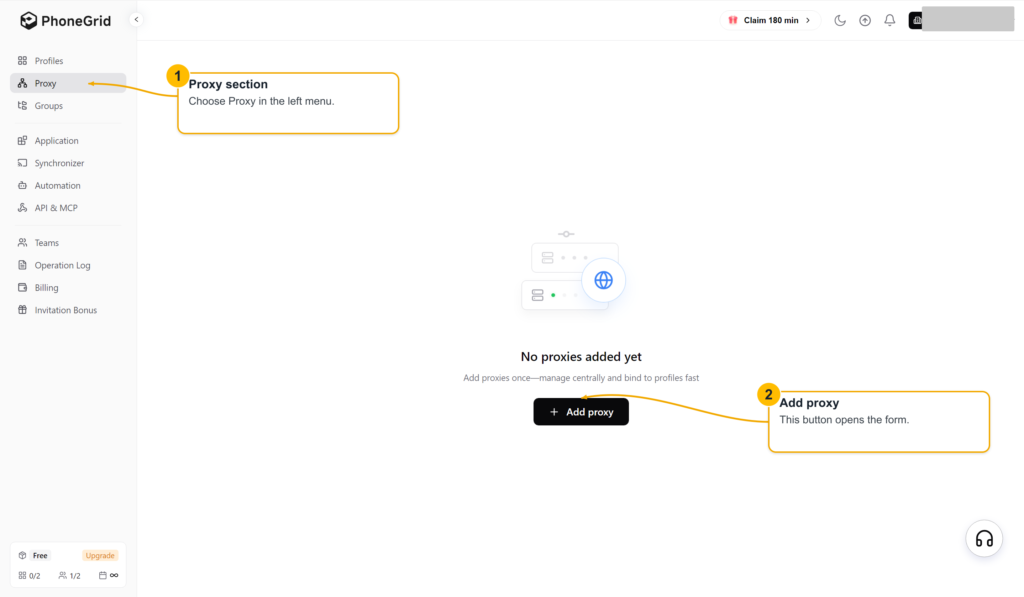
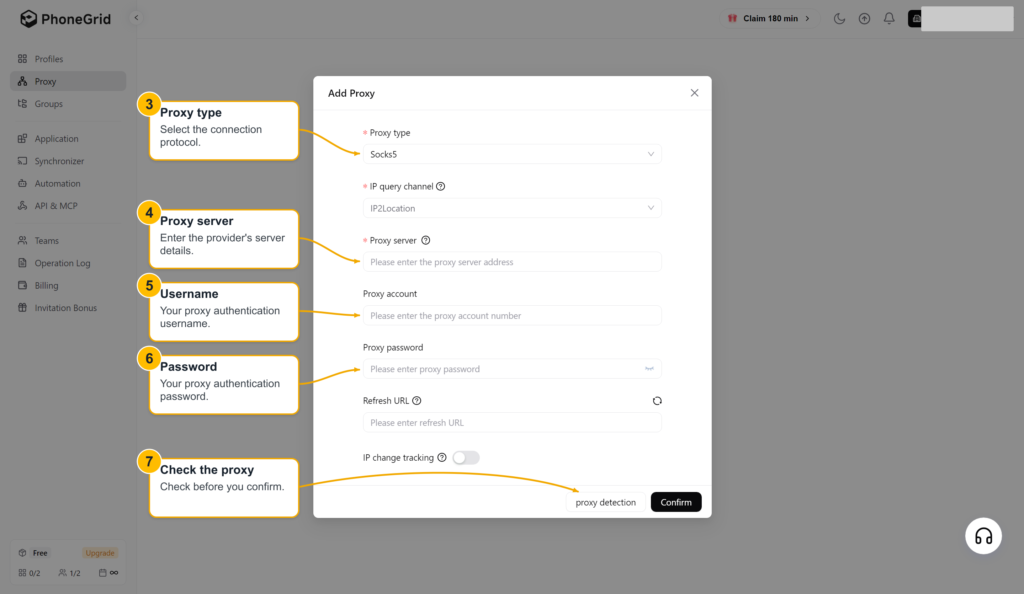
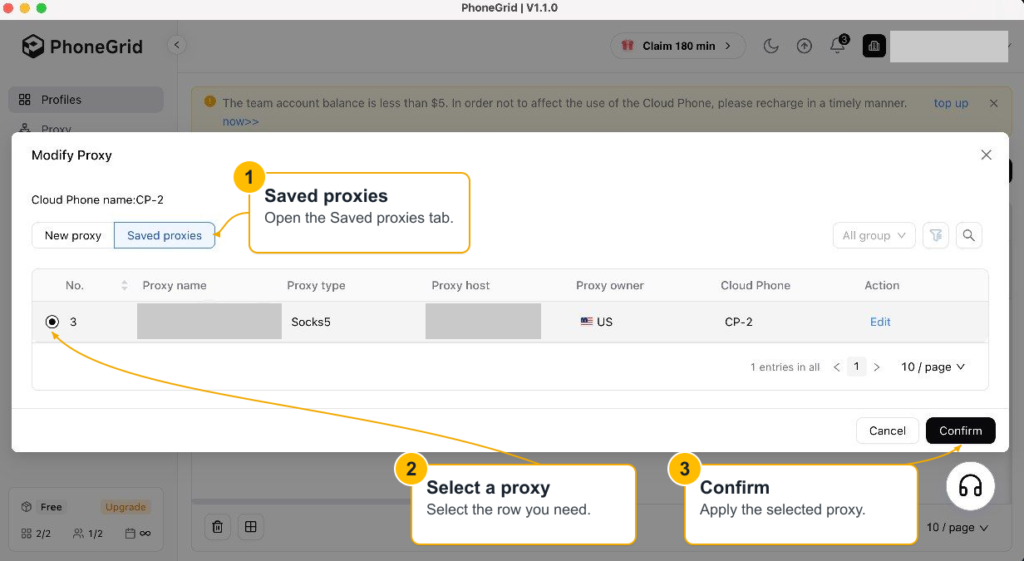
You can add the proxy as you create a phone. Alternatively, enter it in Proxy Management first and select the saved connection for the environment. Have the server address, port and protocol ready, plus the username and password if the proxy requires them. PhoneGrid includes a connection check.
MangoProxy proxies are one option for this infrastructure. Start with what the task needs from the connection; Android itself doesn’t tell you which proxy product to choose.
A proxy does not override an app’s rules. An account can still be blocked, depending on its status and the user’s actions, even when it runs in a cloud phone.
Choosing a Proxy for PhoneGrid
There are two choices here: where the IP comes from and how you connect to the proxy. ISP, datacenter and residential refer to the network and product. HTTP, HTTPS and SOCKS5 are connection protocols listed in PhoneGrid’s documentation. Match the protocol to the options shown for the cloud phone.
| Proxy Type | When to Use It | What to Consider |
|---|---|---|
| Static ISP proxies | for a persistent work environment that needs an IP from an internet provider’s network | MangoProxy assigns the address to the customer for the paid rental period. Check availability in the required region |
| Static datacenter proxies | an option for checks and automation that need a fixed address, provided a datacenter IP is acceptable for the task | Test the app with that connection before relying on it |
| Rotating residential proxies | useful when a research task calls for a change of region or network exit | Consider the session mode: temporarily retaining an IP is different from having a permanent address with a static proxy |
Other options are covered in Which Proxies to Choose: Proxy Types Comparison.
How to Organize Work Across Multiple Cloud Phones
Keep a record of the working configuration for each phone:
Cloud phone → task → assigned proxy and exit IP → app.
- Give environments clear names. In a shared record, note the project, person responsible, purpose of the phone and app version. These details help a colleague understand the setup when taking over a task.
- Configure local settings. PhoneGrid provides geographic settings, language, time zone and proxy options. For a regional check, select the required combination and record it with the configuration.
- Check the network result. Open MangoProxy’s What Is My IP tool in the browser inside the cloud phone. Compare the public address and reported location with what you expect. A check on your computer shows the computer’s connection, rather than the remote environment’s connection.
- Check the target app. The browser check only confirms that particular request. Follow the required steps in the app itself: open a screen, load data or test a navigation step.
- Add more environments after checking the first configuration. If you need different exit IPs, compare the actual addresses: separate proxy entries do not always mean separate network exits.
If you’re investigating an error, leave the app version and environment settings alone while trying another proxy. A single change is easier to trace than several changes made together.
Who Is PhoneGrid For?
Shared access can be a reason to consider PhoneGrid for agencies, social media teams and marketers who pass mobile tasks between colleagues. Developers, QA staff and automation teams may instead care about how often they have to prepare separate Android environments.
Look at the time currently spent organizing the work. If only one person uses one phone, be specific about the task a move to PhoneGrid would simplify.
Conclusion
MangoProxy handles the network side of cloud phone workflows: IP selection, location and rotation settings. PhoneGrid provides the Android environment for apps and automation. Once those settings are recorded and tested, the team has a connection it can use for the same task again.
Frequently asked questions
Here we answered the most frequently asked questions.
Does Android in the cloud require a mobile proxy?
No. Android is the phone’s operating system, while “mobile” in a proxy’s name means the connection exits through a cellular carrier’s network. These are different characteristics; a cloud Android environment does not necessarily need a mobile IP.
Can I replace my physical test phones?
For tests tied to a particular camera, sensor, SIM card or device model, first check that the required hardware conditions are available. Access to a cloud Android environment alone does not establish that it can cover such tests.
The proxy check passed. Why is the app still failing?
First make sure you’re checking the phone that actually has the proxy assigned. Open its browser to check internet access, then restart the environment. If only one app fails while the connection works, check that app’s version and compatibility. Note when the error happened and keep a screenshot with private details hidden for support.
Is phone count enough to work out the cost?
No. Account for runtime, the number of environments running at once, plan terms and additional PhoneGrid packages. Add the proxy bill separately. Depending on the product, that charge is for an IP rental period or for traffic.