
Proxy Detection Explained: How Platforms Identify Proxy Traffic
Published: ≈ 4 min read
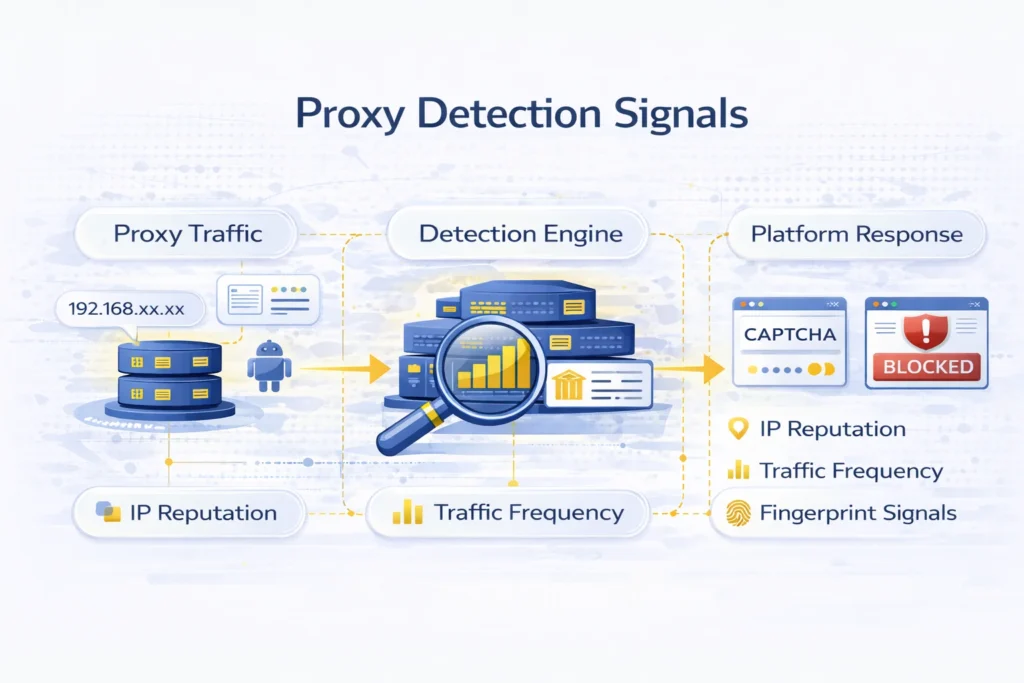
Modern websites use multiple detection mechanisms to identify automated traffic and proxy-based routing. These systems analyze network behavior, IP reputation, browser fingerprints and request patterns to determine whether a connection originates from real users or scripted environments.
Understanding how proxy detection works helps teams design more stable automation workflows and reduce access disruptions.
This guide explains common proxy detection signals, how to test whether your proxy is being flagged and how to improve routing reliability.
Key Takeaways
- websites analyze IP reputation and traffic patterns
- proxy detection combines network and behavioral signals
- rotating proxy strategies can reduce concentration signals
- session persistence is important for authenticated workflows
- connection diagnostics tools help validate proxy setup
How Websites Detect Proxies
Detection does not rely on a single factor. Instead, platforms evaluate multiple signals simultaneously.
IP Reputation and ASN Classification
Some hosting IP ranges are widely used in automation workflows. Platforms may classify traffic based on ASN ownership or historical usage patterns.
Testing visible connection identity using the What Is My IP tool helps confirm whether your proxy routing is active and which IP environment is exposed.
Request Frequency and Traffic Distribution
Sending repeated requests from the same identity can trigger rate limits or CAPTCHA challenges. Rotating proxy environments explained in IP Rotation Explained help distribute traffic more naturally.
Header and Fingerprint Analysis
Websites inspect:
- user-agent strings
- browser capabilities
- request headers
- TLS behavior
Mismatch between connection identity and device signals may increase detection risk.
Geo and Routing Consistency
If IP location changes too frequently or does not match expected session behavior, platforms may flag the connection.
You can analyze geographic signals and ISP classification using the IP Lookup tool to verify how your proxy appears externally.
How to Check if Your Proxy Is Detected
Diagnosing proxy issues should be part of every automation workflow.
Step 1 — Verify Visible IP
Use What Is My IP to confirm that requests are routed through the intended proxy endpoint.
Step 2 — Analyze Network Identity
Check ASN ownership, ISP type and location signals with IP Lookup.
Step 3 — Monitor Platform Responses
Watch for:
- repeated CAPTCHA challenges
- temporary blocks
- inconsistent content delivery
Step 4 — Adjust Rotation Strategy
Combining sticky sessions with rotating proxy pools often improves access continuity.
Proxy Types and Detection Risk
Different proxy infrastructures provide different detection characteristics.
Residential Proxies
Residential routing environments often simulate consumer traffic patterns.
👉 Learn more in Residential Proxies Guide.
Datacenter Proxies
High-speed server routing may require rotation and pacing to reduce detection signals.
👉 See detailed breakdown in Static vs Rotating Datacenter Proxies.
ISP Proxies
Stable identity routing supports long session workflows.
👉 Explore ISP Proxies Guide.
Mobile Proxies
Carrier-based routing introduces dynamic identity behavior.
👉 Read Mobile Proxies Guide.
Best Practices to Reduce Proxy Detection
Use Rotation Strategically
Avoid excessive switching that creates unrealistic traffic patterns.
Control Concurrency
Gradually scale request volume instead of sending bursts.
Match Proxy Type to Task
Residential discovery → datacenter extraction → ISP sessions.
Validate Configuration
Always confirm routing identity before launching large workloads.
Proxy Diagnostics at MangoProxy
MangoProxy provides tools and proxy infrastructure designed to help teams validate routing behavior and scale execution workflows safely.
Users can combine:
- IP diagnostics tools
- rotating proxy pools
- static session routing
- geographic targeting
to build resilient automation environments.
Glossary
Proxy Detection – identifying proxy-based routing
ASN – network ownership identifier
Fingerprint – device signal profile
Rate Limit – platform request restriction
Frequently asked questions
Here we answered the most frequently asked questions.
How do websites detect proxies?
They analyze IP reputation, request patterns and browser signals.
Can rotating proxies prevent detection?
They reduce risk but scraping strategy also matters.
How can I test if my proxy is working?
Use IP diagnostic tools to verify visible connection identity.
Are residential proxies harder to detect?
They often provide more realistic traffic signals compared to server IP ranges.
Matching TLS handshakes beats IP checks