
Proxy Timeout Explained: Connect, Read, and Session Timeouts
Published: ≈ 13 min read
Quick Answer
Use a connect timeout to limit connection setup and a read timeout to limit the wait for response data. In clients such as Requests and HTTPX, the read limit applies to individual waits, so a download can run for longer. Session timeout needs a definition from the service using the term: it may concern a connection’s lifetime, an exit IP assignment, or a website login.
Before changing a setting, find out which wait ended. Your client, the proxy, and the website can each enforce their own limits.
Key Takeaways
- Keep any received HTTP status alongside the client’s error message. A 504 response and a client timeout are different observations.
- A failure at a repeatable interval is a clue to a timer setting, but does not identify who owns it.
- Retries need to fit within the job’s deadline, including the delays between attempts.
- A stable exit IP does not keep every connection open or renew a website login.
Who Is Waiting When a Proxy Times Out?
Both your application and the proxy spend time waiting. The application might be trying to reach the proxy, while the proxy has its own connection to make to the destination. Later, either can be waiting for response data. Each wait may have a different limit.
That is why an error saying only “proxy timeout” leaves an investigation unfinished. You still need the application name, the full error, and the stage where it stopped. Increasing a timer in your script affects that script’s behavior; it does not change the provider’s settings.
Look beyond connect and read for two other limits. An idle timeout closes a connection or expires a session after inactivity, as defined by the system applying it. An overall timeout sets a deadline for a complete operation. Check whether “complete” means one attempt, requests through a chain of redirects, or the whole job with retries.
The deadline may arrive while a phase still has time left. Do not add the phase limits together to calculate how long a request can run. Also check that the chosen tool can actually enforce the overall limit you need.
What Has to Happen Before an HTTPS Request Can Be Sent?
Through a plain HTTP proxy, the client has to establish a tunnel before it can send the website’s HTTPS request. Reaching the proxy’s port is only the start of that process.
For a proxy specified by hostname, DNS lookup comes first. The client then opens a TCP connection to the proxy and sends CONNECT with the destination hostname and port. Once the proxy accepts the tunnel, the client performs a TLS handshake with the website through it. The website request and response follow.
This is the usual tunnel without TLS interception. An HTTPS proxy also protects the connection from the client to the proxy itself.
Read the log in that order. A connection to the proxy may exist without a successful CONNECT response. An accepted tunnel still leaves the TLS handshake to finish. If the client reports a reading error during this preparation, the website may not yet have received the page request.
The boundary between “connecting” and “reading” depends on the client. Use its documentation to interpret the error rather than treating those words as identical phases in every application.
Why Can a Read Timeout Allow a Long Download?
For many clients, receiving more data starts another permitted wait. The transfer continues as long as those waits stay short enough, even when the full download takes much longer than the read setting.
A read timeout can also occur halfway through a response. Record whether any headers or body data arrived before the error. A partial file tells a different story from a request that never received its first response.
Consider where the data is being observed, too. An NGINX reverse proxy in front of a website can buffer a response. The server may be sending data to NGINX while the client is still waiting for it to be passed along. The two read timers are watching different parts of the route.
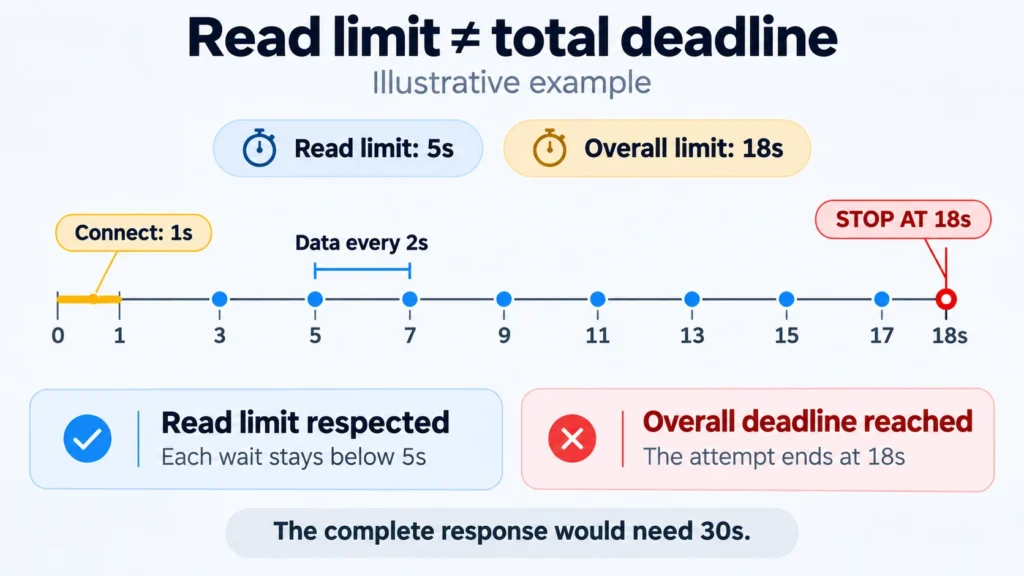
For a streaming response, examine the wait for the first data, later pauses, and the complete elapsed time separately. The practical examples below show how a read limit and an overall deadline can produce different outcomes.
Which Session Does Session Timeout Refer To?
You need to identify the session before deciding what to change. Providers and applications use the word for several things that have separate lifetimes.
An Open Connection
A provider may set a maximum connection lifetime. When that expires, the connection closes even if it was recently carrying data. An idle limit instead concerns how long it has been inactive.
Reconnecting is a separate step. Whether a transfer can continue afterward depends on the application and protocol. Do not assume that reopening a connection automatically resumes the interrupted operation.
A Sticky IP Assignment
A sticky session keeps related requests on the same exit IP under the provider’s rules. It can make the route consistent across successive actions, but it does not set the wait for each response.
Check when the assignment period starts and whether activity extends it. You also need the policy for an unavailable exit. The treatment of an existing tunnel may differ from what happens to a new connection after the assignment expires.
For MangoProxy residential proxies, read the mode description and check your connection settings. The presence of a sticky option alone says nothing about an unlimited connection lifetime.
A Website Login
The website decides whether your login session is valid. It can expire after inactivity or at an absolute limit measured from its creation. Keeping the same IP does not override either policy.
Nor does retaining a cookie guarantee that the server will accept the session identifier it carries. If the login page loads promptly without a network error, investigate the login state. A longer proxy read timeout will not renew that session.
How Do Requests, HTTPX, curl, and NGINX Use These Settings?
Match the setting to its documented operation before moving a value between tools. Even a connect timeout can cover a different amount of work.
Requests
The timeout setting accepts separate connect and read values. With one number, Requests applies that value to both. These limits do not guarantee a deadline for the whole request.
The connect limit applies to an individual address attempt. Trying several IP addresses in sequence can lengthen the actual wait. Python’s system DNS lookup can also fall outside that limit. These are reasons to check the full elapsed time when a script takes longer than expected.
HTTPX
HTTPX separates connect, read, write, and pool timeouts. Its read limit concerns receiving a portion of data. Pool is the wait to acquire a connection from the client’s pool.
A PoolTimeout can therefore occur before a new network attempt when connections are occupied. Inspect the pool and the work using it before treating that error as evidence of a slow proxy.
Curl
The –connect-timeout option covers connection setup, including DNS lookup and the required protocol negotiations. The –max-time option limits one complete transfer attempt, with connection setup included.
Consequently, –max-time is not a read timeout. Curl also has a low-speed threshold and a setting for how long a transfer may remain below it. Choose the control that describes the behavior you want to limit.
NGINX
The proxy_connect_timeout directive limits NGINX’s connection to the next server. The proxy_read_timeout directive applies between successive reads of that server’s response, rather than to the response’s entire duration.
These directives belong to NGINX. An example in a reverse-proxy guide does not give your script control over a third-party proxy service. Check whether you are configuring your own intermediary or merely using someone else’s.
Whose Limit Should You Increase?
Increase the client’s wait only when it is ending the operation too soon and a longer execution time is acceptable. If another server ends the exchange first, its limit needs investigation.
Suppose the application will wait ninety seconds but a gateway stops waiting for its server after thirty. Giving the application three minutes will leave the gateway’s cutoff unchanged.
HTTP 504 means a server acting as a gateway or proxy did not get a timely response from a server it needed to contact. That could be your proxy or a gateway in the website’s infrastructure. Keep the response context: for HTTPS, was the status returned for CONNECT or inside an established tunnel? The code alone cannot identify the server that produced it.
Once a response has begun, a later interruption may appear as an incomplete body or a network error instead of a new 504. Preserve the headers and the amount of data received.
Base a new limit on the operation’s normal behavior. A small availability check and a large report need different amounts of time. If requests become slow as the number of concurrent jobs rises, inspect the queue and occupied connections before increasing their waiting time.
Practical Examples
These are hypothetical scenarios for interpreting settings, not measurements from a proxy test.
Regular Data, but an Eighteen-Second Deadline
A client supports a read timeout and an independent overall deadline. Connecting takes one second. The response then arrives in portions every two seconds, within the five-second read allowance. Completing it requires thirty seconds, but the attempt has an eighteen-second overall limit.
The overall limit stops the attempt at eighteen seconds. None of the waits for data exceeded five seconds. Raising the read limit would leave the outcome unchanged; reconsider the overall deadline if the task can legitimately take thirty seconds.
A Connected Request With No Response Data
The proxy accepts the tunnel, TLS completes, and the client sends the request. It then waits ten seconds without receiving response data. The read limit is ten seconds, and the overall deadline has not arrived.
Investigate what happens after the request is sent. Does only this operation stall? Does it work under lighter load? What does the application log show? Extending connect timeout will not change an already completed connection stage.
A Different IP on the Next Step
A sequence should take twelve minutes. In its hypothetical proxy mode, the IP assignment lasts ten minutes and activity does not extend it. A new connection after expiration gets another exit IP. Both requests receive quick responses.
No connect or read timeout has been exceeded. This task needs an assignment period or another address-retention strategy that fits its duration. Check the website login separately, since its validity follows the website’s rules.
Prepare One Useful Failure Report
Before contacting MangoProxy support, capture one attempt: application and version, destination, proxy protocol, start time with its time zone, elapsed time, and the exact error. Include timeout settings and the number of retries. Note the last completed stage and any HTTP status or response data.
If the problem is intermittent, record whether it follows a new connection, a pause, or a particular step. Keep the IP mode fixed during comparisons unless changing it is what you are testing. A request identifier returned by the service can help locate related log entries.
For a command-line investigation, see Troubleshooting cURL Errors 28 and 52: Timeouts, Empty Responses, and Proxies. Remove proxy passwords, tokens, and cookies before sharing logs.
Allow for retries within the job’s deadline. After a lost response, verify whether an order or job was already created before submitting it again. Use the service’s supported way of preventing duplicates.
Glossary
Connect timeout: the wait allowed for connection setup, with its scope defined by the client or server.
Read timeout: the wait allowed for incoming data; many implementations apply it to individual waits during a response.
Session timeout: a lifetime limit whose meaning depends on the session being managed.
Idle timeout: a limit on inactivity, using the enforcing system’s definition of activity.
Overall timeout: a time limit for a complete operation, with its scope defined by the tool applying it.
HTTP: the protocol for exchanging requests and responses between clients and servers.
HTTPS: HTTP carried over a secure connection using TLS.
DNS: the distributed domain name system, used here to look up a network address from a hostname.
TCP: a transport protocol providing a reliable, ordered stream of bytes.
TLS: a protocol protecting the confidentiality and integrity of data exchanged over a connection.
CONNECT: an HTTP method requesting a tunnel to a host and port.
IP address: a numerical network address used by the IP protocol to deliver packets.
Exit IP: the address from which a proxied request reaches the destination server.
Sticky session: a provider’s mode for keeping related requests or connections on one exit IP.
Connection pool: connections a client manages for reuse.
Cookie: data a server supplies to a client for possible inclusion in later HTTP requests under its scope rules.
Buffering: temporarily storing data before processing or forwarding it.
Reverse proxy: an intermediary accepting client requests and forwarding them to the servers handling them.
Final Thoughts
The useful question is which part of the exchange ran out of time. Once the log answers that, a timeout adjustment has a purpose and a result you can compare with the original failure.
Frequently asked questions
Here we answered the most frequently asked questions.
Does Requests.Session Set a Session Timeout?
Requests.Session stores settings and cookies and uses a connection pool. It does not set the lifetime of a website login or a deadline for all its requests. Configure request timeouts separately and control the job’s duration in the application.
Can Periodic Data Keep a Connection Open?
It may prevent an idle timeout if the enforcing component counts that traffic as activity. It will not extend an absolute connection lifetime. Traffic on one part of the route also need not reach the application waiting on another.
Why Does the Request Fail Almost Exactly After a Minute?
Look for a matching timer in the client, gateway, or application server. Compare the cutoff with the start of the request and the last received data. The interval alone does not identify which component imposed it.
Should I Disable Timeouts for a Large Download?
You can remove a chosen client limit, but the other servers retain theirs. Usually, allow enough time for the transfer while limiting pauses without data. For interrupted downloads, also check whether the server and client support resuming them.
Would a Static IP Fix the Timeout?
A static IP keeps the address consistent between connections. It does not remove an application’s delays or a gateway’s time limits. Choose it for address continuity and investigate the failed wait separately.