
System Proxy Explained: How OS-Level Proxy Settings Work
Quick Answer
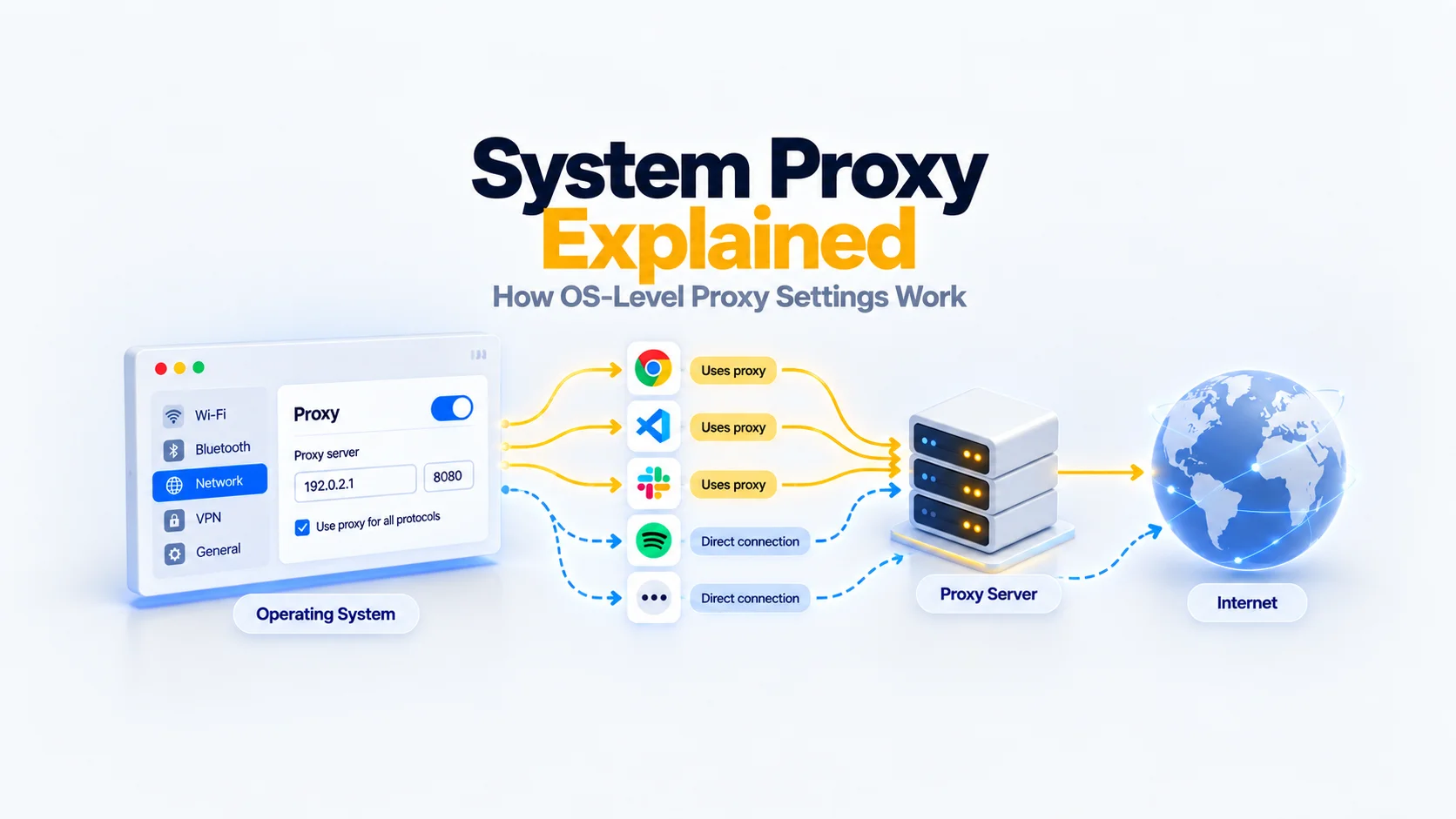
A system proxy is a proxy configuration provided by an operating system or desktop environment. Applications that support that configuration can use it when deciding how to connect.
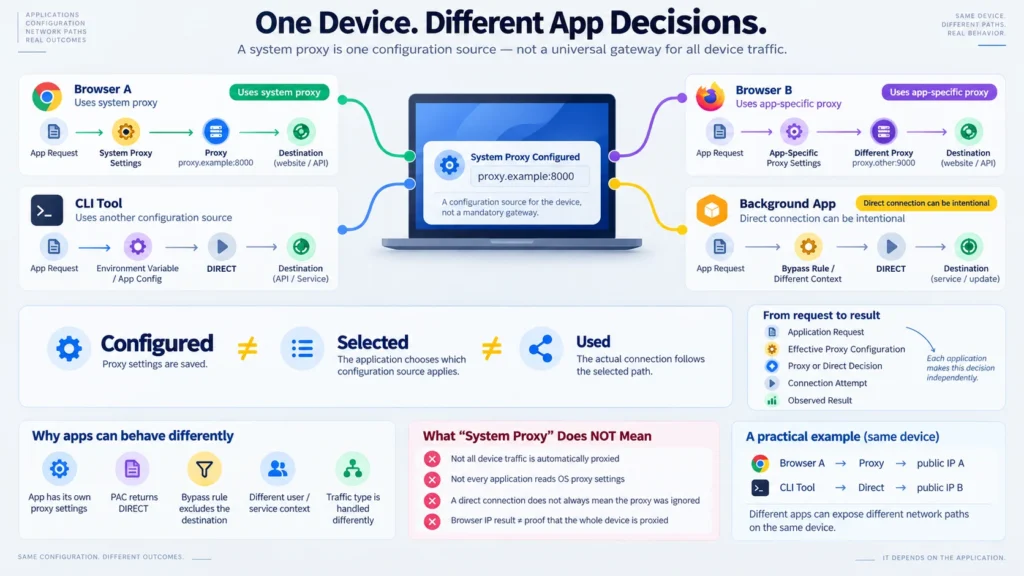
Enabling a system proxy does not automatically send every connection on the device through the proxy. An application may use another configuration source, apply its own settings, follow a bypass rule or make a request outside the supported proxy mechanism.
The essential distinction is:
Configured → Selected → Used
Saving a proxy address establishes configuration. Selecting that proxy for a request is a separate decision. Successfully carrying the request through the proxy requires the connection to work.
System Proxy Setting ≠ All Device Traffic Is Proxied
Key Takeaways
- System proxy settings provide configuration to compatible applications; they do not guarantee device-wide traffic redirection.
- Application settings, policies and execution context can affect which configuration takes effect.
- A direct connection can be the intended result of a bypass rule or PAC decision.
- Browsers can read the same system settings while using different networking implementations.
- Proxy selection, authentication and successful request forwarding are separate events.
- An IP-check result describes the request that reached the checking service, not every connection from the device.
- Diagnose the application and request involved before concluding that the system proxy was ignored.
What Is a System Proxy?
A system proxy is a shared source of proxy configuration that applications can consult. The term describes where settings come from, rather than a separate proxy protocol.
Depending on the platform, the configuration can contain a server address and port, protocol-specific settings, exceptions, an automatic configuration URL or discovery options.
A useful distinction is between the configuration source and the proxy endpoint:
- The configuration source tells an application which connection behavior to use.
- The proxy endpoint is the intermediary the application may connect to.
The endpoint can be remote or run locally. Saving its address does not start that server, establish a connection or confirm that the application will use it.
The central limitation follows from how applications consume configuration:
OS-Level Configuration ≠ Application-Level Configuration
An application can consult operating-system settings, use a networking library that does so, or obtain its proxy configuration elsewhere. The application’s documented behavior determines which case applies.
What Happens After You Configure a System Proxy?
After configuration, a participating application must determine which settings apply to its request, choose a connection option and attempt the connection. Saving settings is only the beginning.
Use this conceptual model:
Application Request → Effective Proxy Configuration → Proxy / Direct Decision → Connection Attempt → Observed Result
“Effective proxy configuration” means the configuration that actually governs the request. It may differ from the settings visible in the operating system.
This model does not prescribe one universal priority order for system settings, application options, policies or environment variables. It also does not imply that every request creates a new connection.
Configured → Selected → Used
| Stage | Meaning | What it does not establish |
| Configured | Proxy parameters exist in a settings source | That the application reads that source |
| Selected | The application’s effective rules choose a proxy for the request | That the proxy is reachable or authentication succeeds |
| Used | The request or tunnel is actually carried through the proxy | That every other request follows the same path or the application succeeds |
For this model, merely attempting a connection to the proxy is not enough to demonstrate successful forwarding.
For example, a saved proxy can be selected correctly but reject a request because credentials are missing. That is different from an application choosing a direct connection.
Proxy Configured ≠ Proxy Actually Used by Every Application
The most useful question is therefore specific: “Which configuration governed this request, and what happened when the application tried to use it?”
What Is the Difference Between System and Application Proxy Settings?
System settings provide a potentially shared configuration source. Application settings control proxy behavior within the scope supported by that application.
| Dimension | System proxy settings | Application proxy settings |
| Configuration location | Operating system or desktop environment | Application, profile, session or client library |
| Potential scope | Multiple compatible applications | The application contexts covered by those settings |
| Participation | Application must support the relevant system configuration | Application must support its own proxy options |
| Exceptions | Platform-specific settings may provide them | Application-specific rules may provide them |
| Verification | Inspect the relevant application’s behavior | Inspect the relevant application’s behavior |
An application-level setting can also say “use system settings.” The two levels are connected, but they are not interchangeable.
Firefox illustrates this distinction clearly: its connection settings offer system, manual, automatic and no-proxy options. Selecting a mode determines how Firefox obtains its configuration. (Firefox Help)
For the steps involved, see Firefox proxy settings.
Which Applications Use System Proxy Settings?
Applications use system proxy settings when their networking implementation and active configuration support doing so. Compatibility should be described with conditions, not a universal “works” or “does not work” label.
| Condition | Behavior | Limitation |
| Chrome is operating in its documented system proxy mode | Proxy configuration comes from the operating system | Other supported modes and configuration controls exist |
| Firefox is set to Use system proxy settings | Firefox uses the operating system’s proxy configuration | Firefox also offers independent configuration modes |
| A Windows application uses WinHTTP | Proxy handling follows the application’s WinHTTP configuration and API choices | A browser’s settings are not sufficient evidence of the service’s effective settings |
| Chromium on Linux detects supported GNOME/KDE settings | Chromium can use those desktop settings | This describes Chromium integration, not all Linux software |
| curl receives supported proxy environment variables | curl can use those variables when selecting a proxy | This does not establish that another program reads the same variables |
These examples come from the respective application and platform documentation. (developer.chrome.com)
Sharing Settings Does Not Mean Sharing a Networking Stack
A browser can obtain configuration from the OS while implementing request handling, proxy resolution and authentication through its own networking components.
Browser Uses System Proxy ≠ Every Browser Uses the Same Proxy Stack
Chromium’s documentation distinguishes system configuration from Chrome-specific proxy behavior. Consequently, two browsers reading the same settings should not be assumed to behave identically in every detail. (chromium.googlesource.com)
Why Can Apps Ignore or Bypass a System Proxy?
An application can connect differently because it uses another configuration source, applies an override or follows a rule that selects direct access. Calling every such case “ignoring the proxy” hides the actual cause.
| Situation | What may be happening | What to establish |
| Another configuration source | The client reads its own file, environment or library settings | Which sources that client supports |
| Explicit application override | An application mode or managed setting controls the request | The effective configuration for that context |
| Bypass rule | The destination matches an exception | Whether the rule applies to this destination |
| PAC returns DIRECT | Automatic configuration chooses a direct connection | The decision for the specific request |
| Unsupported traffic or protocol | The connection falls outside the configured proxy mechanism | Whether the client and proxy support that traffic |
| Different user or service context | A service does not operate with the same configuration as the interactive user | The account, API and configuration used by the process |
Another Source Is Not Necessarily a Broken Setting
Consider a command-line client configured through environment variables. Changing a desktop preference may not change the values that client uses.
curl, for example, documents protocol-specific proxy variables and NO_PROXY exclusions. That behavior is specific to curl and should not be treated as a rule for every command-line program. (everything curl)
Direct Access Can Follow the Configuration Correctly
A bypass rule deliberately excludes matching destinations from proxy use. Likewise, a PAC decision can select DIRECT.
In those cases, the application may have read and applied the configuration correctly. The result is direct access because the rules requested it.
A Different Context Can Produce Different Results
A background service and a browser opened by a signed-in user do not necessarily have the same configuration context.
Microsoft documents how a WinHTTP application can obtain user proxy settings and explains the additional considerations when running as a service. That is evidence to inspect the service context, not a reason to assume every service ignores user settings. (Microsoft Learn)
How Do Windows, macOS and Linux Differ?
The platforms expose different configuration mechanisms and scopes. “System proxy” is a useful general term, but it does not identify one identical feature across operating systems.
Windows: Application APIs and Execution Context Matter
Windows offers multiple networking APIs, including WinINet and WinHTTP. Their configuration and intended usage differ, and applications can make their own API-level choices.
A working browser connection therefore does not prove that a Windows service has the same effective proxy configuration. The service’s implementation and context must be considered. (Microsoft Learn)
For configuration steps, use the dedicated Windows proxy setup guide.
macOS: Settings Belong to a Network Service
macOS exposes proxy settings within a selected network service, such as Wi-Fi or Ethernet. Apple documents manual proxy options, automatic configuration and exclusions in that context. (Apple Support (AU))
The active network service matters when checking configuration. Application participation still needs to be established separately.
The dedicated macOS proxy setup guide covers the interface and setup procedure.
Linux: Several Configuration Sources Can Coexist
Linux desktop settings, process environment variables and application configuration are not one universal settings store.
Chromium documents GNOME/KDE integration and other configuration sources on Linux. A different application may follow a different mechanism, so a desktop setting alone cannot establish its behavior. (Linux Proxy Config)
How Do PAC Files and Bypass Rules Change Proxy Selection?
PAC files and bypass rules can make proxy use depend on the destination or request. A configured proxy does not necessarily apply to every request made by a participating application.
A manual configuration identifies proxy endpoints and may include exceptions.
A PAC file provides logic that returns a connection choice, such as a proxy or DIRECT. The PAC file supplies a decision; it does not forward the request itself. (MDN)
Automatic discovery is another part of the process: a client may discover configuration information rather than requiring an explicitly entered PAC URL. Support and behavior depend on the implementation.
The distinctions are:
- Discovery: where configuration is obtained.
- Selection: which connection option applies.
- Connection: what the application actually attempts.
Chrome’s documented proxy modes separate system configuration, fixed servers, PAC scripts, auto-detection and direct access. Those mode names illustrate the distinctions without defining a universal interface for all software. (developer.chrome.com)
Do not assume every client falls back to direct access when a proxy or PAC file fails. Failure behavior depends on configuration and implementation.
Do HTTP and HTTPS Proxy Settings Cover Every Protocol?
No. HTTP and HTTPS proxy settings describe supported proxy behavior for participating clients; they do not transparently redirect all protocols used by the device.
HTTP(S) Proxy Settings ≠ Transparent Routing of All Protocols
The application, proxy protocol and implementation determine which traffic can be carried. A setting used for web requests is not evidence that unrelated UDP traffic or arbitrary socket connections follow it.
There is also a naming distinction: a proxy configured for HTTPS destinations is not necessarily a proxy reached over TLS. Destination protocol and client-to-proxy protocol are separate properties. Chromium’s documentation explicitly distinguishes these concepts. (chromium.googlesource.com)
An HTTP proxy can support an HTTPS connection through a CONNECT tunnel. The existence of that mechanism does not turn an OS preference into universal traffic redirection. (rfc-editor.org)
Does Configuring a Proxy Also Configure Authentication?
Not necessarily. Saving an endpoint and supplying usable authentication are separate requirements.
A client can select the correct proxy, contact it and still receive 407 Proxy Authentication Required. The response indicates that proxy authentication is required for the request; it is not evidence that the application bypassed the proxy. (rfc-editor.org)
The client must support the required authentication method and have access to suitable credentials. A browser may offer an interactive workflow that a background process does not provide.
For the error-specific explanation, see 407 Proxy Authentication Required.
How Can You Check Whether an App Actually Used the Proxy?
Check evidence from the application and request you care about. A saved setting establishes configuration, while connection evidence establishes what happened.
| Evidence | What it supports | What it does not establish |
| OS settings show a proxy | The endpoint is configured there | The application selected it |
| Application diagnostics show a selected proxy | That request context selected the endpoint | The connection or forwarding succeeded |
| A correlated proxy log records the request or tunnel | The proxy participated in that exchange | All device traffic uses it |
| A destination log records the expected egress address | That request arrived from that address | Which configuration source caused the result |
| A browser IP-check displays an address | The checking service observed that address for the request | Other applications use the same path |
You can use What Is My IP to observe the address visible for a browser request.
Browser IP Result ≠ Proof That All Device Traffic Uses the Proxy
An IP change alone does not identify the cause. Another intermediary or a network change could also affect the observed address. Conversely, a matching address is not always enough to rule proxy use out.
For a useful comparison:
- Identify the exact application, profile and execution context.
- Determine which configuration source should apply.
- Check exceptions or automatic selection for the chosen destination.
- Make a fresh request and record the time.
- Correlate available application, proxy and destination evidence.
Keep the conclusion at the scope of the observation: a particular request, application context and time.
Practical Examples
The following examples are conceptual. They are not results from a Mango experiment.
Example 1: A Browser Uses the System Proxy, but a CLI Client Uses Its Own Settings
A browser is configured to use the operating system’s proxy settings. A command-line client is explicitly configured with a different endpoint.
The applications use different proxies because their effective configurations differ. The operating-system setting can be valid without governing the CLI request.
Lesson: compare configuration sources before treating the difference as a failure.
Example 2: One Application Uses a Proxy for One Destination and Direct Access for Another
An application evaluates a PAC file. The file selects a proxy for a public service and DIRECT for an internal destination.
Both decisions follow the same configuration. Direct access to the internal destination does not mean the application ignored the system proxy.
Lesson: configuration can apply correctly while producing different decisions per request.
Example 3: The Proxy Is Selected, but Authentication Fails
An application selects the configured endpoint and receives a 407 response.
The observation confirms contact with an HTTP proxy requiring authentication. It does not demonstrate successful forwarding to the destination.
Lesson: distinguish the selection and connection attempt from successful use.
Check the Application Before Changing the System Setting
Start with the application whose behavior matters. Identify its configuration source, the destination being requested and the evidence available for that exchange.
Then choose the relevant setup guide or authentication check. A device-wide conclusion is rarely justified by a single browser result.
Final Thoughts
A system proxy setting is useful shared configuration, but its practical effect depends on the application and request.
Keep three questions separate: where are the parameters configured, which connection option was selected, and what was actually used?
Configured → Selected → Used
That distinction explains why two applications can behave differently, why direct access can follow a rule correctly and why a browser IP result cannot validate the entire device.
Glossary
System Proxy
Proxy configuration supplied by an operating system or desktop environment for applications that support it.
Application-Level Proxy Configuration
Proxy settings controlled within an application or its supported execution context.
Effective Proxy Configuration
The configuration that actually governs a particular request.
Proxy Selection
The decision to use a particular proxy or direct connection for a request.
Proxy Endpoint
The intermediary address and port, together with the protocol needed to communicate with it.
PAC
Proxy Auto-Configuration: logic used by a supporting client to choose a proxy or direct connection.
WPAD
Web Proxy Auto-Discovery: a mechanism used by supporting clients to discover proxy configuration information.
Bypass Rule
An exception that excludes matching destinations from proxy use.
DIRECT
A selection to connect without an explicit proxy for that request. It does not describe every intermediary elsewhere in the network.
Proxy Authentication
The process by which a client supplies credentials acceptable to the proxy.
Execution Context
The account, process, profile, session or service environment relevant to an application’s behavior.
Frequently asked questions
Here we answered the most frequently asked questions.
Does a system proxy affect every application?
No. An application must support the relevant configuration source and use it for the traffic involved. Other settings or contexts can produce different behavior.
Why does one browser use the proxy while another does not?
The browsers may have different active modes, policies, extensions or configuration sources. Sharing an operating system does not establish identical effective settings.
Can an app follow system proxy settings and still connect directly?
Yes. A bypass rule or PAC decision can deliberately select direct access for a destination.
Does “Use system proxy settings” mean the browser uses the OS networking stack?
Not necessarily. Reading configuration from the OS does not establish that the browser delegates every networking operation to the same OS implementation.
Does a system proxy setting also control command-line tools?
That depends on the client. Some tools support environment variables or explicit options, and their handling must be checked individually.
Does a 407 error mean the system proxy was ignored?
No. A 407 response is a proxy authentication challenge. The client contacted a proxy, but the request still requires acceptable authentication.
Does an unchanged IP mean the proxy is not working?
Not conclusively. IP observation must be interpreted with the expected egress, selected destination and other connection evidence.
Will an application connect directly if the proxy fails?
Not universally. A client may fail the request, try another configured proxy or use an allowed direct fallback. The effective rules and implementation determine the outcome.