


TgNinja: Telegram Automation and Promotion Platform
Published: ≈ 9 min read
Across several Telegram projects, preparing a message is only part of the work. For each project, someone still has to choose the sending account and pick up the replies.
Group invitations and messages are among the jobs available in TgNinja. Telegram account management sits alongside them, and you can supply your own proxies for the cloud service to use.
What Is TgNinja?
Choose accounts and task settings in your browser. TgNinja then runs the actions through those accounts in the cloud, even with your computer switched off. There is nothing to install on your computer.
A posting task can have its own message and settings, with another task handling replies. Task statuses and logs let you follow what each is doing. Before including a chat, make sure it permits your planned posts.
Core TgNinja Features
One project may need to find communities; another, to handle messages. TgNinja’s Telegram automation tools also cover posting and responses.
Group Invitations
The invitation tool adds users to a Telegram group through connected accounts. It can work with a prepared contact list or an audience from specified chats.
Someone may be interested in the subject of a chat yet have no wish to join your group. Check that invitations to those members are appropriate before using the list.
Direct Messages and Chat Posts
For a private conversation, use the direct messaging tool and select the recipients. For a post in a group, use chat posting with the list of groups where the message belongs.
An event announcement belongs in chats whose administrators allow event promotions. Read their rules before including them in the task, even when the subject appears to fit.
AI-Generated Comments
You specify the channels and chats to watch. New posts become the basis for AI comments, published through the accounts assigned to the task. You make separate account selections for monitoring and commenting.
Check the generated comments before putting the workflow into use. Even a readable response can get a fact wrong or miss the point of a discussion. The community rules still apply.
Story Mentions
TgNinja can publish Stories that mention selected users. Choose mentions with the recipients in mind. The Story should give those people a relevant reason to view it.
Automatic Replies
You can prepare a response and have TgNinja send it when an incoming message contains words you specify. There is also a mode that responds to any incoming message. A colleague handling inquiries can receive forwarded messages in an account or group.
The manager can then pick up the inquiry from there. Plan for the rest of the conversation: the documentation describes just one automatic reply per person who responds.
Finding Chats, Channels and Audiences
Enter your search terms and, if useful, narrow the search to Russian-speaking audiences or communities above a subscriber threshold. Download the findings as an XLS file: one tab contains chats, the other channels.
The list gives you communities to review more closely. Before putting a contact list or audience collection tool to work, establish the source of the data and whether your intended use is permitted.
Managing Multiple Telegram Accounts
TgNinja’s account management page lists added accounts, their settings and status checks. Accounts for each project can go into a list of their own.
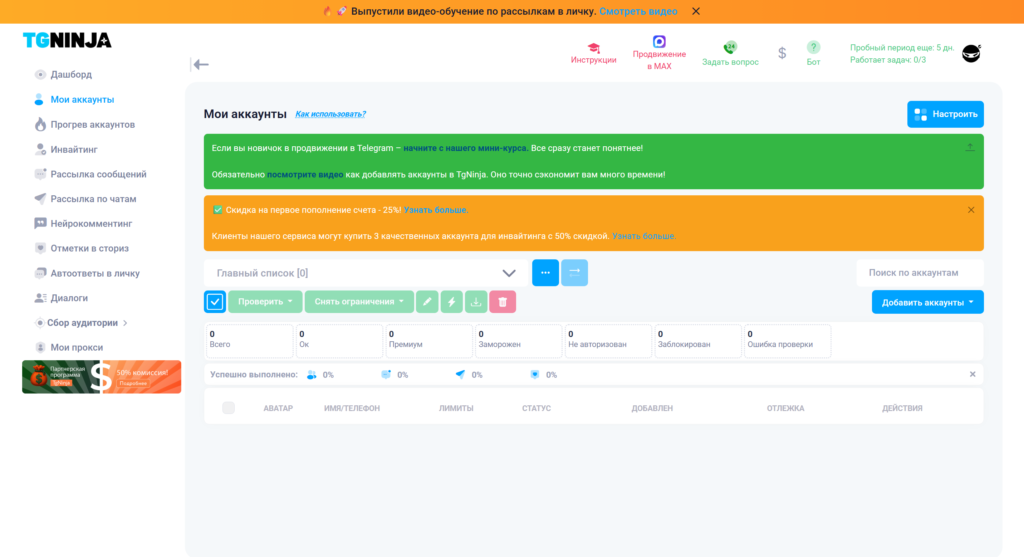
Take an agency working with a training provider and a retailer. The operator can choose accounts from the relevant client’s list when setting up work, then follow that task through its status.
When a task stops, the log lets you work back through its actions to look for an explanation. Look for the actual delivery or group join as well; starting the task alone confirms neither. The account status alone cannot confirm those results.
Why Use Proxies with TgNinja?
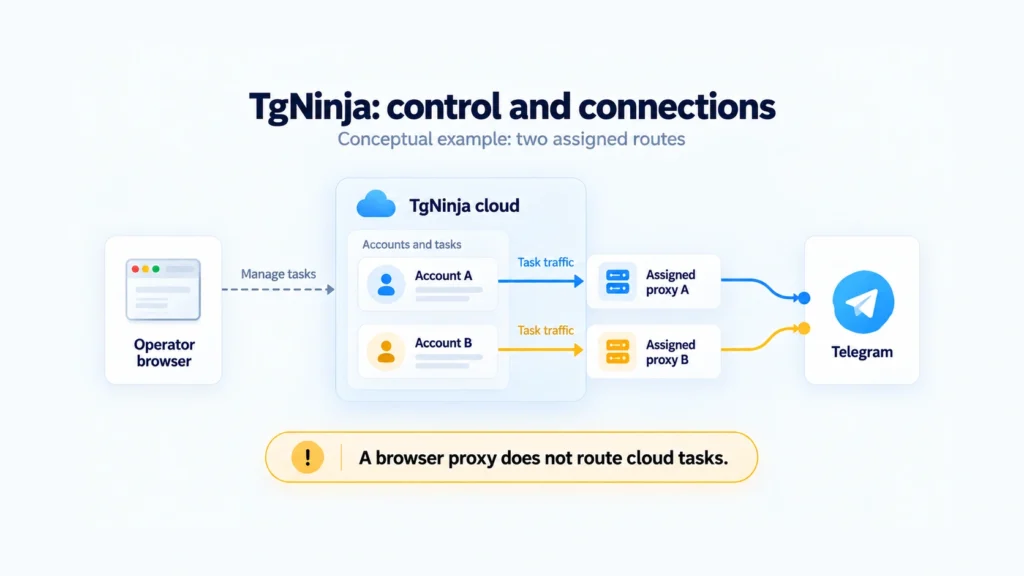
A proxy provides an intermediate network route. Telegram receives the connection from the proxy’s exit IP. You can assign different connections to accounts and select the geographic location of the exit address, often called GEO.
TgNinja has a proxy management page for adding connections used by your accounts. Choose the location with the account’s usual working region in mind. A proxy does not change the country of its phone number or automatically separate account data.
Choose between a fixed address and a rotating one before picking a product. With MangoProxy, residential proxies offer location selection and rotation; static ISP proxies keep the same IP throughout the paid rental period.
A browser proxy on your computer covers that browser connection. The cloud tasks in TgNinja run elsewhere, so that setting does not apply to them. Set up the proxy for TgNinja itself to use. Telegram’s rules apply to the accounts just as before, including the possibility of restrictions or a ban.
Which Proxy Types Suit TgNinja?
When choosing proxies for Telegram, compare location, IP persistence, rotation and billing. The following comparison outlines what to check with a provider.
| Proxy type: Residential. | Suitable for: Choosing locations and using different addresses from a residential pool. | Before choosing: Review the available countries, how IP rotation works and the cost of the traffic you expect to use. |
| Proxy type: Static ISP. | Suitable for: A job that needs the same ISP IP over a long session. | Before choosing: Find out how long you can rent the address and whether the country you need is available. Assign it to the intended account connection. |
| Proxy type: Mobile. | Suitable for: A connection that must exit through a mobile network. | Before choosing: Identify the carrier and country, then review how the address changes and the terms of use. |
| Proxy type: Datacenter. | Suitable for: Work where a datacenter IP meets the connection requirements. | Before choosing: Check that the address reaches Telegram. Choose fixed or rotating IPs according to the job. |
Leave out proxies that need you to open a separate link to change the IP: TgNinja does not support them. Check rotation settings before ordering. Proxies in the same network category may work differently; the category alone does not confirm compatibility.
For more detail, see Which Proxies to Choose: Proxy Types Comparison. For a fixed exit IP, consider MangoProxy’s static ISP proxies.
How to Add a Proxy to TgNinja
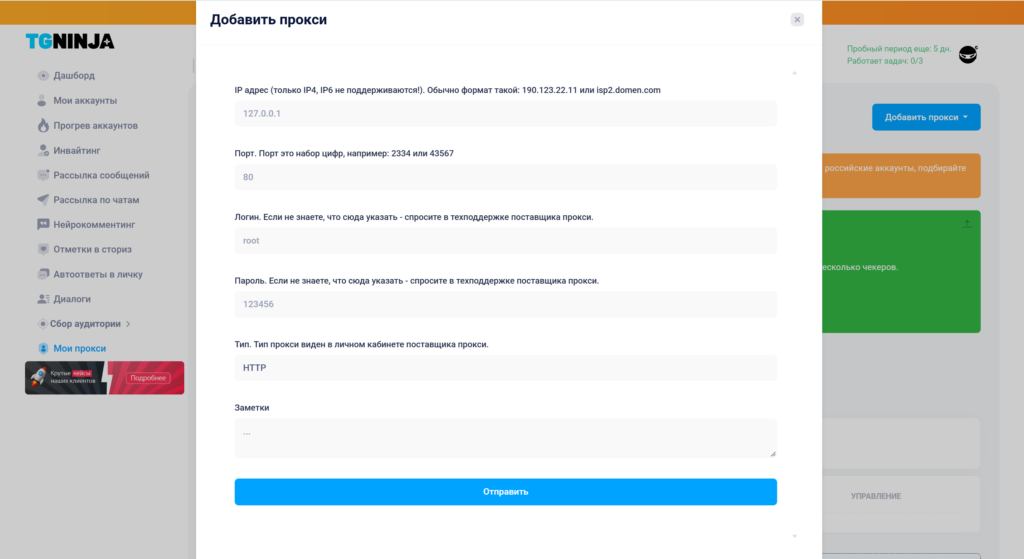
Ask the provider for the server address and port, together with any login details needed for access. Check the protocol, location and IP rotation mode against TgNinja’s requirements.
In proxy management, add a proxy using the option for one you already own. Enter the details in the format the form requests, then check which accounts will use it.
Try the connection with a small task you are allowed to run before using it for regular work. MangoProxy’s proxy checker can provide a preliminary check for a static connection; its page directs residential proxy users to the checker in their dashboard. A successful external check does not replace testing the task in TgNinja itself.
Who Might Find TgNinja Useful?
Agencies and social media specialists can keep each project’s accounts in its own list. Recurring jobs become separate tasks, making the work across projects easier to follow.
Channel and community owners may find the search, permitted posting and incoming message tools useful. For example, Telegram promotion could involve finding relevant chats, publishing an approved announcement and passing subsequent questions to a manager.
Teams doing regular Telegram account automation can manage accounts and connections together. For someone posting once in their own channel, that setup may be unnecessary.
What to Consider Before Starting
Write down the jobs you plan to run and the accounts for each, and decide who will review the results. Keep personal accounts out of the setup. TgNinja’s own documentation recommends separate work accounts.
Check the plan against the tools you need. The documentation includes chat and channel search, AI commenting and Story mentions in the trial and on Guru or higher plans. Confirm the current offer before paying.
Choose a location and account assignments for each connection, and decide whether its IP must stay fixed. Estimate costs around the actions those accounts will perform. The AI commenting documentation specifically notes the traffic used to check regularly for new posts.
Begin with a small test: review the selected accounts, message content, destination and task log. Actions must comply with Telegram’s rules, the community’s requirements and applicable rules for data use and communications.
Final Thoughts
With TgNinja, community search, account management, posts and replies can be handled through the same cloud service. You choose which Telegram tools belong in your workflow. Your own proxies let you organize the network connections separately.
Before expanding the work, try the selected accounts and network route on a small task using the function you need. Check the result before continuing.
Frequently asked questions
Here we answered the most frequently asked questions.
Can I turn my computer off after starting a task?
Yes. The task continues in the cloud. To return to its settings or check progress, open the service in a browser with an internet connection.
Can I use my own proxies?
Yes. Add the connection in proxy management, using the format the service accepts. Check how the address changes, too: proxies that rely on a separate rotation link are unsupported.
Can automatic replies handle an entire conversation?
No. You can arrange for a prepared response or have the incoming message forwarded. The documented automatic reply stops at one per person who responds; arrange separately for someone or another process to carry on the conversation.
Why can proxy traffic usage differ between tasks?
For AI commenting, include the regular checks for new posts in your traffic estimate. The total also depends on the actions being performed, how often requests are made and the content sent through the proxy.