
Web Scraping with JavaScript: HTTP Requests vs Browser Automation
Published: ≈ 10 min read
Quick Answer
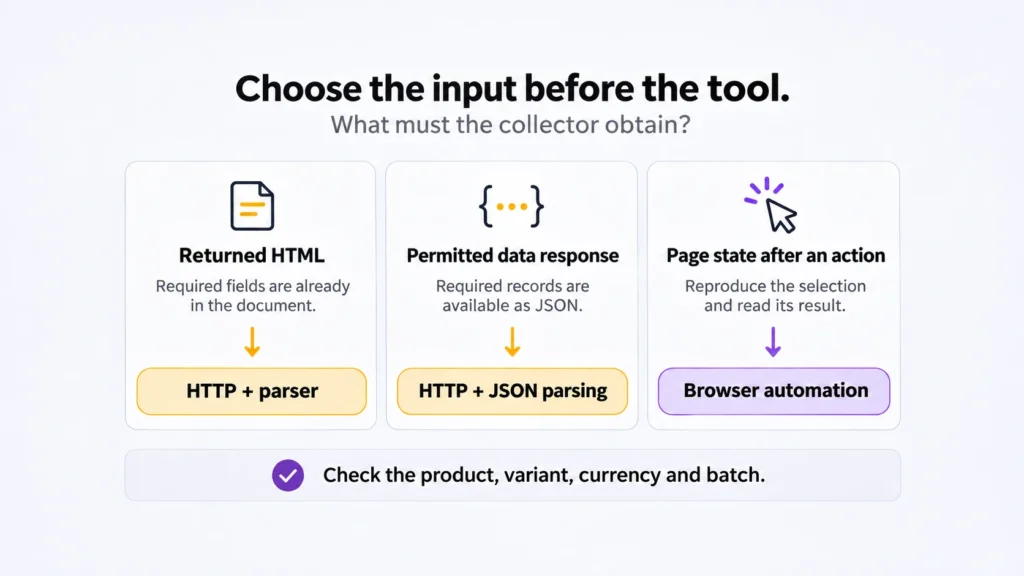
Start a catalogue export with an HTTP request. When its response supplies the required records, parse them there. Use Playwright or Puppeteer for a job that needs page scripts or an interaction to produce the result. JavaScript can handle either route.
Take a price export: the starting amount in the document may be enough for a catalogue, while a delivery quote requires a destination to be selected. Those are different collection jobs, even on the same URL.
Key Takeaways
- A parser can extract embedded data without displaying it. Check the response before deciding that browser rendering is necessary.
- Define the output before comparing methods: a source price and the price displayed after selecting an option may answer different questions.
- A JSON request copied from a browser may depend on session state. Check its requirements before moving it to a separate client.
- Evaluate a method on the records it completes, including retries and missing fields. A fast download alone says little about a finished export.
What If the Product Cards Are Already in the Response?
Use the returned HTML. A browser has little to add to extracting a name and price that the server has already supplied in the required product card.
For a nightly export, a response containing complete product cards gives you a simple collection path. The Node.js Fetch guide and Cheerio’s documentation provide the request and selection details. Complete cards remain usable even if the page later starts a React or Vue application.
Read one card into one row, keeping its name, price, and identifier together. A page-wide match can cross into a recommendation or a different product. Compare the row with its source card before extending the extraction. Once you can, inspect a less convenient row too: perhaps a missing price or a different product variant. These cases help expose an extraction rule that only works on the first card.
What If You See an Empty Page Container but Find Product Data?
Try the data source before committing to browser rendering.
The page might carry its product records in embedded JSON or retrieve them in a later request. Find one known product in that data. Confirm that its amount describes the same variant and currency displayed on the page.
After changing the option, open the resulting response in the network panel and find the selected variant. For recording these requests in Playwright, see its network documentation.
Use the endpoint under its documented access conditions and limits. To reproduce a captured request, check its method and the required parameters, headers, or body alongside the URL. That includes any cookies or tokens the interface requires.
For an export available after browser sign-in, you can keep the request in Playwright. Its browser context has an associated request client that shares the context’s cookies. Creating a standalone request context instead gives it separate storage, as documented in APIRequestContext.
A separate Node.js client needs its own session setup for that export endpoint.
What If Selecting an Option Changes the Price?
Use the browser to reproduce the selection whose displayed result the report needs.
On a hypothetical clothing page, save a price for the chosen size and delivery destination, rather than treating the initial starting price as that offer. Keep those two inputs with the observation.
A supported data request may provide the amount too. Before replacing the browser visit, inspect how the page uses that response. Does it select one variant from a larger set? Does a later response replace the first amount? Following the price through those steps helps decide whether the data endpoint is sufficient or whether the displayed result itself belongs in your evidence.
When using a browser, make the extraction wait for that result. A completed navigation or the appearance of the first card may precede the price update. A fixed pause gives the script time, but supplies no confirmation that the relevant update occurred. Use a condition tied to the chosen product or batch.
Browser automation also brings downloads and state to manage. Before blocking images or other resource types, keep a working extraction as a reference. Removing the script that supplies the prices would save traffic by removing the data. Compare the required values after changing download rules.
Network location is another input to hold steady in a regional comparison. A changed exit, currency preference, or account state can change the offer independently of the collection method. Keep those conditions with the observation rather than attributing every difference to HTTP versus browser rendering.
When Is Changing Methods Worth the Work?
Change methods when it removes a demonstrated obstacle or unnecessary work. An empty export needs diagnosis before a different tool.
A price present in the input but missing from the export points you toward the field mapping. A price absent from the input sends you back to how the page obtains it. If the source denies the request, investigate access through its supported route. These findings lead to different changes.
For a larger collection, compare the effort required to deliver the same accepted batch. Include failed attempts, missing fields, downloaded traffic, and the memory used by browser workers. A nominally quicker request is a poor saving if it sends incomplete records downstream for repair.
Use browser execution for the subset of pages that requires it, while ordinary catalogue pages stay in the HTTP collection. A browser-generated HTML snapshot can reuse an existing Cheerio parser, although that arrangement still requires the browser visit. It also contains only the elements present when captured; a virtualized list may have removed earlier cards.
When making that move, check the connection configuration. Apply proxy settings to the HTTP client sending the request; How to Use Proxies in Node.js covers Fetch and Axios.
Practical Example: One Catalogue, Two Responses
The test used two fictional products with known values: LAMP-01, Desk lamp, $29.90, and NOTE-02, Notebook, $4.50. We served those same records in two ways.
Run the Local Comparison
The example needs Node.js, an installed Google Chrome browser, Cheerio 1.2.0, and Playwright 1.62.1. The chrome channel selects that installed browser. It does not use an external website or proxy. Playwright’s browser documentation explains alternative browser installations.
Save the JavaScript below as demo.mjs in an empty project directory. Install the pinned packages there:
sh
npm install [email protected] [email protected]
Run the saved file with node demo.mjs. It starts a server on a temporary local port, compares the complete HTML, the HTML shell, and the browser-rendered cards, then closes the server. Its assertions check all fields and record order against two fixed products. The data-ready marker belongs to this controlled page; use a source-specific completion condition when adapting an extractor.
The template interpolates only the demonstration’s fixed values and is not an HTML template for arbitrary external input.
javascript
import { createServer } from 'node:http';
import assert from 'node:assert/strict';
import { load } from 'cheerio';
import { chromium } from 'playwright';

const products = [
  { sku: 'LAMP-01', name: 'Desk lamp', price_text: '$29.90' },
  { sku: 'NOTE-02', name: 'Notebook', price_text: '$4.50' },
];
// This fixture interpolates only the fixed demonstration data above.
function cards(items) {
  return items.map(p => `<article class="product" data-sku="${p.sku}">
    <h2>p.name</h2><spanclass="price">{p.price_text}</span>
  </article>`).join('');
}
const server = createServer((req, res) => {
  if (req.url === '/api/products') {
    res.writeHead(200, { 'Content-Type': 'application/json' });
    return res.end(JSON.stringify(products));
  }
  if (!['/html', '/rendered'].includes(req.url)) {
    res.writeHead(404);
    return res.end();
  }
  const direct = req.url === '/html';
  res.writeHead(200, { 'Content-Type': 'text/html; charset=utf-8' });
  res.end(`<!doctype html><html lang="en"><title>Demo catalogue</title>
    <main id="catalogue" data-ready="${direct ? 'yes' : 'no'}">
    ${direct ? cards(products) : ''}</main>
    ${direct ? '' : `<script>
      const cards = ${cards.toString()};
      fetch('/api/products').then(r => r.json()).then(items => {
        const list = document.querySelector('#catalogue');
        list.innerHTML = cards(items);
        list.dataset.ready = 'yes';
      });
    </script>`}</html>`);
});
server.on('error', error => { throw error; });
await new Promise(resolve => server.listen(0, '127.0.0.1', resolve));
const base = `http://127.0.0.1:${server.address().port}`;

async function withHttp(path) {
  const response = await fetch(new URL(path, base), {
    redirect: 'error',
    signal: AbortSignal.timeout(5000),
  });
  if (!response.ok) throw new Error(`HTTP ${response.status}`);
  if (!response.headers.get('content-type')?.includes('text/html')) {
    throw new Error('Expected HTML');
  }
  const $ = load(await response.text());
  return $('.product').map((_, card) => ({
    sku: $(card).attr('data-sku') ?? '',
    name: $(card).find('h2').text().trim(),
    price_text: $(card).find('.price').text().trim(),
  })).get();
}

async function withBrowser(path) {
  const browser = await chromium.launch({
    headless: true,
    channel: 'chrome',
  });
  try {
    const page = await browser.newPage();
    const response = await page.goto(new URL(path, base).href, {
      waitUntil: 'domcontentloaded',
      timeout: 10000,
    });
    if (!response?.ok()) throw new Error('Navigation failed');
    await page.locator('#catalogue[data-ready="yes"]').waitFor({
      state: 'attached', timeout: 5000,
    });
    return await page.locator('.product').evaluateAll(cards =>
      cards.map(card => ({
        sku: card.getAttribute('data-sku') ?? '',
        name: card.querySelector('h2')?.textContent.trim() ?? '',
        price_text: card.querySelector('.price')?.textContent.trim() ?? '',
      }))
    );
  } finally {
    await browser.close();
  }
}

try {
  const html = await withHttp('/html');
  const shell = await withHttp('/rendered');
  const rendered = await withBrowser('/rendered');
  assert.deepEqual(html, products);
  assert.deepEqual(shell, []);
  assert.deepEqual(rendered, products);
  console.log(JSON.stringify({ html, shell, rendered }, null, 2));
} finally {
  await new Promise(resolve => server.close(resolve));
}
The code in this article is provided for illustration. It may behave differently or fail to run depending on your environment settings, software and library versions, or changes to the services and APIs it uses. Before using the examples, test them in your own environment and adapt them as needed.
Read the Results
The /html response contained finished cards. The HTTP extractor reproduced both records exactly, including identifiers, names, and price strings.
At /rendered, the response supplied the container before any cards existed. The HTTP extractor returned an empty array because its input had no product-card elements. There were still two products in the demonstration; that collector had not obtained their cards.
Opening /rendered in a browser changed what happened next. Its script requested /api/products, inserted both cards, and marked the batch as ready. Playwright waited for that marker and recovered the same two product records as the HTTP collector had found on /html.
Here, the browser’s useful contribution was executing the script that constructed the second page. The HTTP parser already had the cards it needed on /html.
On November 6, 2026, all three assertions passed against the local server using Node.js 24.22.1, Cheerio 1.2.0, Playwright 1.62.1, and installed Google Chrome in headless mode; no external proxy was involved. The check establishes these output values; it supplies no speed benchmark, production access result, or evidence of complete collection across multiple pages.
Match the Connection to the Collection
If a permitted project requires residential exits in selected locations, review MangoProxy Residential proxies for geographic targeting and its rotation and session controls. Choose the exit policy around the job: a sequence of related actions and a set of independent regional checks can need different allocations. Inspect a product record returned through the connection you configured.
Glossary
HTTP (Hypertext Transfer Protocol): The protocol carrying web requests and responses.
HTML (HyperText Markup Language): The markup that structures a page.
Rendering: Browser work that produces the page from its document and resources.
Headless: A browser running without a visible window.
Selector: A pattern for matching page elements during extraction.
API (application programming interface): An interface that lets software use defined data or operations. JSON (JavaScript Object Notation) – A text format for structured data.
Browser context: An isolated session for browser cookies and related storage.
Cookie: Client state sent with matching requests under the applicable cookie rules.
Virtualized list: A list that keeps only part of its records in the document at a time.
IP address: Internet Protocol address; the destination sees a proxy’s exit address for a routed connection.
CORS (Cross-Origin Resource Sharing): A mechanism through which a server permits browser scripts from another origin to read its responses.
Final Thoughts
Let the required observation set the method: delivered catalogue records can go straight to a parser; an offer defined by a page interaction calls for following that interaction.
Frequently asked questions
Here we answered the most frequently asked questions.
Does a Console Match Prove the HTTP Extractor Will Work?
No. The tab may have already loaded data and created elements. Check the response body used by the extractor separately. Browser requests also follow origin and CORS rules. Moving the collector to Node.js changes that environment, while access still needs to follow the source’s allowed route.
What Should I Keep for Debugging a Later Layout Change?
Retain a permitted sample from the failed extraction, labelled as an HTTP response or a rendered snapshot. A later download may show a different layout. Save the source reference, capture time, and extractor version with it; remove credentials and unnecessary personal data before sharing.
Does Choosing Axios Change Whether I Need a Browser?
Switching to Axios changes how the response is requested. When the missing content has to be created by page scripts, you still need browser execution or a permitted data source containing those fields.
Will One Browser Visit Capture an Infinite List?
Only the records loaded and retained during that visit are available to extract. A longer scroll can trigger more requests, and virtualization can remove earlier cards. Track each accepted batch and its record identifiers rather than treating a long page as evidence of complete collection.