
Web Scraping with Playwright: Browser Setup, Page Data, and Proxies
Published: ≈ 15 min read
Quick Answer
A page can open successfully and still give a scraper no records. The quote cards used in this example are built by JavaScript. Let Playwright open the listing, wait for those cards, then read the text and author within each one. The result is a collection of quote records that Node.js can save as JSON.
Follow the same tab through the listing’s Next links, with a limit of three pages. An optional HTTP proxy is configured before that tab opens. Keep its context alive until the last visit so pagination can reuse the browsing state established on earlier pages.
Key Takeaways
- A missing browser executable prevents collection before any page is read. Check that Chromium is installed for the project’s Playwright version.
- On a list loaded in batches, wait for the batch you intend to collect. The first card may appear while the application is still adding others.
- Extract within each card. An author missing from one card should leave a gap in that record, rather than shift the authors assigned to every later quotation.
- Preserve the required browser state and proxy allocation throughout a connected page sequence. A new context does not itself create a new IP.
- Compare a saved page image with its JSON rows when investigating an unexpected result. The image shows the view; the rows supply the values to analyze.
When Is Playwright the Right Tool for Scraping?
Suppose the price you need appears after a size is selected. Playwright can make that selection and read the updated price from the browser. If a list is built by JavaScript, that script has to run. These are good reasons to use Playwright. First look at what your permitted source already returns. If an ordinary HTML response or documented API contains the complete dataset, a browser may add unnecessary processing and downloads.
The difference is visible on the Quotes to Scrape sandbox. Its default endpoint provides quote text in the page response; its JavaScript endpoint generates the quote elements in the browser. The example below uses the JavaScript endpoint so rendering has a clear purpose. It is a training target, rather than a claim that these selectors work on an unrelated site.
This example uses Chromium. There is no browser-comparison task here, so one engine is sufficient. Use Firefox or WebKit instead when your target or deployment requires one of them.
How Do You Set Up the Browser?
A standalone Node.js file is enough for this collector. Follow the Playwright Library documentation to add the package, then install Chromium. The second step matters even when the import works: loading the library does not establish that its browser executable is present.
The setup below starts a project in an empty directory and installs those two components.
bash
npm init -y
npm install playwright
npx playwright install chromium
Save the example as collect.cjs. Its require statements use CommonJS; the .cjs extension makes that choice explicit to Node.js. Launch the file from the directory where you installed the package.
bash
node collect.cjs
Keep the lockfile with the project. If you upgrade Playwright, install its matching browser as part of that upgrade. On Linux, also include the system dependencies specified in the browser installation documentation.
For debugging, turn off headless mode and watch the visit. You can then see whether the tab reaches the expected listing and what happens after an interaction. The example normally leaves the window hidden; neither setting promises access to the target.
The cleanup order follows the work: finish the page sequence, close its context, then close the browser. Recreating a fresh context for page two would lose the first context’s cookies and site storage. Keeping it open avoids that unnecessary reset.
What Should You Wait For Before Reading Page Data?
Check the fields you will actually save. Here, a card needs both quotation text and an author before its record is usable. Elsewhere, a visible card might still contain a price placeholder. Waiting for navigation alone would not distinguish those cases.
The following comparison helps choose the condition.
| Signal | What it tells you | What still needs checking |
|---|---|---|
| DOMContentLoaded | The initial document has been parsed. | The application may still be fetching or inserting records. |
| load | The page’s load event has fired. | Later requests and user-triggered updates can still change the data. |
| A quote card is visible | At least one matching card is displayed. | Its fields and the remaining batch may still be incomplete. |
| A relevant response arrives | The selected request has returned a response. | Its status and payload need validation; the page may render it later. |
| A known batch condition is met | The page satisfies the condition chosen for this collection. | That condition must match how this particular application loads data. |
For a small page that inserts its quote cards together, waiting for the first visible .quote is a useful starting point. The collector then checks that every extracted card has text and an author. This catches missing required fields in the cards it has read. Because this collector has no expected item count, that check covers the cards already extracted. A later batch would fall outside it.
Suppose a listing promises 20 items but initially shows five. The first batch is ready; the requested set is not. Waiting for all 20 fits that page. When no total is supplied, follow the batch request or observe loading start and finish. Checking only for an absent spinner misses that distinction.
The Playwright navigation documentation describes updates that continue after the load event. For this reason, networkidle is a poor substitute for a field or batch condition. A quiet interval can occur before the required content is inserted. Background polling can create the opposite problem: the useful content is already there while the wait continues.
Set up waitForResponse before the Load more click that triggers the request. Otherwise a fast response could arrive before the script starts listening for it. Match the endpoint and relevant request parameters, then inspect its status and body. If you extract the visible page afterward, wait for its corresponding update too. A response and the rendered result are different observations.
How Do You Keep Related Fields Together?
Locate each repeated item first, then extract its child fields. In the quote example, .quote is the record boundary. The text, author, and tags inside that card become one object.
With separate page-wide arrays, a missing author on the second card could shift every later pairing. Reading inside each container preserves the association and makes a missing value visible in its own record.
For a Load more control, Playwright locators can identify the button by its role and accessible name. For the quotes themselves, the inspected card class supplies a convenient boundary. A selector that counts its way through several surrounding containers is harder to maintain: inserting one layout element can move the result even though the quote markup has not changed.
In locator.evaluateAll, the callback receives the matching cards inside the browser page. It reads each card’s elements and returns ordinary strings and arrays. File access happens afterward in Node.js. A file handle from that process is unavailable inside the page callback; return the extracted values to Node.js before writing them.
A missing author stops this page from entering the report, as does missing quote text. Tags have a different rule: none found means an empty list. Set these requirements field by field when adapting the collector.
Where Do Proxy Settings Belong in the Collection?
For this three-page job, supply the proxy when creating the context, before opening its tab. Configure other contexts separately if they need different routes. Supplying the setting at browser launch gives it browser-wide scope instead.
The connection details contain an address to reach and credentials to authenticate with. PROXY_SERVER takes the gateway address, including its scheme and port. The two remaining inputs, PROXY_USERNAME and PROXY_PASSWORD, take the login and password. Use the complete issued username: it may carry the provider’s selected connection parameters. A connection that requires no username/password needs only the server input.
Those variable names belong to this collector; they are not settings Playwright discovers automatically. For MangoProxy, follow the proxy setup instructions to generate and export a connection with the required geography, session duration, and protocol. The server input must identify that gateway. Quotes to Scrape remains the destination URL passed to page navigation.
The .env template below contains no usable connection. Replace its address and port as well as the credentials. The –env-file option loads these values when you start Node.js, provided that your Node.js version supports the option.
dotenv
PROXY_SERVER=http://gateway.example:8000
PROXY_USERNAME=YOUR_CONNECTION_USERNAME
PROXY_PASSWORD=YOUR_CONNECTION_PASSWORD
Use the launch form below to read the local .env file.
bash
node --env-file=.env collect.cjs
An old connection persisting after a file edit can come from the process environment: its existing values override .env. Check there before changing the file again. Quote spaces and comment characters according to Node.js rules, keep credentials out of version control, and leave both credential entries absent for a connection that does not require them. The initial node collect.cjs command remains suitable when no explicit proxy is needed or the variables are supplied by your launch environment.
Choose an exit policy before generating those parameters. A static connection can suit a job that needs a fixed address. A residential connection with a session setting can suit geographically targeted browsing where an exit should remain allocated for a page sequence, subject to the provider’s availability and session rules. Independent jobs can use separate allocations. Rotating during a stateful sequence can change an input the site uses between pages.
This example authenticates with an HTTP proxy gateway. The page address can still begin with HTTPS. Use the gateway scheme issued by the provider rather than copying the destination’s scheme into PROXY_SERVER. Consult Playwright’s HTTP(S) and SOCKSv5 proxy support for other connection types; the username/password fields used here are documented for HTTP proxy authentication. An authenticated SOCKS setup therefore needs checking separately.
Incomplete parameters fail early: the helper rejects credentials without a server, or a username/password pair with one entry missing. Supply none of them and the helper adds no explicit proxy setting. None of these connection values needs to appear in the exported quote data or a public log.
To inspect the exit, create another page in the collection’s context and open MangoProxy’s My IP tool there. Close the extra page after reading the address. A check in your everyday browser would show the route used by that browser instead. Even inside the right context, one observed address cannot establish the exit of later requests if the provider is rotating it.
The Playwright browser contexts and proxies guide covers jobs with separate browsing sessions. Here, introducing more contexts would complicate a single listing-page sequence without helping extract its fields.
Practical Example: Collect Up to Three JavaScript-Rendered Pages
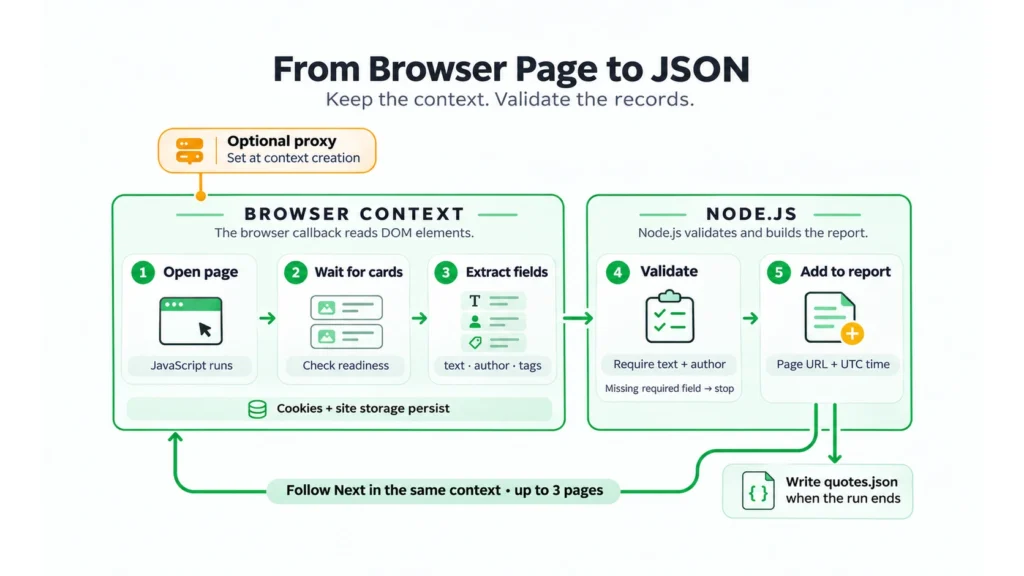
The exercise is to produce quotes.json from up to three pages of the JavaScript listing. Each accepted page contributes its quote records; its Next link supplies the following address. Three pages is the example’s chosen limit, so reaching it leaves the rest of the sandbox outside the collection.
All the field selection starts inside .quote. Its .text and .author children supply the required values; .tag elements supply the optional list. Pagination uses li.next a outside those cards. These names describe this training page’s markup and need inspecting again when the target changes.
javascript
const { chromium } = require('playwright');
const { writeFile } = require('node:fs/promises');

function proxyFromEnv() {
  const server = process.env.PROXY_SERVER;
  const username = process.env.PROXY_USERNAME;
  const password = process.env.PROXY_PASSWORD;
  if (!server) {
    if (username || password) throw new Error('Proxy server is missing');
    return undefined;
  }
  if ((username === undefined) !== (password === undefined)) {
    throw new Error('Supply both proxy credentials');
  }
  return {
    server,
    ...(username === undefined ? {} : { username, password }),
  };
}

async function main() {
  const proxy = proxyFromEnv();
  const browser = await chromium.launch({ headless: true });
  const report = {
    started_at: new Date().toISOString(),
    pages: [],
    stop_reason: 'page_limit',
  };
  try {
    const context = await browser.newContext({ proxy });
    try {
      context.setDefaultTimeout(15000);
      context.setDefaultNavigationTimeout(30000);
      const page = await context.newPage();
      const seenPages = new Set();
      let nextUrl = 'https://quotes.toscrape.com/js/';

      for (let n = 0; n < 3; n++) {
        if (seenPages.has(nextUrl)) {
          report.stop_reason = 'repeated_page_url';
          break;
        }
        seenPages.add(nextUrl);
        const response = await page.goto(nextUrl, {
          waitUntil: 'domcontentloaded',
        });
        if (!response || !response.ok()) {
          report.stop_reason = `http_${response?.status() ?? 'unknown'}`;
          break;
        }
        if (new URL(page.url()).origin !== 'https://quotes.toscrape.com') {
          throw new Error('Unexpected redirect');
        }

        await page.locator('.quote').first().waitFor({ state: 'visible' });
        const rows = await page.locator('.quote').evaluateAll(cards =>
          cards.map(card => ({
            text: card.querySelector('.text')?.textContent.trim() ?? null,
            author: card.querySelector('.author')?.textContent.trim() ?? null,
            tags: Array.from(card.querySelectorAll('.tag'),
              tag => tag.textContent.trim()),
          }))
        );
        if (!rows.length || rows.some(row => !row.text || !row.author)) {
          throw new Error('Required quote fields are missing');
        }

        report.pages.push({
          source_url: page.url(),
          collected_at: new Date().toISOString(),
          rows,
        });
        const nextLink = page.locator('li.next a');
        const href = await nextLink.count()
          ? await nextLink.first().getAttribute('href') : null;
        if (!href) {
          report.stop_reason = 'no_next_link_observed';
          break;
        }
        const next = new URL(href, page.url());
        if (next.origin !== 'https://quotes.toscrape.com' ||
            !next.pathname.startsWith('/js/')) {
          throw new Error('Unexpected pagination target');
        }
        nextUrl = next.href;
      }
    } finally {
      await context.close();
    }
  } catch (error) {
    report.stop_reason = `error_${error.name}`;
    process.exitCode = 1;
  } finally {
    try {
      await browser.close();
    } finally {
      await writeFile('quotes.json', JSON.stringify(report, null, 2), 'utf8');
    }
  }
}

main().catch(() => {
  console.error('Collector failed; inspect the local setup and output path.');
  process.exitCode = 1;
});
Open the report at its page level first. The source_url identifies the page visited, and collected_at records when its rows were read, using UTC. The quote objects sit below that shared reference. Nothing in this timestamp dates the original quotation.
The loop takes the address for its next visit from the listing’s own Next link. It checks the next address against the expected origin and /js/ path, and it stops before requesting the same page URL twice. This URL check does not detect repeated content served at different addresses. A larger collection needs a record identity and a separate rule for handling repeats.
Read stop_reason alongside the saved pages. page_limit identifies the three-page cap; no_next_link_observed identifies an accepted page with no usable Next link. Neither label claims that every record on the site was collected. An HTTP status or error name records an interrupted collection. Pages already accepted remain in the report when a later navigation or extraction fails.
The example does not automatically retry. On a 429 response, its status branch stops the run. Before scheduling another attempt, inspect any waiting instructions and the source’s access policy. Increasing concurrency or changing an IP does not repair a missing field selector.
Setup failures can occur before the report is created, including failure to launch the browser. Other failures are recorded coarsely by error name. A maintained collector should add a sanitized diagnostic category and the failed page reference, keeping credentials out of logs. The short example is intended to expose the collection steps clearly.
How Would You Diagnose an Empty or Incomplete Export?
Find where the records disappeared: in the returned page, in its rendered cards, or between those cards and the exported fields. A zero-row report alone does not identify which stage failed.
In an illustrative failure, the first page has ten visible cards, but one author element uses a new class. The required-field check rejects that page. Inspect the affected card and correct the author selector. A longer navigation timeout would leave the same extraction error.
For another hypothetical failure, Load more leaves the original cards on screen and adds nothing. Look at the response to that click and compare its records with the existing batch. A wait for the first visible card would pass in both the successful and failed cases, so it cannot confirm that this action added data.
To retain the view behind an accepted page, place the optional screenshot call after validation and before report.pages.push.
javascript
await page.screenshot({ path: `quotes-page-${n + 1}.png`, fullPage: true });
The code in this article is provided for illustration. It may behave differently or fail to run depending on your environment settings, software and library versions, or changes to the services and APIs it uses. Before using the examples, test them in your own environment and adapt them as needed.
An image can help explain an odd export: perhaps the browser shows a new layout or an overlay. It has its own coverage limits. Scrolling may be required to load later records, and a virtualized list may remove earlier ones from the page. A full-page screenshot does not recover those absent elements. Apply the source’s retention rules to saved images as well as data.
Use the working export as a reference before reducing downloads. Try excluding an unnecessary resource type, then compare the required fields with that reference. Images may be dispensable for text extraction; a script or response that supplies the cards is not.
Choose Connection Settings for the Job
Once the extractor reads the right fields, decide which geography and exit lifetime the real collection requires. If the job calls for a residential exit and geographic selection, use MangoProxy Residential proxies to obtain a connection with the required targeting and session settings. Transfer its gateway and credentials into the collector’s inputs. Evaluate the returned pages on the intended workload: the connection’s routing features alone cannot show whether the target supplied every required record.
Glossary
Browser terms
Headless means the browser has no visible window. Rendering turns page resources into the displayed result. HTML supplies markup; the DOM (Document Object Model) holds the browser’s current elements. Each context has separate session data, including cookies and site storage.
Extraction terms
Locator: a description Playwright uses to find elements. CSS selector: a rule matching elements. API: an interface exposing software operations. JSON: the structured text format of quotes.json.
Connection terms
The proxy gateway is the endpoint the collector connects to. The exit IP is the source address seen at the destination; it can differ from the gateway’s IP. A sticky session requests that an exit be retained under the provider’s allocation rules. HTTP is the web request protocol, and HTTPS protects the connection with encryption.
Time reference
UTC means Coordinated Universal Time. The report uses it to date the collection.
Final Thoughts
The useful checkpoint is the first correctly extracted page. Trace one card into its exported object, make the wait condition fit the way the page loads, then extend the collection through observed links. Choose the proxy route and session duration once you know what that page sequence requires.
Frequently asked questions
Here we answered the most frequently asked questions.
Can I use Python instead of JavaScript?
Yes. Keep the browser, context, and page arrangement, then implement it with Playwright’s Python API. Choose the synchronous or asynchronous interface to fit the Python application. Use that API’s setup instructions in place of the Node.js installation shown here.
Is scrapy-playwright the same as the standalone library?
A Scrapy project can hand selected requests to the scrapy-playwright integration while retaining its scheduler and item processing. That is useful when browser rendering belongs inside an existing crawl. The collector here is a single standalone script, so the Playwright library is sufficient.
Can I read a network response instead of scraping visible text?
Yes, if the permitted response contains the required records. Begin listening before triggering the request, then validate what it returns. If your subject is what a visitor sees, inspect the resulting page as well. Any filtering or formatting applied there becomes part of that observation.
Does Playwright automatically solve CAPTCHA challenges?
No. The example has no challenge-solver integration or action that completes a CAPTCHA. Record a challenge as an access outcome and review the permitted collection route. Repeated retries can consume traffic without producing any valid records.