
Web Scraping with Selenium: Browser Setup, Data Extraction, and Proxies
Published: ≈ 15 min read
Quick Answer
Use Selenium to collect the book cards from Chrome’s current page. The sample covers up to two listings. For each one, the extractor validates the complete displayed batch, then saves the full book names, price text, stock messages, and links to both JSON and CSV.
HTTP proxy settings are optional for this Selenium scraper. A proxy run begins with an IP-check visit in Chrome; run.json keeps the reported address and the collection totals. The book files keep each row’s source listing and observation time.
Key Takeaways
- If the first launch stops while obtaining ChromeDriver, check Selenium Manager’s network access. The –proxy option in this example controls Chrome’s page requests.
- A navigation finishing does not establish that every required field has loaded. Choose an explicit wait around the data you intend to export.
- Read a title and price within the same product card. Independent lists can silently pair values from different products.
- Chrome ignores credentials embedded in a manual proxy address. A protected HTTP proxy needs an authentication method in addition to its host and port.
- A two-page export is a two-page sample. Record why collection stopped so a file of valid rows is not mistaken for the whole catalogue.
When Does Web Scraping Need Selenium?
Use Selenium when a browser interaction determines which records you can read. After a filter click, for example, the updated listing becomes the collection source. Selenium can make the click and read that state, including elements inserted by page scripts. It also fits a collection job already built around Selenium. For a catalogue whose complete records arrive in HTML or through an allowed API, start by considering that simpler data source.
We use the Books to Scrape practice catalogue. Its server returns the book cards in HTML, so a browser is optional for this target. The sandbox’s prices and ratings are demonstration values, useful here for checking extraction rather than observing a real market.
For your own target, inspect a representative record before choosing the collection method. Write down any selection needed to reach that record, including a size or filter, and check whether its fields belong to an embedded frame. Those details determine the actions and document context the collector needs. Use an authorized collection route and keep within the source’s published request limits.
How Do You Set Up Python and the Browser?
Have Chrome installed on the machine running Python. The setup below uses Python 3.12 to create .venv and installs Selenium 4.52.0 inside it, matching the package used in our checks. Recheck browser and driver compatibility when changing that combination.
Windows PowerShell
Run these in the project folder. After .venv is created, the second command installs Selenium into it.
powershell
py -3.12 -m venv .venv
.\.venv\Scripts\python.exe -m pip install selenium==4.52.0
macOS and Linux
Check that python3.12 resolves to your intended interpreter. Chrome on Linux also needs the libraries required by its distribution package.
bash
python3.12 -m venv .venv
.venv/bin/python -m pip install selenium==4.52.0
The first webdriver.Chrome call can pause while Selenium Manager finds or downloads ChromeDriver. No catalogue page has been visited at that point. If the download needs a proxy, configure Manager through SE_PROXY; a preinstalled compatible driver is another option for a restricted environment. The script’s –proxy setting is passed to Chrome for its browsing traffic.
Add –headed to watch a local run; otherwise Chrome stays hidden. Both modes use a 1440 by 1000 browser size. The finally clause closes the session with quit, including when collection exits through an error.
Which Fields Should You Extract from Each Card?
Keep the card’s fields together in the exported row, with its listing URL and acceptance time. A price such as £51.77 remains text, and In stock remains the displayed message. Currency conversion and stock-quantity calculations belong to a later processing step.
Inspect the first card in Chrome’s developer tools and check its elements against this mapping:
| Output field | Source within article.product_pod | Reason for this choice |
|---|---|---|
| title | title attribute of h3 a | The visible heading can be shortened; the attribute contains the full title in this sandbox. |
| price_text | Text of .price_color | Retains the displayed currency symbol and decimal format. |
| availability | Text of .availability | Records the displayed stock message, with excess whitespace removed. |
| product_url | href attribute of h3 a | Resolves the relative link against the actual listing URL. |
| source_url and observed_at_utc | Current listing URL and the time its batch passes validation | Let you trace a row back to the listing visit that produced it. |
The outer selector, article.product_pod, establishes which book you are reading. Within that element, calls through Selenium’s locator APIs read h3 a, .price_color, and .availability. If one card has no price element, ready_rows returns False and withholds the batch for another check. A missing field therefore cannot shift the next book’s price into this row. On a different site, inspect the name field too: its complete value may be somewhere other than a title attribute.
seen_products holds the product URLs already saved during this run. Repeated sightings retain the first accepted row and increase a duplicate counter. That suits this small snapshot; a price-monitoring application should store later observations rather than discard a changed price. Variants may require their own identifiers too.
What Should Selenium Wait For Before Reading Data?
Accept a page when its displayed range and extracted cards agree. A displayed range of 1 to 20 requires 20 complete cards in ready_rows. An absent field or a replaced element makes that check return False. WebDriverWait repeats the check for up to 15 seconds before the collection fails its wait.
For the rules on combining wait mechanisms, refer to the Selenium waiting documentation. This collector uses the explicit wait on its own. It accepts a page when ready_rows returns validated rows; it does not merely wait for the first card to exist.
Adapt that condition when the source changes. A listing with no displayed count needs another completion signal, such as a documented batch size or an application-specific ready state. A scrollable list may remove earlier cards as new ones appear. Collect and identify each loaded batch in that case; reading the final screen cannot recover elements the page has already removed.
Pagination needs its own decision. The example follows the observed Next link and resolves its relative address. It stops when that link is absent or the requested page limit is reached. Repeated requested or final page URLs cause a failure instead of silently looping. For a Load more interface, replace this URL-navigation step with a click and a condition that detects the newly added records.
How Do You Add a Proxy and Verify Its Use?
Configure the route in ChromeOptions before calling webdriver.Chrome. Keep the same browser open through the collection, and choose an exit policy appropriate to the job. Related page visits can need a stable allocation; independent regional observations can need different ones. Keeping Chrome open preserves its browser state, but a rotating provider can still change the exit under its allocation rules.
Obtain the Connection Parameters
MangoProxy’s English Proxy setup instructions show the generation controls for geography, session duration, and protocol. Open the generator for your selected product and choose the settings your collection needs. For this collector, copy a generated HTTP endpoint and the proxy login issued with it. Use those connection credentials rather than the password for signing into your MangoProxy account.
Transfer the generated connection into these three inputs:
- MANGO_PROXY_SERVER: the http:// address and supplied port.
- MANGO_PROXY_USERNAME: the full generated username, with targeting or session suffixes intact.
- MANGO_PROXY_PASSWORD: the corresponding proxy password.
Keep the login fields separate from the server address. A combined host:port:user:pass line fails the endpoint check.
For a connection using the provider’s IP allowlist, omit both credential variables after authorizing the collector machine’s public address. The collector assumes that authorization has already been arranged.
Handle Authentication Separately
Chrome can tunnel an HTTPS visit through an HTTP proxy with CONNECT. For login, it needs an authentication exchange: putting credentials into a manual proxy address does not supply them, as Chromium’s proxy documentation explains.
Before proxy_auth supplies credentials, it checks the Chrome DevTools Protocol (CDP) challenge: source Proxy, expected host, expected port. The callback cancels an unmatched challenge or a second attempt for the same request. In particular, it does not offer a proxy password to a website’s own login challenge.
This part is Chrome-specific and depends on compatible browser and Selenium DevTools support. Selenium describes CDP support as temporary while WebDriver BiDi develops. Keep that compatibility check when upgrading; the authentication function is not a cross-browser recipe. A provider-supported IP allowlist avoids this callback when available. This example does not implement SOCKS authentication or an extension-based alternative.
Supply the Settings and Check the Browser
Save the complete script in the next section as collect_books.py. First run it without a proxy. On Windows:
powershell
.\.venv\Scripts\python.exe collect_books.py --pages 2 --out direct-run
On macOS or Linux:
bash
.venv/bin/python collect_books.py --pages 2 --out direct-run
Run the assignments and the Python command in the same terminal. Python reads the supplied values from that environment, so collect_books.py needs no credentials added to it. Review terminal history and screenshots for exposed credentials before sharing them.
Windows PowerShell:
powershell
$env:MANGO_PROXY_SERVER = 'http://YOUR_PROXY_HOST:YOUR_PROXY_PORT'
$env:MANGO_PROXY_USERNAME = 'YOUR_PROXY_USERNAME'
$env:MANGO_PROXY_PASSWORD = 'YOUR_PROXY_PASSWORD'
.\.venv\Scripts\python.exe collect_books.py --pages 2 --out proxy-run
macOS or Linux:
bash
export MANGO_PROXY_SERVER='http://YOUR_PROXY_HOST:YOUR_PROXY_PORT'
export MANGO_PROXY_USERNAME='YOUR_PROXY_USERNAME'
export MANGO_PROXY_PASSWORD='YOUR_PROXY_PASSWORD'
.venv/bin/python collect_books.py --pages 2 --out proxy-run
Before the catalogue visit, a proxy-enabled run opens api.ipify.org and reads the returned IP address. Look for observed_exit_ip in run.json and compare it with the allocation you expect, or with an address observed in a direct browser. The gateway is the server Chrome connects to; its resolved address need not be the exit reported by the IP service.
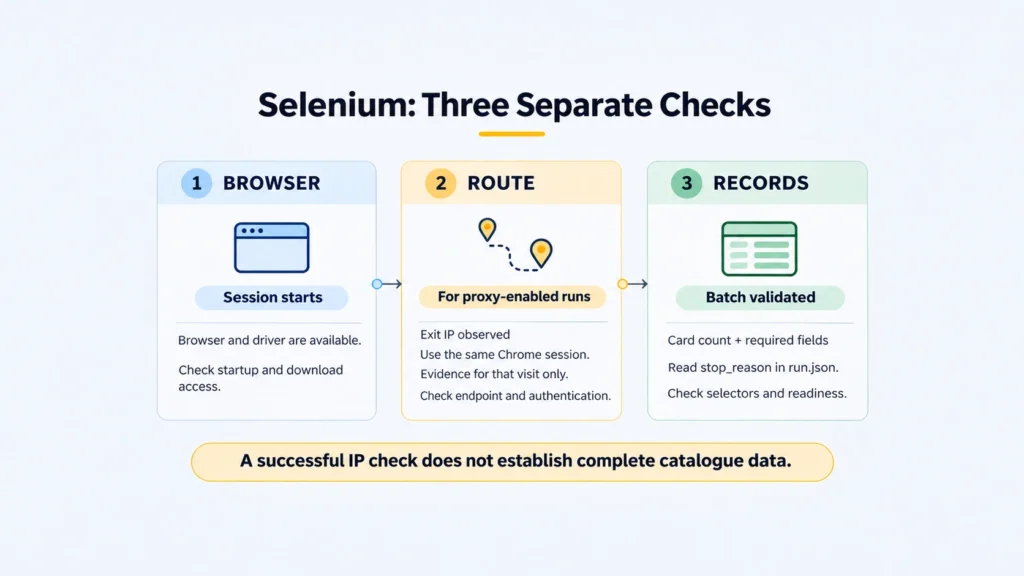
Keep the IP observation attached to that visit. A provider’s later rotation can change the exit, and reaching the IP service says nothing about which records the catalogue will return. Continue to the catalogue checks before treating the run as successful. Selenium Proxy Best Practices covers the wider proxy troubleshooting task.
Practical Example: Export a Bounded Catalogue Sample
Save the following code as collect_books.py. The –out value names the directory the script will create for books.json, books.csv, and run.json; choose a path that does not already exist. The supplied commands request two listing pages.
python
import argparse
import csv
import json
import os
import re
from datetime import datetime, timezone
from pathlib import Path
from urllib.parse import urljoin, urlsplit

from selenium import webdriver
from selenium.common.exceptions import NoSuchElementException, StaleElementReferenceException
from selenium.webdriver.common.by import By
from selenium.webdriver.support.ui import WebDriverWait


def proxy_auth(driver, server, username, password):
    # Chrome-only: answer proxy challenges, never website login challenges.
    devtools, connection = driver.start_devtools()
    endpoint = urlsplit(server)
    attempts = set()

    def answer(event):
        challenge = event.auth_challenge
        origin = urlsplit(challenge.origin)
        matching_proxy = (
            challenge.source == "Proxy"
            and origin.hostname == endpoint.hostname
            and (origin.port or 80) == endpoint.port
        )
        if matching_proxy and event.request_id not in attempts:
            attempts.add(event.request_id)
            reply = devtools.fetch.AuthChallengeResponse(
                response="ProvideCredentials", username=username, password=password
            )
        else:
            reply = devtools.fetch.AuthChallengeResponse(response="CancelAuth")
        connection.execute(devtools.fetch.continue_with_auth(event.request_id, reply))

    connection.add_callback(devtools.fetch.AuthRequired, answer)
    connection.add_callback(
        devtools.fetch.RequestPaused,
        lambda event: connection.execute(devtools.fetch.continue_request(event.request_id)),
    )
    connection.execute(devtools.fetch.enable(handle_auth_requests=True))


def ready_rows(driver):
    try:
        cards = driver.find_elements(By.CSS_SELECTOR, "article.product_pod")
        if not cards:
            return False
        summary = driver.find_element(By.CSS_SELECTOR, "form.form-horizontal").text
        match = re.search(r"showing\s+(\d+)\s+to\s+(\d+)", summary)
        if not match or len(cards) != int(match[2]) - int(match[1]) + 1:
            return False
        rows = []
        for card in cards:
            link = card.find_element(By.CSS_SELECTOR, "h3 a")
            title = (link.get_dom_attribute("title") or "").strip()
            href = link.get_dom_attribute("href")
            price = card.find_element(By.CSS_SELECTOR, ".price_color").text.strip()
            stock = " ".join(card.find_element(By.CSS_SELECTOR, ".availability").text.split())
            if not title or not href or not re.fullmatch(r"£\d+\.\d{2}", price) or not stock:
                return False
            rows.append({
                "title": title,
                "price_text": price,
                "availability": stock,
                "product_url": urljoin(driver.current_url, href),
            })
        return rows
    except (NoSuchElementException, StaleElementReferenceException):
        return False


def main():
    parser = argparse.ArgumentParser()
    parser.add_argument("--start", default="https://books.toscrape.com/")
    parser.add_argument("--pages", type=int, default=2)
    parser.add_argument("--out", default="selenium-output")
    parser.add_argument("--headed", action="store_true")
    parser.add_argument("--proxy", default=os.getenv("MANGO_PROXY_SERVER", ""))
    args = parser.parse_args()
    if args.pages < 1:
        parser.error("--pages must be at least 1")
    username = os.getenv("MANGO_PROXY_USERNAME", "")
    password = os.getenv("MANGO_PROXY_PASSWORD", "")
    if bool(username) != bool(password) or (username and not args.proxy):
        parser.error("Provide both proxy credentials and a proxy endpoint, or none")
    if args.proxy:
        endpoint = urlsplit(args.proxy)
        if (endpoint.scheme != "http" or not endpoint.hostname or not endpoint.port
                or endpoint.username or endpoint.password):
            parser.error("Use http://HOST:PORT, without embedded credentials")
    out = Path(args.out)
    out.mkdir(parents=True, exist_ok=False)
    options = webdriver.ChromeOptions()
    if not args.headed:
        options.add_argument("--headless")
    options.add_argument("--window-size=1440,1000")
    if args.proxy:
        options.add_argument(f"--proxy-server={args.proxy}")

    driver = None
    rows, seen_products, seen_pages = [], set(), set()
    report = {"pages": 0, "duplicates": 0, "stop_reason": "error", "proxy_enabled": bool(args.proxy)}
    failed = False
    try:
        driver = webdriver.Chrome(options=options)
        driver.set_page_load_timeout(30)
        report["browser_version"] = driver.capabilities.get("browserVersion")
        if username:
            proxy_auth(driver, args.proxy, username, password)
        wait = WebDriverWait(driver, 15)
        if args.proxy:
            # This checks the same browser session that will collect the books.
            driver.get("https://api.ipify.org?format=json")
            body = driver.find_element(By.TAG_NAME, "body").text
            report["observed_exit_ip"] = json.loads(body)["ip"]
        next_url = args.start
        while next_url:
            if next_url in seen_pages:
                raise RuntimeError("Pagination repeated a visited URL")
            driver.get(next_url)
            page_url = driver.current_url
            if page_url in seen_pages:
                raise RuntimeError("Navigation returned a visited page")
            batch = wait.until(ready_rows)
            seen_pages.add(page_url)
            observed = datetime.now(timezone.utc).isoformat()
            for item in batch:
                if item["product_url"] in seen_products:
                    report["duplicates"] += 1
                    continue
                seen_products.add(item["product_url"])
                rows.append({**item, "source_url": page_url, "observed_at_utc": observed})
            report["pages"] += 1
            next_links = driver.find_elements(By.CSS_SELECTOR, "li.next a")
            next_url = urljoin(page_url, next_links[0].get_dom_attribute("href")) if next_links else None
            if not next_url:
                report["stop_reason"] = "no_next_link"
                break
            if report["pages"] >= args.pages:
                report["stop_reason"] = "page_limit"
                break
    except Exception as error:
        failed = True
        # Avoid copying credentials or remote URLs from exception messages.
        report["error_type"] = type(error).__name__
        if driver:
            try:
                driver.save_screenshot(str(out / "failure.png"))
                (out / "failure.html").write_text(driver.page_source, encoding="utf-8")
            except Exception:
                pass
    finally:
        if driver:
            driver.quit()

    stem = "books-partial" if failed else "books"
    (out / f"{stem}.json").write_text(json.dumps(rows, ensure_ascii=False, indent=2), encoding="utf-8")
    fields = ["title", "price_text", "availability", "product_url", "source_url", "observed_at_utc"]
    with (out / f"{stem}.csv").open("w", newline="", encoding="utf-8") as stream:
        writer = csv.DictWriter(stream, fieldnames=fields)
        writer.writeheader()
        writer.writerows(rows)
    report["records"] = len(rows)
    (out / "run.json").write_text(json.dumps(report, indent=2), encoding="utf-8")
    print(json.dumps(report, indent=2))
    raise SystemExit(1 if failed else 0)


if __name__ == "__main__":
    main()
The code in this article is provided for illustration. It may behave differently or fail to run depending on your environment settings, software and library versions, or changes to the services and APIs it uses. Before using the examples, test them in your own environment and adapt them as needed.
Read the Export Alongside the Run Report
Our direct run on November 6, 2026 ended at the two-page limit with 40 books and no duplicate product URLs. Both exports matched row for row. The test used Windows, Python 3.12.14, Selenium 4.52.0, and Chrome 157.0.8103.38. The page_limit result records the requested two-page stop; a Next link was still present.
A Light in the Attic – £51.77 is the first book in our export. The card’s title attribute supplies the unabbreviated name. Reading the visible heading instead would save a shortened one despite producing the same number of rows.
Follow source_url to inspect the listing, or product_url for its linked book page. The script collected listings only, leaving detail-page descriptions and reviews outside this export. observed_at_utc marks batch acceptance; it gives no date for a book’s publication or a change in price.
We also checked the same collector against two controlled pages that inserted their cards after a delay, through a local authenticated HTTP proxy. It retained three unique products, counted one repeated product, and stopped at the missing Next link. A separate website-authentication challenge received no proxy credentials. Those are controlled integration checks, not a test of a paid MangoProxy connection.
Diagnose the Failed Stage
After a caught collection error, look for books-partial.json and books-partial.csv. They hold any rows accepted before the failure; run.json gives the exception class under error_type. If Chrome had a usable session, the script also attempts to save failure.png and failure.html. Those files let you inspect the page where collection stopped. A startup failure can leave them absent.
| Observation | What to investigate first |
|---|---|
| SessionNotCreatedException or NoSuchDriverException | Check whether Chrome can start, whether ChromeDriver is compatible, and whether Manager can obtain it. Investigate browser setup before changing catalogue selectors. |
| Proxy login failure or a 407 response | Compare the supplied host, port, protocol, and credentials with the generated connection, then check the authentication method supported by Chrome. Buying another allocation does not fix a malformed endpoint. |
| TimeoutException while waiting for records | The saved page, selectors, displayed range, required fields, and any access challenge. A longer timeout helps only if the expected state can actually arrive. |
| Cards repeatedly become stale | Whether the application is replacing them during extraction. Re-find the card after the update; this collector retries the batch within its deadline. |
| stop_reason is page_limit | Collection reached the requested bound. More catalogue pages may remain. |
| Duplicate count rises unexpectedly | Repeated catalogue content, overlapping pages, or a product key that needs a variant identifier. |
Selenium’s common error reference explains its exception categories. This collector stores the exception class rather than a raw message that could contain connection details. It is not a status-code monitor for every network response; inspect the actual page and network when investigating a target response. Before sharing failure.html, inspect its contents and remove any session details or personal data it contains.
If you adapt ready_rows, examine its price check as well as its selectors. Under the current pattern, £51.77 is a valid price string. Ranges, localized formats, and unavailable offers need their own rules; otherwise the wait expires and the run is recorded as a failure. When adapting the check, distinguish an unparsed value from a real zero and recognize legitimate empty results as a separate accepted state.
Choose an Exit Policy for the Collection
Once the direct sample produces the intended fields, choose the connection around the real workload. If the job needs residential exits and geographic selection, MangoProxy Residential proxies provide targeting and session controls to review for that purpose. Preserve the generated connection parameters through related visits and validate a returned record through the chosen route before expanding the run. Use the proxy observation to check routing, then use the catalogue fields and run report to judge what you actually collected.
Glossary
WebDriver: Browser-control interface used for Selenium commands and responses.
Selenium Manager: Resolves the browser and driver components needed when a session starts.
HTML (Hypertext Markup Language): Markup describing page content and structure.
DOM (Document Object Model): The browser’s structured model of the document.
CSS (Cascading Style Sheets) selector: A rule used to locate matching page elements.
Stale reference: A previously found element reference that is no longer valid.
Explicit wait: Repeated condition checks with a deadline.
Headless: A browser running without displaying its window.
HTTP (Hypertext Transfer Protocol): The request-and-response protocol used to fetch web resources.
HTTPS: HTTP communication protected by encryption.
CONNECT: Request to establish a tunnel through a proxy.
Gateway: The proxy endpoint Chrome connects to.
Exit IP (Internet Protocol address): Source address observed at the destination.
CDP (Chrome DevTools Protocol): Protocol exposing Chrome inspection and automation controls.
WebDriver BiDi: Two-way WebDriver communication for commands and browser events.
JSON (JavaScript Object Notation): A textual representation of structured data.
CSV (comma-separated values): Delimited text holding rows and columns.
UTC (Coordinated Universal Time): Time reference used by observed_at_utc.
API (application programming interface): A defined interface for software to request data or operations.
Final Thoughts
Start the next catalogue with a single-page check of its fields. Extend the run after that page gives usable records, keeping the listing reference and observation time alongside the data.
Frequently asked questions
Here we answered the most frequently asked questions.
Should I use .text, get_attribute, or get_dom_attribute?
Here .text reads what the card displays for price and stock. For title and href, get_dom_attribute reads the attributes declared on the link. Choose get_attribute when you intend a property-first lookup, with the attribute used as a fallback.
Can I use the same script with Firefox or Edge?
Reuse the card-to-row mapping and the file-writing code. Set up browser startup and proxy routing for the engine you choose. The proxy_auth function uses Chrome DevTools support and must be replaced with an authentication method supported by the chosen browser. Recheck the page layout and selectors in the resulting session too.
Does a new Selenium session automatically give me a new proxy IP?
No. It starts another browser session. Check the provider’s session and rotation settings to find out which exit that connection will receive. Starting another browser changes its browser state; it does not itself request another allocation from the proxy service.
Why does the script not click every product or scroll continuously?
Its task is a listing sample containing fields already on each card. Detail-page visits and scrolling would add work without supplying a required field here. Add those actions when the output requires them, with a stopping condition and validation for each additional batch or page.