


Audio Fingerprinting Explained: How Websites Use Audio Processing to Recognize Browsers
Published: ≈ 9 min read
Quick Answer
Audio Fingerprinting is a browser identification technique that measures how a browser processes sound using the Web Audio API. Small differences in hardware, operating systems, browser engines, and audio implementations produce slightly different results, allowing websites to use audio processing as one component of a browser fingerprint.
Key Takeaways
- Audio Fingerprinting analyzes audio processing rather than recorded sound.
- Websites do not listen to your microphone to create an audio fingerprint.
- Small processing differences create consistent browser characteristics.
- Audio Fingerprinting is one signal within a larger browser fingerprint.
- Modern anti-fraud systems combine audio data with many other browser signals.
- Browser consistency matters more than any individual fingerprinting technique.
Why Websites Analyze Audio Processing
When people hear the term Audio Fingerprinting, they often assume that websites are recording sound from their microphone.
That is not how this technique works.
Instead, websites analyze how the browser processes synthetic audio internally.
Modern browsers include the Web Audio API, which allows web applications to generate, modify, and process digital sound directly inside the browser.
Because audio processing depends on many components working together, two browsers rarely produce exactly the same output.
These small computational differences become another useful signal for browser identification.
As explained in Canvas Fingerprinting Explained, browser fingerprinting focuses on subtle implementation differences rather than collecting personal information.
How Audio Fingerprinting Works
The process is conceptually similar to Canvas Fingerprinting.
Instead of rendering graphics, the browser generates a small audio signal.
That signal passes through several processing stages using the Web Audio API.
The website then analyzes the numerical output rather than the sound itself.
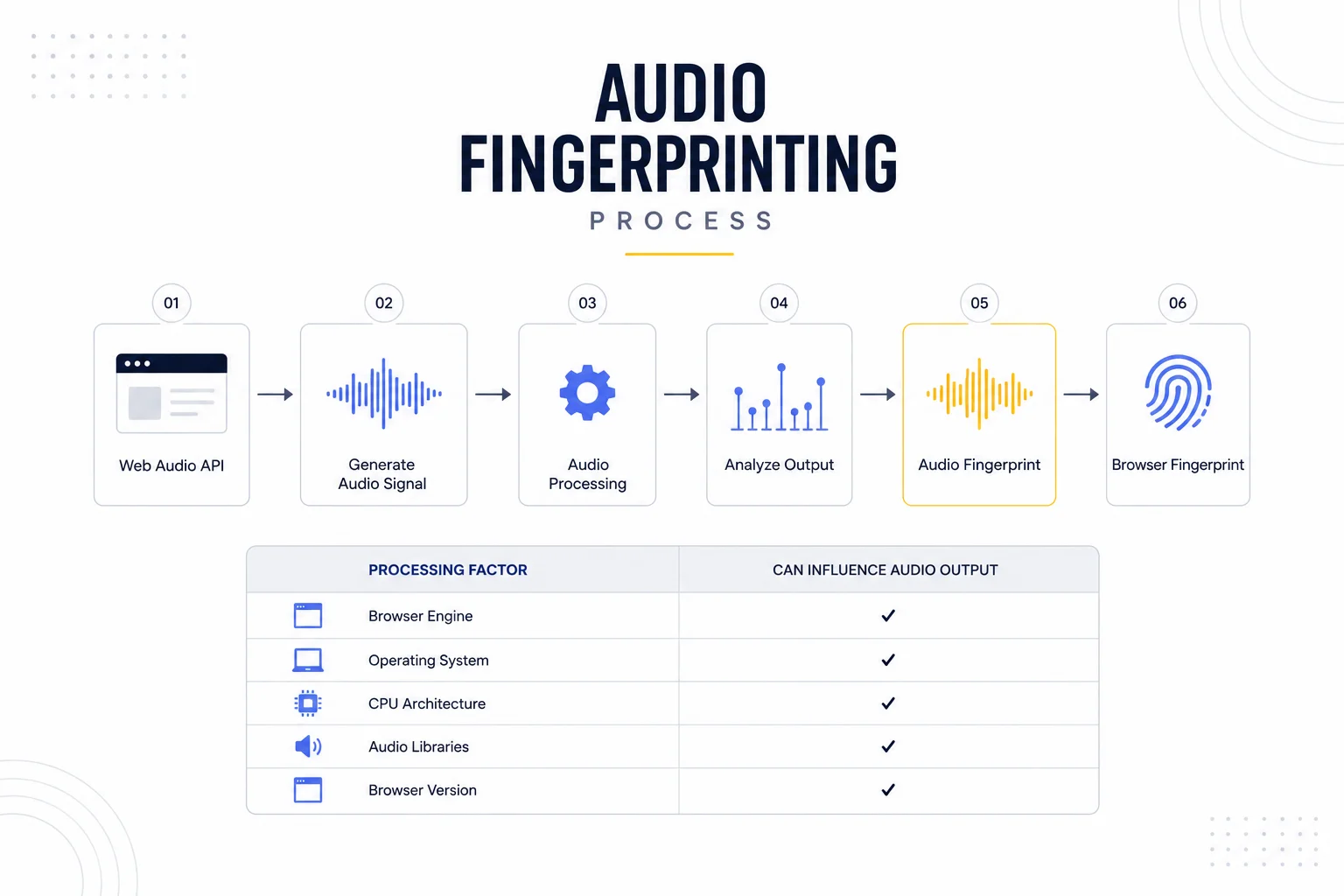
The process typically looks like this:
Website
│
▼
Web Audio API
│
▼
Generate Audio Signal
│
▼
Process Audio
│
▼
Analyze Output
│
▼
Audio Fingerprint
│
▼
Browser Fingerprint
The resulting value is not meant to uniquely identify a browser on its own.
Instead, it becomes another component of a broader browser identity that may also include:
- Canvas Fingerprinting;
- browser storage;
- browser configuration;
- network characteristics;
- user behavior.
This layered approach makes browser recognition more reliable than relying on a single signal.duce different hashes because of subtle rendering differences.
Why Audio Results Differ Between Browsers
Even though browsers execute the same JavaScript code, audio processing isn’t perfectly identical across all systems.
Several factors can influence the final output, including:
- browser engine;
- operating system;
- audio libraries;
- CPU architecture;
- floating-point calculations;
- browser version;
- hardware optimizations.
Most of these differences are far too small for humans to notice.
However, computers compare numerical values with extremely high precision.
Those tiny variations are enough to help distinguish one browser environment from another.
Just like Canvas Fingerprinting Explained, Audio Fingerprinting does not attempt to identify a person.
Instead, it measures how consistently a browser behaves across multiple sessions, making it another valuable input for modern browser trust evaluation.
Why Audio Fingerprinting Is Useful for Websites
Audio Fingerprinting is valuable because it measures something that usually remains stable over time.
Most users do not frequently change:
- browser engine;
- operating system;
- CPU architecture;
- browser version;
- audio processing libraries.
As a result, the same browser often produces nearly identical audio processing results across multiple sessions.
That consistency makes Audio Fingerprinting another useful signal for:
- browser recognition;
- fraud prevention;
- session continuity;
- trust evaluation;
- long-term browser identification.
Just like Canvas Fingerprinting Explained, the goal is not to identify a person. Instead, websites evaluate whether the browser continues to behave like the same browser they have previously seen.
Audio Fingerprinting Is Only One Layer
A common misconception is that websites rely heavily on Audio Fingerprinting alone.
In reality, modern browser fingerprinting is built from many independent techniques working together.
Browser Fingerprint
├── Canvas Fingerprinting
├── Audio Fingerprinting
├── Browser APIs
├── Fonts
├── Screen Resolution
├── Hardware Information
├── Browser Storage
└── User Behavior
│
▼
Browser Identity
Each layer contributes only part of the overall picture.
If one signal changes slightly, the browser may still appear familiar because the remaining signals remain consistent.
This layered architecture is one reason why browser trust has become much more reliable than simply checking an IP address.
As discussed in Why Browser Fingerprints Matter More Than IPs, modern websites evaluate the complete browser identity rather than individual attributes.
Audio Fingerprinting Doesn’t Require Microphone Access
Another widespread misunderstanding is that websites must ask for microphone permission before performing Audio Fingerprinting.
That is incorrect.
The Web Audio API generates and processes audio entirely inside the browser.
No sound is played through the speakers.
No audio is recorded from the microphone.
Instead, the browser performs mathematical calculations on synthetic audio signals and returns the numerical results.
This means Audio Fingerprinting evaluates how the browser processes sound—not what the user is listening to or saying.
Why This Matters for Browser Automation
For browser automation engineers, Audio Fingerprinting illustrates an important principle:
Modern websites don’t trust a browser because one characteristic looks correct.
They trust a browser because many independent characteristics remain consistent together.
A browser may have:
- a stable Canvas fingerprint;
- a stable Audio fingerprint;
- persistent browser storage;
- predictable browser behavior;
- consistent network characteristics.
When these layers align, the browser appears much more natural over time.
Maintaining that consistency is often more effective than constantly creating entirely new browser environments.
For long-running automation projects, pairing persistent browser profiles with the appropriate proxy type also contributes to a more stable identity. Depending on the workflow, that may mean Residential Proxies for residential traffic patterns, Static ISP Proxies for long-lived authenticated sessions, Datacenter Proxies for high-performance infrastructure tasks, or Mobile Proxies for scenarios that require mobile network characteristics.
If you’re evaluating which infrastructure best matches your project before you buy proxies, start by defining the consistency your workflow requires rather than choosing a proxy type based on price alone.
If you suspect network configuration is affecting browser trust, use DNS Leak Test to verify DNS consistency and IP Lookup to inspect how your current IP appears from a website’s perspective. These checks complement browser fingerprint analysis by validating the network layer of your browser identity.
Production Tips
Audio Fingerprinting is one component of browser identity, not a standalone identification system.
Maintain Consistency Across Browser Sessions
Modern websites evaluate how consistently a browser behaves over time.
Frequent changes to:
- browser version;
- operating system;
- browser profile;
- rendering environment;
- network characteristics;
can make an otherwise legitimate browser appear unfamiliar.
Maintaining a stable environment is often more valuable than constantly changing browser characteristics.
Don’t Assume Audio Fingerprinting Works Alone
Audio Fingerprinting contributes only one signal to modern browser trust evaluation.
Websites typically combine it with:
- Canvas Fingerprinting;
- browser storage;
- browser APIs;
- network identity;
- user behavior;
- authentication history.
No single fingerprinting technique determines trust by itself.
Browser and Network Identity Should Match
Reliable browser sessions depend on both browser consistency and network consistency.
Different proxy types serve different purposes:
- Residential Proxies are well suited for workflows that benefit from residential network characteristics.
- Static ISP Proxies provide long-term IP stability for authenticated browser sessions.
- Datacenter Proxies are often preferred for high-speed automation, testing, and infrastructure tasks.
- Mobile Proxies can be useful when mobile carrier network characteristics are required.
Before you buy proxies, choose the proxy type that matches your automation scenario rather than assuming one solution fits every workload.
Verify the Network Layer
Browser fingerprinting is only part of browser identity.
The network layer should also remain predictable.
Useful diagnostic tools include:
- DNS Leak Test to verify that DNS requests follow the expected path.
- IP Lookup to inspect ASN, geolocation, and IP information.
- My IP to confirm the browser is using the expected public IP address.
Together, these tools help validate the network characteristics that complement browser fingerprint consistency.
Final Thoughts
Audio Fingerprinting demonstrates that modern browser identification extends far beyond cookies and IP addresses.
By analyzing how browsers process synthetic audio, websites gain another stable signal that helps recognize returning browser environments over time.
On its own, Audio Fingerprinting is not designed to uniquely identify every browser.
Instead, it becomes part of a much larger trust model that combines graphics rendering, browser storage, authentication state, network identity, and user behavior.
For browser automation, the key lesson is clear: maintaining a consistent browser environment is generally more valuable than constantly creating new ones.
Understanding how Audio Fingerprinting fits into the broader browser fingerprinting ecosystem helps developers build more reliable automation workflows while better understanding how modern websites evaluate browser trust.
Glossary
Audio Fingerprinting
A browser fingerprinting technique that measures how a browser processes synthetic audio signals using the Web Audio API.
Web Audio API
A browser API that allows web applications to generate, process, and analyze audio entirely within the browser.
Audio Fingerprint
A numerical representation of how a browser processes audio. It becomes one component of the overall browser fingerprint.
Browser Identity
The collection of browser characteristics—including fingerprints, browser storage, network information, and user behavior—that websites use to recognize a browser.
Browser Fingerprint
A collection of browser characteristics such as Canvas rendering, audio processing, browser APIs, fonts, and hardware information that together distinguish one browser environment from another.
Trust Evaluation
The process of combining browser, behavioral, and network signals to determine whether a browser appears trustworthy.
Browser Consistency
The ability of a browser to maintain stable technical characteristics across multiple browsing sessions.
Frequently asked questions
Here we answered the most frequently asked questions.
Does Audio Fingerprinting record my microphone?
No. Audio Fingerprinting does not record sound or require microphone access. It measures how the browser processes a synthetic audio signal generated through the Web Audio API.
Can disabling cookies stop Audio Fingerprinting?
No. Audio Fingerprinting operates independently of cookies. Even if cookies are deleted, the browser can still generate similar audio processing results if its environment remains unchanged.
Is Audio Fingerprinting more important than Canvas Fingerprinting?
Neither is inherently more important. Modern websites combine both techniques with many other browser signals to build a more complete browser identity.
Can Audio Fingerprinting uniquely identify every browser?
No. By itself, Audio Fingerprinting is not unique enough to identify every browser. Its value comes from being combined with other fingerprinting techniques, browser storage, network information, and behavioral signals.