


Canvas Fingerprinting Explained: How Websites Identify Browsers Through Graphics Rendering
Published: ≈ 8 min read
Quick Answer
Canvas Fingerprinting is a browser identification technique that uses the HTML5 Canvas API to measure how a browser renders graphics. Tiny differences in hardware, operating systems, graphics drivers, fonts, and browser engines produce slightly different images, allowing websites to generate a unique browser fingerprint without relying on cookies or IP addresses.
Key Takeaways
- Canvas Fingerprinting analyzes how a browser renders graphics.
- Even identical browsers can produce different rendering results.
- Small rendering differences create a unique browser signature.
- Canvas Fingerprinting is only one component of a larger browser fingerprint.
- Modern websites combine Canvas data with many other browser signals.
- Consistency matters more than uniqueness.
Why Websites Use Canvas Fingerprinting
Most people assume that a browser simply displays graphics exactly the same on every computer.
In reality, rendering an image is a surprisingly complex process.
Every browser relies on multiple components working together:
- the browser engine;
- the operating system;
- graphics drivers;
- GPU hardware;
- installed fonts;
- anti-aliasing algorithms;
- font rendering techniques.
Although two computers may display what appears to be the same image to the human eye, the underlying pixels are rarely identical.
These tiny differences are what Canvas Fingerprinting measures.
Instead of asking:
“What browser is this?”
A website asks:
“How does this browser render graphics?”
That answer becomes another signal used to build the browser’s identity.
Modern websites evaluate many independent signals together rather than relying on a single identifier.
How Canvas Fingerprinting Works
The process begins with a small piece of JavaScript.
The browser is instructed to draw a predefined image using the HTML5 Canvas API.
That image may contain:
- text;
- geometric shapes;
- gradients;
- transparency;
- shadows;
- curves;
- different fonts.
Although every browser receives exactly the same drawing instructions, the final rendered image is rarely identical.
Tiny variations appear because every system renders graphics slightly differently.
The website then analyzes the rendered pixels and converts the result into a short digital value known as a hash.
Two browsers may look identical to a person, yet produce different hashes because of subtle rendering differences.
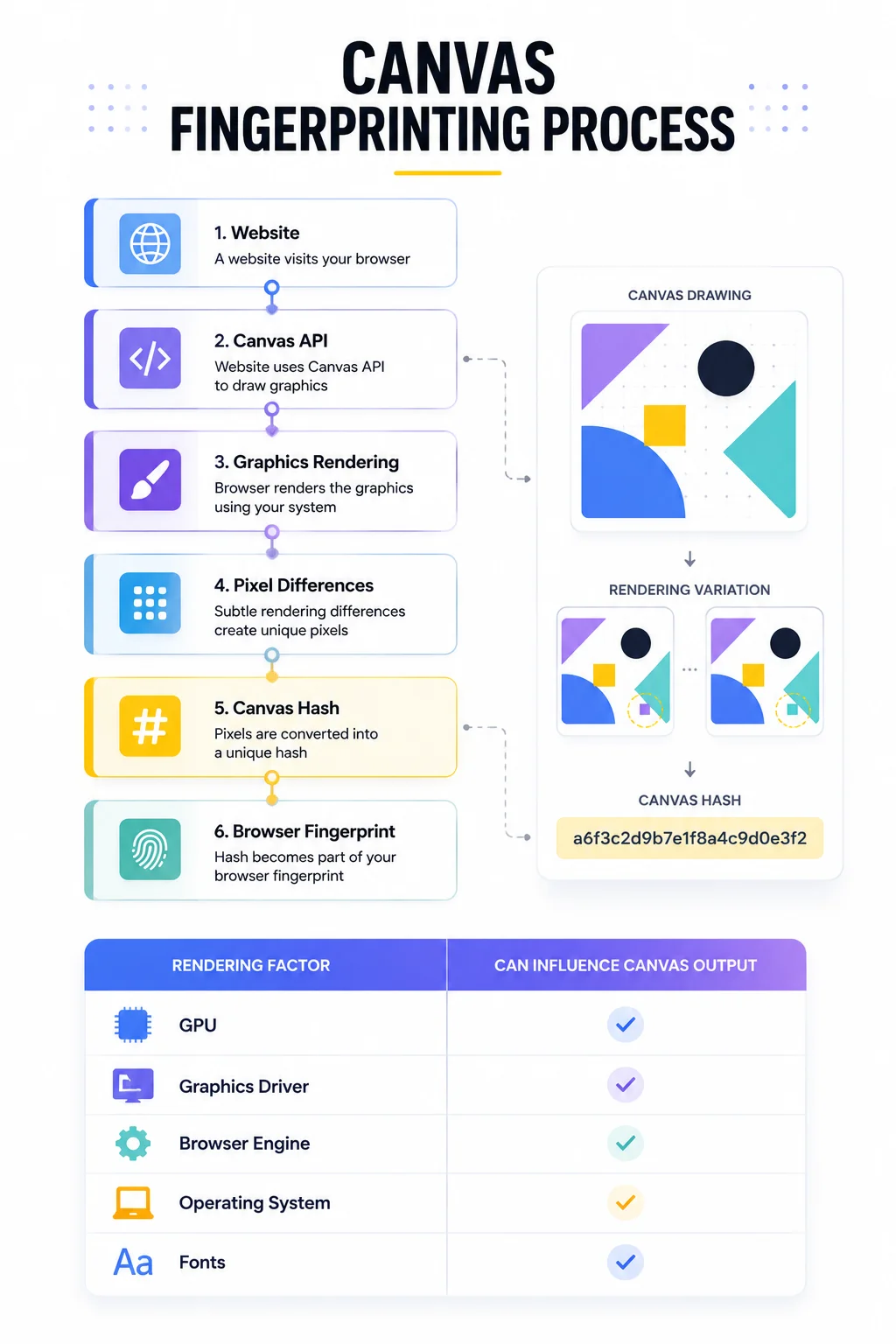
Canvas Fingerprinting Process
Website
│
▼
Canvas API
│
▼
Browser Renders Image
│
▼
Pixel Analysis
│
▼
Canvas Hash
│
▼
Browser Fingerprint
The hash itself doesn’t identify a person.
Instead, it becomes one component of a much larger browser fingerprint that may also include browser storage, hardware information, network characteristics, and behavioral signals.
Why the Same Image Looks Different on Different Computers
At first glance, this seems impossible.
If every browser receives the same instructions, shouldn’t every computer produce exactly the same image?
In practice, the answer is no.
Rendering an image involves multiple layers of software and hardware working together.
Small implementation differences appear at almost every stage.
For example, rendering can be influenced by:
- the graphics card (GPU);
- graphics drivers;
- operating system;
- browser rendering engine;
- installed fonts;
- font anti-aliasing;
- color management;
- hardware acceleration.
Most of these differences are invisible to people.
However, computers compare images pixel by pixel.
Even tiny rendering variations become measurable.
That is precisely what Canvas Fingerprinting takes advantage of.
Canvas Fingerprinting Doesn’t Read Your Data
One of the biggest misconceptions is that Canvas Fingerprinting somehow reads personal files or scans a user’s computer.
It doesn’t.
The browser simply renders an image that already exists in memory.
The website never gains access to:
- personal photos;
- documents;
- browser history;
- downloaded files.
Instead, it analyzes how the browser rendered the image.
This distinction is important.
Canvas Fingerprinting measures rendering behavior-not personal content.
Canvas Is Only One Piece of the Puzzle
Canvas Fingerprinting often receives the most attention because it produces consistent results across many devices.
However, modern websites rarely rely on Canvas alone.
Instead, it becomes one signal inside a much larger browser identity.
Browser Fingerprint
├── Canvas Rendering
├── Audio Processing
├── Fonts
├── Screen Resolution
├── Hardware Information
├── Browser APIs
└── Timezone
│
▼
Browser Identity
Each individual signal provides only limited information.
When combined, they create a much more reliable browser fingerprint.
This layered approach makes browser identification significantly more accurate than relying on any single technique.
As discussed in Why Browser Fingerprints Matter More Than IPs, websites evaluate many browser characteristics together rather than treating one signal as definitive.
Why Websites Use Canvas Fingerprinting
Canvas Fingerprinting is useful because it remains relatively stable.
Most users do not frequently change:
- graphics hardware;
- browser rendering engines;
- operating system rendering behavior;
- installed fonts.
As a result, the Canvas output often stays remarkably consistent across multiple browsing sessions.
That consistency makes it valuable for:
- fraud prevention;
- browser recognition;
- session continuity;
- risk analysis;
- browser trust evaluation.
Importantly, Canvas Fingerprinting is not designed to uniquely identify every individual.
Its purpose is to provide another reliable signal that helps websites determine whether a browser still appears to be the same one they have previously observed.
This fits into the broader concept of Why Session Consistency Matters, where long-term trust is built from many stable browser characteristics rather than a single identifier.
Production Tips
Canvas Fingerprinting is most effective when viewed as part of a complete browser identity rather than an isolated technology.
Avoid Focusing on a Single Signal
A common mistake is assuming that Canvas Fingerprinting alone determines whether a browser is trusted.
Modern websites evaluate many independent signals together.
A browser may have:
- a stable Canvas hash;
- consistent browser storage;
- realistic browsing behavior;
- trusted network characteristics.
The combination of these signals is far more valuable than any individual component.
Keep Browser Rendering Consistent
For long-running browser automation, consistency is usually more important than constantly changing browser characteristics.
Frequent changes to:
- browser version;
- graphics configuration;
- fonts;
- operating system;
- hardware acceleration;
may produce different Canvas rendering results and make the browser appear less consistent over time.
Think Beyond Canvas
Canvas Fingerprinting is only one layer of browser identification.
Modern websites also evaluate:
- Audio Fingerprinting;
- browser storage;
- browser fingerprints;
- network identity;
- user behavior.
As browser fingerprinting continues to evolve, no single signal determines trust on its own.
Combine Stable Browser and Network Identity
Reliable automation benefits from both consistent browser characteristics and predictable network infrastructure.
Maintaining a persistent browser profile together with high-quality Residential Proxies or Static ISP Proxies helps create browser sessions that remain stable over longer periods.
Final Thoughts
Canvas Fingerprinting demonstrates how modern websites recognize browsers using subtle technical characteristics rather than obvious identifiers.
Instead of relying on cookies or IP addresses alone, websites compare how browsers render graphics and combine that information with many other browser signals.
On its own, Canvas Fingerprinting is not enough to uniquely identify every browser.
Its real value comes from being part of a broader browser identity that also includes browser storage, authentication state, network characteristics, and user behavior.
Understanding Canvas Fingerprinting helps explain why modern browser trust is based on consistency rather than any single identifier.
It is one layer of a much larger system that evaluates how familiar a browser appears over time.
Glossary
Canvas API
A standard HTML5 API that allows browsers to draw text, shapes, images, and graphics directly on a web page.
Canvas Fingerprinting
A browser fingerprinting technique that analyzes how a browser renders graphics using the HTML5 Canvas API.
Canvas Hash
A short digital value generated from a rendered Canvas image. It summarizes rendering differences without storing the image itself.
Browser Rendering
The process of converting HTML, CSS, JavaScript, fonts, and graphics into the visual content displayed by a browser.
GPU
The Graphics Processing Unit responsible for rendering images and accelerating graphical operations. GPU characteristics can influence Canvas rendering.
Hardware Acceleration
The use of graphics hardware instead of the CPU to render visual content more efficiently. Different hardware acceleration implementations may produce slightly different rendering results.
Browser Fingerprint
A collection of browser characteristics-including Canvas rendering, fonts, browser APIs, hardware information, and other signals-used to distinguish browsers.
Frequently asked questions
Here we answered the most frequently asked questions.
Does Canvas Fingerprinting identify a person?
No. Canvas Fingerprinting identifies characteristics of a browser’s graphics rendering rather than a person’s identity. It is one browser signal among many used during trust evaluation.
Can two browsers have the same Canvas fingerprint?
Yes. Browsers with very similar hardware, operating systems, browser versions, and rendering environments can produce identical or nearly identical Canvas hashes. For this reason, websites combine Canvas Fingerprinting with many additional browser signals.
Is Canvas Fingerprinting based on cookies?
No. Canvas Fingerprinting works independently of cookies. Even if cookies are cleared, a browser can still generate the same Canvas rendering output as long as its rendering environment remains unchanged.
Why do websites use Canvas Fingerprinting?
Because graphics rendering is relatively stable over time. Combined with other browser characteristics, it helps websites recognize returning browsers, evaluate trust, and improve fraud detection.