
Ping vs Traceroute: Differences and When to Use Each

Quick Answer
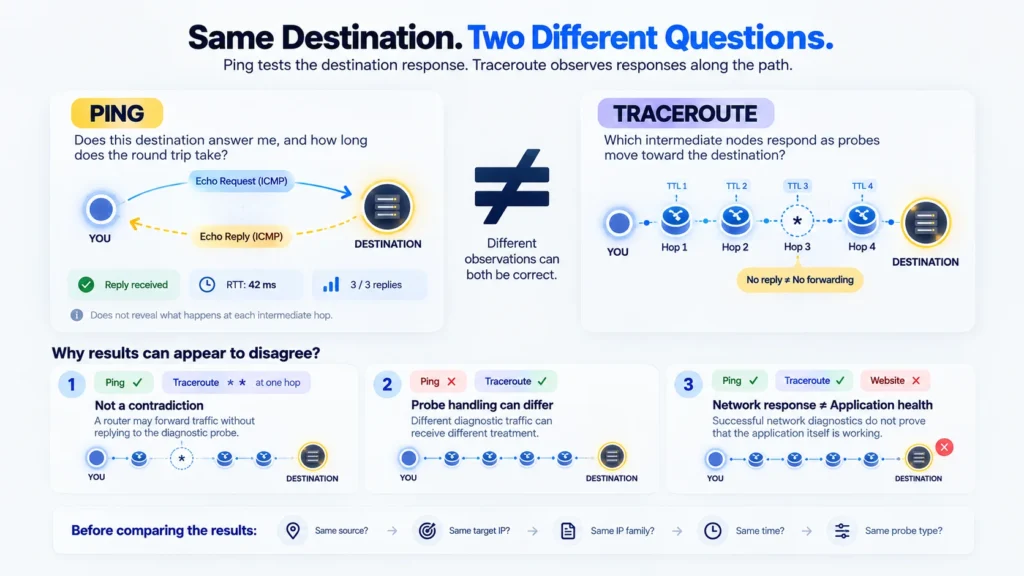
Ping checks whether a destination returns Echo Replies and measures how long those exchanges take. Traceroute uses probes with increasing TTL or Hop Limit values to discover responding hops toward a destination.
The tools answer different questions:
- Ping: “Does this destination answer Echo Requests from here, and how long do the replies take?”
- Traceroute: “Which hops respond to probes toward this destination, and what response times do I observe?”
Their results can differ without contradicting each other. A router may forward traffic without returning a traceroute response. A destination may answer one probe type but not another. Tests launched from different locations may also follow different paths.
Neither tool, by itself, proves that a website or application is healthy.
Key Takeaways
- A destination Echo Reply and an intermediate-hop response are different observations.
- Missing replies do not automatically prove that a router has stopped forwarding traffic.
- Ping RTT measures a diagnostic exchange, not total application response time.
- A traceroute hop’s RTT is not the delay of the individual link before that hop.
- Traceroute implementations can use different probe methods, including UDP, ICMP and TCP.
- Local Ping and online Traceroute may run from different sources, so their results are not directly interchangeable.
- Compare the question, probe, responder and measurement conditions before deciding that two results disagree.
What Is the Difference Between Ping and Traceroute?
Ping focuses on responses from a destination. Traceroute adds observations from responding intermediate hops by varying how far its probes can travel.
| Dimension | Ping | Traceroute |
| Main purpose | Observe destination Echo responses | Observe responding hops toward a destination |
| Typical probe | ICMP Echo Request | Implementation-dependent: commonly UDP, ICMP or TCP |
| Expected responder | Destination for a successful Echo exchange | Intermediate routers and, when reached, the destination |
| Typical output | Replies, RTT and summary statistics | Hop positions, responding addresses, probe RTTs and missing responses |
| Useful question | “Does this address answer this test from here?” | “What path-related responses can I observe from here?” |
| Important limitation | An Echo response is not an application health check | A trace is not a guaranteed complete path or fault-location report |
Windows tracert uses Echo probes, while the documented Linux traceroute implementation supports several methods. Differences between implementations matter when interpreting a comparison. Microsoft Tracert documentation, Linux traceroute manual.
A useful interpretation model is:
Question → Probe → Responder → Observation → Supported Conclusion
For example, “Does the destination answer Echo Requests?” is narrower than “Does the application work?” A tool can answer the first question successfully while leaving the second unanswered.
What Does Ping Actually Tell You?
A successful Ping exchange tells you that an Echo Request received a corresponding Echo Reply under the conditions of that test. Ping also reports the elapsed round-trip time for returned replies. Microsoft Ping documentation.
An ordinary Ping test sends Echo Requests toward a selected address. The destination’s IP stack can return Echo Replies, allowing the sender to match replies to requests. IPv4 and IPv6 define these messages separately. RFC 792, RFC 4443.
What a Reply Supports
A destination Echo Reply is evidence that the tested exchange worked from that source at that time.
It does not establish that:
- a particular TCP or UDP service is available;
- TLS negotiation will succeed;
- a user can authenticate;
- an HTTP request will succeed;
- the application’s database or backend is healthy.
An operating system can answer Echo Requests while an application running on the same host is unavailable.
What a Missing Reply Means
A Ping timeout means that the tool did not receive the expected reply within its waiting period. It does not identify a single cause.
The request might not have reached the destination, the destination might not have generated a reply, or the reply might not have returned in time. Filtering, loss, routing problems and response policies can produce similar observations. ICMP does not guarantee delivery of a diagnostic message. RFC 792.
A summary showing unanswered probes describes that test’s sample. It does not automatically establish the same loss rate for every application using the network.
What Does Traceroute Actually Tell You?
Traceroute shows the responses elicited by probes with progressively increasing travel limits. Those responses provide evidence about the path taken by the probes, but they may leave gaps.
For IPv4, the relevant field is TTL. For IPv6, it is Hop Limit. When a probe’s limit expires during forwarding, a router can return an ICMP Time Exceeded message. Increasing the limit allows later probes to reach farther into the path. RFC 1812, Section 5.3.1, RFC 4443, Section 3.3.
A displayed address identifies a responder to a probe. A missing response leaves an observation gap; it does not reveal everything that happened to that probe.
Intermediate Responses and Destination Responses Are Different
An intermediate router’s Time Exceeded response reports that a probe exhausted its travel limit. A destination response indicates a different event, depending on the tracing method.
For example, an ICMP-based trace may finish with an Echo Reply. A traditional UDP-based trace may identify arrival through an ICMP Port Unreachable response. Those are different response conditions, even when both tools display a completed trace. Linux traceroute manual.
This distinction matters when someone says “Traceroute works.” Seeing a few intermediate hops is not the same as receiving the expected response from the destination.
For a detailed explanation of output fields, see Traceroute Results Explained.
Why Can Ping and Traceroute Appear to Disagree?
Ping and Traceroute can appear to disagree because they may ask different devices for different responses, using different probes and measurement conditions. A difference in output does not automatically indicate an inconsistent or broken network.
| Observed Result | Possible Explanation | What You Can Actually Conclude |
| Ping replies arrive, but some traceroute hops show * | Intermediate diagnostic responses may be suppressed, limited, filtered or lost | The Echo exchange worked; the missing hop responses do not independently prove forwarding failure |
| Ping receives no replies, but a different traceroute method reaches the destination | Echo traffic and the other probe type may receive different treatment | The destination responded to the other test; that does not establish why Echo replies were absent |
| Traceroute shows intermediate hops but never confirms the destination | Only part of the probing process produced replies | Some path-related responses were observed; destination reachability remains unconfirmed by that trace |
| Ping and Traceroute both receive expected replies, but a website fails | The application depends on more than these diagnostic exchanges | Additional evidence is needed at the service or application layer |
| An intermediate hop has a higher RTT than later hops | The router may take longer to generate its reply, or the replies may use different return paths | The highest displayed RTT does not identify the exact location of application delay |
| Local Ping and an online trace produce different results | The tests originate from different networks | The results describe different source-to-destination measurements |
The explanations in this table are possibilities, not diagnoses.
Forwarding a Packet Is Not the Same as Answering a Probe
A router can continue forwarding ordinary traffic while limiting the diagnostic messages it generates. IPv4 router requirements explicitly address rate limiting of ICMP error messages. RFC 1812, Section 4.3.2.8.
That separation explains why a missing intermediate response can coexist with a successful destination Echo exchange.
Destination Echo Response ≠ Intermediate-Hop Response
Missing Probe Reply ≠ Proven Forwarding Failure
For the broader interpretation of stars and missing responses, see Traceroute Timeout Explained.
Different Probes Can Receive Different Treatment
The name “traceroute” does not identify one universal packet type. Before comparing a trace with Ping, establish which method the tracing tool used.
A difference in probe type creates a possible explanation for different outcomes. It does not prove that a particular firewall rule caused the difference.
Are Ping RTT and Traceroute Times Directly Comparable?
Ping RTT and traceroute RTT values measure individual round trips, but they are not automatically interchangeable. The responder, probe type, timing and return path may differ.
A round-trip measurement combines the outward journey and the return journey. Those journeys can follow different routes. RFC 2681, Section 1.1.
For an intermediate traceroute hop, the measured exchange includes reaching that responder and receiving its diagnostic reply. It is not an isolated measurement of the link between two adjacent routers.
Traceroute Hop RTT ≠ Individual Link Delay
Consequently:
- Adding all hop RTTs does not produce destination RTT.
- Subtracting adjacent hop RTTs does not reliably isolate a link’s delay.
- One unusually slow intermediate response does not prove that the router delays forwarded application traffic.
Similarly, a Ping result does not include the full work needed to serve an application request.
Ping RTT ≠ Application Response Time
The useful comparison is between clearly identified measurements, not simply between numbers displayed in milliseconds.
Why Can Local Ping and Online Traceroute Show Different Results?
Local Ping and an online traceroute can originate from different networks, so they may test different paths to the same destination. The same target address does not make the measurements equivalent.
The Mango Traceroute tool describes its trace as running from its server toward the entered IP address or domain. A Ping command running on your computer starts from your own network context.
| Test | Measurement source | What the result describes |
| Local Ping | Your device and its selected network path | Echo exchanges from your environment |
| Mango online Traceroute | The tool’s server | Trace responses from the tool’s environment |
An online trace can therefore provide another viewpoint. It does not reproduce your device’s path simply because you enter the same destination.
For example, successful responses from the online tool do not establish that your local connection can reach the destination under the same conditions. Equally, a successful local Ping does not guarantee that probes from the tool’s server will receive identical treatment.
When Should You Use Ping or Traceroute?
Use Ping when the immediate question concerns destination Echo responses. Use Traceroute when you need additional path-related observations.
| Your question | Useful starting point | Keep this limitation in mind |
| Does this address answer Echo Requests from my network? | Ping | Echo availability is narrower than application availability |
| How consistent are Echo response times during this sample? | Repeated Ping observations | The sample does not describe every traffic type or future condition |
| Which intermediate responders are visible toward the destination? | Traceroute | Some hops may remain invisible |
| Why does the trace look incomplete even though Ping answers? | Compare probe methods and response types | Missing diagnostic replies alone do not identify a failed router |
| Does the actual website or API work? | A test of the relevant service or request | Neither Ping nor Traceroute substitutes for that test |
The choice follows the question. There is no requirement to use both tools for every problem.
How Can You Compare the Results Fairly?
A meaningful comparison identifies what remained the same and what changed between tests. Record enough context to avoid treating different measurements as equivalent.
- Check the source.
Identify whether each test runs locally, on another server or through an online tool. - Check the actual destination address.
Matching domain names are not sufficient if the tools selected different IP addresses. - Check the IP family.
An IPv4 test and an IPv6 test do not examine the same network path. - Identify the probe method.
Record whether traceroute uses ICMP, UDP, TCP or another supported method. - Compare the observation windows.
Tests taken at different times are different samples. Note relevant differences in sample size, packet size and waiting period. - Define success precisely.
Distinguish a destination Echo Reply, an intermediate Time Exceeded response and a traceroute destination response.
Measurement standards treat source, destination, time and packet characteristics as relevant context. This checklist applies that principle to a practical comparison; it is not a guarantee that two tests will produce identical results. RFC 2681.
Practical Examples
The following examples are conceptual. They are not Mango measurements or results from a controlled experiment.
Example 1: Ping Replies Arrive, but a Traceroute Hop Is Missing
A local Ping receives Echo Replies from the destination. A trace from the same source shows a missing intermediate response, followed by later responding hops.
The observations answer different questions:
- The Ping result shows successful destination Echo exchanges.
- The trace shows that one expected intermediate response was not observed.
The missing response does not negate the successful Echo exchanges. The tests have not established whether that response was never generated, filtered, lost or delayed.
Example 2: Ping Times Out, but Another Probe Method Reaches the Destination
Consider a controlled network where Echo Requests are filtered, while a UDP-based trace can receive the destination’s expected terminal response.
Ping would receive no Echo Replies, while that trace could still identify arrival at the destination.
The example illustrates a possible outcome of different traffic policies. In an actual network, the outputs alone would not prove which rule or device caused the difference.
Example 3: Local Ping and an Online Trace Differ
A user runs Ping on a laptop and starts an online trace to the same destination.
The laptop’s test begins on the user’s network. The online test begins on the tool’s server. Even with an identical destination IP, the observations describe different source-to-destination tests.
The correct next question is “Where did each measurement start?” before “Which result is wrong?”
Choose the Question Before the Tool
Before running another test, write down the fact you want to establish.
If the question is whether the destination answers Echo Requests from your environment, use Ping. If the question concerns responding hops toward the destination, use Traceroute. If the question is whether a service works, test that service.
Then keep the conclusion within the evidence returned by the chosen test.
Final Thoughts
Ping and Traceroute become more useful when each result is tied to a specific question.
A destination Echo response, an intermediate router’s reply and a successful application request are separate observations. Differences between them are often understandable once the source, probe type, responder and timing are made explicit.
Use the same reasoning for either tool:
Question → Probe → Responder → Observation → Supported Conclusion
Glossary
Ping
A diagnostic utility commonly used to send ICMP Echo Requests and report replies and round-trip times.
Traceroute
A family of diagnostic tools that uses probes with increasing travel limits to observe responding hops toward a destination.
Probe
A packet sent to obtain a specific diagnostic observation.
Echo Reply
An ICMP response to an Echo Request.
Time Exceeded
An ICMP message that, in a traceroute context, reports that a probe’s TTL or Hop Limit expired during forwarding.
RTT
Round-trip time: the elapsed time associated with sending a probe and receiving its corresponding response.
TTL / Hop Limit
IP header fields that limit how far a packet can travel through routers.
Hop
A routing step along a path. A traceroute row represents a probed hop position and may contain a response or a timeout.
Measurement Source
The device or server from which a test actually runs.
Timeout
The absence of an expected response within the tool’s configured waiting period.
Frequently asked questions
Here we answered the most frequently asked questions.
Is Traceroute a replacement for Ping?
No. Traceroute provides path-related observations, while Ping focuses on destination Echo exchanges. The appropriate tool depends on the question you need to answer.
Does Ping use TCP or UDP?
Ordinary Ping uses ICMP Echo messages, or ICMPv6 for IPv6. Utilities described as “TCP ping” perform a different kind of test and should be identified separately.
Does Traceroute always use ICMP probes?
No. Probe methods depend on the implementation and selected options. A traceroute can send UDP or TCP probes while still relying on ICMP Time Exceeded responses from intermediate routers.
Can Ping work when Traceroute shows stars?
Yes. A destination can return Echo Replies even when intermediate diagnostic responses are absent. The stars describe missing probe responses, not a proven failure to forward all traffic.
Can Traceroute work when Ping fails?
Yes, depending on the probe methods and network policies. Confirm that the trace actually received a destination response; a few visible intermediate hops do not establish that the destination was reached.
Does the slowest traceroute hop identify the faulty router?
No. The displayed time includes the probe’s outward journey and the response’s return journey, with response-generation behavior also affecting the observation. A high hop RTT is evidence to interpret, not a definitive fault location.
Does successful Ping mean a website is online?
It means the tested address returned Echo Replies. It does not verify the website’s TLS, HTTP, authentication or backend behavior.
Should local Ping match an online traceroute?
Not necessarily. An online traceroute may run from a remote server with a different path to the destination. Compare measurement sources before comparing the results.