
HTTP_PROXY, HTTPS_PROXY, ALL_PROXY, and NO_PROXY Explained
Published: ≈ 11 min read
Quick Answer
The destination URL tells curl which variable to consult: https_proxy for HTTPS, http_proxy for HTTP. Either value may be http://proxy.example.com:8080, so a single HTTP proxy can serve both kinds of request.
ALL_PROXY provides curl with a default for protocols without their own proxy setting. NO_PROXY lists destinations to contact directly. Other applications need support for these conventions before the values can affect their connections.
Key Takeaways
- With curl on Linux and macOS, HTTP_PROXY is the wrong spelling. Use http_proxy.
- Check subdomains and IP ranges when reusing a NO_PROXY list: another client may match them differently.
- A task launched by an editor normally inherits the editor’s environment. Updating a separate terminal won’t update the editor.
- A successful response alone does not show whether a proxy was selected. Check proxy use and the exit IP separately.
Who Reads the Proxy Settings?
The program opening the connection reads them, often through an HTTP library. The shell passes the values on. Whether they take precedence over settings supplied in code or operating system preferences depends on that program.
What Does the URL in HTTPS_PROXY Mean?
With HTTPS_PROXY=http://proxy.example.com:8080, the first connection is HTTP to proxy.example.com:8080. HTTPS in the variable name describes the destination, whose connection is established through the proxy.
A compatible client asks that HTTP endpoint to establish a tunnel with CONNECT. TLS negotiation with the destination follows inside the tunnel. Assuming no TLS interception, this encrypted connection carries the HTTPS exchange. Any Basic authentication credentials used for the HTTP proxy remain outside that protection.
The first connection can have its own TLS session if the server offers an HTTPS proxy endpoint. An example address is https://proxy.example.com:8443; its scheme must match the protocol available on that port.
When Will Curl Choose ALL_PROXY?
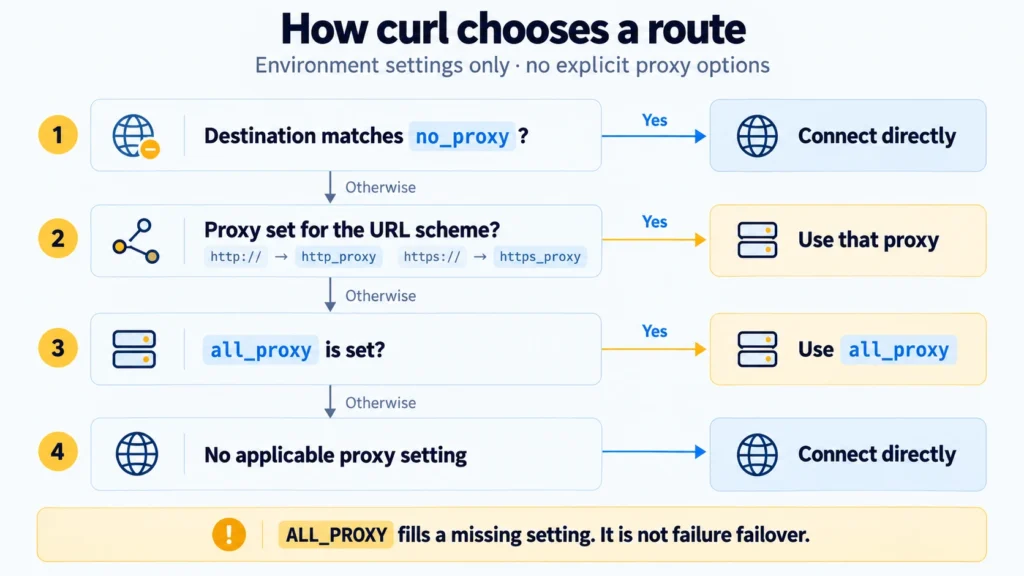
Curl uses ALL_PROXY when it has no proxy configured for the destination’s protocol. For example, suppose its environment contains:
text
https_proxy=http://proxy-a.example.com:8080
all_proxy=http://proxy-b.example.com:8080
With no other proxy options in effect, an HTTPS URL goes through proxy-a. An HTTP URL goes through proxy-b because this example has no http_proxy value. A matching no_proxy entry would bypass either server.
Now suppose proxy-a is unavailable. Curl still has an HTTPS setting, so it doesn’t try proxy-b as a backup. ALL_PROXY is consulted when the setting is missing, not when a connection fails.
A curl all_proxy setting may point at socks5h://proxy.example.com:1080. With this scheme, name lookup for the destination happens at the SOCKS server. The client still needs support for that protocol. The DNS difference from socks5:// is covered in “SOCKS5 vs SOCKS5h: Where Does DNS Resolution Happen?”.
Which Destinations Belong in NO_PROXY?
Put destinations here when they should bypass the proxy selected from the environment. A local development server and an internal API are common examples: sending their requests to an external proxy may be the wrong route.
An example list is:
text
localhost,127.0.0.1,::1,internal.example.com,.internal.example.com
It includes local names and addresses, plus an internal domain and its leading-dot form. Domain matching is where a copied list can produce surprises:
The entry example.com has these effects:
curl – requests for the base name and for www.example.com are exempt from proxy use.
.NET HttpClient – only the exact example.com host qualifies.
For .NET subdomains, the documented form is .example.com. That dotted entry doesn’t include the base domain. Use example.com,.example.com when both need to bypass the proxy.
A lone \* means “bypass every destination” in curl’s exclusion list. The pattern \*.example.com isn’t supported there.
Since version 7.86.0, curl can compare an exclusion with a literal IP in the URL. The sample address 10.1.2.3 falls within 10.0.0.0/8. A URL written with a hostname doesn’t trigger a DNS lookup for that range check; add an exclusion for the name instead.
An excluded destination has to be reachable directly for the request to succeed.
Which Variable Names Will Your Client Read?
On Linux and macOS, HTTP_PROXY and http_proxy can be set independently. Windows treats them as the same name. If two tools choose different servers on Linux or macOS, look for a conflicting value under the other spelling.
Curl
On macOS or Linux, curl’s HTTP lookup requires http_proxy. Uppercase also works for https_proxy and all_proxy.
CGI is why HTTP differs. A server script may receive HTTP_PROXY from the value of an incoming Proxy header. Accepting it as a proxy setting could let request input pick the script’s outgoing proxy. Every example below uses lowercase variable names.
Python Requests
Requests recognizes all four variables by default, in uppercase or lowercase. If you’ve also assigned session.proxies, inspect the environment: its values can override the session dictionary. The proxies argument on an individual request is another setting to account for.
Node.js
Use –use-env-proxy to enable the built-in fetch, node:http and node:https clients to read proxy variables. The flag requires the following minimum versions:
Node.js 22.x: 22.21.0.
Node.js 24.x: 24.5.0.
Configure HTTP_PROXY and HTTPS_PROXY for those clients, with NO_PROXY for exclusions. They don’t use ALL_PROXY in this mode. A custom agent or another HTTP package may need separate configuration.
Where Should You Set the Variables?
Configure the launching process before it starts the application. The child normally inherits those values at startup; changing them in another terminal won’t update it.
Consider an editor opened before you changed https_proxy. A task started by that editor can still inherit the earlier value, even though a newly configured terminal shows the right one. In that case, correct the environment the editor passes to its tasks.
With Docker, first locate the request: inside the running container, during the image build, or in Docker Engine itself. Proxy configuration at one of these levels does not automatically configure the others.
Practical Examples: How Can You Check the Route with Curl?
Use an HTTP proxy you already have access to. Its address and port replace HOST and PORT in the examples; “How to Find Your Proxy Server Address and Port” can help you locate them. If the proxy requires a login, the FAQ shows where the credentials go.
These checks use curl 8.7.0 or later, because older versions don’t provide proxy_used. Open another terminal window for this check. The PowerShell commands below call curl.exe.
Linux and macOS: Bash
Replace HOST and PORT before pasting the block into Bash. Include the opening and closing parentheses: they keep these exported values in a separate shell environment. Your original shell retains its settings after the block finishes.
bash
(
  export http_proxy='http://HOST:PORT'
  export https_proxy="$http_proxy"
  export no_proxy='localhost,127.0.0.1,::1'
  curl -q --silent --show-error --fail --connect-timeout 5 --max-time 20 --write-out '\nproxy_used=%{proxy_used}\n' 'https://api.ipify.org?format=json'
)
This HTTPS destination selects https_proxy; api.ipify.org is outside the supplied exclusions.
Windows: PowerShell
Use a new PowerShell window for the temporary check. Substitute your own HOST and PORT before running the example.
powershell
$env:http_proxy = 'http://HOST:PORT'
$env:https_proxy = $env:http_proxy
$env:no_proxy = 'localhost,127.0.0.1,::1'
curl.exe -q --silent --show-error --fail --connect-timeout 5 --max-time 20 --write-out '\nproxy_used=%{proxy_used}\n' 'https://api.ipify.org?format=json'
The $env: assignments are local to this PowerShell process and the programs it starts. They don’t save permanent user or system settings. Leave the window open for the direct request below, then close it; the parent process is unaffected.
What Should You Read in the Output?
After a successful command, read the ip field in ipify’s JSON response and the line curl adds below it:
ip – ipify’s reported public source address (IPv4).
proxy_used=1 – the successful transfer used a proxy, according to curl.
A transfer error means the check hasn’t completed successfully, even if proxy_used appears in the output. Resolve that error before comparing addresses.
The first argument, -q, keeps curl from loading its user configuration file. The time limits bound the wait for this check.
Now make a direct control request. In Bash, run:
bash
curl -q --silent --show-error --fail --connect-timeout 5 --max-time 20 --noproxy '*' --write-out '\nproxy_used=%{proxy_used}\n' 'https://api.ipify.org?format=json'
In PowerShell, run:
powershell
curl.exe -q --silent --show-error --fail --connect-timeout 5 --max-time 20 --noproxy '*' --write-out '\nproxy_used=%{proxy_used}\n' 'https://api.ipify.org?format=json'
The –noproxy ‘\*’ option makes curl ignore proxies for this one command. On success, proxy_used=0 is the expected marker. If your network requires a proxy, the direct request can fail while the earlier proxied request works. In that case there is no direct IP to compare.
When both commands succeed, compare what ipify reports:
Different ip values – the service received the two requests from different public addresses.
The same ip value – a local proxy may share your direct connection’s public address. Use proxy_used to tell whether curl actually used a proxy.
These are observations for individual requests. A rotating proxy can show another address next time.
For a Python or Node.js application, run this check through the HTTP client it actually uses. The IP page in your browser tests a different request, with potentially different proxy settings.
What If the Request Takes the Wrong Route?
HTTPS goes directly – in curl, http_proxy covers only HTTP destinations. Confirm the https_proxy value and make sure no_proxy doesn’t exclude the destination. In another client, also confirm that reading the environment is enabled.
The wrong proxy receives the request – check case conflicts where the operating system allows them, explicit command options, and library settings. In curl, –proxy selects the server explicitly but does not cancel no_proxy exceptions.
An internal URL goes through the external proxy – check how the URL names the service. If it uses internal.example.com, NO_PROXY needs to match that name. A rule for the service’s IP address, or a CIDR range, may not match a hostname. Check subdomains against the client’s documented rules.
The proxy is chosen but the connection fails – verify its address, port and credentials, then check access to the destination. A correctly selected proxy can still be unavailable.
Note on the Commands
These examples need your proxy details and a check in your own environment. Keep credentials out of shared connection strings, environment dumps and logs.
Configure Your Application Next
Once curl follows the intended route, carry the settings into your application’s launch environment. Test there with its HTTP client: one URL outside the exclusions and one of your own hosts listed in NO_PROXY. Continue the Python setup in “Python Requests Proxy Configuration”.
If you already have a MangoProxy connection, use its active connection details. You do not need to buy another proxy to check variable names. First, confirm that your chosen client reads the intended setting.
Glossary
Environment variable: a string stored under a name in a process’s environment.
HTTP client: the program or library sending an HTTP request and receiving the server’s response.
URL: a resource’s address. The https:// at the start identifies the protocol.
CONNECT: an HTTP method for creating a tunnel through a proxy to a specified server.
TLS: a protocol for securing connections, used by HTTPS.
SOCKS5: a protocol for establishing connections through a proxy.
DNS: the system applications use to find IP addresses for domain names.
IP address: a network address; IPv4 and IPv6 are two versions of IP addressing in use.
CIDR: notation for a network range with a prefix length, such as 10.0.0.0/8.
CGI: an interface for running server programs in which HTTP request information can be passed through the environment.
API: a service’s programming interface, accessed by applications according to defined rules.
JSON: a text data format used by the IP checking service in these examples.
Final Thoughts
Keep the client and launch environment in your configuration notes. If either changes, repeat the request before relying on the proxy setup.
Frequently asked questions
Here we answered the most frequently asked questions.
Will Curl Read a .env File?
No. If you only create the file, curl still has no new environment values. The application or launch setup must load that file and pass the values into the process environment.
How Should a Password Containing @ Be Written?
For the placeholder password demo@pass, write demo%40pass in the password position: http://USERNAME:demo%40pass@HOST:PORT. The @ before HOST is the URL separator and stays unchanged.
The client must accept credentials as part of the proxy URL for this layout to work. Apply encoding to each credential field individually, preserving the delimiters elsewhere in the address. Finish by quoting the value for your shell and keeping actual credentials private.
Can I Put Two Proxy Addresses in HTTP_PROXY?
Give HTTP_PROXY one proxy URL in the clients covered here. A comma-separated value has a different job in NO_PROXY: each entry is a destination to bypass. Configure server rotation or failover through the client or proxy service, if it offers that feature.
Can NO_PROXY Bypass a Proxy for /api/private Only?
No. /api/private is a path, while the clients covered here use NO_PROXY to match destination hosts or IP addresses. Choosing a route for that path requires application code or another mechanism with path support.