


Why DNS Can Make the Internet Feel Slow Even on a Fast Connection
Published: ≈ 5 min read
Quick Answer
DNS affects how quickly devices locate websites and internet services. Even with high bandwidth, slow or overloaded DNS infrastructure may create delays before connections even begin.
Key Takeaways
- DNS requests happen before websites load
- Slow DNS can delay internet responsiveness
- DNS affects routing and CDN server selection
- DNS problems often feel like unstable internet
- Proxy and automation systems depend heavily on DNS speed
Why Fast Internet Sometimes Still Feels Slow
Many users assume internet speed depends only on bandwidth.
In reality, internet responsiveness depends on several systems working together.
Before a browser can connect to a website, it first needs to discover where that website is located.
This process depends on DNS infrastructure.
If DNS becomes slow or unstable:
- websites may hesitate before loading
- APIs may initialize slowly
- connections may feel inconsistent
Even very fast internet connections can appear sluggish under poor DNS conditions.
What DNS Actually Does
DNS converts domain names into IP addresses.
Example:
example.com
↓
DNS lookup
↓
IP address found
↓
Connection starts
Without DNS resolution, browsers cannot locate most internet services.
Why DNS Delays Feel Different From Bandwidth Problems
Bandwidth problems usually affect:
- downloads
- streaming quality
- transfer speeds
DNS problems often affect:
- initial website loading
- connection startup
- API initialization
- first response timing
This creates the common feeling of:
👉 “the site takes a moment before opening.”
Why Some Websites Load Slowly Before Anything Appears
Modern websites depend on many infrastructure systems.
Before rendering begins, browsers often perform multiple DNS lookups for:
- APIs
- CDN resources
- analytics platforms
- fonts
- scripts
If DNS resolution becomes slow, the entire startup process slows down before content even appears.
Why DNS Infrastructure Affects Website Responsiveness
DNS requests travel across real network infrastructure.
Slow DNS providers may suffer from:
- overloaded infrastructure
- distant routing paths
- congestion
- poor regional coverage
This increases lookup latency before websites can even respond.
For related context, see What Is Network Congestion?
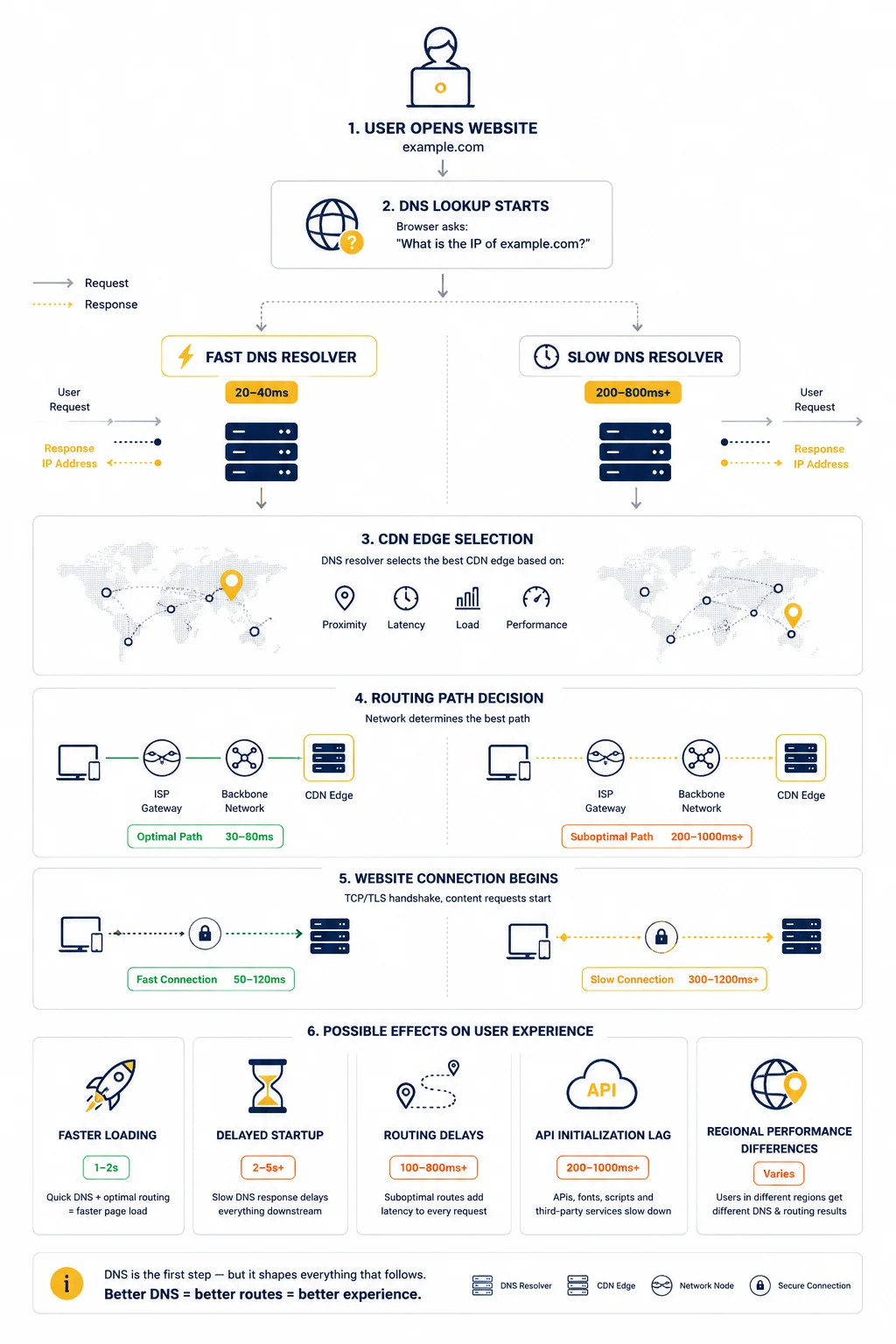
DNS and CDN Edge Selection
Modern CDNs often use DNS to decide:
- which regional server handles your request
- which routing path traffic follows
- which edge location responds
This directly affects:
- latency
- loading speed
- regional performance
Different DNS providers may sometimes route users to different CDN edges entirely.
Why DNS Problems Often Feel Random
DNS issues rarely affect the entire internet equally.
Examples include:
- one website loads normally
- another stalls temporarily
- APIs fail intermittently
- mobile apps partially connect
This happens because different services rely on different DNS infrastructure providers.
Why DNS Matters for Proxy Infrastructure
Proxy systems constantly create new outbound connections.
Each connection may require DNS resolution before communication starts.
Slow DNS infrastructure may increase:
- proxy response delays
- scraping initialization time
- API startup latency
- automation instability
This becomes especially noticeable at large scale.
Why Automation Systems Are Sensitive to DNS Delays
Humans may barely notice small DNS delays.
Automation systems notice immediately.
Large automation environments often generate:
- thousands of DNS lookups
- continuous connection requests
- rapid session initialization
Small delays become amplified under high request volume.
DNS and Routing Behavior
DNS is closely connected to routing infrastructure.
Different DNS providers may direct traffic through:
- different ASNs
- different CDN paths
- different regional routes
This affects:
- congestion exposure
- latency consistency
- regional reliability
For related context, see What Is ASN and Why It Matters
Why DNS Speed Depends on Geography
DNS latency often depends on physical distance.
Resolvers located far away may create:
- longer lookup times
- delayed website startup
- inconsistent response timing
Good DNS infrastructure usually relies on globally distributed resolver networks.
Why DNS Caching Is Important
Caching reduces repeated DNS lookups.
Browsers, operating systems and providers temporarily store DNS records to improve performance.
Without caching:
- websites would repeatedly perform full lookups
- latency would increase significantly
- infrastructure load would grow dramatically
Caching helps stabilize internet responsiveness.
Why DNS Failures Break Websites Completely
If DNS resolution fails:
- browsers cannot locate the destination server
- APIs stop responding
- applications fail to initialize
Even healthy websites become unreachable without functioning DNS infrastructure.
Real Infrastructure Example
Imagine two users opening the same website.
User A:
- uses nearby optimized DNS infrastructure
- receives fast lookup responses
User B:
- uses overloaded distant DNS resolvers
- experiences delayed connection startup
Both users may have identical bandwidth.
However, User B experiences noticeably slower browsing before the website even begins loading.
Why Engineers Analyze DNS During Troubleshooting
Infrastructure teams frequently inspect:
- DNS lookup speed
- resolver stability
- regional DNS behavior
- routing consistency
Many internet performance issues originate from DNS infrastructure rather than web servers themselves.
Additional Tools for Network Diagnostics
DNS behavior is easier to analyze together with other infrastructure diagnostics.
Useful tools include:
• My IP – quickly checks your current public IP address
• IP Lookup – identifies ASN ownership and network information
• IP Trace – analyzes routing paths and latency consistency
• Port Scanner – checks exposed infrastructure services and connectivity
Combining these diagnostics helps identify routing and DNS-related performance problems more accurately.
Glossary
- DNS
The system responsible for converting domains into IP addresses. - DNS Resolver
Infrastructure responsible for performing DNS lookups. - CDN
A distributed content delivery network optimizing regional traffic delivery. - DNS Cache
Temporary storage of previously resolved domain records.
Frequently asked questions
Here we answered the most frequently asked questions.
Why can fast internet still feel slow?
Because DNS delays may slow website startup before communication even begins.
Because DNS delays may slow website startup before communication even begins.
Yes. Slow DNS infrastructure increases connection initialization time.
Why do some websites load slower than others?
Because different services use different DNS and CDN infrastructure.
Why is DNS important for proxies?
Because proxy systems frequently create new outbound connections requiring DNS resolution.