
What Is Network Congestion? Causes, Symptoms and Real-World Impact
Published: ≈ 5 min read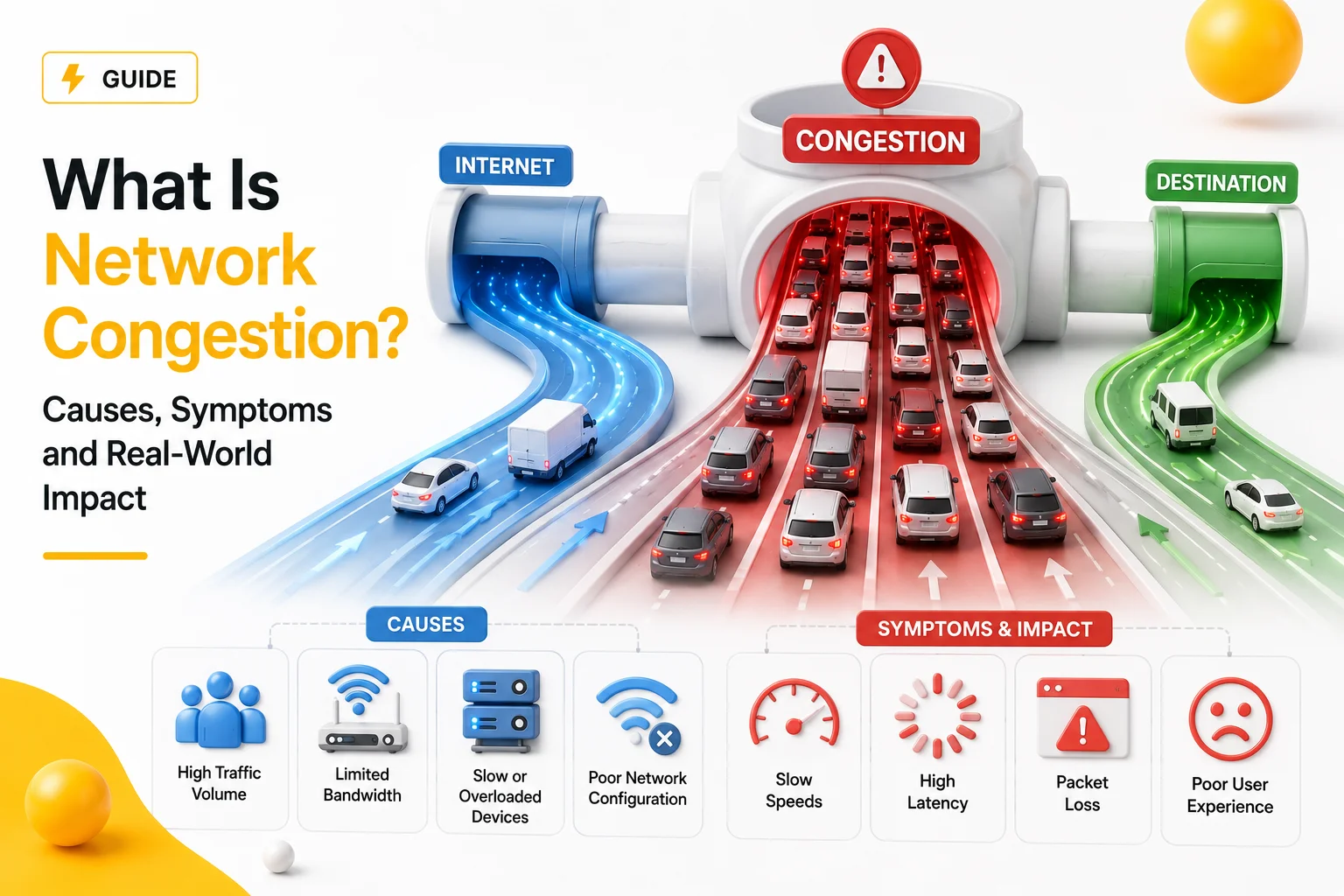
Quick Answer
Network congestion happens when infrastructure receives more traffic than it can process efficiently. This creates delays, packet loss, unstable latency, buffering and inconsistent internet performance.
Key Takeaways
- Congestion happens when networks become overloaded
- High bandwidth does not prevent congestion automatically
- Congestion often causes latency spikes and packet loss
- Internet instability is frequently congestion-related
- Proxy systems and APIs are highly sensitive to congestion
Why Network Congestion Happens
Modern internet infrastructure constantly processes enormous amounts of traffic.
Under normal conditions, routers and servers forward packets efficiently.
Problems begin when traffic volume exceeds what the infrastructure can comfortably handle.
At that point:
- queues begin forming
- delays increase
- routers start dropping packets
- response consistency disappears
This condition is known as network congestion.
What Congestion Looks Like in Real Life
Congestion rarely causes a complete outage immediately.
Instead, it usually creates inconsistent behavior.
Typical symptoms include:
- websites loading unevenly
- video buffering spikes
- APIs randomly slowing down
- cloud dashboards freezing briefly
- unstable gaming latency
- Discord reconnects
Many users describe this as:
- “internet feels weird”
- “everything works, but slowly”
- “some sites randomly hang”
Why Speed Tests Can Look Normal During Congestion
One of the most confusing things about congestion:
👉 bandwidth tests may still show high numbers.
For example:
850 Mbps download
20 ms average ping
At the same time, users may still experience:
- unstable loading
- lag spikes
- request retries
- inconsistent performance
This happens because traditional speed tests often measure short-term throughput rather than long-term stability.
How Congestion Creates Latency Spikes
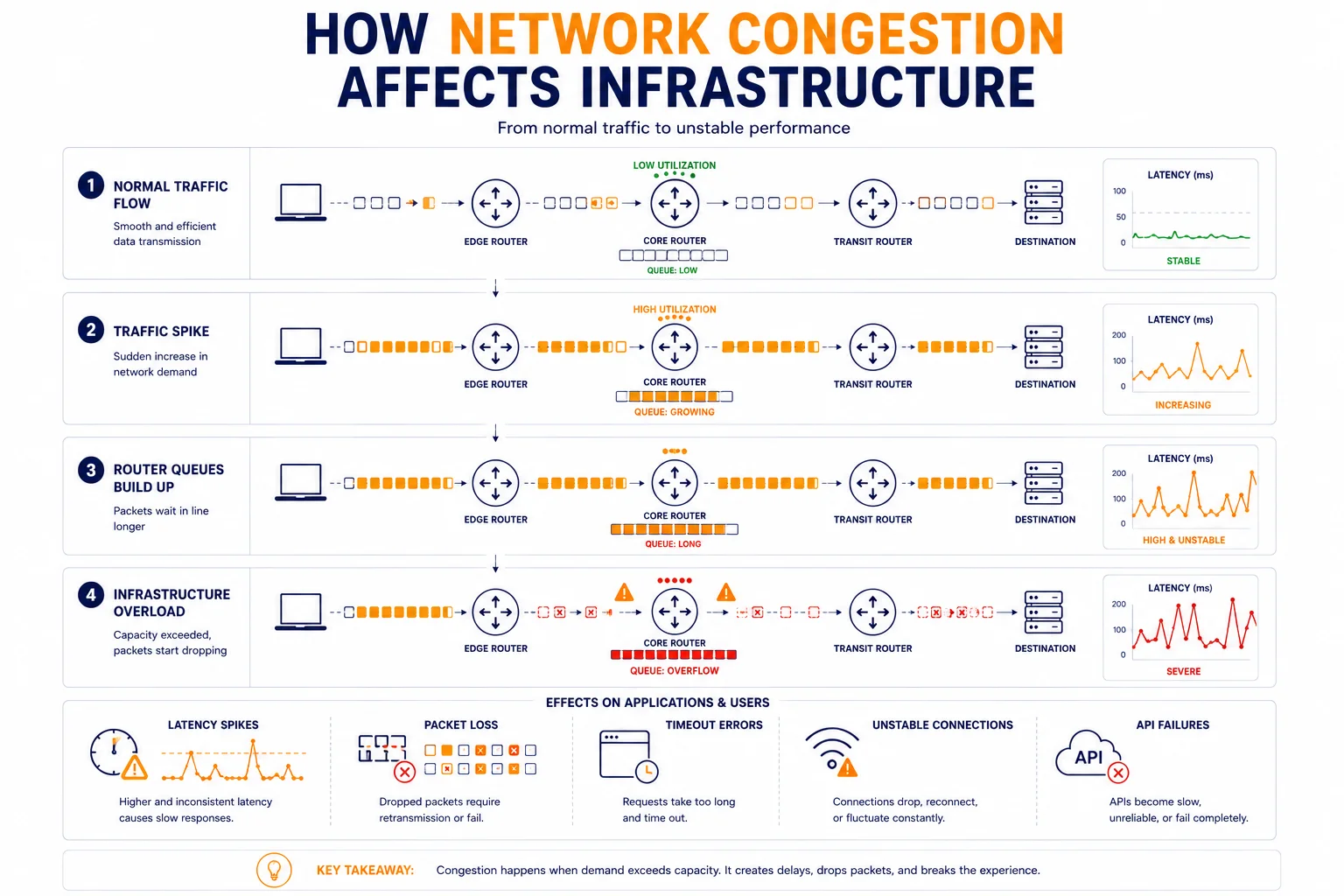
When routers become overloaded, packets wait inside queues before being forwarded.
As queues grow:
- latency increases
- response times fluctuate
- traffic becomes unpredictable
This creates latency spikes even if average latency initially appears acceptable.
For related context, see Bandwidth vs Latency: What’s the Difference?.
Why Congestion Causes Packet Loss
When queues become too large, infrastructure begins discarding packets intentionally.
This happens because routers cannot store unlimited traffic.
As packet loss increases:
- applications retry requests
- delays grow further
- sessions become unstable
For deeper explanation, see What Is Packet Loss and Why It Happens.
Why Congestion Often Appears During Peak Hours
Traffic demand changes throughout the day.
Congestion commonly increases during:
- evening internet usage peaks
- large streaming events
- software updates
- cloud traffic surges
- overloaded ISP backbones
This is why some users experience instability only during certain hours.
Why Congestion Affects Some Services More Than Others
Different services tolerate congestion differently.
For example:
| Service Type | Sensitivity to Congestion |
| Video streaming | medium |
| Gaming | very high |
| APIs | high |
| Large downloads | lower |
| Web browsing | medium |
| Automation systems | very high |
Real-time systems are usually affected first because they depend on stable response timing.
Why Proxy Infrastructure Is Sensitive to Congestion
Proxy traffic already passes through additional routing layers.
Typical flow:
Client → Proxy → Website → Proxy → Client
If congestion appears anywhere in this chain:
- latency grows rapidly
- retries increase
- request success rate drops
This is why overloaded proxy infrastructure often feels unstable even when bandwidth appears sufficient.
For related context, see Proxy Success Rate Explained.
Why Congestion Sometimes Looks Random
Congestion is rarely distributed evenly across the internet.
One route may work perfectly while another becomes overloaded.
As a result:
- one website loads instantly
- another becomes unstable
- APIs fail intermittently
- cloud services behave inconsistently
This creates the illusion of “random internet problems”.
ISP Congestion vs Local Network Congestion
Not all congestion happens inside your home network.
Local Congestion
Usually caused by:
- overloaded Wi-Fi
- too many connected devices
- weak routers
- internal traffic saturation
ISP or Backbone Congestion
Usually caused by:
- overloaded upstream infrastructure
- routing bottlenecks
- regional traffic spikes
- cloud provider saturation
Understanding where congestion happens is critical for troubleshooting.
Why Routing Stability Matters During Congestion
Congestion often forces traffic onto alternative routes.
Sometimes these routes are:
- slower
- geographically inefficient
- overloaded themselves
This may create:
- inconsistent latency
- unstable browsing
- route fluctuations
You can analyze route behavior using IP Trace Tool.
Why APIs and Automation Fail First
Automation systems rely heavily on predictable response timing.
Congestion may cause:
- request retries
- failed authentication
- timeout errors
- broken sessions
Humans may barely notice short delays.
Automated systems usually notice immediately.
Real Infrastructure Example
Imagine a cloud platform during a major software release.
Traffic suddenly increases dramatically.
At first:
- latency rises slightly
- some requests retry automatically
Later:
- routers become overloaded
- packet loss appears
- APIs begin timing out intermittently
Eventually, users experience unstable infrastructure despite servers technically remaining online.
Why Congestion Is Difficult to Diagnose
Many congestion-related problems are intermittent.
For example:
- the issue may appear only at night
- only certain routes may become overloaded
- only some regions may be affected
This is why congestion often feels unpredictable.
How Engineers Detect Congestion
Infrastructure teams usually analyze:
- latency consistency
- packet loss
- route stability
- retransmission rates
- regional performance differences
Professional diagnostics focus on traffic behavior over time rather than isolated speed tests.
Additional Tools for Network Diagnostics
Congestion analysis usually requires several diagnostics together.
Useful tools include:
• Proxy Checker – tests response behavior and connectivity
• IP Lookup – identifies network ownership and ASN information
• IP Trace Tool – analyzes routing paths and latency consistency
Combining these diagnostics helps identify overloaded infrastructure more accurately.
Glossary
- Network Congestion
An overloaded condition where infrastructure cannot efficiently process incoming traffic. - Latency
The delay required for packets to travel through the network. - Packet Loss
Packets discarded during transmission. - Routing
The process of directing traffic through network paths.
Frequently asked questions
Here we answered the most frequently asked questions.
What causes network congestion?
Usually overloaded infrastructure, traffic spikes, routing bottlenecks, or ISP saturation.
Can congestion happen with high internet speed?
Yes. High bandwidth does not guarantee stable infrastructure behavior.
Why does congestion increase latency?
Because overloaded routers create packet queues and forwarding delays.
Why are APIs sensitive to congestion?
Because automation systems depend on predictable response timing and stable connectivity.