
What Is Packet Loss and Why It Happens
Published: ≈ 5 min read
Quick Answer
Packet loss happens when network packets fail to reach their destination during transmission. This can cause slow connections, unstable proxies, failed requests, buffering, timeout errors, and degraded internet performance.
Key Takeaways
- Packet loss means data disappears during transmission
- Even small packet loss can affect stability and response time
- Congestion, filtering, and unstable routing are common causes
- Packet loss impacts APIs, proxies, streaming, gaming and automation
- Stable routing matters more than raw bandwidth in many workloads
What Packet Loss Actually Means
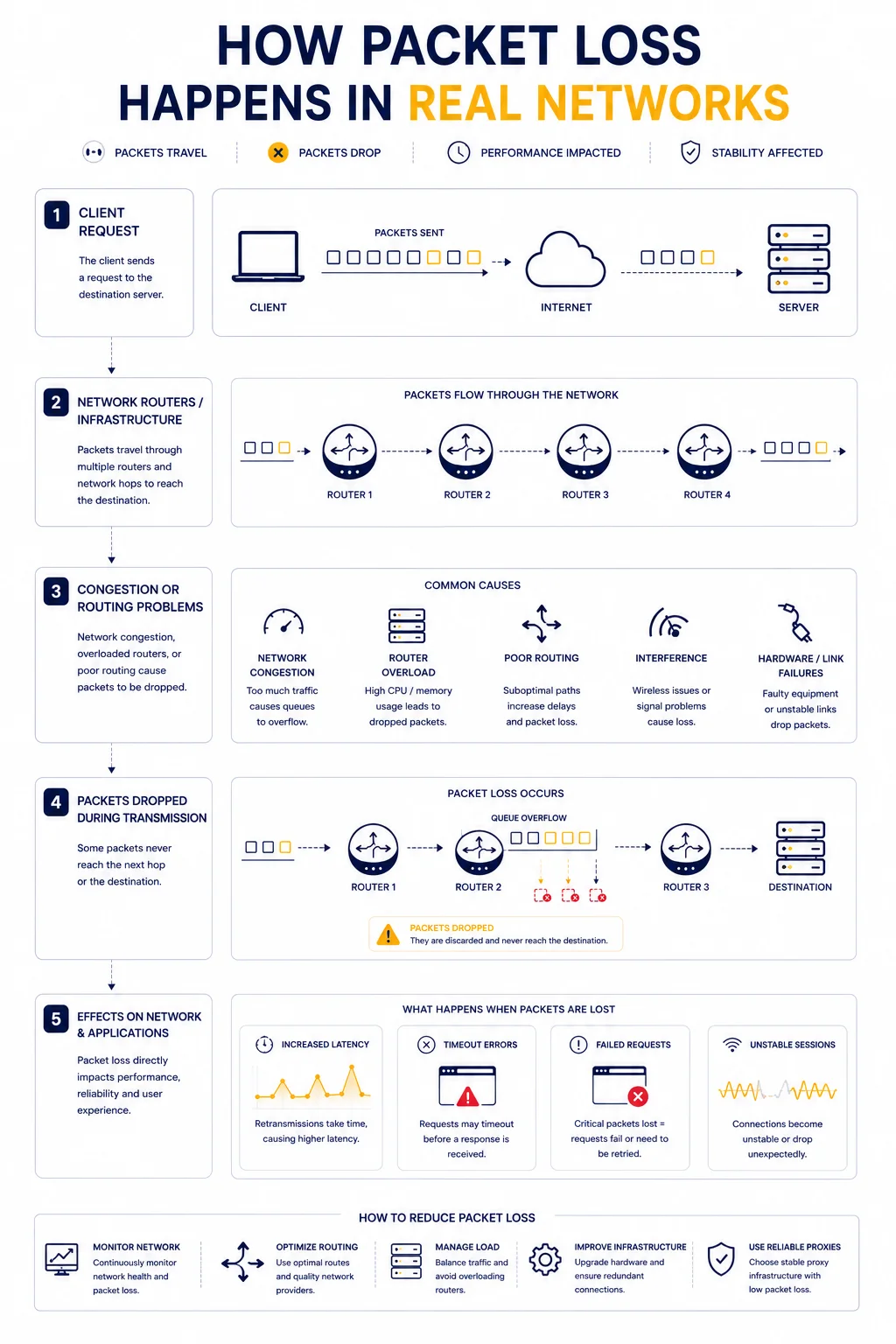
Internet traffic moves through networks in small units called packets.
Each packet contains part of the transmitted data.
When everything works correctly:
- packets travel through routers
- reach the destination
- get reassembled into complete communication
Packet loss occurs when some of these packets never arrive.
This creates incomplete or delayed communication between systems.
Why Packet Loss Matters
A small amount of packet loss may go unnoticed during normal browsing.
However, in real infrastructure, packet loss can quickly create serious problems.
Typical symptoms include:
- unstable websites
- failed API requests
- buffering video streams
- broken SSH sessions
- inconsistent proxy performance
In automation systems, packet loss often causes retries, delays, and connection instability.
How Packet Loss Happens
Packets can disappear for many different reasons.
The most common causes are:
- network congestion
- overloaded routers
- unstable routing paths
- faulty hardware
- firewall filtering
- ISP-level traffic shaping
In many cases, the problem is not the destination server itself.
Instead, packets disappear somewhere along the network path.
Network Congestion and Overloaded Infrastructure
One of the most common causes of packet loss is congestion.
When routers or servers process more traffic than they can handle:
- queues become overloaded
- packets are dropped intentionally
- response consistency decreases
This often happens during:
- traffic spikes
- DDoS mitigation
- overloaded proxy pools
- unstable cloud infrastructure
Why Routing Problems Cause Packet Loss
Traffic rarely travels directly to a destination.
Instead, packets move through multiple hops across different providers.
If routing becomes unstable:
- packets may take inefficient paths
- routers may drop delayed traffic
- latency may fluctuate heavily
This is why routing quality directly affects packet stability.
You can analyze network paths using IP Trace Tool.
Packet Loss vs Latency
These two concepts are closely connected but not identical.
| Metric | What It Measures |
| Latency | how long packets take to travel |
| Packet Loss | packets that never arrive |
High latency slows communication.
Packet loss breaks communication.
In practice, unstable packet loss usually feels worse than moderate latency.
For deeper explanation, see Proxy Latency Explained.
How Packet Loss Affects Websites
Websites rely on continuous packet exchange.
When packets disappear:
- pages load inconsistently
- sessions may break
- assets fail to load completely
- API calls may timeout
Users often describe this as:
- “the website feels unstable”
- “requests randomly fail”
- “everything loads inconsistently”
Why Packet Loss Is Dangerous for Proxy Infrastructure
Proxy systems are especially sensitive to packet loss because they add additional routing layers.
Traffic must travel:
Client → Proxy → Target → Proxy → Client
If packets disappear at any stage:
- connections become unstable
- retries increase
- sessions may fail entirely
This often leads to:
- lower success rate
- timeout errors
- inconsistent automation behavior
For related context, see Proxy Success Rate Explained.
Why Packet Loss Breaks Automation Workflows
Automation tools depend on stable request delivery.
Packet loss may cause:
- partial responses
- failed authentication
- broken sessions
- repeated retries
Even if bandwidth looks acceptable, unstable packet delivery can destroy workflow reliability.
This is one reason stable infrastructure matters more than raw speed.
Real Infrastructure Example
Imagine a scraping system sending requests through overloaded proxy infrastructure.
At first:
- latency increases slightly
- retries become more common
Then:
- packet loss grows
- sessions begin failing
- timeout errors appear
Eventually, the system may appear completely unstable despite “working” bandwidth.
How Packet Loss Relates to Timeout Errors
Many timeout issues are indirectly caused by packet loss.
For example:
| Network Problem | Typical Result |
| Lost TCP packets | delayed responses |
| Dropped TLS packets | broken HTTPS sessions |
| Routing instability | request timeouts |
| Congestion spikes | inconsistent loading |
This is why packet loss often appears together with timeout-related errors.
For related examples, see Why Traceroute Shows Timeout or * * *.
How Engineers Detect Packet Loss
Packet loss is usually diagnosed through:
- ping testing
- traceroute analysis
- infrastructure monitoring
- route comparison
- latency consistency analysis
Engineers often monitor:
- packet retransmissions
- response variance
- dropped connection rates
Why Stable Networks Matter More Than Peak Speed
A connection with:
- stable latency
- low packet loss
- predictable routing
usually performs better than a faster but unstable network.
This is especially important for:
- automation systems
- APIs
- remote infrastructure access
- proxy networks
For performance benchmarks, see What Is a Good Proxy Speed?.
Packet Loss and Anti-Bot Systems
Unstable traffic may also affect detection systems.
For example:
- inconsistent request timing
- broken sessions
- repeated retries
can make traffic appear suspicious.
In some cases, overloaded infrastructure indirectly increases bot-detection risk.
Additional Tools for Network Diagnostics
Packet loss analysis usually works best together with other diagnostics.
Useful tools include:
• Proxy Checker – tests response behavior and connectivity
• IP Lookup – identifies network ownership and ASN information
• IP Trace Tool – analyzes routing paths and latency consistency
Combining these diagnostics helps identify unstable infrastructure earlier.
Glossary
- Packet
A small unit of transmitted network data. - Packet Loss
Packets that disappear during transmission. - Latency
The delay required for packets to travel across the network. - Routing
The process of directing packets through network paths.
Frequently asked questions
Here we answered the most frequently asked questions.
What causes packet loss?
Common causes include congestion, routing instability, overloaded infrastructure, filtering, and faulty hardware.
Is packet loss worse than latency?
In many cases yes, because packet loss breaks communication instead of simply delaying it.
How does packet loss affect proxies?
It can cause unstable sessions, failed requests, retries, and lower success rates.
Can packet loss cause timeout errors?
Yes. Lost packets often delay or interrupt requests completely.